Portable CineTranslate English 1.0.1
CineTranslate English Portable is a state-of-the-art software designed to bridge the gap between language barriers and multimedia content consumption. It provides a sophisticated yet user-friendly solution for translating video and audio in multiple languages into accurate English subtitles and transcripts. In the era of global information exchange and ever-increasing demand for multilingual content accessibility, CineTranslate English Portable positions itself as an essential tool for educators, filmmakers, language learners, content creators, journalists, and everyday consumers eager to access the world’s media—regardless of its language of origin.
This comprehensive description delves deeply into CineTranslate English Portable’s origins, core technologies, architecture, core features, user interface, workflows, customization options, professional and educational applications, performance, limitations, safety considerations, and potential role in shaping the future of media translation.
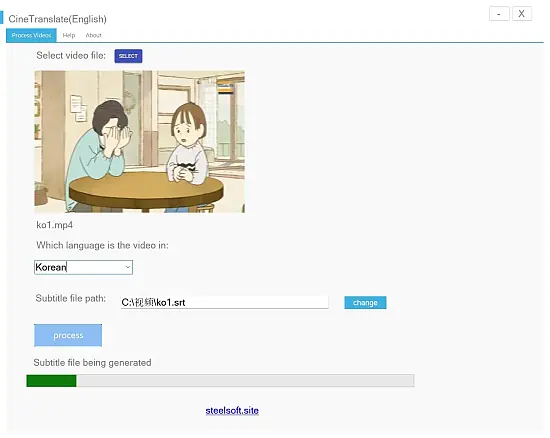
CineTranslate (English) is a high-quality offline translation software designed specifically for multilingual video content, supporting automatic recognition and translation of French, German, Italian, Spanish, Japanese, Korean, and Chinese videos into accurate English subtitles.
1. Rationale and Concept
1.1. The Language Barrier in a Globalized Media Landscape
In today’s interconnected world, access to multimedia information is virtually limitless—but linguistic diversity remains a major challenge. Critical knowledge, artistic cinema, lectures, news, and entertainment are often locked behind unfamiliar languages, making universal access impossible for many. While manual translation and subtitling exist, they are expensive, time-consuming, and not scalable for individual consumers or small organizations.
1.2. CineTranslate English Portable: Mission Statement
CineTranslate English Portable exists to democratize media accessibility. Its core mission is to instantly transform foreign-language videos into easily understandable English-subtitled content, granting every user the power to enjoy, learn from, and share the world’s audiovisual materials with minimal effort and maximum accuracy.
2. Architecture and Core Technology
2.1. Offline, AI-Driven Translation Engine
CineTranslate English Portable stands out through its robust offline mode, meaning users aren’t dependent on a constant internet connection or concerned with the privacy implications of uploading sensitive media to cloud servers. The engine leverages advanced neural machine translation (NMT) models, trained on vast multimedia and linguistic corpora, tailored for spoken language, slang, idioms, and diverse dialects.
2.2. Multilingual Recognition and Auto-Detection
CineTranslate English Portable supports over 30 source languages—including French, German, Italian, Spanish, Japanese, Korean, and Chinese. On loading a media file, the software intelligently detects the spoken language, selects the most appropriate recognition model, and deploys real-time or batch decoding for optimal translation output.
2.3. Audio Transcription and Speech-to-Text
An integral layer, the speech-to-text module, uses state-of-the-art deep learning algorithms to transcribe audio with high accuracy, even in challenging environments featuring background noise or overlapping speakers. Punctuation, timing, and speaker segmentation are handled automatically to enhance readability and usability of subtitles.
3. Key Features and Functionality
3.1. High-Quality Subtitles Generation
-
Accurate Subtitle Files: Instantly produce SRT subtitle files, widely compatible with all common video players (VLC, Windows Media Player, etc.).
-
Time-Coded Alignment: Ensures each subtitle corresponds with spoken content, allowing for clear comprehension and a natural viewing experience.
-
Customization: Subtitle length, reading speed, and formatting can be fine-tuned for accessibility or personal preference.
3.2. Robust Translation Accuracy
-
Natural Language Processing: Goes beyond literal translation, using contextual understanding for idioms, technical jargon, domain-specific terminology, and colloquial speech.
-
Multiple-Mode Translation: Users can choose between literal (“close to original”) or adaptive (“natural English”) translation modes, prioritizing accuracy or readability as needed3.
-
Review & Edit: Built-in subtitle editor allows users to review, correct, or enhance translations before final output.
3.3. Batch Processing and Automation
-
Bulk Translation: Users can process entire folders of video files in a single session, beneficial for studios, schools, or organizations working with large multi-video projects.
-
Automated File Management: Automatically saves subtitle files in user-designated locations, applying organized naming conventions for easy access.
3.4. Offline Accessibility
-
Local Processing: All translations and subtitle generation are performed on the user’s device, ensuring privacy and reliability.
-
No Data Uploads: Ideal for high-security environments, remote areas, or users with limited internet connectivity.
3.5. System Requirements and Performance
-
OS Compatibility: Primarily for Windows 10 or later, with support for modern hardware acceleration2.
-
Resource Efficiency: Requires at least 8GB RAM (16GB recommended) and a dedicated graphics card (4GB minimum VRAM), striking a balance between translation speed and device accessibility.
4. User Interface and Experience
4.1. Clean, Intuitive Dashboard
The main CineTranslate window features a straightforward workflow:
-
Import Media: Drag and drop functionality or file browsing.
-
Language Detection: Automatic (with manual override if needed).
-
Translation Mode Selector: Literal, Adaptive, or Custom.
-
Settings Panel: Subtitle length, reading speed, file output preferences.
-
Progress Monitor: Real-time feedback on transcription and translation.
4.2. Live Preview and Editing
-
Playback Window: Users can preview the video alongside the generated subtitles, reviewing timing, accuracy, and flow.
-
Direct Editing: Any erroneous or awkward translations can be fixed on the spot, with changes reflected in the final output file.
4.3. Accessibility and Localization
-
Multi-language Menus: While the focus is English translation, all interface text and guidance is available in major global languages to aid international users.
-
Keyboard Shortcuts & Customization: Power users can employ hotkeys for rapid navigation and processing.
4.4. Help & Guidance
-
Interactive Tutorials: Newcomers are guided through first use with step-by-step onboarding.
-
Contextual Help: Tooltips, documentation, and usage examples embedded for clarity.
5. Professional and Academic Use Cases
5.1. Film and Video Production
CineTranslate English Portable allows production studios to instantly localize films for preview, post-production review, or early-stage international screenings. Editors can create draft subtitles as a baseline and supply them to human translators for final polish—dramatically saving cost and time.
5.2. Education and Research
In academic environments, the software enables:
-
Cross-cultural Learning: Teachers can subtitle foreign documentaries, lectures, or interviews.
-
Language Study: Language learners analyze real spoken dialogues, aided by parallel English subtitles.
-
Accessibility Compliance: Institutions can ensure audiovisual educational resources are accessible to English speakers regardless of the source language.
5.3. Content Creation and Digital Publishing
YouTubers, independent journalists, and bloggers can:
-
Expand Audience: Translate global interviews, viral videos, or news segments into English.
-
Streamline Workflow: Avoid outsourcing for every translation task, maintaining swift content velocity.
5.4. Corporate and Organizational Communication
Multinational corporations benefit by:
-
Localizing training videos, HR materials, and corporate updates rapidly for English-speaking employees or stakeholders.
-
Ensuring compliance documentation is available to all staff, regardless of original production language.
5.5. Legal and Government Applications
For compliance, evidence review, or international casework:
-
Legal video evidence can be quickly subtitled for court or investigation.
-
Public sector can provide translated public health messaging, emergency broadcasts, or official statements.
6. Customization and Advanced Controls
6.1. Subtitle Formatting
Users can tailor output:
-
Font, color, background, and timing parameters.
-
Subtitle line length and synchronization points for platforms with specific captioning standards.
6.2. Dictionary and Glossary Integration
CineTranslate English Portable enables users to:
-
Upload custom glossaries for technical, legal, or branded terminology, enforcing replacement of ambiguous terms with contextually correct English vocabulary.
6.3. Automated Workflows and API
Advanced users can:
-
Automate recurring translation tasks via scripting or command-line triggers.
-
Integrate CineTranslate English Portable into larger media processing pipelines through its API (where available).
7. Performance, Security, and Reliability
7.1. Speed and Scalability
The software leverages multi-threading and GPU acceleration, ensuring even long or high-resolution videos are processed efficiently.
7.2. Data Security and Privacy
No data leaves the user’s local machine. This design is critical for users handling confidential, sensitive, or embargoed media.
7.3. Error Recovery and Logging
Robust error handling allows for paused, resumed, or retried operations if interruptions occur. Comprehensive logs provide transparency for audit, debugging, or compliance tracking.
8. Limitations and Known Challenges
8.1. Nuanced Translation
While CineTranslate English Portable excels in clear, standard speech, all machine translation tools face challenges with:
-
Heavy dialects, strong accents, or regional slang.
-
Overlapping dialogue or severe background noise.
-
Non-standard pacing (e.g., poetry, music, rapid-fire banter).
8.2. AI “Hallucination” and Mistranslation
The AI may occasionally infer context wrongly, especially for ambiguous language or names. For mission-critical applications, a human review is recommended.
8.3. Supported Languages
Although offering wide language coverage, some rare or minority languages may be unsupported or less accurate.
8.4. Legal Considerations
While CineTranslate delivers fast subtitle generation, legal or broadcast distribution may require officially-certified translations—a service the tool does not automate.
9. Updates, Support, and Community
9.1. Continuous Improvement
CineTranslate English Portable’s translation models are regularly updated to reflect new linguistic data, improved AI techniques, and emerging domain-specific terminology.
9.2. User Support
A dedicated support portal provides troubleshooting, user forums, suggested workflows, and direct customer service for all registered users.
9.3. Community Features
Feedback forms and community discussions help prioritize new features—such as support for new formats, languages, or workflow integrations.
10. The Future of Media Translation
CineTranslate English Portable sets a foundation for the next generation of media consumption. As barriers fall between content creators and global audiences, this kind of tool has the potential to:
-
Foster greater cultural exchange through accessibility.
-
Empower underserved or marginalized language communities.
-
Spur growth in multilingual education, remote work, and international collaboration.
Future developments may involve real-time translation, deeper integration with streaming platforms, augmented reality overlays, and more sophisticated AI-driven adaptation for contextually rich content.
Conclusion
CineTranslate English Portable is more than a translation utility—it is an enabler of global information access. With its blend of sophisticated technology, broad applicability, offline privacy, and ease of use, it empowers users of all backgrounds to access, enjoy, and share the media of the world in English. Whether for personal enrichment, business necessity, or cultural curiosity, CineTranslate English Portable stands tall as a pioneering force in breaking down the walls of language—one video at a time.