Portable ActivePresenter Professional Edition 10.1.1 Multilingual (x64)
ActivePresenter Portable is an all-in-one, AI-powered screen recording and multimedia eLearning authoring suite that seamlessly combines high-fidelity capture of desktop activities, webcam feeds, system/microphone audio, and interactive simulations with professional-grade video editing, slide-based interactivity design, and versatile exporting for training videos, software demos, interactive courses, quizzes, and responsive HTML5/SCORM packages, catering to educators, trainers, instructional designers, marketers, and content creators seeking polished outputs without juggling multiple apps.
This Windows/macOS powerhouse—version 10 introducing groundbreaking AI tools like text-to-speech narration, auto-caption generation from speech, image creation from prompts, project-wide auto-translation, AI writing assistance, and noise-free audio restoration—records in crisp lossless formats (full-motion or cursor-path optimized), auto-trims silences, smartly annotates actions (e.g., “Click Save button”), and empowers slide-timed editing with layers for annotations, shapes, text, transitions, behaviors, and 13 question types (multiple choice, fill-blank, drag-drop, hotspot), enabling rapid prototyping of engaging, accessible content compliant with WCAG/Section 508.
Whether producing a quick how-to for software like Luminar Neo, a gamified compliance module with branching scenarios, or a multi-language tutorial upscaled from PowerPoint imports, ActivePresenter Pro delivers studio results with FlexBox responsive layouts, green screen chroma keying, advanced audio ducking, and exports to MP4/WebM/AVI/MKV/WMV, PDF documents, Word/Excel/PPT, or LMS-ready SCORM/xAPI/HTML5 zips, all accelerated by GPU rendering for 4K/60fps timelines under 2GB RAM.
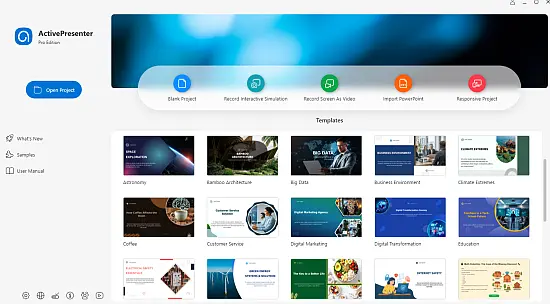
The interface masterfully blends recording simplicity with authoring depth: Record tab for modes (Full Motion, Cursor Path, Hybrid), Editor’s tabbed timeline for multi-track non-linear cuts, Properties pane for object behaviors, and AI Assistant sidebar for generative boosts, ensuring workflows from raw capture to publish in minutes via smart capture (auto-slide per action) and one-click enhancements.
AI-Powered Innovations
Pro’s AI suite transforms creation:
Image Generation
Prompt “futuristic dashboard” → custom visuals inserted as editable layers.
Text-to-Speech (AI Voices)
Convert captions/scripts to natural narration (100+ voices/languages); lip-sync avatars.
Auto Captions (Speech-to-Text)
Transcribe audio → editable subtitles; multilingual.
AI Writing
Generate quiz questions, slide copy, interactions from keywords.
Project Auto-Translation
One-click 50+ languages; preserves timings/interactivity.
Audio AI: Noise Removal/Normalization/Ducking
AI denoises mic hiss; levels clips; ducks BGM under voice.
Screen Recording Excellence
Capture modes:
Full Motion/System Audio/Webcam
-
Regions: Fullscreen/fixed/scrolling window/smart capture (auto-slide on scroll/click).
-
Audio: Stereo mic/system simultaneous; noise gate.
-
Cursor: Effects/highlight/path (editable post-record).
Smart Recording
Auto-detect actions → slides with annotations (“Clicked File > Open”).
Hybrid: Motion blocks + path for crisp demos.
Advanced Video/Audio Editing
Timeline mastery:
-
Cuts: Trim/split/crop/zoom-pan keyframes.
-
Effects: Blur/mosaic for privacy, chroma key green screen.
-
Transitions: 50+ (fade/wipe/slide); slide-based timing.
-
Audio: Fade/equalizer/compress; multi-track mix.
Layers: Unlimited objects (video/image/text/shape); masks/groups.
eLearning Authoring Suite
Slide-based interactivity:
Responsive Design/FlexBox
Mobile-ready: Objects auto-reflow; breakpoints preview.
Interactions/Questions
13 templates: MCQ/true-false/essay/short answer/fill-blank/matching/sequencing/hotspot/drag-drop.
-
Scoring/feedback/branching/shuffles/randomization.
-
Import CSV/GIFT questions.
Behaviors
Click/hover/enter/exit triggers: Show/hide/animate/jump/time.
PowerPoint Integration
Import PPTX: Charts/tables/animations (click-started); editable layers.
Export Versatility
-
Video: H.264/265/WebM/AVI/MKV/WMV/GIF; 8K/60fps.
-
Interactive: HTML5/SCORM 1.2/2004/xAPI/cmi5; LMS review.
-
Docs: PDF/Word/Excel/PPT (Windows).
-
Batch: Folder projects.
Collaboration and Workflow
-
Git/version history.
-
Templates/themes library.
-
Multi-language projects.
Performance and Compatibility
GPU NVENC/Metal: 4K export 5x realtime.
Windows 11/macOS Sonoma; 8GB RAM min.
Use Cases
Trainers: Software sims/quizzes.
Marketers: Product demos.
Educators: Interactive lessons.