

Portable Print Artist Premier 25.0.3.4
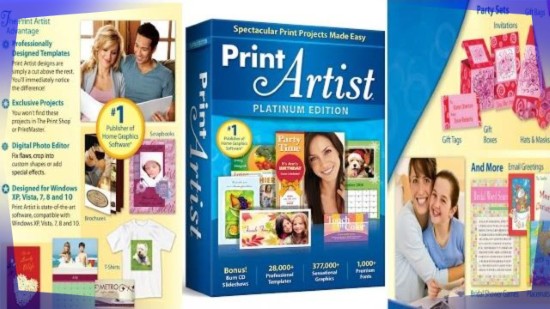
Print Artist Premier Portable is a versatile desktop publishing software tailored for creative individuals, small businesses, educators, and hobbyists who want to design and print professional-quality projects like greeting cards, calendars, business cards, invitations, scrapbooks, brochures, certificates, and personalized photo gifts without needing advanced graphic design skills.
This comprehensive application, now in its 25th edition as of 2026, stands out with its massive library of over 28,000 professionally designed templates, 377,000 sensational graphics, and 1,000 premium fonts, all accessible through an intuitive drag-and-drop interface that combines powerful customization tools with wizard-guided workflows.
Compatible with Windows 7 through 11 and requiring just 2GB RAM and 1.5GB disk space, Print Artist Premier Portable transforms ordinary printers into production machines for home celebrations, office marketing materials, school projects, and seasonal crafts, enabling users to upload finished designs directly to Facebook, YouTube, or email while producing print-ready outputs on standard paper, cardstock, or photo paper.
The software’s strength lies in its balance of accessibility and depth: beginners follow step-by-step project wizards that auto-populate layouts with photos, text, and clipart, while advanced users leverage layers, bezier curves, transparency effects, and precise alignment guides for bespoke creations. With a revamped user interface emphasizing ease-of-use—larger thumbnails, searchable asset libraries, and one-click color schemes—Print Artist Premier Portable eliminates the learning curve associated with professional suites like Adobe InDesign or CorelDRAW, delivering eye-catching results that impress friends, family, clients, and associates.
Project Templates and Categories
Print Artist Premier Portable boasts an expansive template library organized into intuitive categories, each tailored to specific occasions and purposes. Greeting cards dominate with thousands of designs for birthdays, holidays (Christmas, Halloween, Valentine’s Day, Easter), anniversaries, thank-yous, and condolences, available in folded (A2, A6, 5×7) or flat formats with inside message panels and envelope coordination. Calendars range from monthly planners and perpetual datebooks to photo-heavy wall hangers customizable with family portraits and events.
Business materials include flyers, brochures (tri-fold, Z-fold), newsletters, posters (A4, letter, 11×17), business cards (standard 3.5×2, magnetic, mini), letterheads, and invoices, all pre-formatted for branding with logo placeholders and QR code generators. Invitations cover weddings, baby showers, graduations, corporate events, and parties, complete with RSVP cards and matching seals. Certificates and awards feature elegant borders, seals, and achievement badges for schools, sports, and employee recognition.
Scrapbooking enthusiasts find digital layouts with photo grids, journaling spaces, and embellishments like ribbons, frames, and stickers, exportable as printable PDFs or interactive flipbooks. Photo projects shine with collages (heart-shaped, grid, freeform), trading cards, ID badges, labels, and CD/DVD inserts/covers. Specialty items include door hangers, bookmarks, recipe cards, place settings, and yard signs, ensuring versatility for any printing need.
Templates scale responsively across paper sizes (letter, legal, A4, 4×6 photo), with bleed/trim marks for professional print shops.
Graphics and Media Library
The 377,000+ graphics collection spans clipart, illustrations, photos, shapes, and backgrounds, searchable by keyword, category (animals, business, holidays, nature, people, transportation), or color. High-quality vectors scale infinitely without pixelation, while 300 DPI photos suit glossy prints. Embellishments like 3D effects, shadows, glows, and textures add polish.
Users import personal media—scans, digital photos (JPEG, PNG, TIFF, RAW via editor), clipart—from folders or scanners/cameras directly into projects. Drag-drop placement snaps to guides, with auto-crop and alignment.
Text and Typography Tools
Over 1,000 premium fonts cover elegant scripts, bold sans-serifs, decorative dingbats, and handwriting styles, with preview panes showing sample text. Text tools wrap around shapes, follow paths (circular, curved), and apply effects: bevels, emboss, chrome, neon, wood grain, drop shadows with adjustable blur/distance. Paragraph formatting includes kerning, leading, tracking, columns, and bulleted lists.
Special text gallery offers pre-styled elements like curly quotes, banners, and 3D lettering, customizable via color wheels and gradient editors.
Design and Layout Customization
Canvas workspace supports unlimited layers with lock/hide/group, blending modes (multiply, overlay), opacity sliders, and masks. Drawing tools include bezier pens for smooth curves, freehand brushes, shape tools (rectangles, ellipses, polygons, stars) with corner rounding and stroke dashes. Alignment/distribution snaps objects precisely; rulers/guides/margins ensure print accuracy.
Wizards scaffold projects: select category → choose template → swap photos/text → preview print. Freeform mode starts blank canvases (custom sizes/orientations), building from scratch.
Digital Photo Editor
Integrated editor rivals standalone apps: crop/rotate/straighten, exposure/contrast/color balance/curves/levels, sharpen/blur/noise reduction, red-eye removal, blemish healing, vignette, and artistic filters (sepia, watercolor, sketch). Clone stamp/healing brush fixes imperfections; lens correction fixes distortions. Batch processing applies edits to folders.
Photo clipart converts images to shapes, auto-tracing silhouettes for collages.
Effects Gallery and Special Touches
Special effects gallery provides 500+ one-click enhancements: 3D extrusions, metallic sheens, glass reflections, fire/ice textures, particle bursts. Text effects include chrome, fire, lightning, with animation previews for digital exports.
Background generators create gradients, patterns, textures procedurally.
Printing and Output Options
Print wizard calibrates for any printer, handling duplex, multiple copies, paper types (matte/glossy/cardstock), and orientations. PDF export retains layers/fonts for edits; high-res JPEGs for web. Social sharing uploads to Facebook/YouTube directly, optimizing formats.
Bonus slideshow creator compiles projects into TV-playable CDs/DVDs with transitions/music.
In no time at all you’ll be creating expert, eye-popping print projects including:
- Brochures
- Booklets
- Business Cards
- CD and DVD Labels
- Envelopes
- Forms
- Letterhead
- Newsletters
- Banners
- Direct mail postcards
- Calendars
- Greeting Cards
- And more!
Workflow Examples
Home Users: Birthday invites with family photos, holiday cards.
Business: Branded flyers, business cards, newsletters.
Schools: Certificates, posters, recipe books.
Crafters: Scrapbook pages, labels, yard signs.
Updated 2026 interface enhances search, adds AI photo enhancements (object removal, sky replacement), and cloud templates.
What’s different in Premier Edition than Platinum and Gold Editions
Gold and Platinum Editions stream all contents online whereas Premier does have them usable locally.
Print Artist Premier Portable democratizes pro printing, blending vast assets with easy tools for stunning results. Its templates/graphics elevate DIY to designer level—perfect for personalized touches that stand out.
