Portable WinXvideo AI 4.7 (x64)
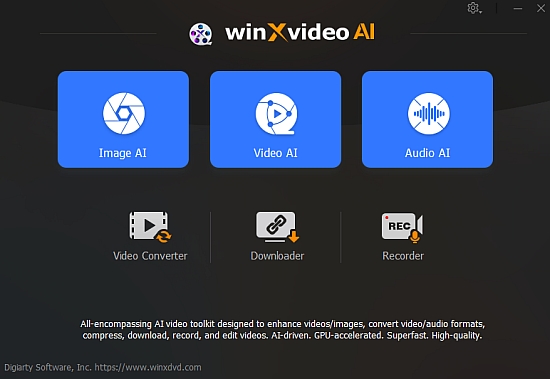
WinXvideo AI Portable is a powerful video editing and production software that uses artificial intelligence to help users easily create professional-quality videos. Unlike traditional video editing software, which often requires manual input and steep learning curves, WinXvideo AI Portable automates and enhances many time-consuming processes through advanced machine learning and AI-driven technologies.
Whether you are a content creator, marketer, educator, or hobbyist, WinXvideo AI Portable aims to make video editing faster, more intuitive, and accessible to all skill levels. By combining automatic video enhancement, smart scene detection, AI-assisted editing tools, and seamless exporting options, this software delivers a truly next-generation video production experience.
Key Capabilities and Features of WinXvideo AI
The core strength of WinXvideo AI lies in its innovative suite of AI-powered tools that streamline video creation from start to finish. Here is an in-depth look at its primary capabilities:
1. Intelligent Video Editing with AI Assistance
WinXvideo AI uses artificial intelligence to analyze raw footage and automatically suggest edits. These include trimming redundant sections, enhancing video quality, stabilizing shaky shots, and even enhancing audio clarity. The AI engine understands the context of scenes and can propose cuts or transitions that flow naturally, vastly reducing manual effort.
2. Automatic Scene Recognition and Segmentation
Traditional video editing requires manual identification of important scenes or segments. WinXvideo AI’s scene detection technology automatically scans footage to recognize scene changes, categorize shots, and organize clips for faster editing. This feature is particularly useful for long videos, such as webinars, concerts, or interviews.
3. AI-Powered Upscaling and Enhancement
One of the standout features is its ability to upscale standard videos to higher resolutions using AI algorithms. This capability enables users to convert SD footage to HD or even 4K quality with improved sharpness and detail, ensuring videos look crisp on large screens or modern devices.
4. Noise Reduction and Color Correction
WinXvideo AI automatically identifies noise, grain, or poor lighting in video clips and applies filters to clean the footage. It also offers smart color correction tools, adjusting brightness, contrast, saturation, and white balance to give your videos a polished, professional look.
5. AI Voice and Audio Enhancement
Good audio is critical for great videos. WinXvideo AI uses AI-based tools to remove background noise, balance audio levels, and enhance voice clarity. It can also automatically sync voice-overs with video clips for a seamless storytelling experience.
6. Text and Subtitle Automation
Adding subtitles manually can be tedious. WinXvideo AI provides automatic speech recognition to transcribe dialogue and create subtitles or captions instantly. Users can customize the style and positioning of text to match their branding or video theme.
7. Smart Templates and Effects
Leveraging AI, the software offers a variety of smart templates, transitions, and effects tailored to the content of your video. For example, it can suggest upbeat music, fitting filters, and smooth transition effects based on the mood and genre of the footage.
8. Multi-Format Export Options
Support for various video formats means that videos can be exported optimized for social media platforms, websites, mobile devices, or broadcast. The software applies AI for format optimization without compromising video quality, ensuring compatibility with specific requirements such as aspect ratios and maximum file sizes.
How WinXvideo AI Works: A User-Friendly Experience Powered by Cutting-Edge AI
WinXvideo AI is designed with user experience in mind, merging advanced technology with an intuitive interface. Here’s how it typically works:
Step 1: Import and Upload Media
Users begin by importing video clips, images, and audio. The software accepts various file formats, ensuring wide compatibility with existing media libraries.
Step 2: Automatic Analysis and Suggestions
Once files are uploaded, WinXvideo AI’s engine analyzes the media. It detects scenes, evaluates image quality, assesses audio levels, and recognizes speech to provide personalized editing recommendations.
Step 3: Customize and Refine
Users can choose to apply AI-powered automatic edits or manually adjust specific parameters like cuts, transitions, filters, and subtitles. The software’s real-time preview helps you gauge changes to ensure creative intentions are met.
Step 4: Add Interactive Elements (Optional)
For marketing videos or tutorials, interactive elements like call-to-actions, clickable links, or pop-up captions can be added with AI-assisted placement based on viewer engagement predictions.
Step 5: Export and Share
Finally, optimized export settings enable fast rendering with high-quality output in formats ready for YouTube, Instagram, Facebook, TikTok, or professional broadcasting.
Advantages of Using WinXvideo AI
Adopting WinXvideo AI brings several compelling advantages that are transforming video production workflows:
1. Time Efficiency and Automation
Manual video editing can take hours or even days. With AI automating key processes, production times are drastically reduced, enabling faster video turnaround.
2. Improved Video Quality
Its AI-based enhancement tools improve resolution, stability, lighting, and sound, elevating the overall presentation without needing expert skills.
3. Accessibility for Beginners and Professionals
The simple, guided interface coupled with advanced automatic features caters to novices looking for quick results and professionals needing powerful tools.
4. Versatility in Usage
WinXvideo AI’s features support a wide range of content types, including vlogs, tutorials, educational content, marketing videos, corporate presentations, and event recordings.
5. Cost-Effective Production
By reducing the need for expensive equipment, expert editors, and multiple software tools, WinXvideo AI makes high-quality video creation accessible for smaller businesses and individual creators.
6. Creative Flexibility
While the AI handles routine tasks, users retain full creative control, able to override suggestions and customize each project’s look and feel.
Target Users and Use Cases of WinXvideo AI
The software has broad appeal across various user segments thanks to its multifaceted capabilities:
Content Creators & Influencers
YouTubers, TikTokers, and Instagram influencers benefit from quick editing, smart templates, and fast uploads, allowing more frequent content releases.
Small Business Owners and Marketers
Businesses save time crafting promotional videos, product demos, and ads that look professionally produced without hiring a dedicated video editor.
Educators and Trainers
Educational organizations and individual instructors can create engaging lecture videos, tutorials, and course materials enhanced with subtitles and clear audio.
Event Organizers and Videographers
Recording and swiftly editing events, conferences, or weddings is simplified, letting professionals deliver polished videos quickly.
Media and Entertainment
TV producers, filmmakers, and podcasters can use AI-powered upscaling and noise reduction to enhance footage captured in less-than-ideal conditions.
The Technology Behind WinXvideo AI
At its core, WinXvideo AI utilizes a suite of artificial intelligence technologies including deep learning, neural networks, and computer vision. These technologies allow the software to:
-
Analyze visual and audio content frame-by-frame
-
Understand context to make intelligent decisions during editing
-
Learn from vast datasets to continuously improve editing accuracy
-
Perform real-time enhancements without lagging user experience
This combination of AI technologies ensures the software adapts to a wide variety of video types, automatically tailoring its approach for the best possible outcome.
User Interface and Ease of Use
One of the highlights of WinXvideo AI is its clean, modern user interface designed to guide users step-by-step. Drag-and-drop import, simple sliders for adjustments, and clear preview windows make editing approachable for those unfamiliar with complex video editing jargon. Meanwhile, advanced users can dive deeper into detailed controls if preferred.
The AI assistant acts as a helpful guide rather than a replacement, making smart recommendations while encouraging creativity and experimentation.
What Sets WinXvideo AI Apart from Other Video Editors?
-
AI-Centric Workflow: While other editors may offer some AI features, WinXvideo AI is built entirely around AI automation, making it truly revolutionary.
-
All-in-One Solution: The combination of video enhancement, editing, audio cleanup, subtitle automation, and export optimization in one platform is unique.
-
Focus on Quality and Speed: It balances high-quality output with fast processing, ideal for users needing quick turnaround without compromising visuals.
-
Scalability: Effortlessly handles small personal projects and large professional productions alike.
-
Affordability and Accessibility: Provides advanced AI features without the user investment typically associated with professional editing suites.
The Future of Video Editing with WinXvideo AI
As video content continues to dominate the digital landscape, the demand for faster, smarter, and easier-to-use editing tools grows. WinXvideo AI is positioned at the forefront of this evolution, driving forward the integration of AI into creative workflows.
Future updates are expected to introduce even more intelligent features, such as emotion analysis for scene mood adjustment, enhanced multi-language subtitle support, and even deeper automation of complex editing sequences.
Transform Your Video Production with WinXvideo AI
WinXvideo AI transforms video editing from a time-consuming challenge into an efficient, creative, and enjoyable process. Powered by sophisticated artificial intelligence, it removes many technical hurdles that typically intimidate users while raising the bar on video quality. Whether you are a beginner eager to produce polished videos quickly or a professional seeking advanced automation to optimize workloads, WinXvideo AI offers the perfect blend of simplicity, performance, and innovation.
Embrace the future of video creation with WinXvideo AI and unlock your full creative potential with the industry’s most intelligent and accessible video editing software.
If you are looking for a reliable partner in crafting outstanding video content with minimal effort and maximum impact, WinXvideo AI is the solution you need to explore today.
Harness CineAI to upscale video/image, stabilize video, & boost FPS.
– Stabilize handheld shots
– Minimize camera shake
– Create Slo-mo
– Remove motion blur
Revitalize classic MVs, low-pixel home recordings, & videos from VHS/DVD/mini DV.
– 480P to 1080P/4K
– 24fps to 60fps
– Restore video/image
– Up to 4X upscaling
– Blurry
– Noisy
– Blocky
– Interlaced
– Heavily Compressed
– To 4K/8K/10K
– Batch process
– GPU-accelerated
Bid farewell to format compatibility struggles and hefty file sizes. WinXvideo AI Portable takes care of all your audio/video conversion needs and compresses your 4K/8K footage from GBs to MBs without compromising quality, backed by full GPU acceleration. Whether playing local files on mobile/PC, transforming GoPro adventures into compact wonders, or sharing cherished memories across social platforms, WinXvideo AI Portable has you covered.
Craft compelling stories with the video editor. Trim video down to the essence, split video into shorter clips for faster sharing, remove distractions, & highlight the best moments to captivate the audience.
Record full/custom screen, webcam, picture-in-picture, audio, and highlight important area at will. Whether you want to play games, deliver presentations, take online courses, save video calls, create demos, or host online meetings, WinXvideo AI Portable addresses your needs.
Based on the information available, there is no official changelog specifically for Winxvideo AI version 4.3. However, information about new features and updates from recent versions are available. The software is continuously updated with new AI models and features.
Recent Updates and Features
- AI-Powered Enhancements: Recent updates have focused heavily on improving AI capabilities. These include the addition of new AI models, such as Gen Detail and Real Smooth, to enhance video and image quality by reducing noise, blur, and artifacts while generating realistic details.
- Image and Photo Restoration: A significant update introduced features for old photo restoration, including the ability to colorize black-and-white photos and intelligently restore faces by repairing blemishes and reconstructing missing parts with high precision.
- Performance Improvements: The software has integrated technologies like NVIDIA® TensorRT™ to optimize processing speed. This has led to faster video upscaling and enhancements, with some updates boasting up to an 80% speed increase.
- New Features: Other additions include an AI Audio Suppression tool to remove background noise from audio and video files and a “Fast Mode” for quicker video enhancements. The software also now offers pre-set resolutions (1080P, 2K, and 4K) for a more streamlined workflow.