Portable AI Old Photo Restorer 2.0.2 Multilingual
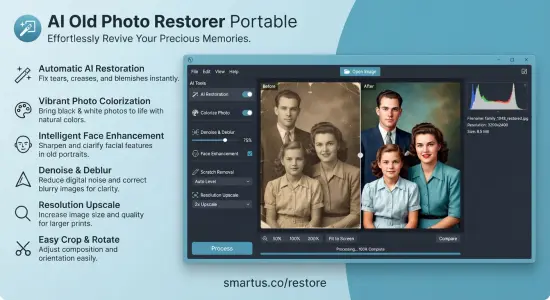
AI Old Photo Restorer Portable is an intelligent photo restoration application designed to bring damaged, faded, blurry, and aging photographs back to life using modern artificial intelligence technology. Developed by SmartUs, this specialized Windows application provides a straightforward way to improve the appearance of old photographs, recover facial details, reduce unwanted image imperfections, and enhance the overall visual quality of pictures that have deteriorated over time.
Photographs are more than ordinary image files. They preserve important family moments, childhood memories, historical events, and personal experiences that cannot always be recreated. Unfortunately, traditional photographs are vulnerable to numerous forms of deterioration. Old prints can become faded, scratched, discolored, grainy, or physically damaged, while scanned photographs frequently suffer from low resolution and insufficient sharpness. Even relatively recent digital pictures may contain motion blur, unwanted noise, or poorly defined facial features.
Restoring these photographs manually can be a complicated and time-consuming process. Traditional image editors provide numerous adjustment tools, but obtaining convincing results often requires considerable experience with sharpening, contrast correction, noise reduction, and detailed retouching. AI Old Photo Restorer Portable approaches this problem differently by using automated artificial intelligence processing to analyze photographs and improve their appearance with minimal user intervention.
The application’s primary purpose is to make photo restoration accessible to everyone, regardless of their previous experience with image editing. Instead of requiring users to understand complicated correction techniques, it provides a simple workflow built around opening a photograph, starting the restoration process, and saving the improved result.
One of its most important characteristics is its offline processing approach. Photographs are analyzed and restored directly on the user’s Windows computer rather than being uploaded to an external processing service. This is particularly valuable when working with private family collections, personal archives, historical photographs, and other images that users prefer to keep confidential.
AI Old Photo Restorer Portable combines facial enhancement, blur reduction, grain removal, image sharpening, and general photographic improvement in an approachable application. Whether the objective is to improve a scanned family album, recover the appearance of an old portrait, or make a low-quality photograph clearer, the software provides a convenient starting point for preserving important visual memories.
What Is AI Old Photo Restorer Portable?
AI Old Photo Restorer Portable is a dedicated artificial intelligence photo enhancement utility created to improve old and damaged photographs through automated image processing. Unlike conventional photo editors that depend heavily on manual adjustments, this application focuses on identifying common photographic imperfections and correcting them through AI-assisted restoration.
The software is particularly useful for photographs that have lost their original clarity. Over the years, printed pictures can develop scratches, fading, grain, and other visible imperfections. Digitizing these photographs preserves their current condition, but scanning alone cannot recover the visual quality that has disappeared. AI-based restoration offers another opportunity to improve their appearance.
The application analyzes the image and applies processing intended to recover sharpness, reduce visual noise, improve facial definition, and enhance the photograph as a whole. This automated approach makes the restoration process considerably more approachable for people who simply want better-looking photographs without spending hours learning professional editing software.
Another important aspect is its emphasis on preserving the original photograph. Rather than requiring users to overwrite their existing files, the application allows them to save restored copies alongside their original images. This makes it possible to retain the untouched source while keeping an enhanced version available for viewing, printing, sharing, or archiving.
Its practical design makes it suitable for personal photo collections, family archives, scanned photographs, and everyday image enhancement tasks.
Artificial Intelligence Photo Restoration Technology
The central technology behind AI Old Photo Restorer Portable is artificial intelligence-based image enhancement. Traditional restoration methods usually depend on predefined filters and manual corrections. Although these techniques remain useful, they can be difficult to apply consistently, especially when dealing with photographs that contain several different types of damage.
AI-assisted restoration introduces a more automated approach. Instead of relying exclusively on individual adjustments, the software processes the photograph to improve its visual appearance through specialized image enhancement techniques.
Photographs often contain multiple imperfections simultaneously. An old family portrait, for example, might have faded contrast, visible grain, soft facial features, and scratches across the background. Correcting each problem separately would normally require several editing operations.
AI Old Photo Restorer Portable is designed to simplify this process by combining several restoration improvements into an accessible workflow. Its processing can address image softness, unwanted grain, fading, and facial clarity without requiring the user to configure a complicated collection of editing parameters.
The objective is to produce a more readable and visually appealing photograph while retaining the character of the original image.
Artificial intelligence is particularly useful when dealing with portraits because faces contain important visual information. Even relatively small improvements to facial sharpness can make an old photograph easier to recognize and appreciate. This is especially meaningful when restoring pictures of grandparents, parents, childhood friends, and relatives whose photographs may be the only surviving visual records of particular moments.
As with every AI restoration solution, results depend on the original image. Extremely damaged photographs or pictures with missing information may not be completely recoverable. Nevertheless, automated enhancement can provide a substantial improvement in many everyday restoration situations.
Restore Old and Damaged Photographs
One of the principal purposes of AI Old Photo Restorer Portable is restoring photographs that have deteriorated over time.
Older printed photographs frequently display imperfections caused by storage conditions, exposure to light, handling, and natural aging. Some pictures become noticeably faded, while others develop scratches, grain, or a general loss of definition.
These problems can make important details difficult to recognize. Facial expressions become less visible, backgrounds lose their original appearance, and objects that were once clearly distinguishable may become blurred.
The application provides an automated restoration workflow intended to improve these photographs without requiring extensive manual intervention.
Users can open a supported image directly from their computer and initiate the restoration process. The software then applies its AI-based enhancement capabilities to produce an improved version.
This approach is useful for digitized family albums, scanned portraits, historical photographs, and other images that require visual improvement before being preserved in a digital archive.
The ability to save a separate restored copy is particularly important because it allows users to compare the enhanced photograph with the original whenever necessary.
AI Face Restoration and Facial Detail Enhancement
Facial restoration is one of the most valuable capabilities of AI Old Photo Restorer Portable.
Faces are often the most meaningful elements in personal photographs. Unfortunately, they are also particularly affected by low resolution, blur, grain, and deterioration. An old portrait might still preserve the general shape of a person’s face while losing important details around the eyes, mouth, hair, and other facial features.
Improving facial clarity can make these photographs considerably more enjoyable to view.
AI Old Photo Restorer Portable includes AI-assisted face enhancement designed to sharpen facial features and improve their definition. The technology attempts to make people in old photographs appear clearer while maintaining their recognizable appearance.
This functionality is especially useful for family portraits containing several people. Group photographs often include small faces that become difficult to distinguish when the original image has limited resolution. Improving facial definition can make these pictures easier to examine and appreciate.
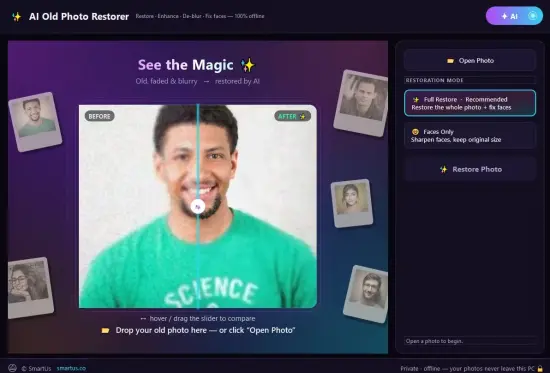
The software also provides a dedicated Faces Only processing mode. This option focuses on facial enhancement while retaining the original image dimensions, making it useful when the primary objective is improving portraits without applying full-image restoration.
The Full Restore mode, by comparison, processes the overall photograph and applies facial improvements as part of the broader restoration workflow.
These two approaches provide useful flexibility depending on the condition of the source image and the desired result.
It is important to remember that AI face restoration is an enhancement process rather than a guarantee of perfect historical reconstruction. When an original photograph contains very little facial information, the software may produce an approximation rather than recover details that were never recorded clearly.
Remove Blur and Improve Image Sharpness
Blur is one of the most common problems affecting old photographs.
Traditional cameras, long exposure times, movement during photography, and limitations in older photographic equipment can all contribute to soft images. Scanned photographs may also appear less defined because of the quality of the original print or scanning process.
AI Old Photo Restorer Portable includes deblurring capabilities intended to improve image clarity and make important details easier to recognize.
The application analyzes the photograph and applies enhancement processing designed to reduce softness and improve the definition of visible elements.
This can be particularly helpful for portraits, family snapshots, and photographs containing important objects or background details.
The ability to improve sharpness automatically also makes the application useful for users who are unfamiliar with traditional sharpening filters. Instead of manually adjusting several image parameters, they can rely on the automated restoration process.
Although severe motion blur cannot always be reversed completely, AI-assisted enhancement provides a practical way to improve many photographs that would otherwise remain difficult to view.
Reduce Image Noise and Unwanted Grain
Grain and digital noise can significantly affect the appearance of photographs.
Older photographic materials frequently contain visible grain, while scanned prints may introduce additional noise during digitization. Digital photographs captured in poor lighting can also contain unwanted image artifacts that reduce clarity.
These imperfections become particularly distracting when viewing portraits or enlarging photographs.
AI Old Photo Restorer Portable includes noise and grain reduction intended to make photographs appear cleaner and more refined.
By reducing unwanted visual interference, the software can improve the overall presentation of an image and make important details easier to distinguish.
Noise reduction is particularly useful for photographs that contain uneven textures or visible grain across large areas. It can also help improve scanned family photographs that have accumulated several generations of image degradation.
The purpose is not simply to make every image appear artificially smooth. A good restoration should maintain as much recognizable photographic information as possible while reducing distracting imperfections.
The actual balance depends on the source photograph and the characteristics of the AI processing.
Improve Faded and Low-Resolution Photos
Fading is another frequent problem encountered when working with older photographic collections.
Photographs stored in unsuitable environments or exposed to sunlight for extended periods may gradually lose contrast and visual intensity. Details become less distinguishable, and the entire image can develop a washed-out appearance.
Low-resolution images present a different challenge. They contain fewer pixels than modern photographs, limiting the amount of information available when viewing or enlarging them.
AI Old Photo Restorer Portable includes enhancement capabilities intended to address faded and low-resolution photographs.
Its processing can lift fading, improve image definition, and enhance the visual quality of pictures that have become difficult to appreciate in their original condition.
These improvements can be useful when preparing photographs for digital albums, presentations, family websites, or printing.
The application also includes image upscaling and enhancement capabilities intended to improve overall image quality. This can be helpful when dealing with small photographs that need additional visual refinement.
However, upscaling should not be confused with recovering every original detail. Artificial intelligence can improve the appearance of available information, but it cannot guarantee an exact reconstruction of details that have been permanently lost.
Two Convenient Restoration Modes
AI Old Photo Restorer Portable provides two principal processing modes designed for different restoration requirements.
Full Restore Mode
Full Restore is the recommended option when the objective is to improve the entire photograph.
This mode combines overall image restoration with facial enhancement. It is designed to address common imperfections such as blur, grain, fading, and reduced facial definition in a single automated operation.
It is particularly appropriate for old family photographs, scanned portraits, and images that require general visual improvement rather than a correction limited to one specific area.
The advantage of this mode is convenience. Instead of performing several separate editing operations, users can initiate a complete restoration process and evaluate the resulting image.
Faces Only Mode
Faces Only is intended for photographs where facial clarity is the main priority.
Unlike Full Restore, this mode concentrates on improving faces while maintaining the original image dimensions.
It can be useful for portraits, group photographs, and images where the background and surrounding composition are already acceptable.
This approach also provides an alternative when users prefer to retain the original overall appearance of a photograph while making the people within it easier to recognize.
Having these two processing modes available makes the application suitable for different types of photographs without introducing an unnecessarily complicated interface.
Before and After Comparison
Evaluating restoration results is an important part of any photo enhancement workflow.
An image may look different after processing, but the most useful way to understand the improvements is to compare the original and restored versions directly.
AI Old Photo Restorer Portable includes an interactive before-and-after comparison slider that allows users to examine both versions of a photograph.
By moving the slider, users can inspect the differences between the original image and its restored counterpart. This makes it easier to evaluate changes in sharpness, facial definition, grain reduction, and general image quality.
The comparison feature is especially valuable when working with family portraits because even relatively small improvements can make a meaningful difference.
It also helps users determine whether a restoration has produced a natural-looking result or whether the original photograph is preferable.
Instead of automatically accepting every enhancement, users can inspect the outcome and decide whether the restored version is suitable for their needs.
Simple and Beginner-Friendly Interface
A major advantage of AI Old Photo Restorer Portable is its straightforward operating approach.
Professional image editing applications frequently provide extensive collections of tools, panels, adjustment layers, filters, and advanced settings. While these features are valuable for experienced editors, they can make simple restoration tasks unnecessarily difficult for beginners.
This application takes a more direct approach.
Its primary workflow is based on three simple actions:
- Open a photograph from the computer.
- Press Restore to start AI processing.
- Compare the original and restored images, then save the improved copy.
This streamlined design reduces the learning curve and allows users to concentrate on their photographs rather than technical editing procedures.
The software is therefore suitable for people who want to restore old memories without becoming familiar with professional image manipulation techniques.
It can also be useful for experienced computer users who prefer a dedicated restoration utility for straightforward enhancement tasks.
Supported Image Formats and Photograph Importing
AI Old Photo Restorer Portable supports common image formats, including JPG and PNG.
These formats cover a substantial portion of everyday digital photography and scanned image collections.
JPG is widely used for photographs captured by digital cameras, smartphones, and other imaging devices. PNG is commonly used for digital images and exported graphics.
The application also accepts scans of old printed photographs, allowing users to work with digitized versions of physical pictures.
This makes it possible to create a digital restoration workflow for photographs that were originally stored in traditional family albums.
Before processing particularly valuable photographs, it is advisable to create high-quality digital scans. A clean, sufficiently detailed scan provides a better starting point for AI enhancement than a poorly captured or heavily compressed image.
Save Restored Copies Without Replacing Originals
Protecting the original photograph is an important consideration when restoring personal images.
AI Old Photo Restorer Portable allows users to save the improved result as a new copy alongside the original photograph.
This approach provides several advantages.
First, the original image remains available for future restoration attempts or comparison. Second, the enhanced version can be shared or printed without changing the source file. Third, users can organize their collections while maintaining a clear distinction between original and processed photographs.
Keeping both versions is particularly important for historical and family photographs, where preserving the untouched source is just as valuable as improving its appearance.
It also provides additional flexibility when experimenting with different restoration approaches.
100% Offline Photo Processing and Privacy Protection
Privacy is one of the defining characteristics of AI Old Photo Restorer Portable.
Many modern AI photo services rely on cloud processing. Users upload their photographs to remote servers, wait for the restoration process, and download the resulting images.
Although this approach can be convenient, it may not be suitable for everyone.
Family photographs frequently contain personal information, recognizable individuals, private locations, and other details that users may prefer not to share with external services.
AI Old Photo Restorer Portable follows a different model by processing photographs directly on the local Windows computer.
According to its developer, photographs are never uploaded to external servers during the restoration workflow. The application is designed to operate completely offline, allowing users to enhance their images without depending on a remote restoration service.
This local-processing approach offers several practical benefits:
- Greater control over personal photographs.
- No need to upload family images to cloud services.
- Reduced dependence on an internet connection.
- Convenient access to local image collections.
- A more private restoration workflow.
Offline operation is especially valuable when working with sensitive personal archives or large collections of family photographs.
Users can also avoid the delays and potential limitations associated with uploading and downloading large image files.
A Practical Tool for Family Photo Preservation
Family photographs are among the most meaningful images people own.
They document important milestones, preserve the appearance of relatives, and provide a visual connection to previous generations. Unfortunately, many family collections contain photographs that have deteriorated considerably over time.
AI Old Photo Restorer Portable provides an accessible way to improve these pictures and prepare enhanced digital copies for long-term preservation.
It can be useful when restoring childhood photographs, old wedding pictures, family portraits, grandparents’ photographs, and scanned images from traditional albums.
The software can also help users prepare photographs for digital family archives.
A restored image can be stored alongside its original file, organized by date or family member, and shared with relatives.
The ability to improve facial clarity is especially meaningful for photographs containing people who may no longer be available to provide new pictures.
Although restoration cannot reverse every form of physical damage, even moderate improvements can make old photographs easier to appreciate.
Useful for Scanned Albums and Historical Photographs
Digitizing old photographs is an effective way to protect them against further physical deterioration.
However, scanning does not automatically improve their condition. It simply creates a digital representation of the photograph as it currently exists.
Consequently, scanned images may contain scratches, grain, fading, blur, and low-resolution details.
AI Old Photo Restorer Portable can be incorporated into a broader digitization workflow.
Users can scan their photographs, save the resulting files in JPG or PNG format, and process them through the application.
This approach is particularly useful for collections containing many photographs from different periods.
A consistent restoration process can help improve the overall appearance of a digital archive, making photographs easier to browse, share, and display.
For particularly valuable historical material, retaining the original scans is strongly recommended. Restoration should be treated as an additional preservation copy rather than a replacement for the untouched digital source.
Improve Photographs Before Printing and Sharing
Restored photographs are not only useful for digital storage.
Many users also want to print their enhanced images, include them in photo albums, create family presentations, or share them through messaging applications and social networks.
Improving sharpness, reducing grain, and enhancing facial details can make photographs more pleasant to view on different displays and in printed formats.
AI Old Photo Restorer Portable offers a convenient way to prepare photographs before these activities.
For example, a faded family portrait can be enhanced and saved as a separate image before being included in a printed album.
Similarly, an old childhood photograph can be improved before being shared with relatives.
The resulting quality will depend on the original resolution, the degree of damage, and the intended output size. Users should therefore inspect restored photographs at their intended viewing dimensions before printing important images.
Performance and Local Processing
Because AI Old Photo Restorer Portable processes photographs directly on the computer, the available hardware can influence the overall experience.
Image restoration involves analyzing visual information and applying enhancement operations. Processing speed can therefore vary according to the computer’s capabilities, the image dimensions, and the complexity of the restoration task.
The offline approach also means users do not have to wait for photographs to be uploaded to remote servers or downloaded after processing.
This can make the workflow particularly convenient for people who regularly work with private photographs or prefer desktop applications over browser-based services.
For the best experience, users should ensure that their Windows installation is up to date and that sufficient free storage space is available.
Closing unnecessary applications can also help when processing large images on computers with limited resources.
Who Should Use AI Old Photo Restorer Portable?
AI Old Photo Restorer Portable is designed for a broad range of users who want to improve photographs without dealing with complicated editing procedures.
Family archivists can use it to enhance scanned photographs and prepare improved copies of important family memories.
Photography enthusiasts may find it useful for improving older images that need additional sharpening, noise reduction, or facial enhancement.
Beginners can benefit from the straightforward restoration workflow without having to learn professional photo editing techniques.
Collectors of historical photographs can use its AI enhancement capabilities to improve the visual presentation of digitized images while retaining their original files.
People with old family albums can use the application to give faded, blurry, and scratched photographs a clearer appearance.
Users concerned about privacy can appreciate the offline processing approach, which avoids uploading personal photographs to external restoration services.
Its combination of simplicity, automated enhancement, facial restoration, and local processing makes it a practical choice for everyday photo preservation.
Advantages of AI Old Photo Restorer Portable
The application’s main strengths come from its focused feature set and uncomplicated operation.
Unlike comprehensive photo editors that include numerous unrelated tools, it concentrates on restoring and improving photographs.
Its most notable advantages include:
- AI-powered restoration for old and damaged photographs.
- Automated improvement of facial details.
- Dedicated Full Restore and Faces Only modes.
- Blur reduction and image sharpening.
- Grain and noise reduction.
- Enhancement of faded and low-resolution photographs.
- Image upscaling capabilities.
- Interactive before-and-after comparison.
- Support for JPG and PNG photographs.
- Ability to save restored copies alongside original images.
- Offline processing directly on the computer.
- No requirement to upload personal photographs to external servers.
- Beginner-friendly restoration workflow.
- Free-to-try licensing model.
- One-time purchase instead of a recurring subscription.
These characteristics make the application particularly appealing to users who want a specialized restoration tool rather than a complicated image editing environment.
Limitations and Realistic Restoration Expectations
Although AI Old Photo Restorer Portable offers several useful enhancement capabilities, it is important to understand that artificial intelligence cannot guarantee perfect restoration in every situation.
The quality of the result depends heavily on the original photograph.
Images with moderate blur, grain, fading, and scratches may respond well to automated processing. However, photographs with extensive physical damage, missing sections, severe overexposure, or almost completely lost facial details may remain difficult to restore.
AI-based facial enhancement can improve the appearance of people in photographs, but some reconstructed details may be estimated rather than historically accurate.
For this reason, restored photographs should be considered enhanced interpretations of the original images rather than definitive reconstructions of every missing detail.
Users should always preserve their original files and carefully inspect the results before using restored photographs for historical documentation or other purposes where absolute accuracy is important.
Final Verdict on AI Old Photo Restorer Portable
AI Old Photo Restorer Portable is a focused and approachable application for anyone interested in restoring old photographs with the assistance of artificial intelligence.
Its main strength is the combination of automated image enhancement and a simple workflow. Instead of requiring users to perform complicated manual adjustments, it provides dedicated restoration modes that address common photographic problems such as blur, grain, fading, and reduced facial clarity.
The Full Restore and Faces Only options offer flexibility for different restoration requirements, while the interactive comparison slider makes it easy to evaluate the results before saving an improved image.
Another important advantage is its offline architecture. Processing photographs locally provides a convenient alternative to online restoration services, particularly when working with private family pictures and personal archives.
The ability to save restored copies without replacing original files also makes it suitable for responsible digital photo preservation.
Although the software cannot guarantee perfect results for severely damaged photographs, it provides an accessible solution for improving many everyday images and making old memories easier to appreciate.
Overall, AI Old Photo Restorer Portable is a useful choice for beginners, family archivists, photography enthusiasts, and anyone looking for a straightforward Windows application that combines AI-powered facial enhancement, image restoration, and privacy-conscious offline processing.
Features at a Glance
- Software Name: AI Old Photo Restorer Portable
- Developer: SmartUs
- Category: AI Photo Restoration and Image Enhancement
- Operating System: Windows 10 and Windows 11
- Technology: Artificial Intelligence-Based Image Processing
- Main Purpose: Restore and enhance old, faded, scratched, and blurry photographs
- AI Face Restoration: Yes
- Facial Detail Enhancement: Yes
- Full Restore Mode: Yes
- Faces Only Mode: Yes
- Blur Reduction: Yes
- Image Sharpening: Yes
- Noise and Grain Reduction: Yes
- Faded Photo Enhancement: Yes
- Low-Resolution Image Enhancement: Yes
- Image Upscaling: Yes
- Before-and-After Comparison: Interactive Slider
- Supported Image Formats: JPG and PNG
- Image Importing: Local photographs and scanned prints
- Saving Options: Save a restored copy alongside the original
- Cloud Upload Required: No
- Offline Processing: Yes
- Privacy: Photographs remain on the local computer
- User Interface: Simple and beginner-friendly
- Internet Connection: Not required for local photo restoration
Release Notes:
- NEW: 10 languages — English, Français, Deutsch, Español, Português (Brasil), Italiano, Polski, Türkçe, Bahasa Indonesia and 日本語.
- Stronger automatic restore: scratches, spots, faded colours and colour casts are fixed better, noise removal adapts to each photo
  and faces are found more reliably
- NEW: Open Photo and Open Folder at the top — Open Folder restores a whole folder with Bulk Restore
- NEW: Clear, Undo and Reset under the photo, plus a right-click menu on the photo
- Restoring again? Choose to start from the restored photo or the original
- NEW: Cancel a restore at any time
- A memory check before very large restores; your PC stays responsive while the AI works