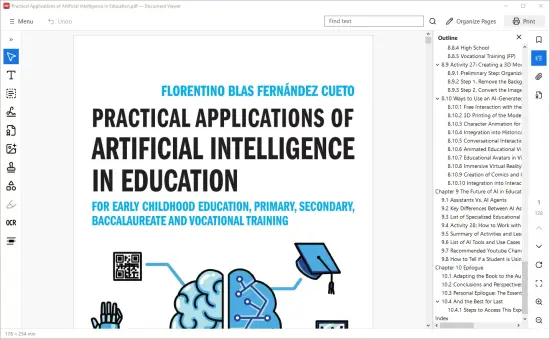
Portable Asoftis PDF Editor 1.4.0 (x64) Multilingual
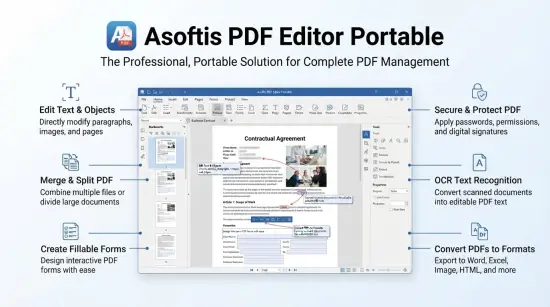
Asoftis PDF Editor Portable is a modern PDF management solution designed for users who need a practical and straightforward way to work with digital documents. Whether the task involves editing text, reorganizing pages, completing forms, signing files, or protecting sensitive information, the software offers a comprehensive toolkit focused on everyday productivity.
PDF documents have become one of the most widely used formats for sharing information because they preserve formatting across different devices and operating systems. However, many users discover that viewing a PDF is simple while editing one can often require expensive subscriptions or complex software suites. Asoftis PDF Editor Portable addresses this challenge by providing a dedicated environment for creating, modifying, organizing, and securing PDF files without unnecessary complexity.
The software is aimed at individuals, professionals, students, administrators, and small businesses that regularly exchange electronic documents. From invoices and contracts to reports and forms, it provides the tools necessary to manage documents efficiently while maintaining document integrity and professional presentation.
Why PDF Editing Matters Today
In modern digital workflows, PDF files are used for nearly every type of communication. Businesses exchange contracts electronically, institutions distribute forms in PDF format, and individuals store important documents as PDFs for long-term archiving.
Without a capable editor, users often find themselves printing documents only to fill them out manually before scanning them again. This process wastes time and reduces document quality. Asoftis PDF Editor Portable eliminates many of these obstacles by allowing direct text modifications, form completion, and document annotation within the software itself.
The ability to edit PDFs efficiently can significantly improve productivity by reducing repetitive administrative tasks and streamlining document workflows.
Clean Interface Designed for Productivity
One of the strongest aspects of Asoftis PDF Editor Portable is its user-oriented interface. The application focuses on accessibility and ease of use without overwhelming the user with unnecessary menus and technical options.
The workspace is organized logically, making it easy to locate common functions such as:
- Opening PDF files
- Editing document content
- Managing pages
- Adding signatures
- Applying security settings
- Converting scanned documents
- Processing multiple files
This layout helps both beginners and experienced users navigate the software efficiently.
Instead of spending time learning complicated workflows, users can quickly begin working with their documents immediately after installation.
Comprehensive PDF Editing Tools
The core functionality of Asoftis PDF Editor Portable revolves around PDF editing.
Many PDF readers allow users only to view documents, but this software expands capabilities significantly by enabling modifications directly within existing files.
Users can adjust and rewrite text content without needing access to the original source document. This capability is particularly useful when correcting errors, updating information, or making revisions to previously finalized documents.
Typical editing scenarios include:
- Correcting spelling mistakes
- Updating dates
- Revising addresses
- Adjusting pricing information
- Amending contractual details
- Updating company information
These editing tools make the software suitable for a broad range of business and personal applications.
Merge Multiple PDF Documents Into One
Combining several PDF files into a single document is a common requirement in offices and administrative environments.
Asoftis PDF Editor Portable simplifies this process by offering PDF merging functionality that allows users to combine multiple files quickly and efficiently.
Examples include:
- Combining invoices into monthly reports
- Joining contract sections into a complete agreement
- Merging scanned pages into one archive file
- Creating portfolios of project documentation
This feature helps organize information while reducing document fragmentation.
The resulting PDF maintains a professional appearance and can be easily shared with clients, colleagues, or institutions.
Split Large PDF Files Efficiently
Large PDF documents often contain sections that need to be distributed individually.
Asoftis PDF Editor Portable provides document splitting tools that allow users to separate PDFs into smaller components based on their requirements.
Common use cases include:
- Extracting specific chapters
- Separating reports by section
- Distributing individual forms
- Creating smaller archives for email transmission
This flexibility makes document distribution much more manageable.
Rearrange and Organize Pages
Managing page order is another important aspect of document preparation.
The software allows users to:
- Move pages
- Reorder content
- Rotate pages
- Delete unwanted pages
- Insert additional pages
This functionality is particularly helpful when working with scanned documents or complex reports where page sequence may require adjustment.
Instead of recreating documents from scratch, users can reorganize content with minimal effort.
Form Filling Without Restrictions
Many organizations distribute forms as standard PDF files rather than interactive forms.
In these situations, completing documents digitally can be challenging.
Asoftis PDF Editor Portable provides tools that help users enter information directly into PDF files, even when the original document lacks editable form fields.
This capability can significantly reduce paperwork and eliminate the need for printing, handwriting, and rescanning documents.
The result is a more efficient and environmentally friendly workflow.
Digital Signatures and Electronic Validation
Electronic signatures have become increasingly important in modern business operations.
Asoftis PDF Editor Portable supports document signing, enabling users to authenticate documents electronically while maintaining document integrity.
Digital signatures offer advantages such as:
- Faster document approval
- Improved security
- Enhanced traceability
- Reduced paper consumption
- More efficient remote collaboration
Organizations working with contracts, agreements, and official documentation can benefit greatly from integrated signing capabilities.
This feature supports modern digital workflows that increasingly rely on secure electronic transactions.
PDF Security and Document Protection
Protecting sensitive information is essential when handling confidential documents.
Asoftis PDF Editor Portable includes document security features designed to help users control access and prevent unauthorized viewing or modification.
Security options help safeguard:
- Financial records
- Business contracts
- Personal documents
- Internal reports
- Legal paperwork
By applying document protection measures, users can share files more confidently and maintain compliance with organizational requirements.
Redaction of Sensitive Information
Removing confidential information from a document requires more than simply hiding text visually.
Asoftis PDF Editor Portable includes redaction functionality intended to permanently remove information from documents before sharing them with third parties.
This feature can be useful when preparing:
- Legal documents
- Contracts
- Personal records
- Human resources paperwork
- Compliance documentation
Proper redaction helps prevent unintended disclosure of personal or sensitive information.
OCR Capabilities for Scanned Documents
Many PDF files originate from scanners and contain images rather than searchable text.
Asoftis PDF Editor Portable includes OCR functionality designed to convert scanned content into searchable and more usable documents.
OCR benefits include:
- Text searching
- Improved accessibility
- Easier information retrieval
- Better document organization
- Simplified archival management
Users working with historical records, paper archives, or scanned forms can save considerable time through OCR-assisted document processing.
Batch Processing for Increased Efficiency
Organizations often need to perform identical operations on large numbers of PDF files.
Instead of repeating actions manually, Asoftis PDF Editor Portable supports batch processing capabilities that can automate repetitive workflows.
Potential batch processing tasks include:
- Applying watermarks
- Securing documents
- Converting file structures
- Modifying document properties
- Performing repetitive maintenance operations
Batch operations can significantly improve productivity when managing extensive document collections.
Multiple Document Tabs
Modern users expect multitasking capabilities from productivity software.
Asoftis PDF Editor Portable enables working with multiple PDF files simultaneously through tab-based navigation.
Advantages include:
- Faster comparison of documents
- Easier content transfer
- Reduced desktop clutter
- Improved workflow organization
Users can switch between open files quickly without launching additional application instances.
Watermarks, Headers, and Footers
Professional document presentation often requires additional elements beyond basic content.
Asoftis PDF Editor Portable allows users to enhance documents with:
- Watermarks
- Page numbers
- Headers
- Footers
- Identification marks
These additions can improve professionalism and help maintain document consistency across larger projects.
Businesses frequently use such features for branding, document tracking, and organizational purposes.
Password Protection and Encryption
Document privacy remains a major concern in both personal and professional environments.
Asoftis PDF Editor Portable includes options for securing PDF files through advanced password protection mechanisms.
Benefits include:
- Restricted access
- Controlled sharing
- Enhanced confidentiality
- Safer document storage
When sensitive documents are transmitted electronically, encryption serves as an additional layer of protection against unauthorized access.
Optimized for Everyday Business Use
Asoftis PDF Editor Portable is particularly suitable for small and medium-sized businesses that require dependable PDF functionality without the complexity or cost associated with enterprise-scale solutions.
Typical professional applications include:
- Contract preparation
- Document approval workflows
- Customer communications
- Invoice processing
- Report generation
- Regulatory documentation
The software provides an effective balance between functionality and simplicity.
Suitable for Personal Users
The program is not limited to business environments.
Individual users can leverage its features for personal document management tasks such as:
- Completing official forms
- Organizing personal archives
- Editing travel documents
- Managing financial records
- Preparing academic submissions
Its accessible interface makes advanced PDF operations available even to less experienced users.
Enhanced Document Workflow Management
Managing documents effectively often involves more than editing alone.
Asoftis PDF Editor Portable contributes to workflow efficiency by reducing dependence on multiple applications.
Rather than switching between viewers, converters, editors, compressors, and signing tools, users can complete many document-related tasks within a single environment.
This consolidation can reduce complexity while improving overall productivity.
Performance and Usability
Performance plays an important role in document management applications.
Users frequently work with large files containing numerous pages, graphics, scanned images, and embedded elements.
Asoftis PDF Editor Portable is designed to handle these workloads while maintaining responsive operation. Fast navigation, efficient page management, and streamlined editing tools contribute to a smoother user experience.
The software focuses on practical performance rather than unnecessary visual effects, ensuring that system resources are allocated efficiently.
Advantages of Asoftis PDF Editor Portable
Several characteristics contribute to the software’s appeal:
- Comprehensive PDF editing functions
- Page organization tools
- PDF merging and splitting
- OCR support
- Digital signature capabilities
- Security and encryption options
- Redaction features
- Batch processing support
- User-friendly interface
- Multi-document tab system
- Form completion capabilities
- Professional document enhancement tools
Together, these features create a versatile PDF management environment suitable for a wide variety of tasks.
Who Should Use Asoftis PDF Editor Portable?
The software is well suited for:
Office Professionals
Employees managing reports, contracts, invoices, and correspondence can benefit from its comprehensive editing and organizational features.
Small Businesses
Organizations seeking cost-effective document management tools may find the software particularly attractive.
Students
Academic users can edit, organize, review, and annotate PDF-based educational materials efficiently.
Legal Professionals
The combination of redaction, signatures, security, and document organization supports many legal document handling requirements.
Administrative Staff
Form processing, file organization, and document preparation become substantially easier with integrated PDF management tools.
Final Thoughts
Asoftis PDF Editor Portable provides a feature-rich environment for working with PDF documents in professional and personal settings. Its combination of editing tools, page management capabilities, security features, OCR functionality, digital signing support, and batch processing options makes it a versatile solution for modern document workflows.
Users who regularly create, edit, organize, secure, and distribute PDF documents can benefit from the software’s streamlined design and practical feature set. By centralizing numerous document management tools within a single application, it helps reduce workflow complexity while improving efficiency and control over PDF-based information.
Features at a Glance
- Edit existing PDF content
- Merge multiple PDF documents
- Split PDFs into smaller files
- Rearrange pages using drag-and-drop operations
- Rotate and delete pages
- Fill PDF forms
- Add text to non-fillable forms
- Apply digital signatures
- Verify electronic signatures
- OCR support for scanned documents
- Redact sensitive information
- Password-protect PDF files
- Document encryption support
- Add headers and footers
- Insert page numbering
- Apply watermarks and stamps
- Compress large PDF documents
- Batch process multiple files
- Open multiple documents in tabs
- Print PDF files directly
- Document organization and workflow tools