Portable BeeConverter Pro 3.3.0
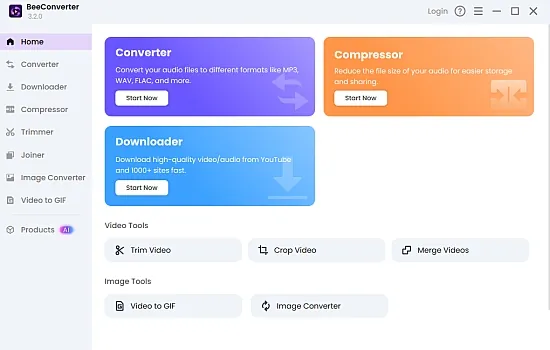
BeeConverter Portable is a highly versatile and advanced multimedia conversion software designed to streamline the process of converting, editing, and managing various audio and video formats. Combining remarkable speed with quality preservation, BeeConverter Portable provides an all-in-one platform suited for both casual users and professionals needing fast, efficient media conversion tools. This software stands out due to its extensive feature set, support for a wide array of formats, and user-friendly interface that balances power with simplicity, making it an essential tool for content creators, digital marketers, videographers, and anyone involved in multimedia content management. In this detailed overview, we will explore the core functionalities, technical capabilities, user interface design, supported formats, additional editing features, device compatibility, performance metrics, and the overall value proposition that BeeConverter Pro offers to its users.
Core Functionalities and Capabilities
At its foundation, BeeConverter Pro is primarily a media file converter that supports an extensive range of formats for both audio and video files. Its core purpose is to facilitate seamless format transformation without compromising the quality of the original content. Whether converting a high-definition 4K video to a compatible format for playback on mobile devices or transforming audio into different formats for editing or distribution, BeeConverter Pro delivers with rapid conversion speeds—up to 60 times faster than traditional converters.
The software’s speed advantage is driven by its advanced acceleration technology, enabling batch processing of hundreds of files concurrently, which drastically reduces waiting times and enhances productivity. Its high-performance core ensures that even large video files, such as full-length movies or lengthy high-resolution clips, can be processed swiftly and efficiently, making it suitable for handling professional-grade multimedia workflows.
Wide Format Support
BeeConverter Pro boasts support for over 300 media formats, encompassing a diverse range of both common and specialized file types. It covers all major video formats—such as MP4, AVI, MOV, MKV, WMV, FLV, WEBM, HEVC/H.265, AVC/H.264, and more—as well as audio formats including MP3, WAV, WMA, M4A, and AC3. This broad compatibility ensures users can easily convert files to meet the requirements of different devices, platforms, or editing software, eliminating the need for multiple specialized tools.
Specific support features include 4K and HD resolution conversions, with the capability to convert videos without any perceptible quality loss. The software makes use of efficient compression algorithms, notably HEVC/H.265, which allows for high-quality 4K video transmission with less data, commonly essential for efficient streaming and storage.
User Interface and Usability
One of BeeConverter Pro’s significant strengths lies in its user interface, which combines simplicity with powerful features. Designed with both novices and advanced users in mind, the interface offers drag-and-drop support for easy file addition and a straightforward workflow that guides users from file selection to format choice and output configuration. The software includes pre-set export profiles tailored to common devices, such as smartphones, tablets, gaming consoles, and media players, allowing users to quickly select optimal settings for their target device.
The software also provides a built-in video trimmer and merger, facilitating quick edits within the same platform. Users can trim unwanted sections or merge multiple clips into a single file without needing additional editing software. These tools operate in real-time, maintaining high quality and avoiding the tedious process of external editing workflows.
Advanced Editing Features
Beyond basic format conversion, BeeConverter Pro integrates several editing tools aimed at improving and customizing media content. The video trimmer enables precise cutting, allowing users to remove unwanted segments or extract highlights efficiently. The video merger supports merging multiple clips seamlessly, optimizing editing workflows for content compilation or montage creation.
Another noteworthy feature is the ability to convert videos directly into GIFs — a feature tailored for social media content creation and meme generation. This process involves selecting a video file and converting it into animated GIF format in seconds, with flexibility over frame rate, size, and quality settings. The integration of GIF conversion extends the software’s use case from basic file format translation to creative content production.
Moreover, BeeConverter supports converting video URLs from over a thousand websites, including social media platforms like Facebook, Instagram, TikTok, Twitter, and Reddit. This ability simplifies downloading and converting online media content, further expanding its utility for users who frequently work with web-based videos and audio streams.
Device and Platform Compatibility
BeeConverter Pro is compatible across multiple operating systems, including Windows (Windows 7, 8, 8.1, 10, 11) and Mac OS X (macOS 10.7 and higher). This cross-platform support ensures flexibility for users working within diverse environments.
On Windows, its design adheres to standard application conventions, with an intuitive layout that emphasizes ease of access to features. On Mac, it maintains an aesthetic aligned with macOS norms, ensuring a smooth experience regardless of the platform. The software supports exporting files optimized for numerous devices, including smartphones, tablets, gaming consoles, and PCs, facilitating playback compatibility across a broad spectrum of hardware.
Performance and Speed
One of the defining attributes of BeeConverter Pro is its exceptional speed. Thanks to optimized acceleration technology and multi-thread processing, the software achieves up to 60X faster conversion speeds compared to traditional converters. Whether converting a single file or hundreds simultaneously, users benefit from rapid turnaround times, making it highly suitable for workflows requiring quick results, such as social media content creation, professional editing, and batch media management.
The software’s efficiency extends to large file handling, supporting uploads up to 4GB in size without deteriorating performance. Also, the conversion process preserves the original quality of media, including support for high-bitrate HD and 4K videos, utilizing codecs like HEVC, H.264, and VP9 to optimize both quality and compression ratios.
File Management and Export Presets
BeeConverter Pro simplifies file management through its support for batch processing, enabling users to drag and convert over 200 files in one go. This high-capacity batch processing minimizes manual intervention and accelerates large projects, such as multimedia libraries or content archives.
Supported export presets further streamline workflows. Users can select from a comprehensive list of predefined profiles suited for various devices and quality needs, such as streaming, offline playback, or social media. Once a profile is configured, it can be saved as a default for repeated use, making future conversions even quicker and more consistent.
Additional Features and Usage Scenarios
Beyond standard conversion, BeeConverter Pro offers several auxiliary functions that expand its utility. Its ability to convert videos into HD or 4K resolution ensures content remains high quality, suitable for professional production, editing, or archival purposes. The software can also transform videos into GIFs, providing an excellent tool for social media content creators or meme enthusiasts.
The software is ideal for various use cases, including:
- Converting videos for compatibility with specific devices or platforms.
- Downloading and converting online videos directly from URLs.
- Creating video snippets or highlights through trimming.
- Merging multiple videos into a single clip for presentation or sharing.
- Generating social media memes from longer video clips.
- Compressing videos for streaming or storage using efficient codecs.
Technical Requirements
For optimal performance, BeeConverter Pro requires at least Windows 7 or higher, or macOS 10.7 or later. A compatible graphics card can accelerate video encoding and decoding processes further, especially when handling large 4K or HD files. Sufficient RAM (recommended 8GB or more) and storage space are advised to ensure smooth operation during intensive batch conversions.
Conclusion and Overall Value
BeeConverter Pro combines high-speed performance, extensive format support, and user-friendly design to make it a compelling tool for anyone working with multimedia files. Its support for 4K and HD videos, along with its ability to convert between over 300 formats, makes it suitable for professional video editors, content creators, and everyday users alike. The integrated editing features, such as trimming and merging, add considerable value by eliminating the need for external editing programs. Its capacity for batch process handling, URL-based conversions, and GIF creation further demonstrate its versatility and comprehensive approach to multimedia management.
In essence, BeeConverter Pro excels as a one-stop solution for fast, reliable media conversion, editing, and management—delivering professional-grade results with extraordinary speed, ease of use, and broad compatibility, making it an invaluable addition to any media toolkit.
Main Features of BeeConverter Portable
• Convert files to any format at 60X faster speed
• HD/4K video conversion without quality loss
• Built-in video trimmer & merger
• Convert video to GIF in seconds
Let BeeConverter Endow Your Video with Vitality
Convert File Between Key Formats
All popular video/audio formats are supported, including HD video (H.265/HEVC, H.264/AVC). You can easily convert video or audio in any popular format, such as MP4, MKV, AVI, FLV, WEBM, and MP3, WMA, WAV, M4A, etc., and even 4K video.
60X Faster Conversion Speed
Equipped with advanced acceleration technology, you’re able to experience the ultrafast conversion speed. The problem of slow conversion of large files hardly occurs, because BeeConverter enables you to convert video at 60X faster speed.
Advanced Export Presets
BeeConverter’s export preset covers almost all formats and devices. By using this feature, you can choose the quality and format of the desired video more expediently. After setting it once, it will automatically save your options unless you set it once again.
Create Funny Meme in Seconds
Make funny meme with BeeConverter is easy. There’s no need to waste hours in designing meme as you can directly convert video to GIF from Facebook, Instagram, Twitter, Reddit, etc., The process can be executed in a few seconds.
Trim & Merge Video Quickly
Instead of downloading a heavy professional video editor, The built-in video trimmer and video merger of BeeConverter can help you trim videos in a simple way, and enables you to merge all video clips into one as quick as a flash, no matter how large the files are.
HEVC/H.265 Video Coding Supported
High-efficiency video coding (HEVC/H.265) compresses video more efficiently than AVC/H.264, and it can transmit 1080P/4K video with the same quality and less data. When you want to convert video to MP4 in 4K, BeeConverter will choose HEVC for you by default.