

Portable Files Inspector Pro 4.41 (x64) Multilingual
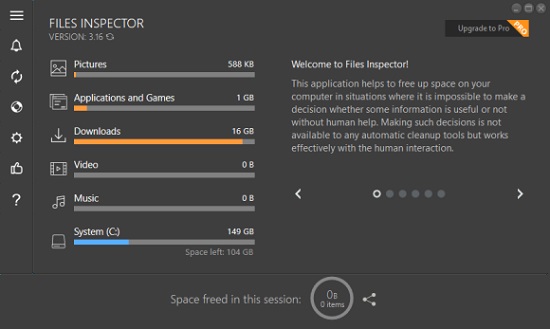
Files Inspector Portable is a tool that allows you to inspect the data on your disks and delete or uninstall the obsolete ones, thus freeing up space and improving the performance of your system at the same time.
Includes an analyzer that helps you assess that data on the disk
Following an uneventful installation you are welcomed by a modern, sleek and stylish interface. You should bear in mind that the tool begins to scan your disk as soon as you open it, a procedure that could take some time depending on the size of the HDD or SSD. On a side note, while waiting you can check out the tips and functionality notes of the app especially if you did not use similar apps before.
The idea behind the tool is to perform an express analysis of the documents, images, multimedia and other type of data, and display the space occupied in a clear manner. While it is true that it does not display it with charts, the bars are quite intuitive and you can easily get an overview of the files that take up the most space.
Advanced users can make even deeper analysis as the tool comes with a parser that allows you to examine data in all files and folders on the exiting storage.
Quickly delete the data that you do not need
Once you decided what data needs to be removed from the disk, you have the option to erase it directly from inside the app. This is not only applicable to files and folders, but also for applications that you no longer use and just take up space. According to the developer, the app allows for safe deletion and, just in case you change your mind, you can find the recently erased data in Recycle Bin.
Features:
1. Quick analysis of the file system
Provides the results shortly after startup. Allows you to assess what data are on the disks.
2. Quick analysis of the file system
The analyzer checks the data on the disks and displays the results in a convenient diagram, which makes it clear which elements occupy the most disk space on your PC.
3. Advanced features for experienced users
Experienced users can flexibly and completely study the information about their media and delete unnecessary data.
Capabilities:
Express analysis of user files
Express test analyzes folders, documents, images, videos, music, and other files and displays the space occupied on the disks.
Advanced analyzer
For advanced users, Files Inspector has an advanced parser that allows you to assess the data in all files and folders on the existing storage media.
Deletion of unneeded data
After you find unneeded files or folders in the list of Files Inspector’s analyzer, you can delete them without the need to use Explorer or another tool for working with the file system.
Deleting unneeded files and folders
While studying the content of the discs, you can delete unneeded files and folders in a couple of clicks to free space on the media in your computer.
Removing unneeded applications
Removing unneeded applications is one of the important steps to freeing up the disk space. Applications may be removed directly through Files Inspector.
Safety
Files Inspector allows deleting files and folders. To prevent erroneous actions, all deleted items are placed in the Recycle Bin, from which they may be immediately restored.
PRO Compressing photos without the loss of their quality
For freeing up additional space, you can compress photos without losing their quality. This also reduces the space occupied by photos an average of 10%.
Changelog
- Applications and Games section:
- When installing applications with tracing, the drivers, services, and other startup entries created by installers are now detected. Upon uninstalling a traced program, these components will be removed from the system (along with other traced items of the program) to ensure complete cleanup.
- Startup items are now added to the traces of applications found in the system. You can immediately see which installed applications are set to launch automatically when the system starts. Applications that launch automatically are marked in the list with a “speedometer” icon.
- When application traces cannot be moved to the Recycle Bin, the program requests confirmation for permanent deletion.
- When pressing the F5 key or selecting the command Ellipsis icon -> “Refresh Window data”, a deeper refresh is performed compared to previous versions. The number of traces is recalculated for all programs displayed in the window.
- More accurate sorting by installation date. Previously, applications installed on the same day could be sorted in a different order than they were actually installed.
- Improved removal of applications that register themselves not in just one (as is usual), but in two or more registry sections containing data for installed applications (uninstall keys).
- User-created application folders are now sorted alongside standard applications, rather than being pinned to the top or bottom of the list.
- After tracing the application installation, the types and quantities of traces created (files, registry entries, startup items) are now shown.
- The application traces lookup algorithm has been improved.
- Faster applications size calculation on multi-processor systems (when Task Manager shows 9 or more logical processors).
- Bugs fixed:
- If the program was maximized to full screen, after restarting the system and restoring it from the tray, it did not remember this window state.
- The list in the Applications and Games section could contain duplicate items with technical names, such as {B606743A-7044-4BF7-97C7-597927366183}.
- Fixed Bugs introducted by v4.40