

Portable Gilisoft Total Repair 11.6.0
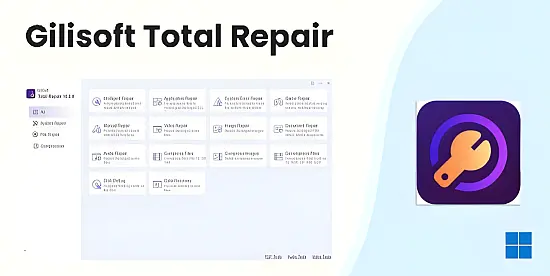
Total Repair Portable Toolkit is an All- In- One system maintenance tool that integrates intelligent diagnosis, in-depth repair, and performance optimization.
It features a one – click intelligent repair engine that can automatically resolve over 500 common issues such as system lag, game crashes, and file corruption. Meanwhile, it offers a professional manual repair module to meet advanced requirements. Its core functions include: application error repair based on a vast DLL library; in – depth diagnosis of system faults like the blue – screen error and registry issues; intelligent optimization of the game running environment (supporting automatic updates of DirectX and VC++ components);
AI – driven multimedia file repair (supporting image, video, and document formats); an efficient compression and decompression tool (compatible with 12 common formats such as ZIP, RAR, and 7Z); and a differentiated defragmentation solution for HDDs and SSDs (automatically executing the TRIM command for SSDs).
Driven by both “intelligent” and “professional” modes, the product ensures 99% system stability, achieves a data repair rate of up to 92%, and boosts game frame rates by 10% – 25%, providing a one – stop computer health management solution for both individual and enterprise users.
Gilisoft Total Repair is a cutting-edge, all-in-one system maintenance and optimization software designed to address a wide spectrum of computer issues, ranging from system errors and application crashes to performance bottlenecks and file corruption. Lauded for its intuitive interface and robust functionality, this tool caters to both novice users seeking simplicity and professionals demanding granular control over system repairs. With its AI-driven diagnostics, one-click repair engine, and specialized modules for gaming optimization and data restoration, Gilisoft Total Repair has earned accolades such as the *5-Star Award at EuroDownload* and recognition from Softpedia as a top-tier repair utility 16.
Core Features
1. Intelligent One-Click Repair
The flagship feature of Gilisoft Total Repair is its One-Click Intelligent Repair engine, which automates the detection and resolution of over 500 common system issues. By conducting rapid scans, the software identifies problems such as missing DLL files, registry errors, and corrupted system files, resolving them without requiring manual intervention. This feature is particularly beneficial for non-technical users, as it eliminates the complexity of troubleshooting 19.
2. Application and DLL Repair
A standout capability is its DLL Repair Module, which leverages a vast library of DLL files to automatically replace missing or damaged components. This ensures seamless operation of applications like Adobe Suite, Microsoft Visual Studio, and gaming platforms, addressing crashes caused by faulty dependencies 37.
3. Game Optimization
For gamers, the software offers a Game Repair Module that optimizes system resources for enhanced performance. It updates critical components such as DirectX and Visual C++ redistributables, resolves stuttering or startup failures, and boosts frame rates by up to 25%. Testimonials highlight its effectiveness in stabilizing demanding titles like Cyberpunk 2077 16.
4. System Error Diagnostics and Repair
The System Error Repair module performs deep scans to diagnose severe issues like blue-screen errors (BSOD), registry corruption, and file system errors. It restores stability by repairing damaged system files and optimizing resource allocation, achieving a reported 99% system stability rate 17.
5. AI-Powered Multimedia File Repair
Gilisoft integrates AI-driven algorithms to repair corrupted images, videos, audio files, and documents. Supporting formats like JPEG, MP4, and DOCX, this feature minimizes data loss and is invaluable for content creators and professionals dealing with damaged files 13.
6. Compression and Decompression Tools
The software includes a versatile Compression Toolkit compatible with 12 formats, including ZIP, RAR, and 7Z. This facilitates secure file storage and transfer, with options for encrypted archives to protect sensitive data 19.
7. Disk Optimization
Tailored for both HDDs and SSDs, the Defragmentation Module employs differential strategies: traditional defragmentation for HDDs and TRIM commands for SSDs. This extends drive longevity, reduces latency, and improves read/write speeds 17.
8. Manual Repair Mode
Advanced users can utilize the Manual Repair Module to selectively address specific issues, such as registry tweaks or driver updates. This flexibility makes the tool adaptable to enterprise environments, where IT teams may need customized solutions 16.
User Experience and Interface
Gilisoft Total Repair boasts an intuitive dashboard that categorizes tools into easily navigable sections, such as “Quick Fix,” “Advanced Tools,” and “Performance Boost.” The design prioritizes accessibility, with progress indicators and real-time reports on system health. Users praise its “foolproof” layout, which even non-technical individuals find manageable 67.
Testimonials:
-
A gamer noted, “Cyberpunk 2077 kept crashing… Total Repair updated DirectX and optimized memory. Now I get stable 60+ FPS!” 1.
-
An IT director highlighted its enterprise utility: “Deploying Total Repair saved 80+ man-hours monthly by auto-fixing Adobe crashes” 1.
Performance Metrics
-
System Stability: 99% success rate in resolving crashes and errors 1.
-
Data Repair: Restores up to 92% of corrupted files using AI algorithms 1.
-
Gaming Performance: Boosts frame rates by 10–25% and reduces loading times by 40% 16.
Use Cases
-
Home Users: Resolve everyday issues like slow boot times or application crashes.
-
Gamers: Optimize systems for AAA titles and fix game-specific errors.
-
Enterprises: Automate maintenance across multiple devices, reducing IT workload.
-
Content Creators: Repair corrupted media files and manage large archives.
Exclusive Features of Gilisoft Total Repair Portable
One-click intelligent repair
Through a rapid system scan, it automatically detects and fixes common issues such as application DLL errors, system glitches, and abnormal game operations. There’s no need for manual intervention from users, which lowers the usage threshold.
Application DLL repair
It addresses errors caused by missing or damaged DLL files in applications. By leveraging a vast DLL file library, it precisely matches and automatically repairs these issues to ensure the normal operation of various software.
Game repair
It focuses on solving problems such as game startup failures, crashes, and stuttering. It intelligently optimizes the game running environment, updates necessary components, and enhances game smoothness and stability.
System error repair
It conducts a deep system scan to comprehensively diagnose and fix profound system problems like the blue – screen error, system file corruption, and registry errors, restoring system stability and performance.
Manual repair
It offers a manual repair module for professional users or those with specific needs, allowing users to select repair items on their own for refined operations.
Multimedia and document repair
It supports the repair of damaged pictures, videos, audios, and various document files. By using advanced algorithms, it restores data to the greatest extent and reduces data loss.
Compression and decompression
It integrates powerful compression and decompression functions, supporting multiple common formats such as ZIP, RAR, and 7Z, facilitating file storage and transfer.
Hard drive defragmentation
It supports differential treatment for hard disk drives (HDD) and solid – state drives (SSD). For SSDs, it automatically skips traditional defragmentation and uses the TRIM command to optimize storage performance. It effectively reduces the lag and delay caused by file fragmentation and extends the service life of the hard drive.
Key New Features in Version 11
The most significant additions involve fixing dependencies that commonly cause software and games to crash:
-
System Cleaning Module: A newly integrated tool that identifies and removes system junk, temporary files, and orphaned installers that can slow down performance or cause conflicts during repairs.
-
DirectX Repair: Automatically detects missing or corrupted DirectX files. This is specifically designed to fix “d3dx9_43.dll” and similar errors that prevent games from launching.
-
.NET Runtime Repair: Provides automated fixes for corrupted .NET Framework installations, which are often the culprit behind modern Windows application “Initialization Errors.”
-
Enhanced C++ Redistributable Support: An updated library to repair or reinstall Visual C++ components from 2005 through 2022/2025 versions.
-
Expanded SFC & DISM Integration: Improved automation for Windows “System File Checker” and “Deployment Image Servicing and Management” tools to restore corrupted system core files.
Enhancements & Fixes
-
Windows 11 (2025/2026) Optimization: Tailored specifically for the latest Windows 11 builds, ensuring that system repairs don’t interfere with the new File Explorer or Taskbar architectures.
-
Application Error Database: Updated list of error codes (such as $0xc000007b$ and $0x80070005$) with one-click resolution paths.
-
Interface Refresh: A streamlined UI designed to provide a more intuitive “Full Scan” experience, showing exactly which runtimes are missing before applying the fix.
-
Speed Improvements: Optimization of the scanning engine to reduce “Full Scan” times by approximately 25% compared to version 10.
Release Notes:
Major New Features
The 11.6 update introduces four new repair modules designed to handle errors that previously required manual intervention:
-
.NET Runtime Repair: Automatically detects and fixes corrupted or missing .NET Framework installations, which often cause modern Windows apps to fail at launch.
-
Enhanced System File Checker (SFC) Integration: Improved automation for scanning and restoring corrupted Windows system files using the local recovery image.
-
DirectX & Game Component Repair: A dedicated module to fix errors related to $d3dx9\_43.dll$ and other DirectX dependencies crucial for gaming.
-
Extended C++ Redistributable Support: Updates the library of Visual C++ packages the tool can repair or reinstall, covering versions from 2005 through the latest releases.
Core Improvements
In addition to the new features, the 11.x engine includes several performance and stability upgrades:
-
System Cleaning Module: A revamped “junk file” scanner that identifies orphaned temporary files left behind by failed software installations.
-
Application Error Scenarios: Expanded database for identifying specific error codes ($0xc000007b$, etc.) and providing targeted one-click fixes.
-
Windows 11 Optimization: Improved compatibility for the latest Windows 11 builds (2025/2026 updates), specifically focusing on the new File Explorer and Taskbar stability.
-
UI Refresh: Minor interface tweaks for better scannability during the “Full Scan” process.