Portable Axialis IconGenerator 2.10 Multilingual
Axialis IconGenerator Portable is a streamlined and powerful icon creation tool designed specifically for developers, UI designers, illustrators, and software engineers who need to produce high-quality, professional icons rapidly without diving into complex graphic design software. This free utility leverages an extensive online database of professionally crafted vector icon sets, allowing users to search, customize, and generate icons in both vector and bitmap formats with just a few clicks. Whether building toolbars, ribbons, menus, or web interfaces, IconGenerator transforms base icons into tailored variants by adding overlays, applying colorization, and exporting in developer-ready formats like SVG, PNG, ICO, and more, all while ensuring pixel-perfect alignment on standard grids such as 16×16, 24×24, or 32×32 pixels.
Core Workflow and User Interface
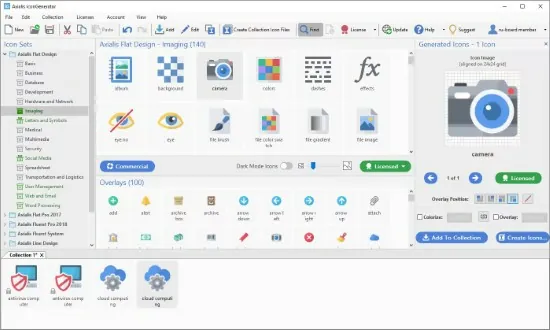
The application’s interface is clean and intuitive, centered around a central workspace where users browse icon sets via a searchable catalog. Upon launch, IconGenerator connects to its continuously updated online database, presenting categorized collections—such as actions, objects, symbols, and UI elements—crafted by professional designers. A powerful search bar filters by keywords, tags, or visual similarity, surfacing relevant icons instantly. Selection is drag-and-drop simple: pick base icons, preview them in real-time, and layer on modifications without leaving the main view.
The preview pane shows icons at multiple sizes simultaneously, with zoom controls and grid overlays to verify crisp rendering. Customization panels flank the workspace: one for base icon selection, another for overlays, and a third for color and style options. This modular layout minimizes clutter, enabling a workflow that generates complete icon batches in seconds rather than hours.
Icon Database and Selection
IconGenerator’s strength lies in its vast, ever-expanding database of vector icons, organized into themed sets for efficiency. Users choose from hundreds of families covering everyday needs: file operations (save, delete, upload), navigation (home, search, menu), status indicators (success, warning, error), and abstract shapes. Each set includes variants for different states—normal, hot (hover), and disabled—ensuring consistency across UI components.
Icons are purely vector-based, scalable without quality loss, and pre-aligned to pixel grids for optimal small-size rendering. This eliminates common issues like blurry edges or misalignment in toolbars. The database updates regularly with new sets, maintaining relevance for modern design trends like flat, material, or neumorphic styles.
Overlay System for Customization
A standout feature is the overlay modifier system, which lets users annotate icons to convey actions or states dynamically. Overlays—small icons like plus (add), minus (remove), check (OK), exclamation (info/error), or gear (settings)—snap to four positions: bottom-right, bottom-left, top-right, or top-left. Independent colorization for overlays creates contrast; for instance, a red minus on a green base signals “delete safely.”
Placement intelligence prevents overlaps, with automatic scaling and clipping for harmony. Users combine multiple overlays per icon, building complex visuals like a document with a lock and upward arrow for “secure upload.” This system shines for ribbon interfaces or adaptive UIs, where icons must communicate compound ideas succinctly.
Colorization and Styling Options
IconGenerator offers flexible color controls to match brand themes or UI palettes. Monochrome mode flattens icons to single hues, ideal for dark/light themes, while shaded colorization preserves gradients and shadows for depth. Users pick from built-in palettes, eyedropper sample from images, or input hex/RGB values.
Advanced options include:
-
Hot and disabled states: brighten for hover effects or desaturate/gray for inactive.
-
Independent overlay tinting: base blue folder with yellow star overlay.
-
Gradient fills on select icons for metallic or glassy looks.
These non-destructive edits preview across sizes, ensuring versatility from 16px favicons to 512px app icons.
Batch Generation and Variants
Efficiency peaks in batch mode: select multiple base icons, apply uniform or per-icon customizations, and generate variants in one go. Automate hot/disabled pairs or image strips—horizontal/vertical rows of icons for toolbars or sprite sheets. Configure output sizes (standard: 16/24/32/48/64/128/256/512px; custom up to 1024px) with DPI settings for retina/high-DPI displays.
The generator processes hundreds of icons simultaneously, leveraging multi-threading for speed. Results appear in a dedicated folder view, ready for drag-to-project integration.
Export Formats and Developer Integration
IconGenerator supports a comprehensive export suite tailored for cross-platform development:
Vector Formats:
-
SVG: Scalable for web/SVG icons, with viewBox optimization.
-
XAML: WPF/UWP-ready, embedding paths for Silverlight/WinUI.
-
PDF/EPS/PS: Print/archival, preserving layers.
-
Web fonts: EOT, WOFF, TTF, OTF with auto-generated CSS/HTML for icon fonts.
Bitmap Formats:
-
PNG: Alpha-transparent, lossless, multi-size sheets.
-
BMP/JPEG: Legacy compatibility.
-
ICO (Windows): Multi-layer, up to 256×256.
-
ICNS (macOS): Retina-optimized bundles.
Image strips pack sets efficiently, reducing HTTP requests in web apps. Exports include metadata like set names for organization.
Integration with Other Tools
Seamless workflow extensions link to Axialis IconVectors for deep edits: right-click an icon to open in the vector editor, refine paths/shapes, and import back. This hybrid approach suits users needing occasional tweaks without full vector suites.
Exports integrate directly into IDEs/visual builders: drop ICO/ICNS into resources, SVG into HTML, or strips into image lists. For web devs, font generation simplifies icon usage over sprites.
Performance and Platform Support
Optimized for Windows and macOS (version 2.10+), IconGenerator runs lightweight (under 100MB RAM idle), with offline caching for database subsets. Online sync requires internet for new sets but works fully offline post-download. High-DPI aware, it scales crisply on 4K/Retina displays.
Use Cases Across Disciplines
Software Developers: Populate toolbars/ribbons consistently; generate app icons for installers.
UI/UX Designers: Prototype icon sets matching Figma/Sketch themes.
Web Developers: Create icon fonts/web sets faster than manual SVG.
Game Devs: UI sprites/strips for HUDs/menus.
Illustrators: Base for custom glyphs in branding.
Advanced Features and Tips
-
Sorting: Name/date for large collections.
-
Favorites: Pin frequently used sets.
-
Rendering tweaks: Anti-aliasing control, path optimization.
-
Bulk recolor: Apply themes across batches.
Version 2.10 enhancements include smoother curves, better clipping, and stability.
Free Model and Updates
Fully free, with no watermarks/limits. Regular updates add sets/formats via auto-updater.
Axialis IconGenerator Portable democratizes pro icon design, collapsing weeks of work into seconds. By fusing vast libraries, smart customization, and dev-friendly outputs, it empowers creators to focus on innovation, not asset grinding—ideal for agile teams shipping polished UIs across platforms.