
Portable Legacy File Converter Standard + Plus 6.2.0
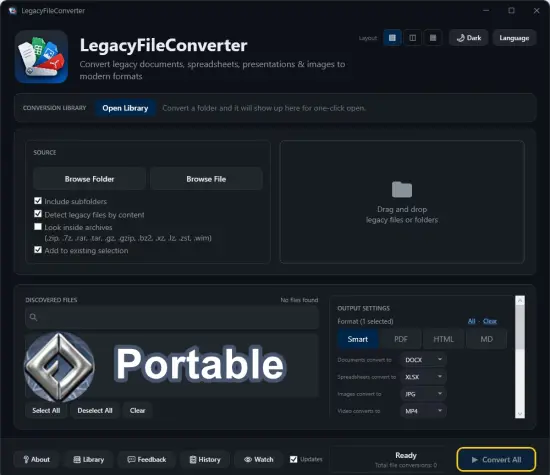
Open any old file.Convert it to a modern format. WordPerfect, Lotus 1-2-3, HEIC, XPS, and more — convert documents, spreadsheets, presentations, and images on your PC. A file you can’t open is a file you’ve effectively lost. Decades of documents, spreadsheets, and photos have outlived the software that made them. Legacy File Converter brings them back to life — without the headaches.
Windows just won’t open it
Double-click a .wpd, .xps, .qpw, .heic, or .psd and you get an error, a blank window, or a wall of formatting codes. The data is fine — Windows simply has no app for it.
The original software is gone
WordPerfect, Lotus 1-2-3, Quattro Pro, and Microsoft Works are discontinued. Tracking down a copy that installs on Windows 11 is a losing battle.
Online converters want your files
Free web tools make you upload private documents to a stranger’s server, cap how many files you can do, and watermark the results.
Dozens of legacy formats, bucketed to modern equivalents
Legacy File Converter recognizes each file’s family and sends it to the right modern format — or convert anything to a universal PDF, Markdown, or HTML.
Documents
DOCX · PDF · RTF · ODT · TXT · MD · HTML
– WordPerfect (.wpd)
– Word (.doc/.docx)
– Microsoft Works (.wps)
– Microsoft XPS (.xps/.oxps)
– Lotus Word Pro (.lwp)
– Hangul (.hwp)
– StarWriter (.sdw)
Spreadsheets
XLSX · PDF · CSV · MD · HTML
– Lotus 1-2-3 (.123/.wk*)
– Quattro Pro (.qpw/.wb*)
– Excel (.xls/.xlsx)
– dBASE (.dbf)
– SYLK (.slk)
– OpenDocument (.ods)
Presentations
PPTX · PDF · HTML
– PowerPoint (.ppt/.pptx)
– OpenDocument (.odp)
– StarImpress (.sxi)
– Slideshows (.pps)
Images
JPG · PNG · PDF · TIFF · WEBP
– iPhone Photos (.heic/.heif)
– TIFF scans (.tif/.tiff)
– Photoshop (.psd)
– AVIF (.avif)
– Targa (.tga)
– JPEG 2000 (.jp2)
Three steps to a modern file
No learning curve, no settings to wrestle with — just point, pick, and convert.
Drop in your files
Drag a single file or an entire folder, or right-click any legacy file in Explorer and choose Convert.
Pick a modern format
The app recognizes the file family and suggests the right target — or send everything to a universal PDF, Markdown, or HTML.
Convert offline
Everything runs on your PC. No uploads, no cloud, no account, and no original application required.
Built for files that should stay private
Legal records, medical scans, financial statements, family photos — these don’t belong on someone else’s server. Legacy File Converter never uploads anything, so your files never leave your machine.
– 100% local — works with no internet connection
– Right-click any file or folder in Windows Explorer
– Batch-convert thousands of files in one pass
– Watch a folder and auto-convert new files
You converted the files. Now search them.
Standard converts WordPerfect, Lotus, Works, Quattro Pro, Ami Pro, HEIC, and 100+ formats locally on this PC. Plus unlocks Conversion Library — search converted files, add tags and knowledge maps, and open previews. Same installer. Unlock with a Plus key. Nothing is uploaded.
– Full-text search across converted documents, spreadsheets, presentations, and images on this PC
– Tags and knowledge maps for related files
– Built-in previews — Word, PDF, Excel, photos, and more
