
Portable Magic File Renamer Pro 8.1.3
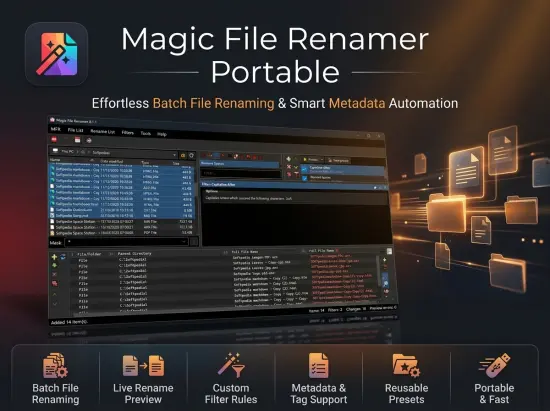
Magic File Renamer Portable (MFR) is a batch renamer and audio/image tagger for Windows. Rename files and folders, adjust dates and attributes, and update tags for music and photos – all in one place.
Magic File Renamer Portable is not an ordinary file renaming tool. It has several features such as batch renaming, audio file tagging, online music album information retrieval, image info and metadata reading support, editing of text files and others. It also gives you the ability to preview any changes before they are made, as well as keep a log of all the performed actions.
Build a Filter Chain from a large set of filters to handle nearly any renaming job without tedious hand edits. Pattern renaming with the Formatter pulls values from audio tags, media properties, photo tags and EXIF, and document Info (PDF, EPUB, Office).
Preview every field before you apply, save presets, keep a rename log, undo operations, and automate with the mfrc console. MFR is built for large batches and tuned for speed, without burying the essentials behind complexity.
Whether you organize music libraries, photo shoots, media archives, or everyday collections, MFR fits the same workflow: build a chain, preview, then GO.
Highlights:
- The most comprehensive and flexible file-renaming and tagging software for Windows.
- Extensive Filter Chain with case, space, trimming, replace, formatting, audio, image tag, attributes, and misc filters for almost any renaming task.
- Real-time preview (including AB before/after), Rename Log, and Undo Last for any changes made.
- Pattern renaming with Formatter tokens from audio tags, media properties, image tags and EXIF, and document Info (PDF, EPUB, Office).
- Audio tag read/write for MP3 (ID3v1/ID3v2), Ogg/Opus, FLAC, APE, M4A/MP4 (Apple), WMA/ASF, and WAV (RIFF INFO).
- Image tag read/write for JPEG, PNG, and GIF (EXIF, XMP, PNG text, comments).
- Document Info read for PDF, EPUB, and Office (DOCX, XLSX, PPTX).
- Read image properties from JPEG, TIFF, PNG, GIF, HEIF/HEIC, and related formats.
- Read media properties from MP3, MP4, MKV, AVI, and related audio and video formats.
- Reverse geocoding via GeoNames – Use nearby place from image EXIF GPS in names.
- Path Mover relocates files and can build folder hierarchies from patterns in the same operation.
- Save a Filter Chain as a preset and reload it later.
- Console mode (mfrc) for automatic batch renaming from the command line.
Features:
- Modify names, extensions, attributes, and dates for files and folders.
- Modify audio tags for MP3 (ID3v1/ID3v2), Ogg Vorbis / Opus, FLAC, APE, M4A/MP4 (Apple), WMA/ASF, and WAV (RIFF INFO). Tag changes appear in preview before GO.
- Modify image tags (Title, Caption, Date Taken, Rating and more) on JPEG, PNG, and GIF (EXIF, XMP, PNG text, comment blocks).
- Read image properties and EXIF from TIFF, HEIF/HEIC, WebP, GIF, and related formats.
- Read media properties from MP3, MP4, MKV, AVI, and related audio and video formats – including Media Created / Media Modified on MP4 and QuickTime so you can rename by recording time.
- Document Info read for PDF, EPUB, and Office (DOCX, XLSX, PPTX).
- Path Mover relocates files and can build folder hierarchies from patterns (for example \artist\album\track).
- File Time Shifter moves file timestamps. Date Taken Shifter moves photo Date Taken, by Match clocks from two photos of the same moment.
- Recursively process sub-folders, including network paths Windows can reach.
- Real-time preview of names, tags, dates, and attributes, with a one-button before/after (AB) mode and highlighted predicted errors.
- Powerful pattern renaming (Formatter) with tokens from audio tags, media properties, photo tags and EXIF, document Info, and file content checksums (MD5, SHA-1, SHA-256, CRC-32).
- Reverse geocoding via GeoNames – nearby country, region, and place from GPS in image EXIF (for example add a place name to the file name).
- Advanced counter for serial numbers in names.
- Extensive casing, spacing, and trimming filters.
- Search and replace with regular expressions and replace lists.
- Remove unwanted characters from file names.
- Use and modify tokens and substrings from names.
- Rename files from a name list built into the filter options.
- Swap parts of file names (Token Mover).
- Save a Filter Chain as a preset and reload it later.
- Multi-column sort on the Rename List.
- Manual cell override for names and tags (F2).
- Undo Last (reverse preview until GO) and Rename Log.
- Integrated File List lets you add files and folders without leaving the application.
- Windows Explorer right-click Rename with MFR 8.
- Console mode (mfrc) for automatic renaming from the command line. Command Line Builder builds a ready-to-run mfrc line.