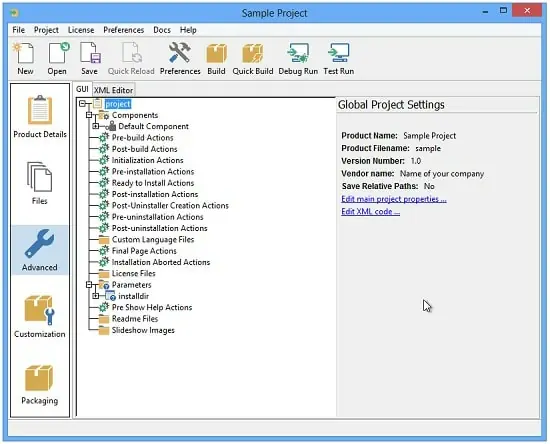
Portable VMware InstallBuilder Enterprise 26.5.0 (x64)
VMware InstallBuilder Portable is a comprehensive development environment designed to streamline the creation and deployment of installers for desktop and server software across multiple operating systems. Built as a professional tool for developers, DevOps teams, and release managers, it replaces ad‑hoc installation scripts and platform‑specific packaging workflows with a single, unified project model that generates installers, packages, and distribution media from a central configuration. This approach drastically reduces the time and complexity involved in delivering software to users on different platforms, while also improving reliability, consistency, and supportability.
Core Purpose and Target Users
At its heart, VMware InstallBuilder Portable is a packaging and deployment engine tailored for organizations that ship software to heterogeneous environments. It targets software vendors, internal IT teams, SaaS product groups, and enterprise developers who need to distribute applications on Windows, Linux, macOS, Solaris, and potentially other Unix‑like systems. Instead of maintaining separate MSI, DEB, RPM, DMG, or tar‑based workflows, users work from a single project definition that can be compiled into platform‑specific installers and packages, ensuring that the same logic and behavior is replicated across all targets.
This consolidated model is especially valuable for teams that manage large suites of tools, middleware stacks, or custom enterprise software where even minor differences in deployment behavior can cause support headaches. InstallBuilder Enterprise acts as the central “source of truth” for how an application is installed, configured, and later upgraded.
Single‑Project, Multi‑Platform Build Model
One of the defining features of VMware InstallBuilder Portable is its single‑project architecture. Users define an installation project once, specifying the files, directories, registry entries, environment variables, and configuration files that make up their application. From that single project file, the tool can generate native installers for Windows (such as graphical and silent installers), Linux RPM and DEB packages, macOS installers, and even Solaris distributions, all without requiring separate build scripts or packaging definitions.
Each platform target is handled through internal configuration templates and platform‑aware rules, so the same project automatically adapts file paths, service definitions, startup items, and package metadata to the conventions of the target OS. This not only reduces the amount of platform‑specific code a developer must maintain but also makes it easier to audit, test, and version‑control the entire installation logic.
Support for RPM and Debian Packages
For Linux‑centric environments, VMware InstallBuilder Portable includes built‑in support for generating RPM and Debian packages alongside traditional installer binaries. This means that the same project can produce both interactive setup wizards for desktop users and standard package‑manager‑ready archives for server deployments. The tool automatically handles metadata such as package names, versions, dependencies, descriptions, and architecture identifiers, and can respect the guidelines of major Linux distributions when generating these packages.
The generated packages can be integrated into existing Linux deployment pipelines, including configuration management tools, continuous‑integration systems, and internal software repositories. This tight integration helps organizations maintain a consistent approach to software delivery across bare‑metal servers, virtual machines, and containers.
Installer Types and Distribution Media
VMware InstallBuilder Portable supports a wide range of installer types and output formats, enabling flexible delivery options for different use cases. In addition to platform‑specific executables and packages, the tool can generate multi‑platform CD/DVD images and self‑extracting archives that bundle all necessary components into a single distributable file. These images can be used for offline installations, training environments, or air‑gapped deployments where network‑based package managers are not available.
Silent and unattended installers are a core part of the platform, allowing administrators to deploy software across large fleets of machines without user interaction. Silent‑mode behavior is configured directly within the project, so that command‑line flags, default choices, and configuration templates can be defined and tested from the same interface used for interactive installers.
Customizable User Interface and Branding
InstallBuilder Enterprise provides a fully customizable installation interface, enabling vendors and enterprises to present branded, professional installers to end users. The user interface is not hardcoded; instead, it is defined declaratively through XML‑based layouts, panel definitions, and theme settings. Users can modify the look and feel of the installer, including colors, fonts, icons, and layout, to match corporate branding guidelines.
Advanced UI features include multi‑step wizards, conditional panels that appear only when certain conditions are met, and custom dialogs that gather user input or present license agreements, EULAs, and configuration options. This UI flexibility ensures that the installer can be tailored to both technical and non‑technical audiences, from system administrators running script‑based deployments to end users guided through an intuitive setup sequence.
Platform‑Aware Scripting and Pre‑/Post‑Install Logic
VMware InstallBuilder Portable includes a powerful scripting engine that allows developers to embed custom logic into the installation and uninstallation process. Scripts can be written in the tool’s proprietary scripting language or integrated with external binaries and system commands, enabling complex operations such as service configuration, database initialization, user account creation, and environment validation.
The platform is designed to be platform‑aware, so that scripts can execute different code paths depending on the target operating system. For example, a single script block might start a Windows service on Windows, install and enable a systemd unit on Linux, and configure a launchd agent on macOS, all driven by the same logical flow defined in the project. This greatly simplifies the management of OS‑specific setup tasks while still maintaining a single source of installation logic.
Pre‑Flight Checks and Validation
To reduce deployment failures, InstallBuilder Enterprise supports pre‑flight checks and validation steps that run before the main installation begins. These checks can verify system requirements such as disk space, available memory, installed libraries, required services, and operating‑system version. If a check fails, the installer can present a clear error message, suggest corrective actions, or even abort the installation entirely, depending on the configured policy.
Validation logic can also inspect existing software versions, configuration files, or registry entries, allowing the installer to detect potential conflicts or perform upgrades only when appropriate. This proactive approach helps ensure that installations succeed on the first attempt and minimizes the need for post‑deployment troubleshooting.
Multi‑Language and Localization Support
VMware InstallBuilder Portable treats localization as a first‑class feature, enabling vendors to ship installers in multiple languages without duplicating their entire project structure. Translations are managed through language resource files, where each supported language provides its own set of strings, dialog titles, and messages. The installer then automatically selects the appropriate language based on the system locale or user preference.
Localization extends beyond static text: it covers license agreements, help messages, tooltips, and even some dynamically generated content, ensuring a consistent multilingual experience. This is particularly useful for software vendors that distribute products globally or internal teams that support multiple regional offices with different language requirements.
Automatic Updates, Patching, and Remote Management
A key capability of VMware InstallBuilder Portable is its built‑in support for automatic updates and remote patching. Once an application is deployed to end users, the installer framework can periodically check update servers for new versions, download patches or full releases, and apply them in a controlled manner. This update mechanism can be fully automated or configured to require user confirmation, depending on the organization’s security and change‑management policies.
Update behavior is defined at the project level, so that the same update logic is applied consistently across all platform‑specific installers. The system can support incremental patches, full replacement binaries, and configuration hot‑fixes, allowing vendors to deliver small, targeted updates without requiring users to re‑install the entire application.
Update Security and Integrity
To ensure that updates are tamper‑proof and trustworthy, VMware InstallBuilder Portable integrates support for digital signatures and cryptographic verification. Installer packages and update payloads can be signed using standard certificate infrastructures, and the runtime engine can validate these signatures before executing any installation or update operation. This helps prevent the accidental or malicious deployment of unauthorized code and aligns with enterprise security requirements.
Administrators can also enforce policies such as requiring valid signatures, restricting update sources, or auditing update activities across the organization. When combined with centralized logging and reporting, this capability strengthens the overall security posture of software deployments.
Integration with Development and DevOps Workflows
InstallBuilder Enterprise is designed to integrate smoothly with existing development and DevOps pipelines. Its project files are XML‑based and text‑oriented, making them compatible with version control systems such as Git, SVN, and Perforce. This allows teams to track changes to installation logic, review them in pull requests, and roll back to previous configurations if needed.
The tool can be driven from the command line, enabling automated builds that generate installers as part of continuous‑integration or continuous‑delivery workflows. Build scripts can invoke InstallBuilder Enterprise, pass in version numbers, branding assets, and environment variables, and then publish the resulting packages into internal repositories, artifact stores, or external distribution channels.
Scalability and Enterprise‑Level Features
VMware InstallBuilder Portable is built with scalability in mind, supporting large organizations that manage dozens or hundreds of software products. The platform includes features such as centralized project templates, reusable components, and shared configuration libraries, which allow teams to standardize installation practices across multiple projects. Templates can define common behaviors such as logging, error handling, and update mechanisms, reducing duplication and ensuring that best practices are applied consistently.
For enterprise environments, the tool supports advanced scenarios such as multi‑stage deployments, role‑based installation options, and environment‑specific configuration. Installers can be configured to adapt their behavior based on whether they are running in a development, test, staging, or production environment, and can embed environment‑specific settings without requiring manual modification.
Debugging, Logging, and Troubleshooting
VMware InstallBuilder Portable includes a robust debugging and logging framework that helps developers and support teams diagnose installation issues. The installer engine can generate detailed logs that capture every step of the installation process, including file operations, script executions, and configuration changes. These logs can be saved locally or transmitted to centralized logging systems for analysis.
An integrated debugger allows developers to step through installation scripts, inspect variables, and evaluate conditions in real time, making it easier to reproduce and fix edge cases. The debugging environment works across all supported platforms, so that the same debugging workflow can be used whether the installer is executed on Windows, Linux, or macOS.
User‑Friendly Error Handling
When problems do occur, InstallBuilder Enterprise emphasizes clear, user‑friendly error handling. Instead of cryptic system messages, the installer can present tailored error dialogs that explain what went wrong, suggest corrective actions, and, where possible, offer built‑in repair options. This reduces the burden on support teams and improves the end‑user experience, especially for non‑technical users.
Digital Signature Support and Security Features
Security is a core concern for any software distribution framework, and VMware InstallBuilder Portable addresses this through extensive support for digital signatures and secure installation practices. Installer binaries can be signed using standard code‑signing certificates, and the runtime engine can verify these signatures to ensure that only trusted, authorized installers are executed.
The platform also supports secure communication channels between the installer and update servers, including support for HTTPS and certificate validation. This ensures that update payloads are delivered over encrypted links and that the integrity of the distribution chain is maintained from build to end‑user deployment.
Extensibility and Custom Plugin Architecture
VMware InstallBuilder Portable is designed to be extensible, allowing organizations to add custom functionality beyond the built‑in features. The platform provides plugin and integration points that let developers hook into the installation lifecycle, extend the UI, or invoke external tools and services. For example, custom panels can be created to integrate with identity and access‑management systems, configuration management tools, or internal license‑validation servers.
Because the underlying project model is open and declarative, advanced users can programmatically generate or modify installer projects using automation scripts or external tools. This enables organizations to build higher‑level workflows that assemble installation packages from configuration data, feature toggles, or environment descriptions.
Use Cases and Typical Deployment Scenarios
VMware InstallBuilder Portable is suitable for a wide range of deployment scenarios, including:
- Enterprise Application Suites that must be deployed consistently across Windows desktops, Linux servers, and macOS workstations in large organizations.
- Middleware and Infrastructure Tools such as database connectors, monitoring agents, or custom frameworks that require precise configuration and service setup on multiple platforms.
- On‑Premises Software Products sold to customers who need to install and manage software in their own environments, often with strict security and compliance requirements.
- Internal IT Tools built by internal teams, such as deployment utilities, configuration tools, or diagnostic suites that must be distributed to other departments or subsidiaries.
Learning Curve, Documentation, and Training Resources
VMware InstallBuilder Portable is a powerful tool aimed at professional developers and system administrators, and its learning curve reflects that level of complexity. However, the platform is designed with usability in mind, providing a structured project editor, intuitive inspectors for installer components, and visual representations of the installation sequence. New users can begin with simple projects and gradually adopt more advanced features such as scripting, platform‑specific logic, and multi‑stage updates.
Comprehensive documentation, sample projects, and reference guides are provided to help teams get up to speed. These resources cover everything from basic installer creation to advanced topics such as custom dialogs, update workflows, and integration with external tools. For enterprises, the tool can be incorporated into internal training programs and onboarding materials, ensuring that multiple teams can maintain and extend the same installation infrastructure.
Summary
VMware InstallBuilder Portable stands out as a professional, enterprise‑grade platform for building and managing cross‑platform software installers. By consolidating installation logic into a single, platform‑aware project model, it enables organizations to deliver consistent, reliable, and secure deployments across Windows, Linux, macOS, Solaris, and other environments. The tool’s support for RPM and Debian packages, silent deployments, automatic updates, multi‑language interfaces, and robust security features makes it well‑suited for vendors, system integrators, and internal IT teams that need to manage complex software distributions at scale.
Whether used to package desktop applications, server components, or mixed‑platform toolkits, VMware InstallBuilder Portable provides a centralized, extensible, and well‑documented environment that bridges the gap between development workflows and operational deployment requirements. It represents a mature, long‑term solution for organizations serious about standardizing how their software is installed, configured, and updated across diverse computing landscapes.
New in InstallBuilder
The new InstallBuilder greatly improves building and installing performance when using the new LZMA-ulta compression algorithm. This improvement is achieved by parallelizing the process making use of your multiple CPU cores.
It also allows signing your OS X and Windows installers from any of Windows, OS X or Linux platforms.
Improved Building and Installation Performance
InstallBuilder takes its LZMA Ultra compression algorith one step further by allowing it to use all your machine CPU cores. You will now be able to make use of the full potential of your machine.
It now only makes use of the parallelization when building but also when installing so the installation time will be also dramatically decreased when installing in a multicore machine
Multiplatform Windows and OS X signing
InstallBuilder allows signing your OS X and Windows installers from any of OS X, Windows and Linux platforms. You no longer need to copy your OS X installers to an OS X machine just to sign them.
DMG creation
The most common way used to deliver applications on OS X is using DMG files. InstallBuilder is now able to automatically generate DMG files for your application from Windows, OS X and Linux platfroms. It also allows setting up a background image to get a more professional look and feel.
Release Notes:
- Fixed <choiceParameter> on qt mode not properly enforcing its value when setting an empty default
- Support setting <standardOutPath>, <standardErrorPath> and defining environment variables when creating macOS services
- Improved linux_distribution detection
- Improved Windows 11 detection
- Added support for generating debugtrace files in the windows-signer tool
- Fixed crash when configuring the debugger on some Linux environments
- Improved RHEL 10 and RHEL 9 detection
- Fixed product icon not properly configured in InstallBuilder installation
- Documented <windowsDPIAware> setting
- Improved some actions node labels in the GUI builder tree
- Improved <linkParameter> wrapping when running in qt mode
- Updated internal dependencies