

Portable Nero Blur Face – AI Motion Tracking Video Editor 1.0.51.0 Multilingual
Nero Blur Face Portable is a specialized AI-powered video editing application developed by Nero that focuses on privacy protection and content anonymization through intelligent motion tracking and blurring effects. This standalone tool enables users to automatically detect, track, and obscure sensitive elements in videos—such as human faces, license plates, logos, text documents, or any custom-selected areas—with remarkable precision and ease. Ideal for content creators, journalists, security professionals, vloggers, and everyday users sharing footage on social media, Nero Blur Face Portable ensures personal information remains hidden while preserving the overall video quality, supporting formats up to 4K resolution and exporting in high-efficiency codecs for seamless sharing across platforms like YouTube, TikTok, or Instagram.
Core AI Motion Tracking Technology
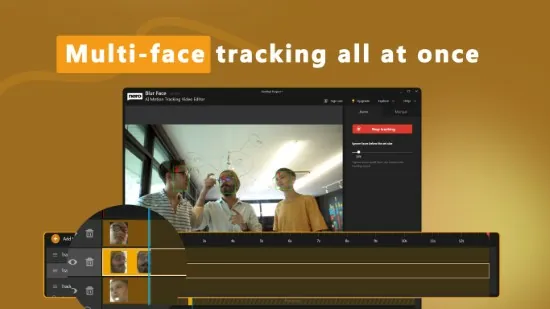
The foundation of Nero Blur Face Portable is its advanced AI-driven motion tracking engine, which employs deep learning algorithms to identify and follow moving objects frame-by-frame across entire videos without manual keyframing. Upon importing a clip—via drag-and-drop or file browser—the software scans for faces using facial recognition models trained on diverse datasets, achieving near-perfect detection even for profiles, partial occlusions, or varying lighting conditions. Users set a minimum face size threshold (e.g., ignore detections below 2% of frame height) to focus on prominent subjects, generating multiple trackers automatically for group scenes with up to dozens of individuals.
Tracking initiates with a single click: the AI predicts trajectories using optical flow analysis combined with temporal consistency checks, adapting to scale changes (zooming in/out), rotations, and partial blockages by nearby objects. Lost trackers—due to brief disappearances behind foreground elements—can be manually reattached by dragging to the target, with the AI seamlessly interpolating the gap. Multi-object tracking handles complex scenarios like crowds or vehicles in traffic, assigning unique IDs to prevent swaps. Preview playback reveals trackers as colored bounding boxes, adjustable in real-time for accuracy before applying effects.
This technology extends beyond faces: manual detection mode lets users draw boxes on license plates, brand logos, sensitive paperwork, or arbitrary regions (e.g., barcodes, addresses on screens), with the AI locking on via edge detection and pattern matching. Fixed-area tracking blurs static elements like watermarks throughout the clip, while adaptive tracking follows dynamic ones like a walking person or speeding car.
Blurring and Mosaic Effect Library
Once tracking completes, Nero Blur Face Portable offers a versatile suite of 10+ obfuscation effects, each customizable for intensity, feather edges, and opacity:
-
Gaussian Blur: Smooth, natural softening ideal for faces, with radius sliders from subtle (5px) to heavy (50px+), preventing readability while maintaining motion fluidity.
-
Pixel Mosaic: Blocky pixelation for a digital anonymity look, with tile sizes from 8×8 to 64×64 pixels, perfect for license plates or logos.
-
Motion Blur: Directional streaking simulates speed, enhancing realism for fast-moving objects.
-
Selective Mosaic: AI-smart mosaics that preserve outlines (hair, clothing edges) for less obvious censorship.
-
Clip Art Overlays: Fun or professional masks like emojis, stickers, or geometric shapes that snap to trackers, adding creativity to vlogs.
-
Custom Masks: Gradient blurs, vignette circles, or irregular shapes drawn freehand.
Effects apply non-destructively: multiple layers stack per tracker (e.g., face blur + logo mosaic), with keyframes for evolving strength (fade in during entrances). Feather controls blend seamlessly into backgrounds, avoiding harsh edges that scream “edited.” Real-time GPU-accelerated previews play at full speed, split-screen comparing original vs. blurred for instant validation.
Manual and Hybrid Tracking Workflows
For precision control, manual mode empowers pros: place initial trackers, set duration limits (e.g., blur only first 30 seconds), or chain segments across cuts. Drag-to-merge consolidates duplicate detections on the same subject crossing frames. Hybrid auto-manual workflow starts with AI detection, refined by user nudges—ideal for low-contrast scenes or artistic license.
Text tracking isolates on-screen documents or subtitles via OCR integration, blurring classified info while leaving video narration intact. Object-agnostic mode uses SIFT/ORB features for generic shapes, tracking QR codes or product serials effortlessly.
Video Editing and Trimming Integration
Nero Blur Face Portable isn’t just a tracker—it’s a lightweight editor with timeline scrubbing, clip trimming, speed adjustments (0.25x to 4x), and multi-clip sequences. Cut videos pre/post-tracking: trim intros/outros, split for batch effects, or concatenate scenes. Audio remains untouched or duckable under effects whooshes. Basic color correction (exposure, contrast) polishes footage without bloating the app.
Export previews simulate final output, with aspect ratio crops for social (9:16 verticals, 1:1 squares).
Batch Processing and Automation
Batch mode queues unlimited videos, processing in parallel across CPU/GPU cores for efficiency—handle event footage libraries overnight. Watch folders auto-import new files (e.g., from phone syncs), applying saved presets like “Privacy Party Mode” (all faces + plates). Presets save tracker templates, effect stacks, and thresholds for repeatable workflows.
Progress dashboards show ETA, frame success rates, and error logs (e.g., “Tracker lost at 2:15—manual review?”).
Export Options and Format Support
Outputs span platforms: H.264/MP4 for web, HEVC for 4K efficiency, MOV for editing handoff. Resolutions up to 8K passthrough, with bitrate controls (VBR/CBR) and hardware encoding (NVENC/AMF). Subtitles embed as burned-in or sidecar SRT; watermarks optional for trials.
Direct uploads to YouTube/TikTok/Instagram optimize specs automatically, embedding privacy metadata.
Performance and System Optimization
Lightweight footprint (under 200MB RAM idle) leverages modern hardware: NVIDIA/AMD/Intel GPUs for 10x speedups, falling back gracefully. Windows 10/11 exclusive, with high-DPI scaling and dark mode. Processing scales: 1080p@30FPS clips finish in seconds; 4K hours in under an hour on RTX cards.
Privacy and Security Focus
All processing stays local—no cloud uploads—ensuring GDPR compliance for sensitive footage (surveillance, journalism). Undo stacks and project saves (.nbp) allow revisions; originals remain untouched via non-destructive edits.
Use Cases Across Industries
Content Creators: Anonymize extras in vlogs, blur brand competitors’ logos.
Journalists: Protect sources/interviewees in investigative reports.
Security Footage: Redact plates/faces pre-sharing with authorities.
Social Media: Family videos sans kid identification.
Legal/Evidence: Sanitize bodycam/dashcam for court.
Marketing: Demo products without exposing trademarks.
Advanced Customization and Extensibility
Pro features unlock multi-face merging hierarchies, custom AI model tweaks (upload training data for niche objects like uniforms), and scriptable APIs for pipeline integration (e.g., Premiere plugins). Effect chaining with Nero’s ecosystem (Video Upscaler) creates full privacy pipelines.
Community presets share via cloud library, evolving with user feedback.
Accessibility and Learning Curve
Intuitive for beginners—one-click face track + export—yet deep for pros. In-app tutorials, tooltips, and 40k+ user base forums accelerate mastery. Multilingual (20+ languages), voiceover support.
Nero Blur Face Portable redefines video privacy as effortless artistry, blending AI smarts with creative controls. Whether shielding identities or crafting stylized censorship, it empowers secure sharing without compromising storytelling—40k active users across 20 countries affirm its transformative impact.