
Portable Ashampoo Photo Card 3.0.1 (x64) Multilingual
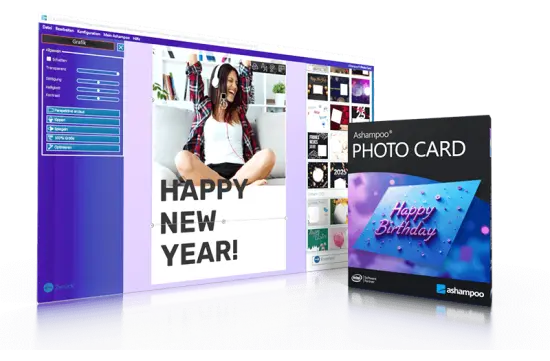
Ashampoo Photo Card Portable is a practical greeting card creation application designed for users who want to turn ordinary photographs into attractive, personal cards. Instead of working with complex desktop publishing software or advanced graphic design tools, users can select a picture, choose a suitable layout, add a message, make a few visual adjustments, and prepare the finished card for printing or digital sharing.
The software is aimed at home users, families, small offices, hobby photographers, and anyone who wants to create a thoughtful greeting without spending hours learning complicated design techniques. Its straightforward workflow focuses on the most important parts of card creation: selecting an image, choosing a theme, positioning the photograph, adding text, and exporting the final result.
Whether you are preparing a birthday greeting, a Christmas card, a wedding message, a thank-you note, or a simple postcard for friends and relatives, Ashampoo Photo Card Portable provides a convenient way to build a finished design from a personal image.
What Is Ashampoo Photo Card Portable?
Ashampoo Photo Card Portable is photo greeting card software for creating personalized cards from digital images. It combines pre-designed templates, basic photo editing features, text tools, decorative graphics, and sharing options in one accessible application.
The program is not intended to replace professional photo editors, page-layout applications, or full graphic design suites. Instead, it concentrates on a specific creative task and makes that task quick to complete. Users do not need to design every element from a blank page. A ready-made template provides the basic composition, while the user adds a favorite photograph and personal message.
This approach makes the software suitable for people who want attractive results with minimal preparation. The application can also be useful for users who already own advanced creative software but need a faster solution for simple greeting cards.
The Portable name emphasizes convenience and accessibility. A portable-style workflow can be useful for users who prefer to keep a specialized utility available without building a complicated design environment. The main appeal remains the same: fast photo card creation with simple controls and a guided editing process.
Simple Photo Card Creation for Beginners
One of the strongest aspects of Ashampoo Photo Card Portable is its beginner-friendly design. Greeting card creation usually involves several separate tasks, including image preparation, layout design, text placement, decoration, and exporting. The application brings these stages together in one streamlined workflow.
A typical project can begin by opening a photo stored on the computer. Users can browse to an image, select it, and place it into a card layout. The program can also work with images captured through a webcam, which is useful for quick personal messages, informal greetings, and spontaneous snapshots.
After selecting a photograph, the user can choose a template or frame. The preview updates to show how the card will look, making it easier to compare different designs. Rather than requiring users to understand layers, grids, margins, or print setup, the program provides a visual editing environment where many changes can be made directly on the card.
Text can be added and edited within the design. A short message, a recipient’s name, a date, or a longer greeting can be placed on the card and adjusted to match the overall appearance. Decorative clipart and graphic objects can provide additional personality without requiring users to find and prepare external design assets.
Templates for Birthdays, Holidays, and Special Events
A template gives every card a starting point. Ashampoo Photo Card Portable includes themed layouts intended for common occasions, helping users begin with a design that already matches the mood of the message.
Possible uses include:
- Birthday greetings
- Christmas cards
- New Year messages
- Wedding congratulations
- Anniversary cards
- Thank-you cards
- Invitations
- Congratulations
- Holiday postcards
- Family announcements
- Friendship greetings
- Seasonal photo cards
Templates can save considerable time because they establish the placement of the photograph, decorative borders, text areas, and visual style. Instead of creating a composition from an empty canvas, users can focus on choosing the right image and writing an appropriate message.
A birthday card might benefit from bright colors, playful decorations, and a prominent text area. A wedding greeting may look better with a more elegant frame and restrained decoration. A Christmas card could use seasonal imagery and space for a warm family message. By choosing a theme that fits the occasion, users can create a more polished result with fewer adjustments.
The template-based approach also makes the software suitable for repeat use. Once users become familiar with the interface, they can create multiple cards for different occasions without starting from the beginning each time.
Use Your Own Photos
Personal photographs are the central element of Ashampoo Photo Card Portable. A card created with a user’s own image often feels more meaningful than a generic design because the photograph connects the message to a shared memory, person, place, or event.
Users can select photos from local storage and place them into a chosen card layout. Family portraits, holiday snapshots, vacation scenes, pet photographs, wedding pictures, landscape images, and everyday moments can all become the focus of a greeting card.
The application is designed to make photo placement flexible. An image can be repositioned within its frame, enlarged or reduced, and adjusted until the most important part of the photograph is visible. This is particularly helpful when the original image has a different shape or composition from the selected template.
For example, a landscape photograph may need to be moved slightly to keep a person centered inside the frame. A portrait image may require resizing to avoid cutting off the subject. The ability to adjust the image directly within the card makes these corrections simple and visual.
Webcam Support for Instant Greetings
Ashampoo Photo Card Portable can also use a webcam as a source for card images. This feature allows users to take a picture directly inside the application rather than searching for an existing image.
Webcam support can be useful in several situations. A family member can create a quick greeting for someone who lives far away. A small business can prepare a simple announcement with a team photograph. Teachers, clubs, and community groups can make informal cards without relying on a separate camera application.
The process is designed to be straightforward: select the webcam, preview the image, capture the photograph, and use the result in the card. After the image has been taken, it can be adjusted in the same way as a photograph imported from the computer.
Although a webcam image may not have the same quality as a dedicated camera photograph, it can add immediacy and personality to a greeting. For casual cards, that spontaneous character may be more valuable than perfect technical quality.
Built-In Photo Editing Tools
A separate photo editor is not required for many everyday corrections. Ashampoo Photo Card Portable includes basic image adjustment tools that help users improve the appearance of a photograph while working on the card.
Available adjustments include:
- Image resizing
- Brightness correction
- Contrast adjustment
- Color saturation control
- Transparency changes
- Mirroring
- Flipping
- Perspective correction
- One-click image optimization
Brightness adjustment can help recover a photograph that looks too dark. Contrast controls can make a flat image appear more defined, while saturation adjustments can strengthen or soften the intensity of colors. These controls are useful when a picture needs minor improvement before it is placed into the final design.
Mirroring and flipping tools can change the direction of a composition. This may be helpful when a person or object is facing away from the text area. Perspective correction can improve photographs taken at an angle, particularly when the image contains a sign, document, building, or other rectangular subject.
The one-click optimization option is useful when users want a quick improvement without testing several sliders. It provides a convenient starting point for photographs that need general correction.
These tools are intentionally focused rather than extensive. Users looking for advanced retouching, layers, masking, professional color management, or detailed image restoration may need a dedicated editor. For greeting card projects, however, the built-in controls cover many common corrections.
Position, Resize, and Adjust the Image
A photograph rarely fits a template perfectly on the first attempt. Ashampoo Photo Card Portable allows users to position and resize the image inside its frame so the finished composition looks balanced.
Users can drag the photograph to reveal the most important area. Handles or control points can be used to enlarge or reduce the image. This helps maintain focus on faces, objects, scenery, or other visual details that should remain visible.
Perspective transformation can also be used when the photograph needs to be adjusted to fit a frame at an angle. This gives the card a more natural appearance when the template uses a tilted or stylized image area.
These controls are especially helpful for photographs with uneven framing. A group picture may contain empty space on one side, while a portrait may place the subject close to an edge. Repositioning allows the user to make the card look intentional rather than simply inserting an image and accepting the default crop.
Add and Format Custom Text
A personal message is what turns a photo design into a greeting card. Ashampoo Photo Card Portable allows users to add text elements and edit their appearance directly within the project.
Text can be used for:
- Short greetings
- Names
- Dates
- Quotes
- Event details
- Personal messages
- Captions
- Holiday wishes
- Thank-you notes
After adding text, users can customize its presentation. Font choice, size, color, alignment, and styling can be adjusted to suit the template. A formal message may call for a clean and elegant typeface, while a children’s birthday card may benefit from a more playful appearance.
The text should remain easy to read against the photograph and decorative background. Users can improve readability by choosing a contrasting color, adjusting the font size, or positioning the message in a less crowded area of the design.
A short message often works best for a digital greeting, while a printed card may provide space for a longer personal note. The flexibility of the text tools allows the same template to be used for both purposes.
Decorative Clipart and Graphic Elements
Ashampoo Photo Card Portable includes a clipart library and decorative graphics that can be added to a card. These elements can give a design more character and help communicate the theme of the occasion.
Decorative objects may include symbols, arrows, seasonal graphics, playful illustrations, and other visual accents. A small amount of clipart can draw attention to a message or make a card feel more festive. For example, a birthday card could include balloons, while a Christmas design might include winter-themed decorations.
Users should consider balance when adding graphic elements. Too many objects can distract from the photograph and make the message difficult to read. A few carefully positioned decorations will usually create a cleaner result than filling every available space.
Graphic objects can also be used to guide the viewer’s attention. An arrow can point toward a message or subject, while a border can help define the edges of the card. Because the elements can be combined with templates, users can create variations from the same basic design.
Create Printed and Digital Greeting Cards
A completed card can be used in several ways. Ashampoo Photo Card Portable supports saving and printing, allowing users to produce a physical greeting for mailing, gifting, or display.
Printed cards are useful for birthdays, anniversaries, family celebrations, and formal occasions where a physical message feels more personal. The user can preview the design, check the position of the image and text, and then print the result using an available printer.
Digital cards can be shared by email or through other online methods. This makes the software practical for quick greetings and last-minute messages. A finished card can be attached to an email or used in a web-based email service.
The ability to create both printed and digital cards gives the program flexibility. A single design can be prepared for a traditional paper card and also shared with people who live far away.
Users should review the final design before printing. Checking the edges, text size, image cropping, and overall alignment can prevent wasted paper and ink. It is also helpful to confirm that the selected paper size matches the intended card format.
Sharing Options for Finished Cards
Ashampoo Photo Card Portable provides sharing options intended to make completed cards easier to distribute. Depending on the available version and connected services, users may be able to send cards by email or publish them through supported online platforms.
Email sharing is useful for personal greetings, announcements, and quick correspondence. The application can prepare the finished card as an attachment so that users do not need to export it manually first.
Webmail support can also help users send cards through browser-based email services. This is convenient for people who do not use a traditional desktop email client.
Online publishing options can be useful when a card is intended for a social network or photo-sharing service. Before uploading a personal image, users should review the destination service’s account and sharing settings. For private family greetings, email or local saving may be a better choice than public posting.
A Practical Workflow for Making a Card
Creating a card with Ashampoo Photo Card Portable can be organized into a few simple stages.
1. Choose an Image
Start by selecting a personal photograph from local storage or capture a new image with a webcam. Choose a picture that matches the occasion and has enough visual quality for the intended output.
2. Select a Template
Browse the available frames and themes. Select a layout that suits the event, the photograph, and the message you want to write.
3. Adjust the Photograph
Move and resize the image so the important subject is positioned correctly. Use brightness, contrast, saturation, transparency, or perspective controls if the photograph needs improvement.
4. Add a Message
Insert a text element and write the greeting. Adjust the font, size, alignment, and color so the text remains readable and complements the image.
5. Add Decorations
Use clipart or graphic objects to add personality. Keep decorative elements balanced and avoid covering important parts of the photograph.
6. Preview the Result
Look at the complete card before finalizing it. Check the image crop, spelling, text placement, colors, and margins.
7. Save, Print, or Share
Save the project or export the finished card. Print it for a physical greeting or send it digitally through email or an available online service.
This workflow is simple enough for occasional users but flexible enough for repeated projects.
Who Should Use Ashampoo Photo Card Portable?
Ashampoo Photo Card Portable is best suited to users who prioritize speed and ease of use. It can be a good choice for people who do not want to learn a large design application just to create a greeting card.
The software may appeal to:
- Families creating personal holiday cards
- Parents preparing birthday greetings
- Hobby photographers showcasing favorite pictures
- Small businesses making simple announcements
- Teachers preparing classroom messages
- Clubs and community groups designing invitations
- Seniors who prefer guided creative tools
- Users who want quick printable photo cards
- Anyone who wants to share personalized digital greetings
It is less appropriate for advanced designers who need full control over layers, vector objects, color profiles, complex typography, or professional print production. Its strength lies in focused card creation rather than unrestricted graphic design.
Advantages of Ashampoo Photo Card Portable
The software offers several practical benefits. Its guided workflow reduces the time required to create a finished design. Templates provide an immediate visual structure, while the built-in editing tools eliminate the need to switch between multiple applications.
Another advantage is the combination of personal photography and ready-made decoration. Users can create something unique without having to draw every element themselves. The program also supports multiple output methods, including saving, printing, email, and online sharing.
The application’s accessibility is particularly valuable for users with limited design experience. Clear controls and direct visual editing make it easier to understand how each adjustment affects the final card.
Limitations to Consider
Ashampoo Photo Card Portable is a focused greeting card tool, so it does not provide every feature found in professional design software. Its editing tools are intended for basic corrections rather than detailed retouching or advanced compositing.
Users who need extensive control over page dimensions, bleed settings, color separation, typography, or multi-page documents may prefer a desktop publishing application. The available templates and clipart also define much of the program’s creative direction. While users can personalize a design, the application is built around guided layouts rather than completely unrestricted design.
For most home greeting card projects, these limitations are reasonable. The program’s simplicity is part of its appeal, and adding too many advanced features could make the workflow more complicated.
Final Review of Ashampoo Photo Card Portable
Ashampoo Photo Card Portable offers an approachable way to transform everyday photographs into personalized greeting cards. Its combination of templates, image adjustments, text tools, clipart, webcam support, printing, and sharing options creates a complete workflow for casual card design.
The software is especially useful when speed matters. A user can begin with a photo, select a theme, adjust the image, write a message, and prepare the result without relying on separate editing or layout applications. That simplicity makes it suitable for both occasional projects and repeated seasonal card creation.
Its strongest qualities are ease of use, focused functionality, and practical output options. Although it does not aim to replace professional creative software, it succeeds as a dedicated tool for personal photo greetings. Anyone who wants to create attractive birthday cards, holiday designs, wedding messages, thank-you notes, and similar projects can benefit from its direct and uncomplicated approach.
Features at a Glance
- Personalized greeting card creation
- Templates for birthdays, holidays, weddings, Christmas, anniversaries, and other occasions
- Import photos from local computer storage
- Capture images directly through a webcam
- Resize and reposition photographs inside card frames
- Perspective correction for angled images
- Brightness adjustment
- Contrast adjustment
- Color saturation control
- Transparency adjustment
- One-click image optimization
- Mirror and flip tools
- Customizable text elements
- Font, color, size, and alignment controls
- Integrated clipart and decorative graphics
- Drag-and-drop style editing
- Preview before finalizing a card
- Save finished designs to the computer
- Print personalized photo cards
- Send cards by email
- Support for webmail sharing
- Online publishing options through supported services
- Beginner-friendly interface
- Fast workflow for home and personal projects
- Suitable for printed and digital greetings
- Convenient Portable-oriented use
