

Portable Ssak Delete Strong 1.0 (x64)
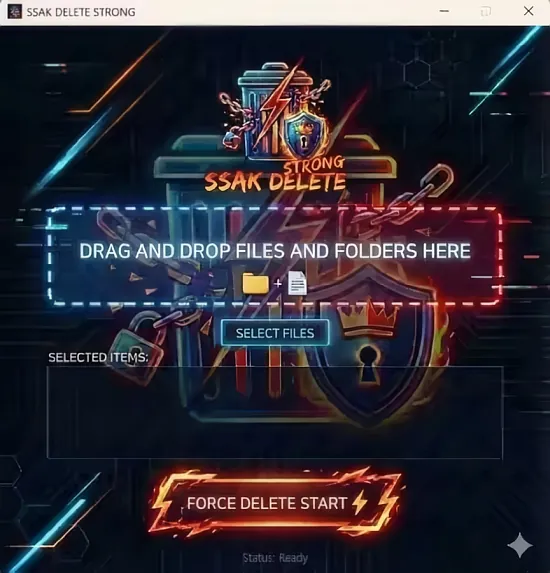
Ssak Delete Strong Portable is a robust and specialized file deletion utility engineered for Windows environments, specifically targeting stubborn, locked, or protected files and folders that resist standard removal methods. This powerful tool excels at force-deleting items held by running processes, system locks, or hidden attributes, making it indispensable for IT administrators, developers, security professionals, and everyday users dealing with remnants of failed installations, malware traces, or corrupted data. By automatically terminating obstructing processes, stripping read-only/system/hidden flags, and employing multi-pass overwriting where needed, Ssak Delete Strong Portable ensures complete and irrecoverable erasure, safeguarding privacy and reclaiming disk space with minimal risk of data resurrection through recovery software.
Core Purpose and Force Deletion Mechanism
At its essence, Ssak Delete Strong Portable addresses the frustration of “file in use” errors by intercepting Windows’ deletion pathways at a low level. When a user selects a target—via drag-and-drop, right-click context menu, or direct path input—the software scans for dependencies: open handles from Explorer, antivirus scanners, background services, or rogue applications. It presents a diagnostic preview listing culprits (e.g., “notepad.exe holding file.txt”), allowing selective or bulk termination before deletion.
Unlike basic unlockers, Ssak Delete Strong Portable operates in safe mode escalation: first attempting non-intrusive unlocks via handle release APIs, then process suspension if needed, and finally forceful termination with reboot options for kernel-locked items. This tiered approach minimizes system disruption—critical processes like explorer.exe are paused briefly rather than killed outright. Post-deletion verification confirms absence via sector scans, alerting if remnants persist.
Process Termination and Safety Protocols
The process killer integrates deeply with Windows Task Manager-like visibility, displaying PID, path, CPU/memory usage, and dependency trees. Users toggle “Safe Kill” to avoid system-critical services (svchost.exe variants, winlogon.exe), with whitelists for custom exclusions. Batch mode queues multiple deletions, prioritizing non-critical processes first.
Safety layers include:
- Pre-kill snapshots logging states for rollback.
- Virtual dry-run simulating outcomes without changes.
- Auto-backup of targets to recycle bin or user-specified folder.
- UAC elevation prompts only when necessary, with silent mode for scripts.
For elevated privileges, it leverages Windows’ Restart Manager to gracefully close apps like Microsoft Office before deletion.
Attribute Handling and Protection Bypass
Files marked read-only, system, or hidden often evade deletion; Ssak Delete Strong Portable preemptively clears these flags using raw NTFS attribute manipulation. It detects alternate data streams (ADS), junction points, and reparse tags that masquerade deletions, purging them comprehensively. Encrypted files (EFS/BitLocker) prompt decryption where possible, or sector-wipe if locked.
Folder recursion handles nested structures, deleting children first to avoid partial failures. Symbolic links and junctions are resolved to targets, preventing infinite loops.
Secure Wiping and Irrecoverable Erasure
Beyond simple removal, “Strong” mode activates DoD-compliant overwriting (3-7 passes of random data, Gutmann 35-pass optional), verifying each pass with hash checks (MD5/SHA-256). Free space wiping targets slack space and MFT residues, essential post-deletion forensics defense. SSD optimization uses TRIM commands instead of overwrites to preserve NAND lifespan.
Progress bars track bytes processed, ETA, and integrity via read-back verification. Pause/resume supports large drives (terabytes), with logging to TXT/CSV for audits.
User Interface and Workflow Efficiency
The interface balances power with simplicity: a dark-themed window with dual panes—left for targets, right for diagnostics/logs. Drag-drop centralizes operations; context menus integrate into Explorer (“Delete with SsakDelete”). Quick actions: single-click “Nuke” for max security, “Quick” for speed.
Advanced tabs expose:
- Process Monitor: Live handle viewer with kill/kill-tree.
- Wipe Scheduler: Timed cleans (weekly free space).
- Rules Engine: Auto-delete patterns (e.g., temp*.exe on boot).
- Reports: Visual charts of space reclaimed, processes terminated.
Portable mode runs from USB without install, ideal for tech support.
Command-Line and Scripting Power
CLI mode unlocks automation: ssakdelete.exe -f "C:\stubborn\file.exe" -p 3 -kill -log output.txt forces 3-pass wipe with process kill. Parameters include /recurse, /verify, /ssd-safe, /whitelist. Batch scripts (.bat/.ps1) integrate with cleanup routines, Task Scheduler, or deployment tools like PDQ Deploy.
PowerShell module exports cmdlets for enterprise scripting.
Performance and Resource Management
Optimized for all Windows 10/11 editions (x64/x86), it uses <50MB RAM, multi-threading for 500MB/s+ wipe speeds on NVMe. Low I/O footprint avoids thrashing; adaptive algorithms throttle during high disk activity.
Compatibility spans FAT32/NTFS/ReFS/exFAT, with volume shadow copy awareness for locked system files.
Use Cases Across Scenarios
IT Support: Clear failed app remnants blocking upgrades.
Developers: Nuke temp builds, lockfiles from IDE crashes.
Security: Wipe malware droppers, PII traces pre-disposal.
Users: Delete stubborn thumbnails, update caches.
Forensics Prep: Pre-analysis sanitization.
Edge cases like OneDrive-synced files handle sync pauses; network shares use SMB3 resilient protocols.
Comparison and Unique Strengths
Versus competitors (Unlocker, Wise Force Deleter), Ssak Delete Strong Portable uniquely combines process termination, attribute stripping, secure wiping, and CLI in one package. No ads/bloatware; free core with Pro unlocks (unlimited batches, enterprise logging).
Regular updates patch Windows changes, add formats.
Ssak Delete Strong Portable empowers decisive file exorcism, blending brute force with finesse to conquer digital ghosts—reclaiming control where Explorer fails.
Key Features
– Force delete locked files and folders
– Automatically terminate processes using the files
– Remove read-only, system, and hidden attributes
– Easy drag & drop file addition
– Resolve permission issues with administrator privileges
Use when you encounter
– “File is being used by another program” errors
– “Access denied” errors
– Empty folders that won’t delete
– Files with permission issues