
Portable Ultimate Vocal Remover GUI v5.6.0 (x64) (FIXED)
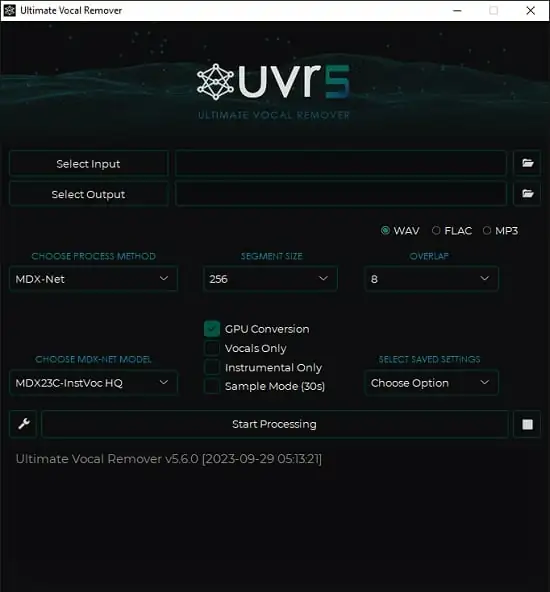
Ultimate Vocal Remover v5 Portable is an advanced audio source separation application designed to extract vocals, instrumentals, drums, bass, and other musical elements from full songs. Often referred to as UVR5, the software uses deep neural network models to analyze an audio recording and divide it into separate stems.
This makes it possible to create karaoke tracks, isolate acapellas, prepare samples, study individual instruments, improve remixes, and experiment with music production in ways that would be difficult using traditional audio editing tools alone. Instead of relying only on equalization, filtering, phase cancellation, or manual editing, Ultimate Vocal Remover v5 Portable uses trained artificial intelligence models to identify the characteristics of different sounds within a mixed recording.
The application is intended for musicians, DJs, remix producers, karaoke enthusiasts, music students, audio editors, content creators, and anyone who wants more control over an existing song. It provides a graphical interface that allows users to import audio, choose a separation model, adjust processing settings, and export the resulting stems.
As an open-source project, Ultimate Vocal Remover v5 Portable has become popular among users who want powerful source separation without committing to a subscription-based service. It supports multiple operating systems and provides access to different model architectures, allowing users to select the processing method that best matches their audio material.
What Is Ultimate Vocal Remover v5 Portable?
Ultimate Vocal Remover v5 Portable is a graphical user interface for AI-assisted vocal and instrument separation. The program processes a mixed audio file and attempts to separate its component sounds into individual output files.
A typical song contains several overlapping elements. Lead vocals may share frequencies with guitars, keyboards, or cymbals. Bass can overlap with kick drums and lower instruments. Reverb may spread vocal energy across the stereo field, while backing vocals can blend with the main vocal performance. Separating these elements is therefore a technically complex task.
UVR5 addresses this challenge with neural network models trained to recognize musical patterns. Each model has different strengths and may produce better results for certain genres, arrangements, recording qualities, and source types. Users can select a model based on whether they want vocal isolation, instrumental extraction, four-stem separation, or a more specialized result.
The Portable name describes the convenient software format requested for this description. The main application is designed as a standalone desktop tool, with packaged versions intended to include the interface and necessary processing components so users can work without assembling a complete programming environment manually.
AI Audio Source Separation for Music Production
The primary function of Ultimate Vocal Remover v5 Portable is audio source separation. Source separation refers to the process of dividing a combined recording into separate elements, often called stems.
For example, a two-stem separation may produce:
- Vocals
- Instrumental accompaniment
A four-stem separation may produce:
- Vocals
- Drums
- Bass
- Other instruments
The quality of the result depends on the original recording, the chosen model, the processing settings, and the complexity of the arrangement. Clear studio recordings often produce cleaner results than heavily compressed files, live recordings, tracks with extensive reverb, or songs containing dense layers of similar sounds.
Ultimate Vocal Remover v5 Portable does not simply remove a fixed frequency range. Instead, its models analyze the audio over time and attempt to distinguish musical sources according to their learned characteristics. This allows the software to preserve more of the desired material than basic filtering methods.
Vocal and Instrumental Separation
Vocal and instrumental separation is the most recognizable use of the application. Users can load a complete song and process it to generate a vocal stem and an instrumental stem.
The vocal output can be useful for:
- Creating acapella performances
- Studying vocal arrangements
- Practicing harmonies
- Preparing vocal remixes
- Analyzing lyrics and phrasing
- Building vocal samples
- Creating educational material
- Editing or replacing selected vocal sections
The instrumental output can be used for:
- Karaoke
- Live performance practice
- Dance rehearsals
- DJ edits
- Background music
- Cover versions
- Instrumental study
- Video and podcast production
The separation may not always be completely clean. Some instrumental sounds can remain in the vocal stem, and vocal traces may remain in the instrumental file. However, the results can be remarkably useful, especially when the goal is remixing, practice, creative sampling, or analysis rather than exact restoration.
Multi-Stem Music Separation
Ultimate Vocal Remover v5 Portable can work with more than just vocals and accompaniment. Supported model families can separate recordings into multiple stems, including drums, bass, vocals, and other instruments.
Multi-stem separation gives producers more flexibility. A drummer can isolate the drum part for practice. A bassist can reduce competing low-frequency material. A remix producer can lower the original drums while adding a new rhythm. A musician can study how different instruments interact within a commercial production.
The “other” or “accompaniment” stem usually contains instruments that are not assigned to the vocal, drum, or bass categories. Depending on the model and source material, this may include guitars, piano, synthesizers, strings, brass, percussion, effects, and background textures.
Four-stem processing can require more time and computer memory than a simpler vocal-versus-instrumental separation. It may also create different artifacts because the system has to divide more overlapping sounds. Nevertheless, it is an important feature for users who need deeper control over a complete mix.
Multiple AI Models and Model Architectures
One of the defining characteristics of Ultimate Vocal Remover v5 Portable is its support for multiple separation models. Rather than forcing every project through one universal algorithm, the program lets users choose among different approaches.
The available model families can include technologies associated with:
- MDX-Net
- MDX23C
- VR Architecture
- Demucs
- Specialized vocal models
- Instrumental separation models
- Denoising and refinement workflows
Each model may respond differently to a particular song. One model may preserve vocal clarity, while another may reduce instrumental leakage. A third model may work better with dense electronic arrangements or tracks containing substantial reverb.
This model variety encourages experimentation. Users can process the same song with different models, listen to the resulting stems, and choose the output that best suits the project. Advanced users can also combine results from several passes to create a cleaner final stem.
Model selection can seem complicated to beginners, but the basic concept is simple: different models are trained or configured for different separation tasks. Starting with a recommended vocal model is usually sufficient, while experienced users can compare alternatives when the first result contains unwanted artifacts.
How Ultimate Vocal Remover v5 Portable Works
The application analyzes an imported audio file in sections rather than treating the entire track as one simple waveform. Neural network models examine the musical content and estimate which parts belong to vocals, drums, bass, or other sources.
The processing may involve several stages:
- The source file is loaded and decoded.
- The audio is divided into manageable segments.
- The selected neural network model analyzes those segments.
- The model estimates the target source and unwanted material.
- The individual results are reconstructed into audio stems.
- The stems are exported in the selected format.
Segment and window settings can influence both performance and output quality. Larger processing windows may provide more context for the model but can require additional memory. Smaller settings may help prevent memory errors on systems with limited resources.
The processing time depends on the length of the audio, the selected model, the number of stems, the computer’s processor, available graphics hardware, and other settings. GPU acceleration can significantly improve performance on compatible systems, although CPU processing remains useful for users without a supported graphics card.
User-Friendly Graphical Interface
Although the technology behind source separation is complex, Ultimate Vocal Remover v5 Portable presents the main functions through a graphical interface. Users do not need to write code or understand neural network programming to process a song.
The interface typically provides controls for:
- Selecting an input file
- Choosing an output directory
- Selecting a separation model
- Choosing the desired processing mode
- Adjusting segment or window values
- Enabling hardware acceleration
- Starting and stopping processing
- Reviewing progress
- Accessing settings
- Viewing error information
This layout makes the program accessible to musicians who may not have technical experience with Python, command-line audio utilities, or machine learning tools.
The interface also remembers various settings, which can make repeated processing more convenient. A producer working on several tracks can maintain a preferred output folder, model, and processing configuration instead of entering every option again.
Batch Processing for Multiple Audio Files
Batch processing is useful for users who need to separate several songs. Rather than importing and processing each track individually, users can add multiple files to a queue and let the application work through them.
This feature can save time when preparing:
- A collection of karaoke tracks
- A remix project with multiple source files
- Practice material for a music class
- A catalog of samples
- Several recordings from the same session
- A video soundtrack archive
- A set of songs for DJ preparation
Batch processing can place a heavier demand on system resources, especially when using demanding models or high-quality audio files. It is wise to monitor available disk space because each input song can generate multiple output stems.
A clear output folder structure is also helpful. Separating files into project-specific directories makes it easier to identify the correct vocal, instrumental, drum, bass, and accompaniment files after processing.
Audio Format Compatibility
Ultimate Vocal Remover v5 Portable can work with common audio formats, including WAV and other widely used compressed formats, when the required decoding components are available.
WAV files are often preferred for production because they preserve uncompressed audio data. MP3 and similar formats may be more convenient for storage and sharing, but their compression can affect the quality of the separation. If the original recording is already heavily compressed, the AI model may have less detailed information available for identifying individual sources.
The program can use FFmpeg-related functionality when importing or exporting non-WAV audio files. If a file does not open correctly, users may need to confirm that the required components are installed and that the selected format is supported.
For best results, users should begin with the highest-quality source they legally possess. A lossless file or a high-bitrate source will generally provide more information than a low-bitrate online conversion.
GPU Acceleration and Processing Performance
Source separation is computationally intensive. Ultimate Vocal Remover v5 Portable can benefit from compatible GPU acceleration, particularly when processing long files, high-resolution audio, or complex multi-stem models.
NVIDIA graphics cards with suitable processing support are commonly preferred for demanding AI workloads. Systems with adequate video memory can handle larger models and processing settings more comfortably. CPU-only processing remains possible, but it may take considerably longer.
Performance can also be affected by:
- Audio duration
- Number of stems
- Selected model
- Segment size
- Window size
- Sample rate
- Available system memory
- Graphics card memory
- Background applications
- Storage speed
If the application reports memory allocation errors, reducing the segment or window size may help. Closing other demanding applications can also free system resources.
Users should think of processing as an offline rendering task rather than an instant effect. A short song may finish quickly, while a long recording or batch job can take much longer.
Improve Vocal Extraction Results
The best results often come from testing more than one model. No single model performs identically on every recording. A clean pop song, a live rock performance, a heavily reverberated ballad, and an electronic track may each require different processing choices.
Users can improve their workflow by following several practices:
- Start with a high-quality source file.
- Use a model designed for the desired separation task.
- Compare the vocal output and instrumental output together.
- Test more than one model when leakage is noticeable.
- Avoid unnecessarily aggressive processing settings.
- Listen for artifacts between phrases and during pauses.
- Check whether backing vocals should remain with the vocal stem.
- Use a dedicated audio editor for final cleanup.
- Preserve the original file before processing.
- Organize multiple model results in separate folders.
It is important to evaluate the result in context. A vocal stem may contain small traces of guitar or cymbals, but those traces may be inaudible after mixing with effects, new instrumentation, or background sound. A stem intended for a clean solo performance may require more refinement than one intended for a remix.
Uses for Musicians and Producers
Ultimate Vocal Remover v5 Portable can support a variety of creative workflows. Producers can use extracted vocals to build remixes, mashups, edits, and alternate arrangements. Instrumental stems can provide a foundation for new performances or production experiments.
Musicians can study the role of individual instruments in professional recordings. By muting the vocal or accompaniment, they can focus on drums, bass, guitar, keyboard parts, and arrangement changes.
Singers can use instrumental outputs for practice. DJs can prepare edits and transitions. Beatmakers can isolate rhythmic ideas for inspiration. Music teachers can demonstrate arrangement and production concepts to students.
The software can also help recover useful material from old recordings. If a multitrack session is unavailable, source separation may provide a way to work with selected parts of the final mix. The results will not recreate the original studio tracks perfectly, but they can make new editing possibilities available.
Uses for Content Creators and Educators
Content creators can use separated stems when preparing videos, presentations, tutorials, and demonstrations. An instrumental track can serve as background music, while a vocal stem can be used to explain performance techniques or song structure.
Educators can use the program to demonstrate:
- Musical arrangement
- Vocal harmony
- Rhythm patterns
- Bass movement
- Song structure
- Production techniques
- The difference between a mix and individual stems
A teacher can play a complete song, mute selected stems, and show students how each element contributes to the final result. This can make production concepts easier to understand than explanations based only on diagrams or notation.
Creators should always consider copyright and licensing requirements before publishing separated audio. The technical ability to process a recording does not automatically grant permission to distribute or monetize the resulting stems.
Open-Source and Cross-Platform Design
Ultimate Vocal Remover v5 Portable is associated with an open-source development model. This allows the project to evolve through contributions, model improvements, troubleshooting, and community experimentation.
The application is available for major desktop platforms, including Windows, macOS, and Linux. Cross-platform availability makes it useful for users working in different production environments. A project created on one operating system can generally follow a similar separation workflow on another, although installation details, hardware support, and performance may vary.
The open-source nature of the project also means that users may encounter frequent changes in model availability, package structure, or installation methods. This flexibility is valuable for development but may require more attention than a commercial application with a fixed release system.
Limitations of Ultimate Vocal Remover v5 Portable
Although the software can produce impressive results, it cannot perfectly reconstruct every original track. Source separation is an estimation process. The models must infer which sounds belong to which category, and overlapping frequencies can make that task difficult.
Common artifacts may include:
- Metallic or watery vocal sounds
- Instrumental leakage
- Short clicks or warbling
- Reduced transients
- Missing high-frequency detail
- Reverb remaining in the wrong stem
- Drum sounds appearing in the instrumental output
- Backing vocals being classified inconsistently
These issues are more likely with live recordings, low-quality files, dense arrangements, strong effects, distorted audio, and recordings with unusual production techniques.
The application also requires significant storage space for its models and output files. New users should ensure that the computer has enough free disk space before downloading several models or processing large collections of songs.
Final Thoughts on Ultimate Vocal Remover v5 Portable
Ultimate Vocal Remover v5 Portable is a powerful solution for AI-assisted vocal removal and music stem separation. It gives users access to advanced source separation technology through a practical desktop interface, making tasks such as vocal isolation, karaoke creation, remix preparation, and musical analysis more approachable.
Its broad model selection is one of its greatest strengths. Users can choose different approaches for different songs, compare results, and refine their workflow over time. Batch processing, multi-stem output, cross-platform support, and hardware acceleration make it suitable for both casual experimentation and more demanding production tasks.
The best results come from using high-quality source material, choosing an appropriate model, and treating the exported stems as starting points for further creative work. Even when a result contains minor artifacts, it can still provide valuable material for remixes, practice tracks, educational demonstrations, and sampling.
For musicians, DJs, producers, students, and content creators who want to extract more possibilities from finished recordings, Ultimate Vocal Remover v5 Portable offers an accessible and flexible entry point into modern AI audio separation.
Features at a Glance
- AI-powered vocal removal
- Vocal and instrumental separation
- Multi-stem audio extraction
- Drum, bass, vocal, and accompaniment separation
- Support for MDX-Net models
- Support for MDX23C models
- Support for VR Architecture models
- Support for Demucs-based separation
- Multiple model choices for different audio types
- Graphical user interface
- Batch processing for multiple files
- High-quality audio export
- WAV and other common audio format support
- CPU processing support
- Compatible GPU acceleration options
- Adjustable segment settings
- Adjustable window settings
- Output folder selection
- Vocal stem creation
- Instrumental stem creation
- Acapella preparation
- Karaoke track creation
- Remix and mashup workflow support
- Music analysis and educational applications
- Webcam-independent desktop audio processing
- Cross-platform availability
- Open-source project structure
- Portable-oriented standalone workflow
- Offline processing after required models are installed
- Useful for producers, DJs, singers, educators, and content creators
- Exported stems suitable for further editing in a digital audio workstation
