
Portable Pazu All-In-One Music Converter 3.1.9
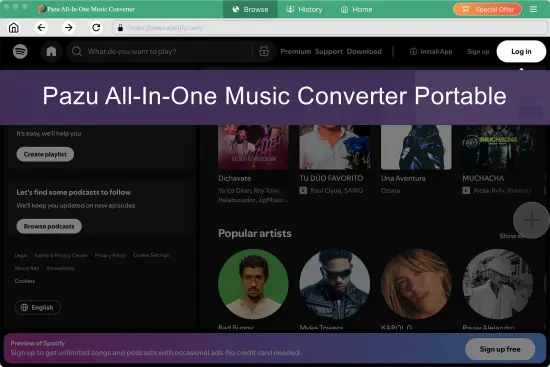
Pazu All-In-One Music Converter Portable brings music from several supported streaming services into a single desktop workflow. Instead of switching between separate applications for different platforms, users can browse supported catalogs, choose tracks or playlists, and save audio files in common formats. The program is designed for people who want a more centralized way to manage offline listening and keep a personal music library organized on a computer.
The software combines a built-in web player with conversion and download controls. Its advertised platform support includes Spotify, Apple Music, Amazon Music, Tidal, YouTube Music, Deezer, and Pandora. Supported services and features may change as platforms update, so it is sensible to check that the service you use is currently available before relying on the software for a large project.
What Is Pazu All-In-One Music Converter Portable?
Pazu All-In-One Music Converter Portable is a Windows and macOS application for converting audio from supported streaming services into local music files. It is aimed at listeners who want to organize selected songs, albums, playlists, or other available audio in one place and play the resulting files using compatible devices or media players.
The “all-in-one” idea is the central appeal: one interface provides access to multiple supported services rather than requiring a different converter for each one. A built-in web player lets users browse or search within the application, select content, and add it to a conversion workflow. The software also offers settings for output format, destination folder, and file naming, helping users decide how their audio library should be arranged.
The “Portable” suffix is used here as part of the requested software name. It should not be taken as a confirmation that the application is an officially portable edition that runs without installation. The product information identifies desktop availability for Windows and macOS; check the installer and system requirements before assuming it can be launched from removable storage or used without installation.
Supported Music Streaming Services
Pazu All-In-One Music Converter Portable is presented as a multi-service tool. Its listed services include Spotify, Apple Music, Amazon Music, Tidal, YouTube Music, Deezer, and Pandora. This range may make it useful to listeners who subscribe to more than one platform or who want to bring music from different services into a consolidated local library.
The practical benefit is convenience. A listener might use one service for personal playlists, another for albums, and a third for music discovered through recommendations. With a unified application, those workflows can be handled from one desktop interface instead of repeatedly opening different programs.
Availability can depend on service-specific support and platform changes. Streaming catalogs, account access, regional availability, and product compatibility are not identical across services. Before starting a lengthy conversion, users should test a small selection from each service they plan to use and confirm that the output plays as expected.
Audio Formats and Quality Options
The converter lists six output formats: MP3, M4A, AAC, FLAC, WAV, and AIFF. These formats serve different needs, from compact files for everyday listening to larger files that are often chosen for archival or editing workflows.
MP3 is widely supported by phones, car stereos, portable players, and desktop software. M4A and AAC are also common compressed formats and can be convenient when storage space matters. FLAC, WAV, and AIFF are frequently selected when users prefer lossless or uncompressed audio files, though the file size may be considerably larger.
Choosing a format is a balance between compatibility, storage, and intended use. For a phone with limited free space, a compressed format may be practical. For a carefully organized desktop archive, a user may prefer a lossless option—provided the source audio and selected settings support the quality they expect. Converting audio to a lossless file type does not itself restore detail that was not present in the source. It is best to think of format selection as a way to choose how the converted file is stored, not as a guarantee of improved sound.
Pazu advertises options for original-quality or lossless output, as well as compressed formats. The result can depend on the source service, the original audio, and the software’s current behavior. Trying a short sample before converting a complete collection helps users confirm both sound and playback compatibility.
Batch Conversion for Songs, Albums, and Playlists
Pazu All-In-One Music Converter Portable supports selecting groups of tracks, including songs, albums, and playlists, for conversion. Batch handling can save time compared with processing every track individually. Rather than repeatedly choosing an output format and destination for each song, users can prepare a group and let the application handle the queue.
This can be particularly helpful for people building a library around a specific theme, such as workout playlists, favorite albums, or music for travel. It also makes it easier to plan a conversion session: select a manageable group, confirm the settings, and review the results before moving on to another batch.
The developer advertises conversion speeds of up to 10 times normal speed. Actual completion time can vary with the size of the selection, internet connection, computer performance, and service conditions. A headline speed should be treated as a product claim rather than a promise that every track or playlist will finish at the same rate. Starting with a small batch is a useful way to evaluate performance on your own system.
Metadata and Music Library Organization
A well-organized music folder is easier to browse than a directory filled with files that have generic names. Pazu says it preserves ID3 tags and other metadata such as song title, artist, album, and artwork. These details can help compatible music players display tracks correctly and sort them into albums or artist collections.
The application also provides output file-naming and folder settings. These controls can help users establish a consistent library structure. For example, a listener might place converted tracks in separate folders by service or album, or use naming patterns that make files easier to identify in a file manager.
Metadata quality matters most when a music collection is used across several devices and programs. If tags are missing or inconsistent, a track may appear under an unknown artist or be separated from its album. After converting a small sample, it is useful to inspect the file names, tags, and artwork in the media player you normally use. That quick check can prevent organizational problems from spreading across a much larger collection.
Built-In Web Player and User Interface
The built-in web player is intended to let users search for and browse content within Pazu All-In-One Music Converter Portable. The product describes this as a way to access supported playlists or music without installing each streaming service’s separate desktop application. Users can sign in to the relevant service account through the application, find the desired content, and select it for conversion.
A single interface may be more approachable than managing multiple tools, especially for users who are new to audio conversion. The basic workflow is straightforward: choose a service, locate the content, set the output options, and start the conversion. The settings include items such as file format and destination folder, while the main interface handles content selection and the conversion queue.
As with any application that connects to streaming services, the experience may depend on changes to those services. If a service updates its login process, catalog access, or playback behavior, compatibility may be affected until the software is updated. Keeping the application current and testing service access periodically can help users identify issues early.
A Typical Pazu All-In-One Music Converter Portable Workflow
A typical session can be approached in a few clear steps:
- Install and open the application on a supported Windows or macOS computer.
- Select one of the available streaming services and sign in as needed.
- Browse or search for a song, album, or playlist in the built-in player.
- Open the output settings and choose a format, destination folder, and file-naming preferences.
- Add the desired content to the conversion queue and start the process.
- Check the saved files in a media player to confirm playback, tags, and organization.
This workflow is designed to reduce repetitive setup. Users can choose a format and folder that suit their needs, then apply those settings to a batch. If the library is large, it is wise to begin with a small selection and review the result before processing more content.
Compatibility and System Requirements
Pazu All-In-One Music Converter is listed for Windows 11 and Windows 10, as well as macOS 10.15 or later. Since compatibility details can change with new releases, check the current system requirements before downloading or purchasing. This is especially important if you use an older computer or a less common operating-system configuration.
The product information describes use on desktop computers. It does not mean the software itself runs as a mobile app on phones or tablets. Instead, the purpose of creating common audio files is to make it easier to play or transfer compatible files using other devices and media applications.
For best results, users should also ensure they have enough free disk space. Lossless and uncompressed formats can take up significantly more room than compressed formats, and a large playlist may require more storage than expected. Choosing the destination folder in advance and checking available capacity can make a long conversion session more predictable.
Who May Find It Useful?
Pazu All-In-One Music Converter Portable may suit listeners who use several supported music services and prefer to manage selected audio through a single desktop application. It may also appeal to users who want to create a local library, choose among common output formats, or batch-process playlists rather than handle each track manually.
It can be helpful for organizing music for personal devices, keeping files grouped by album or playlist, and listening in situations where a compatible local file is more convenient than streaming. Those benefits depend on the user’s devices, subscriptions, available storage, and the service’s current support in the application.
It may be less suitable for someone who only needs basic playback within a streaming app, does not want to manage local files, or expects the software to operate as a phone app. People who need a specific advanced audio workflow should also check the available settings carefully before purchasing, rather than assuming that every professional editing or library-management function is included.
Responsible Use and Service Terms
Streaming services have their own terms, and copyright rules vary by location and by the intended use of a file. Users should review the relevant service terms and applicable law before converting or storing audio. Personal access to a track through a subscription does not automatically grant permission to redistribute it, publish it, or use it commercially.
A careful approach is to limit use to content and purposes for which the user has the necessary rights and permissions. Avoid sharing converted files publicly or treating a personal backup as permission to distribute copyrighted recordings. The software’s capabilities do not determine whether a particular use is authorized.
Overall Impression of Pazu All-In-One Music Converter Portable
Pazu All-In-One Music Converter Portable brings together several practical features: access to multiple supported music services, a built-in web player, batch conversion, common output formats, metadata preservation, and folder organization. Its strongest appeal is convenience for desktop listeners who want a unified workflow for selected music from different platforms.
The main considerations are equally practical. Users should verify current service support, confirm the app runs on their operating system, test the output with a small sample, and review licensing terms before committing to a large library project. The advertised speed and quality features are useful points of reference, but real-world results depend on the source, computer, connection, and selected settings.
For someone seeking a centralized desktop tool to build and organize a personal offline music collection, Pazu All-In-One Music Converter Portable presents a clearly defined set of features. A brief trial with the user’s own service and devices is the best way to determine whether its workflow fits their needs.
Features at a Glance
- Supports Spotify, Apple Music, Amazon Music, Tidal, YouTube Music, Deezer, and Pandora.
- Provides a built-in web player for browsing and searching supported services.
- Converts songs, albums, and playlists in batches.
- Lists MP3, M4A, AAC, FLAC, WAV, and AIFF output formats.
- Offers settings for output location and file naming.
- Preserves metadata such as title, artist, album, and artwork.
- Advertises conversion speeds of up to 10 times normal speed.
- Available for Windows 10 and 11 and macOS 10.15 or later.
