
Portable VovSoft PDF Reader 6.0 Multilingual
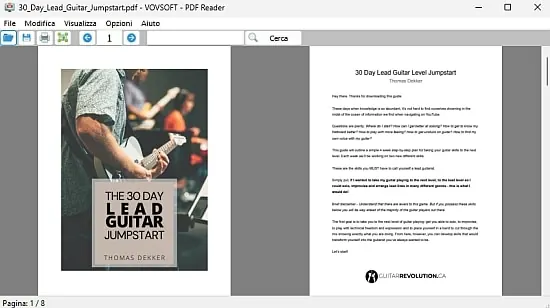
VovSoft PDF Reader Portable is a compact Windows application designed for users who want to open, read, search, and navigate PDF documents without installing a large office suite or a feature-heavy document platform. Its main purpose is simple: provide a fast and practical way to view PDF files while keeping the interface clean and the system requirements modest.
Many PDF applications include editing tools, cloud services, collaboration features, subscription notices, browser integrations, and advanced document-management functions. Those features can be useful, but they are not necessary for everyone. If your everyday PDF needs involve opening manuals, reading ebooks, checking invoices, reviewing reports, viewing forms, or browsing downloaded documents, VovSoft PDF Reader Portable offers a more focused approach.
The Portable edition is especially convenient because it does not require a conventional installation. Users can extract the program to a folder, external storage device, or USB flash drive and launch it directly. This makes it suitable for shared computers, temporary workstations, maintenance toolkits, and anyone who prefers to keep software separate from the Windows installation.
What Is VovSoft PDF Reader Portable?
VovSoft PDF Reader Portable is a Windows PDF viewer created for straightforward document reading. It supports common PDF viewing tasks, including opening files, scrolling through pages, searching for words, changing the zoom level, rotating pages, and switching between different viewing arrangements.
The application focuses on essential functionality rather than attempting to become a complete PDF editing suite. It is intended for reading and reviewing documents, not for creating complex forms, redesigning pages, managing large document collections, or replacing professional publishing software.
Its lightweight design can be helpful on older computers, office PCs, laptops with limited storage, and systems where users want to avoid unnecessary background components. The program can run independently, without requiring Adobe Acrobat Reader or another large PDF platform to be installed.
The Portable edition also gives users greater flexibility in how they manage the application. Instead of placing files throughout standard program directories, the application can remain inside its own folder. This makes it easy to move, back up, archive, or remove.
A Simple Alternative to Large PDF Applications
One of the main advantages of VovSoft PDF Reader Portable is its limited scope. The program does not try to overwhelm users with numerous panels and tools. Instead, it provides a relatively uncluttered environment in which the document remains the main focus.
This design is useful for people who want to open a PDF immediately rather than spend time configuring a complicated application. A student can launch the program to read course notes. An employee can use it to inspect a report or invoice. A technician can carry it on a USB drive for use on different Windows computers.
The program is also suitable for users who primarily rely on keyboard and mouse navigation. Basic controls are easy to understand, and the general workflow is familiar to anyone who has used a standard document viewer.
VovSoft PDF Reader Portable may be particularly appealing when a web browser is not the preferred way to open PDF files. Browser-based PDF viewers are convenient, but they may include unrelated browser features, consume more memory, or make it less obvious where a document is being displayed. A standalone reader provides a dedicated workspace for PDF documents.
Portable PDF Reader for Windows
The defining feature of VovSoft PDF Reader Portable is its portable format. Unlike a traditional installer, the Portable edition can be used without completing a standard installation wizard.
After downloading the portable package, users generally extract its contents to a location of their choice. The program can then be started from that folder. It may be placed on a local drive, an external hard drive, a USB flash drive, or another removable storage device.
This approach offers several practical benefits:
- No standard installation process is required.
- The application can be stored in a dedicated folder.
- The program can be moved between compatible Windows computers.
- Removing the application can be as simple as deleting its folder.
- It can be included in a collection of portable utilities.
- It is convenient for temporary or occasional use.
Portable software can also help users maintain a more organized workspace. Instead of installing a separate application for every occasional task, a user can keep a small set of portable tools in a designated utilities folder. VovSoft PDF Reader Portable fits naturally into this type of setup.
The program is designed for Windows systems, including modern Windows versions and several earlier releases. Compatibility can depend on system configuration, file permissions, and the specific version being used, so users should select a release appropriate for their computer.
Open and Read PDF Documents Quickly
The most important task of any PDF viewer is opening documents reliably. VovSoft PDF Reader Portable is built around this basic function. Users can open a PDF from the program interface, use the Windows file association, or launch a document with the reader when the application is configured as the default PDF viewer.
Once a document is open, the page is displayed in the central viewing area. Users can scroll through the file, adjust the display size, and move between pages using the available navigation controls.
This is useful for a broad range of PDF content, including:
- Product manuals
- School and university materials
- Business reports
- Receipts and invoices
- Digital brochures
- Government forms
- Technical documentation
- Research papers
- Electronic books
- Travel documents
- Printed-document scans
- Software instructions
The viewer is intended to make ordinary reading comfortable without requiring complex setup. Its lightweight nature may also help it start quickly, especially when compared with larger PDF applications that load many additional components.
Search for Text Inside PDF Files
The built-in search function is one of the most useful features for anyone working with lengthy documents. Instead of reading every page manually, users can search for a word, phrase, reference number, name, or other text contained within the PDF.
Search is especially valuable when working with:
- Long user manuals
- Contracts
- Technical specifications
- Academic papers
- Product catalogs
- Financial statements
- Legal documents
- Company policies
- Instruction guides
When a search term is found, the reader can identify the relevant location in the document. This makes it easier to locate a particular section or confirm whether a specific detail appears in the file.
Text search depends on the structure of the PDF. Documents containing selectable text generally provide the best results. A scanned PDF made entirely from images may not support ordinary keyword searching unless it has been processed with optical character recognition. This is a limitation of the document itself rather than a problem unique to one PDF viewer.
Zoom, Scaling, and Page Display Options
Different PDF documents are designed for different page sizes. A presentation may use large landscape pages, while a letter, invoice, or report may use a smaller portrait layout. VovSoft PDF Reader Portable includes display controls that help users adapt the document to the screen.
Users can zoom in to inspect small text, diagrams, tables, and images. Zooming out can provide a better overview of a complete page. The ability to resize the application window also helps users find a comfortable reading arrangement.
The viewer supports common display adjustments such as:
- Zooming in and out
- Fitting pages to the window
- Scaling content for readability
- Rotating pages
- Viewing documents in full-screen mode
- Displaying two pages at once
- Scrolling through pages smoothly
These options are useful when switching between different reading activities. Someone reviewing a detailed diagram may need a high zoom level, while someone reading an ebook may prefer a page-fitting view. A two-page layout can be helpful on wide monitors, especially when reviewing documents designed for print.
Support for PDF Forms
VovSoft PDF Reader Portable can be useful for viewing and completing supported PDF forms. This may include simple fields such as text boxes, checkboxes, and other interactive form elements.
A form-capable PDF can often be completed directly within the reader and saved as a new document. This is convenient for applications, registration documents, internal paperwork, questionnaires, and other files that do not require advanced editing.
Form support should not be confused with full document editing. Filling out existing fields is different from changing the original layout, moving page elements, rewriting paragraphs, or modifying the underlying design. Users who need extensive editing may require a dedicated PDF editor.
Still, for basic form completion, a lightweight reader can be more convenient than installing a large application. It allows users to perform a specific task without adding unnecessary software to the computer.
Annotations and Highlighting
The software includes support for selected text and annotations, making it more useful for reviewing documents rather than simply viewing them. Highlighting can help readers mark important sentences, definitions, instructions, or references.
Annotations may be useful in several situations:
- Students marking study material
- Employees reviewing internal documents
- Researchers noting important passages
- Project teams commenting on drafts
- Readers identifying follow-up items
- Editors marking areas for revision
The exact annotation experience depends on the document and the application version. Users should remember that annotations may not always appear identically in every PDF program. When sharing an annotated file, it is a good idea to open the saved document in another compatible viewer to confirm that the markings appear as expected.
For simple reading notes, however, built-in highlighting and annotation support can make the program more practical than a basic viewer with no review tools at all.
Remember Recent Documents and Reading Progress
VovSoft PDF Reader Portable can remember recent PDF files and the last pages read, which can make it easier to return to documents later. This is particularly useful for ebooks, long manuals, training guides, and reports that are read over several sessions.
Without a reading-progress feature, users may need to remember a page number manually or search for their previous location each time they reopen a document. Remembering the last position creates a more convenient reading experience.
Recent-file support can also reduce repetitive browsing through folders. When reviewing several documents during a workday, users can return to a recently opened file without navigating through the Windows file system from the beginning.
The usefulness of these functions depends on how the Portable edition stores its settings. Users who move the entire program folder between computers should understand that recent-file information may refer to file paths that do not exist on the new system.
Text-to-Speech and Selected Text
The reader also supports speaking selected text through text-to-speech functionality. This can provide an alternative way to consume information, especially when users want to listen while following along visually.
Text-to-speech may be useful for:
- Reviewing written material
- Listening to sections of a report
- Supporting accessibility needs
- Checking the flow of text
- Reducing eye strain during extended sessions
- Proofreading selected passages
The quality and available voices depend partly on the speech services installed in Windows. Some documents may also contain text that cannot be read naturally, particularly when the layout includes columns, tables, footnotes, or unusual formatting.
Even with those limitations, the ability to speak selected content adds flexibility to a lightweight PDF reader.
Export PDF Pages as Images
Licensed functionality may include the ability to export PDF pages into image formats such as PNG, JPG, TIF, GIF, or BMP. This can be useful when a page needs to be inserted into a presentation, attached to a web project, shared through an image-based workflow, or imported into graphics software.
PDF-to-image export can help with:
- Creating image previews
- Sharing a page through a platform that does not accept PDFs
- Placing document pages into slides
- Extracting diagrams or illustrations
- Preparing visual references
- Archiving selected pages as image files
The output quality can depend on the page size, resolution settings, and the complexity of the original document. Users working with professional print materials should check the resulting image dimensions before using them in production.
Support for Attachments and Password-Protected PDFs
Some PDF files contain embedded attachments, such as spreadsheets, additional documents, images, or supplementary files. VovSoft PDF Reader Portable supports PDF attachments, allowing users to work with documents that include related content inside the main file.
The application also supports password-protected PDF documents. Depending on the type of protection applied, users may need to enter a password before opening or interacting with the file.
Password protection can take different forms. Some PDFs require a password to open, while others restrict printing, copying, editing, or annotation. The available actions may therefore vary from one document to another.
Users should always handle protected documents according to the rights granted by the document owner. A PDF reader can display permitted content, but it does not replace the authorization required to access restricted material.
Command-Line Options for Advanced Workflows
Although the program is designed for ordinary desktop use, VovSoft PDF Reader Portable also supports command-line options. This can be useful for experienced users, technicians, administrators, and people who build automated workflows.
Command-line access may help with:
- Launching a specific PDF from a script
- Creating shortcuts with preset behavior
- Integrating the reader into a document workflow
- Opening files from batch commands
- Supporting portable utility collections
This feature is not necessary for casual reading, but it adds flexibility for users who prefer automation. It can also make the application easier to deploy in controlled environments where programs are started through scripts or custom menus.
Anyone using command-line options should consult the documentation for the specific version installed, since available parameters and syntax can change between releases.
System Resource Usage and Performance
A lightweight PDF viewer is often chosen because it places fewer demands on the computer than a complete document-management application. VovSoft PDF Reader Portable is designed with this goal in mind.
Its relatively small size makes it practical for computers with limited storage. It may also be suitable for older systems that struggle with large applications. Startup speed and document performance will naturally vary depending on the PDF itself. A simple text document should be easier to load than a large file containing high-resolution images, complex graphics, embedded fonts, or many interactive elements.
For the best performance, users can close unnecessary applications, keep sufficient free storage available, and avoid opening extremely large documents when the computer has limited memory.
Who Should Use VovSoft PDF Reader Portable?
VovSoft PDF Reader Portable is a good match for people who want a focused PDF viewer rather than a full editing suite. It may appeal to:
- Students reading course documents
- Home users opening occasional PDF files
- Office workers reviewing reports and forms
- Technicians carrying utilities on removable storage
- Travelers using a laptop with limited storage
- Businesses seeking a simple document viewer
- Users of older Windows computers
- Readers who prefer a minimal interface
- People who do not want to install Adobe Acrobat Reader
- Anyone looking for a portable PDF application
It is less suitable for users who need advanced PDF editing, document merging, digital-signature management, extensive collaboration tools, OCR processing, complex redaction, or professional publishing functions. Those tasks generally require specialized software.
Final Verdict
VovSoft PDF Reader Portable is a practical choice for users who value simplicity, portability, and efficient PDF viewing. Its main strengths are the portable format, compact footprint, straightforward interface, text search, zoom controls, page navigation, full-screen viewing, two-page mode, annotations, form support, selected-text speech, attachment handling, and compatibility with password-protected documents.
Rather than competing as a complete PDF office suite, the application concentrates on the everyday tasks most people perform when reading PDF files. It can be carried on a USB flash drive, stored in a dedicated utilities folder, or used as a standalone viewer on a Windows computer.
The program is best understood as a focused reading tool. If you need to open PDFs quickly, locate text, adjust page views, complete supported forms, and occasionally mark passages, VovSoft PDF Reader Portable provides a convenient environment without unnecessary complexity. If your work depends on advanced editing or document production, it may work better alongside a dedicated PDF editor.
For users searching for a lightweight, portable, and easy-to-use PDF reader for Windows, VovSoft PDF Reader Portable offers a sensible balance between essential functionality and a clean, uncomplicated workflow.
Features at a Glance
- Portable Windows PDF reader
- No conventional installation required
- Can run from a local folder or USB flash drive
- Lightweight application with a compact footprint
- Standalone operation without Adobe Acrobat Reader
- Opens and displays PDF documents
- Basic page navigation
- Smooth document scrolling
- In-page keyword search
- Search-result highlighting
- Zoom and page-scaling controls
- Page rotation
- Full-screen reading mode
- Two-page viewing mode
- Support for PDF forms
- Ability to save completed forms as new PDF files
- Annotation support
- Text highlighting
- Remembers selected recent PDF files
- Remembers the last-read page
- Google selected text option
- Text-to-speech for selected content
- Support for PDF attachments
- Opens password-protected PDF files
- Export support for selected image formats in licensed use
- Command-line options
- Compatible with multiple Windows versions
- Free-to-try edition
- Optional lifetime license
- Suitable for personal and professional reading workflows