Portable SysNucleus WebHarvy 7.8.0.244 (x64)
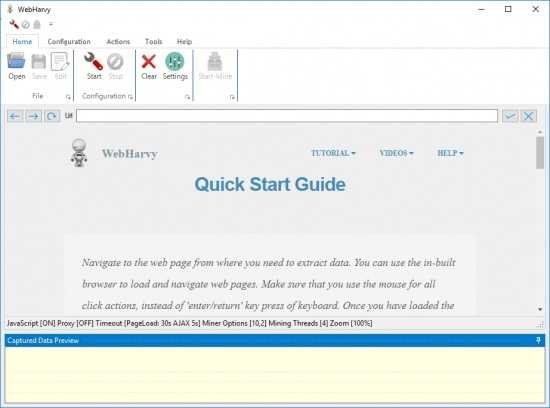
WebHarvy Portable is a visual web scraping software developed by SysNucleus, a company known for creating intuitive data extraction tools. Unlike traditional scraping tools that require programming knowledge, WebHarvy Portable offers a point-and-click interface that simplifies the entire process. Whether you’re a data analyst, a digital marketer, or a small business owner, WebHarvy empowers you to gather data from websites with minimal effort and maximum efficiency.
Philosophy and Design
WebHarvy is built on the principle of accessibility. The software is designed to democratize web scraping by removing the barriers of coding and technical complexity. Its visual interface allows users to interact with web pages just as they would in a regular browser, selecting elements to scrape with a simple click. This approach makes it possible for non-programmers to build sophisticated scraping workflows without writing a single line of code.
The software is available as a Windows desktop application, which means it runs locally on the user’s machine. This design choice ensures high performance, data privacy, and control over the scraping process. While it does not offer a native Mac version or a cloud-based platform, advanced users can run WebHarvy on virtual machines or cloud-hosted Windows servers to achieve similar functionality.
Core Features
WebHarvy is packed with features that cater to a wide range of scraping needs. Below is an in-depth look at its core capabilities:
1. Visual Point-and-Click Interface
At the heart of WebHarvy is its visual scraping interface. Users load a webpage within the built-in browser and simply click on the data they wish to extract. The software automatically identifies the underlying HTML structure and creates a scraping pattern. This intuitive approach eliminates the need for manual coding or XPath queries, making it ideal for beginners.
2. Automatic Pattern Detection
WebHarvy excels at recognizing repeating data structures such as product listings, tables, and search results. When a user selects an item from a list, the software intelligently detects similar elements and extracts them in bulk. This feature is particularly useful for scraping eCommerce websites, real estate listings, job boards, and directories.
3. Pagination and Infinite Scroll Support
Many websites display data across multiple pages or use infinite scrolling to load content dynamically. WebHarvy handles both scenarios with ease. It can follow pagination links, click “Load more” buttons, or scroll down automatically to capture all available data. This ensures comprehensive data extraction without manual intervention.
4. Form Submission and Keyword Automation
WebHarvy allows users to automate form submissions, including login forms, search boxes, and filters. Users can input a list of keywords, and the software will submit them one by one to retrieve corresponding search results. This feature is invaluable for scraping data based on dynamic queries, such as product searches or job listings.
5. Category and Subcategory Scraping
WebHarvy supports hierarchical scraping by enabling users to extract data from multiple categories and subcategories within a website. By configuring a list of category URLs, users can create a single scraping workflow that navigates through each section and collects relevant data. This is especially useful for websites with structured content, such as online stores or news portals.
6. Proxy and VPN Integration
To safeguard user privacy and avoid IP blocking, WebHarvy offers proxy and VPN support. Users can configure the software to access websites through a single proxy server or a rotating list of proxies. This feature is essential for scraping websites that implement anti-bot measures or restrict access based on geographic location.
7. Regular Expressions and JavaScript Support
Advanced users can leverage regular expressions (RegEx) to fine-tune data extraction. WebHarvy allows RegEx to be applied to text or HTML content, enabling precise selection of data patterns. Additionally, users can run custom JavaScript code within the browser to interact with page elements, modify the DOM, or trigger functions before scraping.
8. Image and Multimedia Scraping
WebHarvy is capable of extracting images, image URLs, and other multimedia content. It can download images directly or save their links for later use. This feature is particularly useful for scraping product images, gallery content, or visual assets from design portfolios.
9. Data Export Options
Once data is scraped, WebHarvy offers multiple export formats, including Excel, CSV, XML, JSON, and TSV. Users can also export data directly to SQL databases such as MySQL, SQL Server, and Oracle. This flexibility ensures seamless integration with data analysis tools, reporting systems, and business applications.
10. Scheduled and Parallel Scraping
WebHarvy supports scheduled scraping tasks, allowing users to automate data collection at regular intervals. It also enables parallel extraction from multiple pages, improving efficiency and reducing scraping time. These features are ideal for users who need to monitor websites for updates or collect large datasets.
Use Cases
WebHarvy is versatile enough to serve a wide range of industries and applications. Here are some common use cases:
1. E-Commerce and Price Monitoring
Retailers and market analysts use WebHarvy to track product prices, availability, and reviews across multiple eCommerce platforms. By automating this process, businesses can stay competitive, adjust pricing strategies, and identify market trends.
2. Real Estate Listings
Real estate professionals rely on WebHarvy to gather property data from listing websites. This includes details such as location, price, amenities, and contact information. The software simplifies the creation of property databases and market analysis reports.
3. Job Market Analysis
Recruiters and HR teams use WebHarvy to scrape job postings from career websites. This helps them identify hiring trends, salary benchmarks, and skill requirements across industries. The keyword automation feature is particularly useful for targeting specific roles or locations.
4. Lead Generation
Sales and marketing teams utilize WebHarvy to collect contact information from directories, forums, and business listings. By extracting email addresses, phone numbers, and social media links, they can build targeted outreach campaigns and grow their customer base.
5. Academic Research
Researchers and students use WebHarvy to gather data for academic projects, surveys, and literature reviews. The software enables efficient collection of structured data from online journals, news articles, and public databases.
6. Competitive Intelligence
Businesses monitor competitor websites using WebHarvy to track product launches, promotional offers, and customer feedback. This intelligence helps them refine their strategies and stay ahead in the market.
7. News Aggregation
Media professionals and bloggers use WebHarvy to aggregate news articles, headlines, and summaries from multiple sources. This facilitates content curation, trend analysis, and editorial planning.
User Experience
WebHarvy is designed with user experience in mind. Its clean interface, responsive browser, and intuitive controls make it easy to navigate and configure scraping tasks. The software provides real-time previews of extracted data, allowing users to validate patterns before running the full scrape. Error messages and logs help troubleshoot issues, while the documentation and support resources offer guidance for both beginners and advanced users.
The learning curve is minimal, thanks to the visual approach. Users can start scraping within minutes of installation, without needing to understand HTML, CSS, or JavaScript. For those who wish to explore advanced features, WebHarvy offers tutorials, FAQs, and community forums to deepen their knowledge.
Limitations and Considerations
While WebHarvy is a powerful tool, it does have some limitations:
- Platform Dependency: WebHarvy is available only for Windows. Mac users must rely on virtualization software or cloud-based Windows environments to run it.
- No Cloud or Mobile Version: Unlike some modern scrapers, WebHarvy does not offer a browser extension, mobile app, or native cloud platform.
- Limited AI Integration: WebHarvy focuses on rule-based scraping rather than AI-driven data extraction. Users looking for natural language processing or machine learning capabilities may need to integrate external tools.
- Website Restrictions: Some websites employ anti-scraping measures such as CAPTCHAs, dynamic content loading, or IP blocking. While WebHarvy offers proxies and JavaScript support, scraping such sites may still require manual intervention or custom configurations.
Conclusion
SysNucleus WebHarvy is a robust and user-friendly web scraping solution that bridges the gap between technical complexity and practical usability. Its visual interface, intelligent pattern detection, and comprehensive feature set make it an ideal choice for users across industries. Whether you’re collecting product data, monitoring job listings, or conducting research, WebHarvy streamlines the process and delivers reliable results.
By prioritizing accessibility and automation, WebHarvy empowers users to harness the power of web data without the need for programming skills. Its versatility, scalability, and ease of use make it a valuable asset in the modern data-driven landscape. As web scraping continues to evolve, tools like WebHarvy will play a crucial role in democratizing data access and enabling smarter decision-making.
Point and Click Interface
WebHarvy is a visual web scraper. There is absolutely no need to write any scripts or code to scrape data. You will be using WebHarvy’s in-built browser to navigate web pages. You can select the data to be scraped with mouse clicks. It is that easy !
Scrape Data Patterns Auto Pattern Detection
WebHarvy automatically identifies patterns of data occurring in web pages. So if you need to scrape a list of items (name, address, email, price etc) from a web page, you need not do any additional configuration. If data repeats, WebHarvy will scrape it automatically.
Export scraped data Export data to file/database
You can save the data extracted from web pages in a variety of formats. The current version of WebHarvy Web Scraper allows you to export the scraped data as an XML, CSV, JSON or TSV file. You can also export the scraped data to an SQL database.
Scrape data from multiple pages Scrape from Multiple Pages
Often web pages display data such as product listings in multiple pages. WebHarvy can automatically crawl and extract data from multiple pages. Just point out the ‘link to the next page’ and WebHarvy Web Scraper will automatically scrape data from all pages.
Keyword based Scraping Keyword based Scraping
Scrape data by automatically submitting a list of input keywords to search forms. Any number of input keywords can be submitted to multiple input text fields to perform search. Data from search results for all combinations of input keywords can be extracted.
Scrape via proxy server Proxy Servers / VPN
To scrape anonymously and to prevent the web scraping software from being blocked by web servers, you have the option to access target websites via proxy servers or VPN. Either a single proxy server address or a list of proxy server addresses may be used.
Category Scraping Category Scraping
WebHarvy Web Scraper allows you to scrape data from a list of links which leads to similar pages/listings within a website. This allows you to scrape categories and sub-categories within websites using a single configuration.
Regular Expressions
WebHarvy allows you to apply Regular Expressions (RegEx) on Text or HTML source of web pages and scrape the matching portion. This powerful technique offers you more flexibility while scraping data.
Run JavaScript
Run your own JavaScript code in browser before extracting data. This can be used to interact with page elements or invoke JavaScript functions already implemented in target page.
Download Images
Images can be downloaded or image URLs can be extracted. WebHarvy can automatically extract multiple images displayed in product details pages of eCommerce websites.
Automate browser interaction
WebHarvy can be easily configured to perform tasks like Clicking Links, Selecting List/Drop-down Options, Input Text to a field, Scrolling page etc.