

Portable Intuitibits WiFi Explorer Pro 1.1.12.0 (x64)
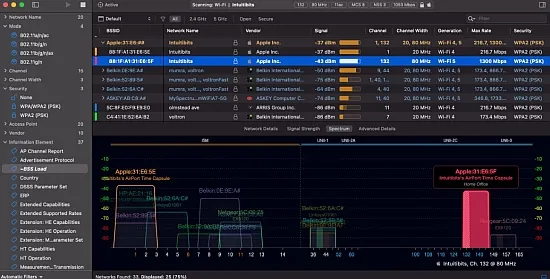
WiFi Explorer Portable is a professional Wi‑Fi scanner and analyzer designed to give WLAN engineers, IT administrators, and serious enthusiasts deep visibility into their wireless environment. It focuses on presenting rich 802.11 data in a clear, sortable, and highly customizable interface so that users can quickly detect configuration issues, performance bottlenecks, and interference problems across home, office, campus, and enterprise deployments.
Available for macOS as WiFi Explorer Pro 3 and for Windows as WiFi Explorer Pro, it supports the latest Wi‑Fi technologies, including Wi‑Fi 4, 5, 6, 6E, and 7, and operates across 2.4, 5, and 6 GHz bands with wide channel bandwidths up to 320 MHz, making it suitable for both legacy and cutting‑edge networks.
Purpose and Overall Approach
WiFi Explorer Pro is built around the idea that a Wi‑Fi analyzer should surface raw technical detail in a form that is approachable and actionable. Instead of hiding low‑level 802.11 fields, the tool exposes hundreds of parameters—channel utilization, PHY mode, MCS, spatial streams, security suites, beacon information elements—while letting the user decide which ones matter for a given task. More than 550–850 fields can be shown as columns depending on platform, and column profiles keep that power manageable.
The application is vendor‑neutral and focused purely on what the RF and beacons reveal, not on any one controller ecosystem. This makes it especially useful in mixed‑vendor environments and for consultants who move between different client networks.
Supported Platforms and Standards
On macOS, WiFi Explorer Pro 3 runs as a native app optimized for Apple Silicon and Intel, supporting Wi‑Fi 4 (802.11n) through Wi‑Fi 7 (802.11be), along with 20, 40, 80, 160, and 320 MHz channels in the 2.4, 5, and 6 GHz bands. On Windows, WiFi Explorer Pro similarly supports Wi‑Fi 6/6E/7 where the underlying adapters and drivers provide the necessary capabilities, keeping the Windows edition aligned with the same standards evolution.
Both editions are designed to work with 802.11a/b/g/n/ac/ax/be networks and adapt to whatever the host platform’s Wi‑Fi stack and external adapters can see, ensuring that the same conceptual workflow applies whether the user is on a MacBook with a built‑in radio or a Windows laptop with a specialized USB adapter.
Scan Modes and Data Acquisition
WiFi Explorer Pro offers several scan modes so that users can balance completeness, intrusiveness, and hardware limitations:
-
Active scan: Actively probes for networks by sending requests, which is fast and reveals many SSIDs, including those not currently beaconing strongly.
-
Directed scan: Targets specific SSIDs or channels, allowing focused investigation of a particular network.
-
Passive scan: Listens silently for beacons and management frames without transmitting, ideal for more detailed and less intrusive analysis and for detecting hidden SSIDs; on macOS this is supported on Intel‑based systems with appropriate drivers.
In addition to local scans through the built‑in adapter, WiFi Explorer Pro can gather information via:
-
Remote sensors or access points acting as data sources, so engineers can scan a site from their desks or correlate multiple vantage points.
-
External USB Wi‑Fi adapters, through a support environment that lets the app see different chipsets and bands than the built‑in radio can provide.
This multi‑source approach means the same tool can be used for quick on‑site checks, remote monitoring, and post‑hoc analysis from capture files.
Visualization of the Wi‑Fi Landscape
The central view of WiFi Explorer Pro is a table of detected networks accompanied by graphical visualizations. Networks can be organized and visualized in several ways:
-
By SSID: Grouping all BSSIDs advertising the same network name together to see how a given ESS is deployed across channels and bands.
-
By physical access point or radio: Clustering BSSIDs by hardware unit, useful for understanding multi‑radio APs and channel planning.
-
By vendor: Grouping by OUI to quickly understand which manufacturers dominate a given environment.
Graphical plots show channel occupancy and signal strength over time, making it easy to spot co‑channel and adjacent‑channel interference, overlapping networks, and coverage gaps. Separate graphs can highlight 2.4, 5, and 6 GHz activity, and visualization of channel widths shows whether neighboring deployments are using 20 MHz, 40 MHz, or wider channels and how they interact.
Coloring rules let users assign colors based on any criteria—specific SSIDs, vendors, security types, or channel ranges—making complex environments visually readable at a glance.
Column System and Expert Detail
A key strength of WiFi Explorer Pro is its detailed column system. On macOS, there are more than 550 available fields, and on Windows over 850, covering everything from basic SSID and RSSI to fine‑grained information elements (IEs) and 802.11ax/11be capabilities.
Users can:
-
Create custom column profiles, each with a curated subset of fields suited to specific work—e.g., a “Design” profile focusing on channels and PHY rates, or a “Security” profile emphasizing authentication and encryption.
-
Pin columns so that critical fields (like SSID, BSSID, channel) remain visible even when horizontally scrolling through many other fields.
-
Sort and filter on any column, turning the table into a flexible analysis grid.
The advanced details view goes deeper by decoding and describing information elements in beacons and probe responses, helping troubleshoot issues like misconfigured 802.11k/v/r, band steering inconsistencies, or mismatched capabilities between APs.
Filtering, Rules, and Troubleshooting Aids
For targeted troubleshooting, WiFi Explorer Pro offers:
-
Custom filters that can be built with logical conditions on any field—e.g., “show only open networks,” “show only channels above 100,” or “SSID starts with Guest‑”.
-
Coloring rules that apply colors to rows meeting certain conditions, making problem networks stand out visually (for example, legacy 802.11b rates, insecure WEP/WPA, or 40 MHz channels in 2.4 GHz).
-
Labels and annotations fields that let engineers tag networks or APs with notes (“Move to channel 36”, “Warehouse AP #3”), which are then saved with the scan for future reference.
These tools are particularly valuable during site surveys or audits, where quickly flagging misconfigurations and documenting planned changes is essential.
Remote Scanning and Sensors
WiFi Explorer Pro can connect to remote sensors or supported access points that act as scanning probes. This enables:
-
Gathering data from locations that may be physically distant or difficult to access.
-
Comparing multiple sensors to understand how a network behaves across floors or buildings.
-
Performing ongoing remote monitoring without being on‑site.
The remote scan architecture abstracts away the sensor’s hardware; scan results look and act the same as local scans, meaning the same filters and visualizations can be applied regardless of the source.
Capture File and External Scan Import
Beyond live scanning, WiFi Explorer Pro can import capture files (.pcap, .pcapng, .pkt) and scan results from external tools. This is useful when:
-
Packet captures have been collected with tools like Wireshark or specialized sniffers, and you want to visualize the high‑level network structure without wading through individual frames.
-
You have scan data from other utilities (e.g., AirPort Utility, Aruba Utilities, Analiti, Mobile Eye) exported as CSV and want to take advantage of WiFi Explorer Pro’s visualization and filtering capabilities.
By turning raw capture or CSV data into the familiar table and graph views, the software bridges traditional packet analysis with higher‑level RF mapping.
Associated Clients and Traffic Awareness
In many deployments, understanding what clients are doing is as important as understanding the APs. WiFi Explorer Pro can identify associated client devices for nearby access points, displaying client MACs, PHY modes, and sometimes basic traffic characteristics.
This helps answer questions such as:
-
Which APs carry the most client load?
-
Are legacy clients dragging down cell performance?
-
Are there clients attaching to the wrong BSS (e.g., not respecting band steering)?
Having client insight in the same interface as the AP data helps triangulate performance issues faster.
Spectrum Analysis Integration
Non‑Wi‑Fi interference—microwave ovens, Bluetooth, cordless phones, radar—is often invisible to pure Wi‑Fi scanners. WiFi Explorer Pro addresses this by integrating with supported spectrum analyzers, ingesting non‑802.11 energy information and correlating it with Wi‑Fi channel use.
This integration allows users to see, for example:
-
High noise floors or bursts of energy in the same channels as certain APs.
-
Continuous interferers that overlap specific channels or bands.
-
The relationship between observed throughput issues and underlying RF congestion.
This fusion of spectrum and beacon‑level analysis makes the tool suitable for more complex diagnostic work that previously required multiple independent tools.
SSID Overhead and Channel Utilization
Another advanced feature is SSID overhead estimation, which helps visualize how much airtime is being consumed simply by management traffic from many SSIDs. Large enterprise networks sometimes advertise many SSIDs per AP, and each SSID adds beacon traffic that eats into capacity, especially in 2.4 GHz. WiFi Explorer Pro quantifies this effect so engineers can make informed design decisions about how many SSIDs to keep.
Combined with channel utilization metrics, this makes it easier to distinguish between problems stemming from heavy client data traffic and those from inefficient configuration.
Data Saving, Export, and Reporting
WiFi Explorer Pro allows users to save scan sessions for later review and comparison, which is vital when tracking changes over time or documenting pre‑ and post‑deployment states. Exports include:
-
CSV exports of data points and network details for use in spreadsheets, reports, or custom scripts.
-
Session files that retain filters, column profiles, annotations, and coloring rules for consistent re‑analysis.
This data portability makes the tool a good fit in formal troubleshooting workflows and documentation processes.
User Interface and Customization
Despite its depth, WiFi Explorer Pro maintains a clean, uncluttered interface:
-
Dark and light themes accommodate different working environments and user preferences.
-
Full‑screen mode helps focus on graphs and tables during active troubleshooting.
-
Labels, device names, and annotations can be shown or hidden as needed to keep views readable.
On Windows, the interface has been designed to be fast and “clean,” allowing users to focus on relevant information and reveal further detail only when required. On macOS, the layout leverages native macOS UI patterns, making the app feel integrated with the platform while still offering the power features Wi‑Fi professionals expect.
Typical Use Cases
WiFi Explorer Pro is used across a broad range of scenarios:
-
Design and validation: Checking that proposed channel plans, AP placements, and SSID strategies behave as intended in the real RF environment.
-
On‑site troubleshooting: Rapid investigation of complaints about poor performance, dropped connections, or roaming issues.
-
Audits and health checks: Periodic surveys of environments to ensure configurations remain aligned with best practices and new interference sources are detected early.
-
Education and training: Because it is vendor‑neutral and visual, WiFi Explorer Pro is often used in training labs and books to teach Wi‑Fi fundamentals and troubleshooting techniques.
In all of these, the combination of flexible scanning, rich detail, and powerful visualization helps experts move from symptoms (“Wi‑Fi is slow”) to causes (channel overlap, legacy clients, misconfigured security, or interference) much more quickly than with basic system tools.
Licensing and Editions
WiFi Explorer Pro is offered as a commercial product, with WiFi Explorer Pro 3 on macOS and WiFi Explorer Pro on Windows representing the flagship editions for professionals. There are also non‑Pro variants (such as standard WiFi Explorer) with reduced feature sets; the Pro line adds capabilities like passive and directed scan modes, advanced filters, remote sensor support, SSID overhead estimation, spectrum integrations, and extensive column customization.
Trial options and store distribution (including the Mac App Store and Microsoft Store) make it straightforward to evaluate and deploy the software in both individual and organizational settings.
Strengths and Role in a Toolkit
In the ecosystem of Wi‑Fi tools, WiFi Explorer Portable fills the niche of a highly capable yet approachable front‑line scanner and analyzer. It is often used in conjunction with packet capture tools and controller dashboards but serves as the first instrument to reach for when stepping into a new environment or chasing intermittent issues. Its combination of multi‑mode scanning, deep column detail, remote sensor support, and spectrum integration gives professionals a single pane of glass from which to understand their RF landscape, regardless of vendor or network size.
Release Notes:
– Adds support for Alta and Meter AP names.
– Renames the column “Device Name” to “AP Name.”
– Improves vendor name resolution.
– Improves AP name detection for nontransmitted networks.
– Migrates the vendor database update endpoint from Amazon S3 to Cloudflare R2.
– Other fixes and improvements.