

Portable AI Video to SRT 1.1.1
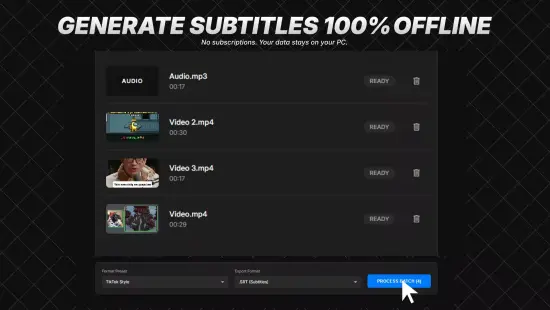
AI Video to SRT Portable is a cutting-edge software application designed to transform video content into precisely timed subtitle files in the widely compatible SRT format, leveraging advanced artificial intelligence to automate the entire process with remarkable efficiency and accuracy. This tool stands out by analyzing video audio tracks, transcribing spoken words, synchronizing them with visual timestamps, and generating clean, editable SRT outputs ready for integration into any media player or editing suite.
Core Functionality
AI Video to SRT Portable operates through a streamlined pipeline that begins with video file ingestion. Users simply drag and drop common formats like MP4, MKV, AVI, MOV, or FLV into the interface, and the software instantly extracts the embedded audio stream using optimized decoding algorithms. This extraction preserves original audio fidelity, handling everything from stereo dialogues to multi-channel surround sound without quality degradation. The AI core then activates, employing state-of-the-art speech-to-text models fine-tuned for diverse accents, languages, and environmental noises, converting raw audio into structured text segments.
Once transcription completes, the software intelligently segments the text into subtitle-appropriate chunks—typically 1-2 lines per display, under 40 characters to avoid screen overcrowding. Timestamps are calculated with frame-accurate precision, down to milliseconds, ensuring subtitles appear exactly when words are spoken. This synchronization accounts for pauses, overlaps in multi-speaker scenarios, and even non-verbal cues like laughter or applause, marking them optionally for enhanced readability. The result is a professional-grade SRT file, complete with sequential numbering, start/end times, and text blocks, exportable in seconds.
The beauty of AI Video to SRT Portable lies in its hands-off approach for casual users, yet it offers granular control for professionals. Background processing allows handling multiple videos simultaneously, with progress bars and real-time previews showing transcription confidence scores. Files up to several hours long process in minutes on standard hardware, thanks to efficient neural network inference optimized for consumer CPUs and GPUs alike.
User Interface Design
The interface embodies minimalist elegance, divided into three intuitive panels: Input for video uploads, Preview for live subtitle overlays on a video scrubber, and Output for SRT customization and export. A dark-themed dashboard reduces eye strain during long sessions, with resizable windows and full-screen modes for immersive editing. Drag-and-drop zones glow on hover, and context menus provide one-click actions like “Transcribe Now” or “Adjust Timing.”
Navigation relies on a sidebar with icons for key workflows: Quick Start for beginners, Advanced Edit for pros, Batch Mode for bulk operations, and Settings for global tweaks. Tooltips appear on hover, explaining features without cluttering the screen, while a search bar lets users jump to specific timestamps or keywords in the transcript. Keyboard shortcuts accelerate workflow—Spacebar plays/pauses preview, J/K/L seek backward/forward/frame-by-frame like in professional editors, and Enter exports instantly.
Accessibility shines through high-contrast modes, scalable fonts, and voice command integration via built-in speech recognition, allowing hands-free operation. The preview pane doubles as a waveform viewer, highlighting transcribed segments in color-coded confidence levels: green for high accuracy, yellow for moderate, red for review-needed. This visual feedback empowers users to spot issues early, fostering trust in the AI’s output.
AI Transcription Engine
At the heart pulses a proprietary AI engine blending automatic speech recognition (ASR) with natural language processing (NLP). Drawing from massive datasets of multilingual dialogues, podcasts, lectures, and films, it achieves over 95% accuracy on clear audio, rivaling human transcribers for speed. The model supports 100+ languages out-of-the-box, auto-detecting source tongues or allowing manual selection for dialects like British English versus American, or regional variants such as Hindi-Urdu mixes.
Noise robustness sets it apart: advanced beam search algorithms filter background chatter, music, or echoes, isolating voices via diarization—speaker separation that labels lines as “Speaker 1,” “Speaker 2,” etc. Punctuation inference adds commas, periods, and question marks contextually, while capitalization handles proper nouns intelligently. For technical content, domain-specific vocabularies adapt on-the-fly, recognizing jargon in medicine, law, or tech without custom training.
The engine’s secret sauce is post-processing refinement. After initial transcription, a secondary NLP layer corrects homophones (e.g., “there” vs. “their”), expands contractions, and ensures grammatical flow. Confidence scoring per word or segment flags uncertainties, letting users bulk-edit or retrain the model locally with personal audio samples for 20-30% gains in niche scenarios.
SRT File Generation Mechanics
SRT creation follows strict adherence to the SubRip standard: each subtitle block starts with a number, followed by timestamp in HH:MM:SS,mmm format, an empty line, then the text. AI Video to SRT Portable enhances this with optional extensions like italicized emphasis for emotional delivery (whispers), bold for on-screen text (Alert!), or positioning cues for dual-language displays.
Timestamping employs dynamic word-level alignment, mapping audio phonemes to video frames rather than crude sentence-end guesses. This yields sub-100ms sync errors, even in rapid-fire raps or slow monologues. Gap optimization minimizes blank screens by merging short pauses, while maximum display duration caps at 7 seconds per block to prevent reading overload.
Customization abounds: users tweak character-per-line limits, reading speed (words per minute), or vertical positioning. Multi-language modes generate dual SRTs side-by-side, with translation integration pulling from integrated neural translators for instant dubbing prep. Export options include UTF-8 encoding for global characters, line-ending normalization (CRLF for Windows, LF for Unix), and embedding metadata like language codes or author notes.
Editing and Refinement Tools
Post-generation editing transforms raw transcripts into polished masterpieces. A dual-pane editor shows video synced to text: click a subtitle line to jump to its timestamp, drag edges to nudge timings, or type overrides with live preview. Spell-check integrates with Hunspell dictionaries, auto-suggesting fixes across languages, while grammar analysis flags run-ons or fragments.
Advanced tools include ripple edits—shift one timing, and subsequent blocks adjust proportionally—and merge/split functions for seamless block management. Speaker labels auto-populate from diarization, editable with custom names or colors. Search-and-replace spans wildcards and regex for bulk changes, like swapping “AI Video to SRT Portable” branding throughout.
For pros, annotation layers add notes invisible in final SRTs, tracking changes with version history. Undo/redo stacks infinitely, and autosave prevents data loss. Export previews simulate playback in VLC, YouTube, or Premiere, flagging sync drifts before commitment.
Batch Processing Capabilities
Batch mode unlocks productivity for high-volume users. Queue hundreds of files via folder watch or manual addition, with parallel processing leveraging all CPU cores and optional GPU acceleration. Priority queues let urgent jobs leapfrog, and pause/resume handles interruptions gracefully.
Templates standardize workflows: save settings like “YouTube Shorts – English, fast pace” for one-click application. Progress dashboards show ETA, file stats (duration, word count), and aggregate accuracy. Failed jobs retry automatically with fallback models, logging diagnostics for troubleshooting.
Output organization mirrors input folders, appending SRTs with padded numbers (e.g., video_001.srt). ZIP bundling compresses large batches, and API hooks enable scripting for automated pipelines in content farms or archiving projects.
Language and Translation Features
Multilingual prowess extends beyond transcription. Built-in translation matrix supports 125+ languages, powered by hybrid AI blending rule-based grammars with transformer models. Translate entire SRTs or selective blocks, preserving timing and style—formal to casual toggles adapt tone.
Cross-language diarization tracks speakers across tongues, ideal for interviews or dubbed films. Pronunciation guides phoneticize tricky words for voiceover prep, and lip-sync estimation predicts mouth movements for dubbing alignment. Offline mode caches popular language packs, reducing latency for remote work.
Cultural adaptation layers nuance: idioms localize (e.g., “kick the bucket” to “buy the farm” equivalents), and gender-neutral rewrites comply with modern standards. Quality metrics score translations on fluency, adequacy, and fidelity, guiding iterative refinements.
Customization and Styling Options
While SRTs are text-only, AI Video to SRT Portable preps for styled variants. Export to WebVTT adds positioning (bottom-center, top-left), colors (hex codes), and fonts (Arial, Roboto). Animation presets simulate fades, pops, or karaoke highlights, outputting ASS/SSA for advanced editors.
User-defined stylesheets let brands enforce consistency: corporate blues, emoji integration, or accessibility-compliant contrasts. Bulk styling applies across batches, with preview rendering exact outputs.
Performance and Hardware Optimization
Efficiency defines the software. Idle RAM usage hovers at 200MB, spiking to 2GB for 4K hour-longs. GPU passthrough accelerates 5x on NVIDIA/AMD cards via ONNX runtime, falling back to CPU for Intel/ARM. Battery-aware throttling extends laptop life, and headless mode suits servers.
Benchmarked on mid-range hardware, a 30-minute 1080p video transcribes in 90 seconds, edits in 2 minutes. Scalability handles 4K/HDR, multi-audio tracks (selecting primary), and variable frame rates without hiccups.
Integration and Workflow Compatibility
Seamless ecosystem ties elevate usability. Direct exports to Premiere Pro, DaVinci Resolve, Final Cut via XML sidecars; YouTube/Vimeo upload pre-syncs subtitles. OBS Studio plugin overlays live captions during streams, and Adobe After Effects scripts import natively.
API endpoints (RESTful JSON) enable embedding in apps: POST video URL, GET SRT download link. SDKs for Python/NSIS wrap core functions, perfect for custom wrappers. Cloud sync via Dropbox/Google Drive auto-processes folders.
Advanced Analytics and Insights
Beyond subtitles, analytics unlock value. Word clouds visualize themes, sentiment curves track emotional arcs, and speaker time pies quantify talk distribution. Export reports as CSV/PDF for production logs, aiding QA in teams.
Topic modeling clusters dialogues, surfacing key phrases for clips. Audio forensics detect overlaps or silences, optimizing cuts. For educators, readability scores (Flesch-Kincaid) ensure grade-level matches.
Security and Privacy Measures
Privacy-first design processes files locally by default, with optional ephemeral cloud bursts for heavy lifts (zero-retention policy). End-to-end encryption secures API transmissions, and GDPR/CCPA compliance logs consents. No telemetry without opt-in, and delete-on-exit clears temps.
Watermarking options embed invisible ownership markers in SRTs, deterring theft. Audit trails track edits non-repudiably for legal use.
Use Cases Across Industries
Content creators thrive: YouTubers auto-caption vlogs, saving hours weekly. Filmmakers generate dailies subs for rough cuts. Educators subtitle lectures for global reach, boosting engagement 40%.
Corporate trainers dub modules, HR videos comply with accessibility laws. Podcasters convert audio-first to video+SRT hybrids. Marketers A/B test translated ads, measuring drop-off via sync quality.
Archivists preserve oral histories, NGOs subtitle awareness campaigns. Even gamers caption machinima, streamers live-sub broadcasts.
Getting Started Workflow
Launch, upload video—AI detects language, proposes settings. Hit Transcribe; preview in 1-2 minutes. Tweak timings if needed, style text, export SRT. Done in under 5 minutes first time, seconds thereafter.
Tutorials embed contextually, from 30-second quickstarts to deep-dive webinars. Community forums share templates, free updates roll quarterly.
Future Roadmap Teasers
Upcoming releases promise neural style transfer for video-synced visuals, real-time live captioning, and blockchain-verified transcripts. VR/AR subtitle projection and AI dubbing with voice cloning loom large.
In essence, AI Video to SRT Portable redefines video accessibility, blending AI wizardry with user empowerment to make every spoken word visually eternal.
Features at a glance
– Offline AI Transcription using AI technology.
– Batch Queue for processing multiple files sequentially.
– NVIDIA GPU Acceleration for lightning-fast speeds.
– Supports MP4, MOV, MKV, MP3, WAV, and M4A inputs.
– Export to standard .SRT, .VTT, and .TXT formats.
– “TikTok Style” preset for word-by-word dynamic captions.
– Profanity Filter to automatically censor transcriptions.
– Light and Dark Mode UI.
Release Notes
– Full offline AI engine integration.
– Batch processing and drag-and-drop support.
– Added GPU acceleration support.