
Portable Cisdem VideoPaw 7.0.0.7000 Multilingual
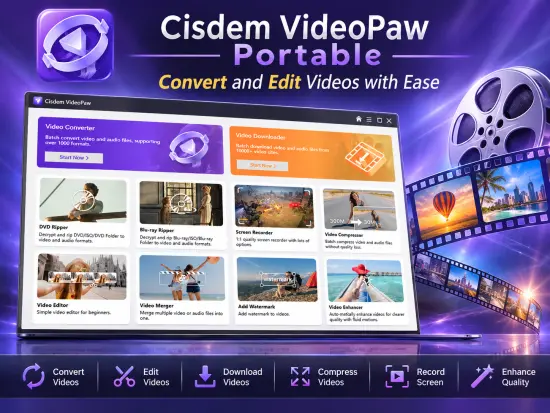
Cisdem VideoPaw Portable is a versatile multimedia application designed to simplify the way users manage, convert, optimize, edit, and download digital media. As video formats, audio codecs, streaming platforms, and playback devices continue to evolve, maintaining compatibility across different environments can become challenging. This software addresses that challenge by providing an all-in-one environment capable of handling a broad range of media-related tasks from a single interface.
Whether you are working with personal recordings, professional video projects, DVD backups, online media downloads, or device-specific conversions, Cisdem VideoPaw Portable provides a streamlined workflow that reduces the need for multiple specialized utilities. The software combines powerful conversion technology with editing tools, compression capabilities, media downloading functions, and format optimization features that make it suitable for casual users and experienced content creators alike.
The emphasis on simplicity allows newcomers to complete complex media operations without a steep learning curve, while advanced users benefit from extensive customization options for fine-tuning output quality and performance.
User-Friendly Interface Designed for Efficiency
One of the most appealing aspects of Cisdem VideoPaw Portable is its clean and organized user interface. The layout is designed to make all major functions easily accessible, reducing the amount of time users spend searching through menus or configuring unnecessary settings.
The main workspace provides quick access to various modules, including conversion, editing, downloading, ripping, compression, and recording functions. Files can be imported through traditional browsing methods or by using convenient drag-and-drop operations.
Each module follows a consistent design philosophy, ensuring that users become familiar with the software rapidly. Important controls remain visible without overwhelming the interface with technical complexity. This balance between simplicity and capability is one of the software’s strongest characteristics.
Even users who have little experience with media conversion applications can quickly understand the workflow and produce high-quality results.
Extensive Video Format Support
Modern media environments contain countless video formats, each designed for specific purposes and devices. Cisdem VideoPaw Portable provides support for an extensive collection of popular and professional video formats.
Users can work with common containers such as:
- MP4
- MOV
- MKV
- AVI
- WMV
- FLV
- WebM
- MTS
- M2TS
- MPEG
- TS
- VOB
- 3GP
- ASF
This broad compatibility eliminates many of the problems associated with unsupported formats. Users can import content from cameras, smartphones, screen recordings, downloaded videos, and archived media collections without worrying about playback limitations.
The software can then transform those files into formats optimized for specific playback requirements, ensuring maximum compatibility across operating systems, media players, mobile devices, televisions, and gaming systems.
High-Quality Audio Conversion Capabilities
Beyond video processing, Cisdem VideoPaw Portable also functions as a robust audio conversion platform. Audio extraction and format conversion are especially useful for users who want to create music collections, podcasts, audiobooks, or soundtrack archives.
Supported audio formats include:
- MP3
- AAC
- FLAC
- WAV
- M4A
- OGG
- AIFF
- WMA
- ALAC
- APE
Users can extract audio tracks from video files and save them in their preferred format. This makes it easy to convert music videos into standalone audio files or archive important audio content separately from video sources.
Advanced parameter control allows adjustments to bitrate, sample rate, codec selection, and channel configuration, providing excellent flexibility for professional workflows.
Accelerated Conversion Performance
Speed is a critical factor when processing large media collections. Cisdem VideoPaw Portable utilizes hardware acceleration technologies that significantly improve conversion efficiency without sacrificing output quality.
By leveraging modern CPU and GPU resources, the software can complete demanding conversion tasks much more quickly than traditional software-only solutions.
Users handling high-resolution video libraries, lengthy recordings, or large batches of files benefit greatly from these performance enhancements.
The optimization engine focuses on maintaining visual quality while minimizing processing times, allowing users to complete projects faster and improve overall productivity.
Batch Processing for Large Media Libraries
Managing hundreds or even thousands of media files can be time-consuming when conversions must be performed individually.
Cisdem VideoPaw Portable addresses this challenge through comprehensive batch processing functionality.
Multiple files can be imported simultaneously and processed using shared conversion settings. Users can:
- Convert multiple videos at once
- Compress several files simultaneously
- Edit batches of content
- Download numerous media items together
- Process entire playlists
- Optimize large collections efficiently
This automation significantly reduces repetitive work and is particularly beneficial for content creators, educators, media managers, and digital archivists.
Powerful Video Editing Tools
In addition to conversion features, Cisdem VideoPaw Portable includes a set of practical video editing tools that allow users to improve and customize content before exporting.
Available editing functions include:
Trimming
Users can remove unwanted sections from the beginning, middle, or end of videos. This feature is useful for eliminating mistakes, pauses, advertisements, or unnecessary footage.
Cropping
The cropping tool helps remove black bars, unwanted borders, and distracting visual elements while focusing attention on important content.
Rotation and Flipping
Videos captured with incorrectly oriented devices can be quickly corrected through rotation and flipping options.
Watermark Management
Users can add personalized branding elements, logos, copyright information, or text overlays directly into their media files.
Subtitle Integration
The software supports subtitle embedding and management, making it easier to create accessible or multilingual content.
Visual Adjustments
Brightness, contrast, saturation, and other image settings can be modified to achieve better visual quality.
These editing features eliminate the need for separate basic video editors and contribute to a more efficient workflow.
Video Compression Without Excessive Quality Loss
Large video files often create storage and sharing challenges. Uploading content to websites, emailing videos, or transferring files between devices can become difficult when file sizes are excessive.
Cisdem VideoPaw Portable includes advanced compression tools designed to reduce file size while preserving visual quality.
Users can customize compression levels according to their priorities:
- Maximum quality
- Balanced compression
- Smaller file sizes
- Device-specific optimization
Real-time previews allow users to evaluate results before final processing, helping them achieve the best balance between quality and storage efficiency.
Content creators and social media users particularly benefit from this feature when preparing videos for online publication.
Media Downloading Capabilities
An important component of Cisdem VideoPaw Portable is its integrated media downloading functionality.
The software can retrieve videos, audio content, playlists, and streaming media from numerous supported sources.
Instead of relying on browser extensions or separate download managers, users can centralize these tasks within the application.
Downloaded content can then be immediately converted, edited, compressed, or optimized without switching programs.
The downloader supports various resolution options and quality settings, allowing users to select configurations that match their storage capacity and viewing preferences.
This integration significantly streamlines multimedia management workflows.
DVD and Blu-ray Conversion Features
Physical media remains important for many users, particularly those maintaining archival collections or backing up purchased content.
Cisdem VideoPaw Portable includes dedicated DVD and Blu-ray processing capabilities that facilitate the conversion of optical media into digital formats.
Users can:
- Import movie discs
- Process VIDEO_TS folders
- Read ISO images
- Convert media collections to digital formats
- Optimize files for portable devices
Digital conversion simplifies playback, backup creation, and long-term preservation.
The ability to consolidate physical media collections into searchable digital archives remains a valuable feature for home entertainment enthusiasts and collectors.
Screen Recording Functionality
Modern content creation increasingly relies on screen recording technologies. Cisdem VideoPaw Portable incorporates recording capabilities that allow users to capture activity directly from their displays.
Potential uses include:
- Software tutorials
- Educational presentations
- Product demonstrations
- Online training sessions
- Gameplay recordings
- Technical documentation
The recording system is designed for straightforward operation while maintaining good output quality.
Users can create professional demonstrations without requiring separate screen capture applications.
Audio Recording Support
The software also includes dedicated audio recording functionality.
This capability can be useful for:
- Podcast production
- Voice narration
- Academic recordings
- Business presentations
- Audio notes
- Music capture
Integrated recording features reduce software dependency and support more comprehensive multimedia workflows.
Webcam Capture Features
Webcam recording expands the software’s content creation capabilities even further.
Users can record:
- Video messages
- Online presentations
- Training content
- Educational lessons
- Personal updates
- Marketing materials
The streamlined recording environment makes webcam capture accessible even for users with limited video production experience.
Device-Specific Output Profiles
Not every device supports every media format.
To simplify compatibility, Cisdem VideoPaw Portable offers numerous predefined output profiles tailored for popular hardware platforms.
These presets automatically adjust technical settings such as:
- Resolution
- Codec selection
- Audio format
- Bitrate
- Aspect ratio
Users simply choose their target device, and the software handles the technical configuration automatically.
This dramatically reduces the complexity of preparing content for smartphones, tablets, televisions, game consoles, and portable media players.
Media Library Organization Benefits
Large multimedia collections can quickly become difficult to manage.
By combining downloading, conversion, editing, compression, ripping, recording, and optimization capabilities in one package, Cisdem VideoPaw Portable helps centralize media workflows and maintain better organization.
Rather than moving files between multiple utilities, users can handle most common tasks from a single environment.
This approach minimizes workflow interruptions and improves productivity.
Suitable for Beginners and Professionals
A notable strength of Cisdem VideoPaw Portable is its broad appeal.
Beginners appreciate:
- Simplified controls
- Guided workflows
- Device presets
- Clean interface
- Easy conversion procedures
Advanced users benefit from:
- Format flexibility
- Parameter customization
- Batch processing
- High-performance conversion
- Comprehensive media management capabilities
The software successfully accommodates both groups without sacrificing usability or functionality.
Reliable Everyday Multimedia Processing
Daily media management tasks often involve repetitive operations such as format conversion, media optimization, downloading, compression, and editing.
Cisdem VideoPaw Portable brings these functions together within a cohesive environment that reduces workflow complexity and improves efficiency.
Its versatility makes it suitable for personal users, students, educators, content creators, business professionals, digital archivists, and multimedia enthusiasts seeking a complete media toolkit.
The continued expansion of supported formats, recording features, downloading technologies, editing capabilities, and performance improvements reinforces its position as a comprehensive solution for modern multimedia management.
Features at a Glance
- All-in-one multimedia processing platform
- Video conversion between numerous formats
- Audio conversion and extraction tools
- Batch processing support
- Hardware-accelerated performance
- Video compression functionality
- Built-in video editor
- Cropping, trimming, and rotation tools
- Watermark insertion capabilities
- Subtitle management support
- DVD conversion tools
- Blu-ray conversion support
- ISO image processing
- Integrated media downloader
- Playlist downloading support
- Screen recording module
- Audio recording functionality
- Webcam recording capability
- Device-specific output presets
- High-quality output generation
- User-friendly interface
- Real-time preview options
- Media optimization tools
- Extensive format compatibility
- Suitable for beginners and advanced users
Release Notes:
1. Redesigned the user interface for an improved experience.
2. Improved downloading, including fixes for private link downloads and live stream downloading.
3. Enhanced the video editing module.
4. Added support for Dark Mode.
5. Updated the device list.
6. Fixed some crash issues.