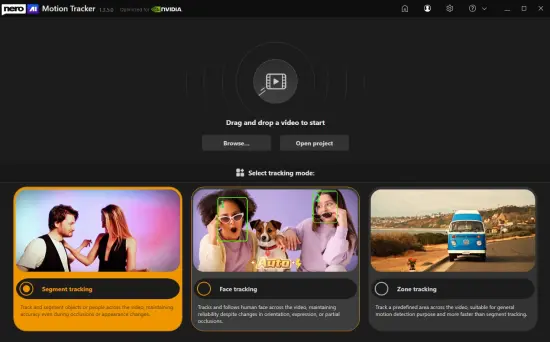
Portable Nero AI Motion Tracker 1.3.5.0 Multilingual

Nero AI Motion Tracker Portable is a specialized video processing application designed to automate the detection, tracking, and manipulation of moving elements within digital footage. Built on advanced artificial intelligence architectures, the software eliminates the need for manual keyframing and frame-by-frame adjustment that traditionally characterized motion tracking workflows.
The application analyzes video content to identify objects, faces, and specific zones, then maintains precise lock on these elements as they move through the frame across time. This capability serves multiple professional and personal use cases, from privacy protection and content anonymization to creative effects and dynamic annotation.
The portable distribution model ensures that the software can operate from any directory or removable storage device without requiring system-wide installation or registry modifications, making it suitable for users who maintain clean system environments or work across multiple computing stations.
Core Tracking Technology and Artificial Intelligence Foundation
The centerpiece of Nero AI Motion Tracker Portable is its neural network-based tracking engine, which has been trained on extensive datasets of moving objects across diverse lighting conditions, motion patterns, and environmental contexts. This training enables the software to distinguish between foreground subjects and background elements with high accuracy, even in challenging scenarios involving rapid movement, partial occlusions, or complex camera motion. The AI models operate in real-time during the tracking process, continuously analyzing each frame to predict object position and adjust the tracking parameters accordingly. This predictive capability allows the software to maintain lock on subjects even when they temporarily disappear behind other objects or move outside the frame boundaries, automatically resuming tracking when the subject reappears.
Three distinct tracking modes form the operational foundation of the application, each optimized for different use cases and subject types. Segment tracking represents the most advanced mode, utilizing instance segmentation algorithms to identify and isolate specific objects within the scene. This mode creates precise masks that conform to the actual shape and boundaries of tracked elements, enabling effects to be applied with pixel-level accuracy. The segmentation engine can distinguish between multiple objects of the same class, allowing users to track individual people in a crowd or separate vehicles in traffic footage without interference between tracking targets.
Face tracking mode specializes in human facial detection and recognition, employing dedicated neural networks optimized for the unique characteristics of human faces. This mode can track multiple faces simultaneously, maintaining individual identity labels even when subjects move in and out of frame or cross paths with one another. The face tracking engine accounts for variations in head orientation, facial expressions, and partial obstructions such as hands, accessories, or other objects that may temporarily cover portions of the face. This robustness makes it particularly valuable for privacy-focused applications where consistent face anonymization is required throughout extended footage.
Zone tracking provides a more flexible approach for scenarios where precise object boundaries are less critical than general area monitoring. Users define rectangular or custom-shaped regions within the frame, and the software tracks motion within those zones. This mode is ideal for monitoring specific areas of interest, such as doorways, windows, or equipment locations, where the exact identity of moving elements is secondary to detecting and responding to movement within the designated space. Zone tracking requires less computational resources than segment or face tracking, making it suitable for longer footage or systems with limited processing capacity.
Privacy Protection and Anonymization Capabilities
One of the primary applications of Nero AI Motion Tracker Portable is the protection of individual privacy through automated anonymization of identifiable features in video content. The software offers multiple effect options specifically designed for this purpose, including mosaic blur, Gaussian blur, and pixelation effects that can be applied to tracked faces, license plates, or other sensitive elements. These effects are rendered dynamically, following the tracked elements precisely throughout their movement in the footage. The result is professional-quality anonymization that maintains visual consistency without the telltale signs of manual tracking errors such as slipping masks or misaligned effects.
The mosaic effect deserves particular attention for its effectiveness in privacy applications. This effect divides the tracked area into a grid of colored squares that obscure detail while maintaining the general shape and movement of the underlying subject. The mosaic size and intensity are fully adjustable, allowing users to balance privacy protection against visual aesthetics based on their specific requirements. For legal or regulatory compliance scenarios, the effect can be configured to meet specific anonymization standards, ensuring that tracked elements remain unrecognizable even under close inspection or frame-by-frame analysis.
Blur effects offer an alternative approach that maintains more visual continuity while still obscuring identifiable details. Gaussian blur creates a smooth, out-of-focus appearance that integrates naturally with the surrounding footage, making it less visually intrusive than mosaic effects while still providing effective anonymization. The blur radius can be adjusted to achieve the desired level of obscuration, and the effect can be combined with opacity controls to create subtle privacy masks that protect identities without completely removing visual context. This approach is particularly valuable for documentary or journalistic applications where maintaining some visual information about tracked subjects is important for narrative purposes.
For scenarios requiring complete visual removal, the software supports solid color masks and custom image overlays that can completely obscure tracked elements. These options are useful for situations where even blurred or mosaic-obscured elements might reveal sensitive information through their shape, size, or movement patterns. Custom overlays can include logos, graphics, or contextual information that replaces the obscured content while maintaining visual interest and narrative flow in the final video.
Creative Effects and Dynamic Annotation
Beyond privacy applications, Nero AI Motion Tracker Portable opens extensive creative possibilities for video producers, content creators, and educators who wish to add dynamic visual elements to their footage. The software can pin text, graphics, stickers, and custom images to tracked objects, creating annotations that move naturally with the underlying subject. This capability transforms static overlays into intelligent visual elements that maintain their relationship to scene content regardless of camera movement or subject motion.
Text annotation features enable users to add labels, captions, or informational content that follows specific objects throughout the video. This is particularly valuable for educational content, where identifying and labeling equipment, processes, or subjects enhances viewer understanding. The text can be styled with custom fonts, colors, sizes, and backgrounds to match the visual aesthetic of the production or to ensure maximum readability against varying backgrounds. Animation options allow text to fade in and out, scale, or change color based on time or tracking conditions, adding another layer of creative control to the annotation process.
Graphic overlays extend these capabilities to include arrows, circles, highlights, and other visual indicators that draw viewer attention to specific elements or actions within the scene. These graphics can be configured to respond to tracking conditions, such as changing color when a tracked object enters a specific zone or pulsing to emphasize particular moments. The flexibility of the graphic system allows for everything from simple pointing arrows to complex multi-element compositions that create professional-quality visual effects without requiring dedicated motion graphics software.
Custom image overlays enable users to attach logos, product images, or other graphics to tracked objects, creating opportunities for branded content, product placement visualization, or creative compositing. The software handles scaling and perspective adjustments automatically, ensuring that overlaid images maintain appropriate proportions relative to the tracked subject throughout its movement. This capability is particularly valuable for commercial applications where consistent brand presentation across varying shot compositions is essential.
Workflow Integration and User Experience Design
Nero AI Motion Tracker Portable is designed to integrate smoothly into existing video production workflows, whether as a standalone tool or as part of a larger editing pipeline. The application accepts a wide range of input video formats, including common consumer formats like MP4 and AVI as well as professional codecs used in broadcast and cinema production. This format flexibility ensures that users can work with footage from any source without requiring intermediate conversion steps that might degrade quality or introduce compatibility issues.
The user interface follows a logical progression that mirrors the natural tracking workflow: import footage, select tracking mode, define tracking targets, apply effects, and export results. Each stage is supported by contextual tools and visual feedback that help users achieve optimal results without requiring extensive technical knowledge. The preview window provides real-time visualization of tracking results, allowing users to verify accuracy before committing to the full processing operation. This immediate feedback loop significantly reduces the iteration time typically associated with motion tracking tasks, enabling rapid refinement of tracking parameters and effect settings.
Timeline integration allows users to visualize tracking data across the duration of the video, identifying potential issues such as tracking loss or effect inconsistencies. The timeline view displays tracking confidence indicators that highlight moments where the AI engine may have struggled to maintain lock on the subject. Users can manually intervene at these points to adjust tracking parameters or add keyframes that guide the software through challenging sequences. This hybrid approach combines the efficiency of automated tracking with the precision of manual control when needed.
Batch processing capabilities enable users to apply the same tracking configuration to multiple video files, significantly accelerating workflows that involve consistent treatments across footage sets. This is particularly valuable for projects such as surveillance video review, where similar anonymization requirements apply across many hours of footage, or for series content where consistent branding elements must be applied to multiple episodes or segments.
Performance Optimization and Hardware Acceleration
The computational demands of AI-powered motion tracking are substantial, requiring sophisticated optimization strategies to deliver practical processing times. Nero AI Motion Tracker Portable leverages GPU acceleration wherever possible, offloading intensive neural network inference operations to dedicated graphics hardware. This approach can provide order-of-magnitude improvements in processing speed compared to CPU-only execution, making real-time or near-real-time tracking feasible on modern systems. The software automatically detects available GPU resources and configures itself to maximize hardware utilization without overwhelming system resources or causing instability.
Memory management is another critical aspect of performance optimization, particularly when processing high-resolution or extended-duration footage. The application employs intelligent buffering strategies that balance memory usage against processing efficiency, ensuring stable operation even on systems with limited RAM. For extremely large projects, the software can process footage in segments, managing disk-based temporary storage to extend effective working memory beyond physical limits. This approach enables processing of projects that would otherwise exceed system capabilities, albeit with some performance penalty due to increased disk I/O operations.
Multi-threading support allows the software to utilize multiple CPU cores for parallel processing of independent operations such as effect rendering, encoding, and file I/O. This parallelization complements GPU acceleration to maximize overall system utilization and minimize processing time. The software automatically adjusts its threading configuration based on detected hardware capabilities, ensuring optimal performance across diverse system configurations from entry-level laptops to high-end workstation-class machines.
Export performance is optimized through support for hardware-accelerated video encoding, taking advantage of dedicated encoding blocks in modern GPUs to accelerate output generation. This capability is particularly valuable for high-resolution output formats where software encoding would be prohibitively slow. The export engine supports a range of quality and compression settings, allowing users to balance output file size against visual fidelity based on their specific distribution requirements.
Output Flexibility and Format Support
The final stage of any motion tracking workflow is export, and Nero AI Motion Tracker Portable provides extensive options for output format, quality, and delivery. The primary export format is MP4 with H.264 or H.265 encoding, providing excellent compatibility with virtually all video playback platforms and devices. Users can configure resolution, frame rate, and bitrate settings to match their target distribution channel, whether that be web streaming, social media platforms, broadcast delivery, or archival storage.
For users who require integration with professional editing workflows, the software supports export of tracking data in formats compatible with major non-linear editing applications. This allows tracked elements to be imported into editing software where they can be combined with additional effects, color grading, and audio post-production. The ability to separate tracking data from rendered output provides maximum flexibility for complex projects where motion tracking is just one component of a larger post-production pipeline.
Quality presets simplify the export process for common use cases, providing optimized settings for platforms such as YouTube, Vimeo, and social media channels. These presets account for platform-specific requirements such as maximum resolution, recommended bitrates, and preferred codecs, ensuring that exported videos meet distribution standards without requiring manual configuration. Advanced users can create custom presets that capture their preferred export settings for repeated use across multiple projects.
Portability and System Integration Considerations
The portable nature of Nero AI Motion Tracker Portable extends beyond simple execution from removable media to encompass a comprehensive approach to system independence and user control. All configuration data, user preferences, and processing history are stored within the application directory, ensuring that the software leaves no trace on the host system. This design philosophy supports users who work in shared or restricted environments where software installation is not permitted or where system cleanliness is a priority.
License management in the portable version operates without requiring online activation or persistent internet connectivity, enabling use in offline or air-gapped environments where necessary. License files can be transferred between systems along with the application directory, maintaining full functionality across different workstations without requiring re-activation or online verification. This approach respects user privacy and provides maximum flexibility for deployment scenarios ranging from personal use to enterprise distribution.
Update mechanisms are designed to work within the portable framework, allowing users to download and apply updates without compromising the portable nature of the installation. Update packages can be downloaded on connected systems and transferred to offline installations, ensuring that portable users have access to the latest features and improvements without requiring constant internet connectivity. The update process preserves user settings and configurations, maintaining workflow continuity across software versions.
Advanced Configuration and Automation
For users with advanced requirements, Nero AI Motion Tracker Portable exposes configuration options that enable fine-tuning of tracking behavior and effect rendering. Tracking sensitivity parameters allow adjustment of how aggressively the AI engine pursues subject movement, with higher sensitivity providing tighter tracking at the cost of potential instability in challenging conditions. Effect rendering parameters control the quality and performance characteristics of applied effects, enabling optimization for specific output requirements or hardware capabilities.
Command-line interface support enables script-based automation of tracking operations, facilitating integration into automated video processing pipelines or batch workflows. This capability is particularly valuable for users who need to apply consistent tracking treatments to large volumes of footage or who wish to incorporate motion tracking into larger automated production systems. The command-line interface supports all major configuration options, allowing complete control over tracking behavior without requiring manual interface interaction.
Configuration file editing provides another avenue for advanced customization, allowing users to modify application behavior beyond what is exposed through the graphical interface. This approach enables power users to experiment with experimental features, adjust internal parameters, or create specialized configurations for specific use cases. The configuration file format is well-documented, supporting community sharing of optimized settings for common scenarios.
Error Handling and Recovery Mechanisms
Robust error handling is essential for any video processing application, particularly one dealing with the computational complexity of AI-powered motion tracking. Nero AI Motion Tracker Portable implements comprehensive error detection and recovery strategies that minimize data loss and maximize processing completion rates. Tracking failures are detected automatically, with the software attempting to recover by adjusting tracking parameters or requesting user intervention when automatic recovery is not possible.
Checkpoint saving during long processing operations ensures that progress is preserved even in the event of unexpected interruptions such as power loss or system crashes. Users can resume processing from the last checkpoint rather than restarting from the beginning, significantly reducing the impact of failures on overall workflow efficiency. This feature is particularly valuable for extended footage or high-resolution projects where processing times may span hours or even days.
Log file generation provides detailed records of processing operations, including tracking confidence metrics, effect application details, and any errors or warnings encountered during processing. These logs serve both diagnostic purposes for troubleshooting problematic projects and documentation purposes for quality assurance in professional environments where processing history must be maintained for compliance or auditing reasons.
Future-Proof Architecture and Extensibility
The software architecture underlying Nero AI Motion Tracker Portable is designed for longevity and adaptability, employing modular components that can be updated or replaced independently as technology evolves. This approach ensures that improvements in AI tracking algorithms, effect rendering engines, or export codecs can be incorporated without requiring complete application rewrites or disruptive version changes. The modular design also supports potential future extensions such as additional tracking modes, new effect types, or integration with emerging video formats and standards.
Plugin architecture enables third-party developers to create custom effects, tracking modes, or export formats that extend the application’s capabilities beyond the base feature set. This extensibility model creates opportunities for specialized functionality tailored to specific industries or use cases, from medical imaging applications to security and surveillance workflows. The plugin API is documented and supported, encouraging community development and innovation around the core platform.
Cloud integration options provide pathways for users who wish to leverage cloud-based processing resources for particularly demanding projects or who need to collaborate on tracking projects across distributed teams. While the portable version maintains full standalone functionality, optional cloud features enable outsourcing of intensive processing tasks or sharing of tracking data and configurations between collaborators. This hybrid approach balances the independence of portable software with the scalability and collaboration benefits of cloud-based services.
Features:
Segment Tracking
Track and segment objects or people across the video, maintaining accuracy even during occlusions or appearance changes.
Face Tracking
Tracks and follows human faces across the video, maintaining reliability despite changes in orientation, expression, or partial occlusions.
Zone Tracking
Track a predefined area across the video, suitable for general motion detection purpose and more faster than segment tracking.
Track and segment any object
Moving subjects often change angles, get blocked, or disappear behind others. Manually adjusting the tracking box frame-by-frame is tedious and inaccurate. With Nero’s Segment Tracking, you can lock onto people or objects even when they change appearance or face occlusion. Easily pin text, clip art, or effects to the action and let AI handle the heavy lifting.
Auto-detect and protect faces
Interviews and public footage often contain faces that need anonymity. Tracking them as they move, turn, or change expression is a manual nightmare for editors. Use Nero’s Face Tracking to automatically recognize and follow human faces across the video. Apply mosaic or blur effects instantly to hide identities without editing a single frame manually.
Fast zone tracking & export
For general motion detection or covering specific areas like license plates, you need a solution that is fast and doesn’t bog down your system. Nero’s Zone Tracking covers predefined areas faster than other modes. It utilizes NVIDIA GPU acceleration to process quickly and export your final MP4 without losing the original video quality.
Conclusion
Nero AI Motion Tracker Portable represents a sophisticated solution for automated video element tracking, combining cutting-edge artificial intelligence with practical workflow considerations to deliver professional results without requiring professional-level expertise or investment. The application’s three tracking modes address the full spectrum of motion tracking needs from precise object segmentation to general zone monitoring, while the extensive effect library supports both privacy protection and creative enhancement applications. Performance optimization through GPU acceleration and intelligent resource management ensures that the software can handle demanding projects on a wide range of hardware configurations, from entry-level systems to high-end workstations. The portable distribution model respects user preferences for system cleanliness and deployment flexibility, while the comprehensive feature set and advanced configuration options provide the depth required for professional applications. For anyone working with video content who needs reliable, efficient motion tracking capabilities, Nero AI Motion Tracker Portable offers a compelling combination of power, flexibility, and ease of use that addresses the full range of modern video production requirements.