

Portable Directory List and Print Pro 4.39
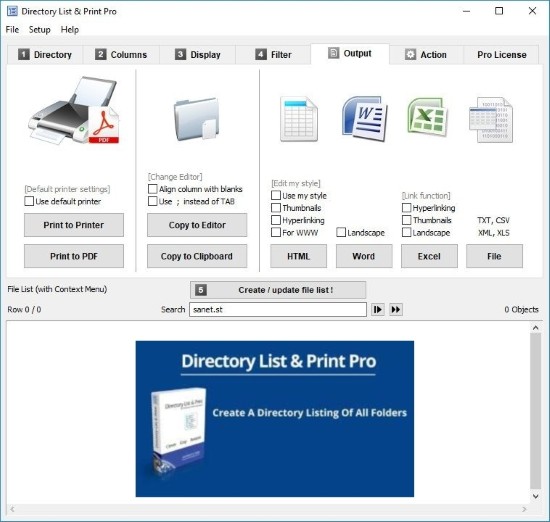
Directory List & Print Portable is a versatile and highly customizable directory listing utility designed exclusively for Windows operating systems, empowering users to generate detailed inventories of files and folders from local drives, network shares, USB devices, or even remote locations, with precise control over displayed attributes, sorting criteria, filtering rules, and output formats ranging from simple text files to richly formatted HTML tables, Microsoft Office documents, PDFs, and more.
Developed by Infonautics GmbH, this shareware application—available in free and Pro editions—stands out for its wizard-like simplicity combined with professional-grade power, allowing IT administrators to audit storage usage, legal professionals to catalog case files, photographers to index image libraries by metadata, developers to document project structures, and everyday users to print organized backups or shared folder contents without the limitations of Windows Explorer’s basic list views.
Whether scanning gigabytes of data across recursive subfolders or producing a neatly paginated report with hyperlinks, row numbers, checksums, and custom headers, Directory List & Print Portable transforms chaotic directories into actionable, exportable insights, supporting batch processing, command-line automation, and integration with tools like Excel for further analysis.
The Pro version elevates the free edition’s core capabilities with advanced features such as CRC32/MD5/SHA checksum generation for integrity verification, XMP metadata extraction from Adobe images (titles, creators, dates), bulk file operations (copy/move/delete/rename/attributes), folder tree printing with expandable hierarchies, and enhanced layouts including HTML styling (fonts, colors, CSS), making it indispensable for data migration projects, compliance audits, asset inventories, and software release documentation where precision and completeness are paramount.
Selection and Scanning Interface
Directory List & Print Portable launches to a straightforward three-panel wizard interface optimized for efficiency:
-
Left Panel (Directories): Tree view navigates drives/folders with favorites (My Documents, Program Files, Temp), recursion depth slider (1-99 levels or unlimited), and quick picks for system paths (AppData, Windows, OneDrive). Network UNC paths (\server\share) and mapped drives supported seamlessly.
-
Center Panel (Columns): Checkbox grid selects attributes displayed—essential (name, path, size, modified/created date/time), advanced (attributes R/W/H/S, owner, CRC checksums, row #), metadata (image dimensions, audio bitrate, video duration), custom (calculated fields like age in days).
-
Right Panel (Preview): Live text list updates as selections change, sortable headers (click name sorts alpha, size numerical), resizable columns.
Double-click panels toggle groups (Basic, Dates, Size, Attributes, Multimedia). “Display Details” button previews full paths/extensions for refinement.
Scan button initiates: multi-threaded enumeration handles millions of files swiftly (1M/sec on SSDs), progress bar with ETA/cancel. Huge trees (100GB+) pause/resume without data loss.
Filtering and Sorting Power
Filtering refines lists pre-scan/post:
-
Name/Extension: Wildcards (jpg, photo?.png), regex (^backup..bak$).
-
Size/Date: >1MB, modified since 2025-01-01, age <30 days.
-
Attributes: Hidden/system/archive, owner matches “DOMAIN\User”.
-
Content: Text search within files (Pro: multi-file grep).
Sorting 50+ columns ascending/descending, multi-column (name then date), stable for ties.
Output Formats and Printing
Pro’s output versatility shines:
-
Text/CSV: Tab/comma-delimited for Excel/import.
-
Word/Excel: Native DOCX/XLSX with formatting/tables.
-
HTML: Tables with CSS (colors, fonts, zebra stripes), hyperlinks to files.
-
PDF: Paginated, headers/footers, landscape/portrait.
-
XML: Structured for databases.
-
Clipboard: RTF/plain for paste.
Print preview paginates, scales columns, adds page X/Y, custom headers (“Inventory as of 2026-01-13”). Batch prints multiple scans.
Pro-Exclusive Advanced Features
-
Checksums: CRC32/MD5/SHA1/256/512 verify integrity/downloads.
-
XMP Metadata: Adobe tags (Title/Description/Creator/Date) for photos.
-
Bulk Operations: Select/copy/move/delete/rename/attrib from list.
-
Folder Trees: Hierarchical print/export (expandable HTML).
-
Templates: Save column/filter/output configs.
-
CLI:
dlpp.exe /dir C:\ /cols name,size,date /out list.csv.
Use Cases Across Professions
IT Admins: Audit servers (sizes/owners), license compliance (EXE counts).
Photographers: Catalog shoots (dimensions/DPI/metadata), web galleries (HTML thumbs).
Lawyers: Case files (dates/authors), discovery (filtered exports).
Developers: Project inventories (source lines via content scan), release notes.
Archivists: Backup verification (checksums), migration logs.