Portable FileViewPro Gold Edition 1.9.8.23 Multilingual
FileViewPro Portable is a comprehensive file viewer and universal opener software developed for Windows operating systems, designed to eliminate the frustration of encountering unknown file formats by providing a single, intuitive application capable of handling hundreds of different document types, media files, archives, and more without requiring additional installations.
This premium edition of the FileViewPro suite promises to open any file instantly through a simple drag‑and‑drop interface, supporting everything from common Office documents and PDFs to obscure image formats, video codecs, audio streams, compressed archives, and even CAD drawings or database files, making it an essential tool for users who receive miscellaneous attachments via email, downloads, or shared drives.
With features like built‑in printing, emailing, ZIP compression, text search, and detailed file property inspection, FileViewPro Portable positions itself as a cost‑effective alternative to purchasing dozens of specialized programs, claiming to save users over $1,000 in software costs by consolidating functionality into one lightweight package compatible with Windows 11,10, 8, 7, Vista, XP, and 2000.
The software’s core appeal lies in its simplicity and breadth: rather than struggling with error messages like “Windows cannot open this file” or hunting for niche converters online, users simply drag the mystery file into FileViewPro’s window, and it automatically detects the format, renders the content, and provides actionable options tailored to that type—viewing spreadsheets in tabular form, playing videos with controls, extracting archives, or converting images—all while displaying comprehensive metadata such as file size, path, creation/edit/access dates, and MIME type. Portable enhancements include priority support for over 400 formats (expanding on the standard version’s 300+), batch processing for multiple files, advanced search within documents, one‑click sharing via email or cloud links, and premium printing with layout previews, positioning it as a professional tool for office workers, IT support staff, digital hoarders, and casual users alike.
Universal File Opening Mechanism
FileViewPro Portable’s engine employs a modular architecture where built‑in parsers and decoders handle each file category independently, ensuring robust support without conflicts between codecs or viewers. For documents, it renders Microsoft Office formats (DOC, DOCX, XLS, XLSX, PPT, PPTX), OpenOffice (ODT, ODS, ODP), PDFs, RTFs, and text files (TXT, CSV, LOG) with zoom, page navigation, and text selection/copy capabilities. Spreadsheets display as interactive grids with cell navigation, formula evaluation where possible, and export to CSV/Excel; presentations show slide carousels with thumbnail previews and full‑screen mode.
Image support encompasses over 100 raster formats including JPEG, PNG, GIF, BMP, TIFF, WebP, ICO, RAW camera files (CR2, NEF, ARW), vector graphics (SVG, EPS, PDF), and CAD previews (DWG, DXF thumbnails). Viewers provide rotation, flip, zoom (fit page/width/100%), slideshows, and basic edits like crop/resize (non‑destructive). Animated GIFs/WebPs play looped; multi‑page TIFFs paginate smoothly.
Media playback covers video (AVI, MP4, MKV, MOV, WMV, FLV, 3GP, WebM, M4V) and audio (MP3, WAV, M4A, FLAC, OGG, WMA, AAC), with embedded players offering play/pause, seek, volume, and subtitle support for MKV/MP4. DVDs/Blu‑rays mount as ISOs for navigation, extracting menus/chapters. Podcasts and ringtones (M4R, AMR) preview with waveforms.
Archives unzip RAR, ZIP, 7Z, TAR, GZ, BZ2, CAB, ISO with tree views, drag‑extract, and preview panes for nested files. Password‑protected extracts prompt securely.
Cadastre/databases (DBF, KML previews), eBooks (EPUB, MOBI thumbnails), and executables (EXE/DLL metadata, PE headers) round out coverage, displaying properties without execution risks.
Drag‑and‑Drop Workflow and User Interface
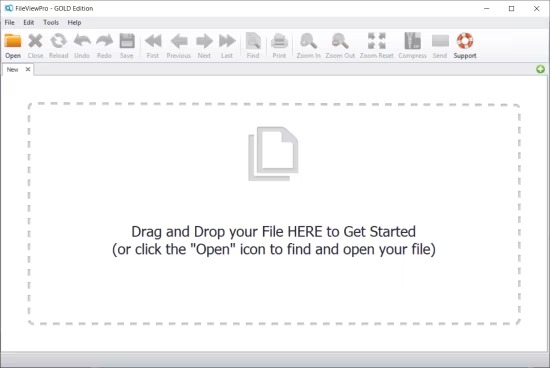
The interface prioritizes immediacy: a central drop zone spans the window, with sidebar categories filtering by type (Documents, Images, Audio, Video, Archives, Other) once opened. Toolbar icons handle universal actions: Print (layout preview, duplex options), Email (attach/share link), ZIP (compress folders), Search (find/replace text across docs), Properties (full metadata pane).
Clean, modern UI adapts to themes, with tabbed multi‑document support for batch viewing. Zoom/pan gestures work universally; keyboard shortcuts (Ctrl+O open, Ctrl+P print) accelerate use. Portable adds dark mode, high‑DPI scaling, and batch queue for processing 100+ files sequentially.
Printing and Document Output
Printing shines for received docs: PDFs/Docs format to any printer with margins, scaling (fit/page), watermarks, and N‑up layouts (4‑per‑page). Spreadsheets print grids with headers; images optimize DPI/resolution for photo paper. Batch printing queues jobs, collating multi‑page sets.
PDF export retains fidelity, embeddable fonts, hyperlinks. Gold’s “Print to PDF Pro” adds bookmarks, security (passwords, permissions).
Search, Compression, and Sharing Features
Text search scans contents recursively (docs, archives), highlighting matches with context snippets. Regex support (Gold) enables advanced queries.
ZIP tool compresses files/folders with levels (store/fast/ultra), splitting large archives, password protection.
Sharing emails files/links via defaults (Outlook/Gmail), or generates secure temp URLs for non‑email recipients.
File Properties and Metadata Viewer
Universal properties pane reveals details: dimensions (images/videos), bitrate/duration (media), sheets/pages (docs/spreadsheets), compression ratio (archives), MIME/extensions, geolocation (photos/videos), EXIF/IPTC tags. Batch mode scans folders, exporting metadata to CSV/JSON for inventories.
Performance, Compatibility, and Gold Enhancements
Lightweight (110MB install), it launches instantly, handling GB files without lag via streaming decoders. Windows 2000‑11 compatible, 1GHz CPU/1GB RAM min.
Gold upgrades batching (unlimited), 400+ formats (vs 300), OCR text extraction, batch convert (image formats, audio transcodes), priority support.
Use Cases Across Scenarios
Office Workers: Open client attachments (mixed formats) without app hunts.
IT Support: Preview logs/databases/CAD previews during repairs.
Digital Nomads: ZIP/share large files, print receipts anywhere.
Hoarders: Catalog archives, extract nested zips.
Creatives: Quick media previews without full editors.
FileViewPro Portable redefines file access as effortless universality—drag, view, act. Its breadth, simplicity, and extras make “unsupported format” obsolete, saving time/money across Windows workflows.