

Portable Frammer 1.0.5 (x64)
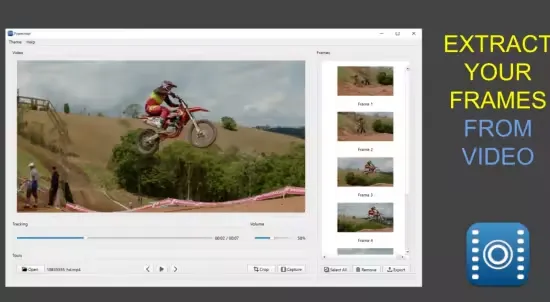
Frammer Portable is a minimalist yet powerful video frame extraction application available across iOS, macOS, and Windows platforms through the Microsoft Store, meticulously designed for filmmakers, photographers, content creators, videographers, and animation enthusiasts who need to precisely capture and export individual frames from videos as high-quality still images for storyboarding, reference screenshots, promotional materials, print posters, or digital art projects.
This elegantly simple tool stands out with its touch-optimized, gesture-driven interface that allows users to scrub through videos frame-by-frame at half-speed or full-speed in both forward and reverse directions, using intuitive finger taps for play/pause, sliders for precise positioning, and multi-touch gestures for cropping, rotating, and scaling selected frames before saving them as JPEG, PNG, or TIFF files directly to the photo library or shared albums.
Whether dissecting a cinematic sequence to analyze director’s choices, pulling key moments from smartphone footage for social media graphics, creating custom thumbnails for YouTube videos, or archiving pivotal frames from 4K/8K high-dynamic-range recordings without quality loss, Frammer delivers pixel-perfect extraction with zero bloat, running offline and locally to ensure privacy and performance on devices ranging from iPhone SE to high-end MacBooks and Windows laptops.
The app’s philosophy embodies “precision through simplicity”—eschewing complex menus or feature creep in favor of a single-screen workflow where videos from the device’s camera roll appear in a clean list, tapping one launches full-screen playback with overlaid controls that fade during scrubbing, enabling creators to isolate the exact millisecond of action with surgical accuracy. Compatible with all major video codecs including H.264, H.265/HEVC, ProRes, and AV1, Frammer handles everything from 240fps slow-motion clips to multi-gigabyte cinema files, outputting frames at native resolution with optional adjustments for composition, aspect ratio, and export quality.
Core Frame Extraction Workflow
Frammer’s interface prioritizes tactile control:
Video Library Access
-
Instantly lists all device-saved videos (Camera Roll, Recents, Albums).
-
Thumbnails with duration/dates; search by name.
-
Import from Files/iCloud (iOS/macOS), drag-drop (Windows).
Precise Scrubbing and Playback
-
Tap Center: Play/pause toggle.
-
Frame Advance: Swipe left/right single-frame steps.
-
Half-Speed Scrub: Hold finger on screen—slow-motion forward/backward.
-
Slider Precision: Thumb-drag timeline with frame-accurate snapping (1/60s increments).
-
Loop Section: Pinch-select range for repeated review.
Visual feedback: frame counter (e.g., “Frame 1247/3000”), timecode (00:12.47), resolution indicator.
Frame Capture and Editing
Once positioned:
-
Instant Extract: Double-tap or “Capture” button saves current frame.
-
Crop Tool: Pinch-zoom crop box, aspect presets (16:9, 1:1, 4:5 Instagram).
-
Rotate: Two-finger twist 90°/180°/270° or free-angle.
-
Scale/Fill: Maintain aspect or stretch-fit canvas.
-
Preview Overlay: Before/after split-view.
Export Options
-
Formats: JPEG (quality slider), PNG (lossless alpha), TIFF (print).
-
Resolution: Native or custom upscale/downscale.
-
Batch: Multi-select frames, export zip/album.
-
Share: Photos app, AirDrop, Files, email, social (optimized sizes).
Advanced Features for Professionals
High-Frame-Rate Support
Optimized 240/120/60fps slow-mo—extract buttery-smooth sequences for motion studies.
HDR and Wide Color
Preserves 10-bit Rec.2020, Dolby Vision metadata in exports.
Animation and GIF Handling
Frame-by-frame from animated GIFs/WebP; export sequences numbered (frame_0001.png).
Reference Mode
Split-screen: video scrubber + frame preview + notes overlay for storyboards.
Performance and Compatibility
Native acceleration (Metal/OpenGL/DirectX):
-
4K/60fps scrub 60fps smooth (M1+).
-
8K support (previewed).
-
Offline, local processing—no cloud.
iOS 11+, macOS 11+, Windows 10+.
Creative Workflows
Filmmakers: Storyboard pulls (analyze blocking/lighting).
Photographers: Video light tests to stills.
Social Creators: Viral moment screenshots.
Animators: Keyframe references.