

Portable Free Video Editor 1.4.64.903 Premium
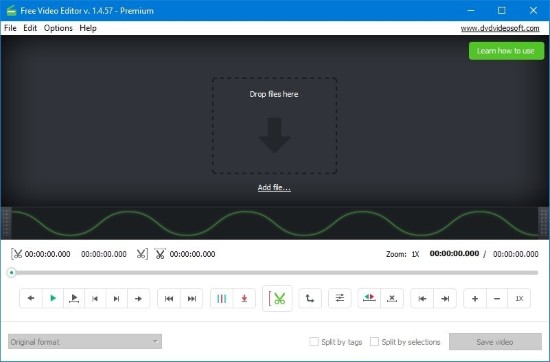
Free Video Editor Portable is a popular video editing software known for its ease of use, intuitive interface, and powerful editing capabilities. It offers a comprehensive set of video editing tools designed to meet the needs of casual users and semi-professionals alike while being completely free, making it an accessible option for a vast user base.
This extensive description explores everything about Free Video Editor Portable — its features, technical specifications, user experience, application scenarios, and how it empowers users to create polished videos that stand out.
What is Free Video Editor Portable?
Free Video Editor Portable is a compact and straightforward video editing application developed to help users easily modify, cut, and join video files without requiring advanced skills or expensive software. It provides fundamental editing functions like cutting unwanted segments, trimming clips, merging different files, and adding transition effects between video parts.
The software supports a wide range of video formats, allowing users to work flexibly with various file types produced by cameras, smartphones, and screen recording devices. Unlike complex professional suites, Free Video Editor Portable focuses on delivering essential editing functionalities wrapped in an accessible and minimalistic user experience.
Key Features and Tools of Free Video Editor Portable
1. Simple Video Cutting and Trimming
One of the standout features is its efficient video cutting capabilities. Users can select portions of videos to trim out unwanted scenes, ads, or errors seamlessly. This straightforward process allows for quick video cleanup without affecting the remaining content.
The slider-based timeline and frame preview make video cutting precise and easy to execute, even for those unfamiliar with typical timeline-based editors.
2. Video Merging and Joining
Free Video Editor Portable enables combining multiple video clips into a single continuous video file. This is ideal for compiling highlight reels, event coverage, or creating longer videos from multiple shots or parts.
The software handles different video formats and frame rates during merges, automatically adjusting them to produce smooth playback without synchronization issues.
3. Wide Format Support
The editor supports a broad variety of video file formats such as MP4, AVI, MOV, WMV, MKV, FLV, MPEG, and many others. Users are not limited by file type, ensuring they can import videos from virtually any device or source.
4. HD and 4K Video Editing
Despite its simplicity, the software supports editing high-definition (HD) and ultra-high-definition (4K) videos, enabling users to work on modern footage with exceptional clarity and detail preservation.
5. Fast Processing Speed
Free Video Editor Portable is optimized to perform quick encoding and rendering, minimizing waiting times when saving edited videos. The lightweight design and efficient algorithms contribute to this speed, making it suitable for users with varying hardware capabilities.
6. User-Friendly Interface
The application is designed with a clean and instinctive layout:
-
Clear, easy-to-understand controls,
-
Simple drag-and-drop support for quick video import,
-
Visual timeline with frame preview,
-
Minimal button clutter focusing on essential functions only.
This design philosophy ensures a minimal learning curve and fast mastery for beginners.
7. Video Preview Window
The preview feature allows users to view edits in real time before exporting, ensuring that cuts, merges, and transitions meet the desired requirements without guesswork.
8. Export Options and Quality Settings
Users can export videos in the same format as source files or convert them to other popular formats. The software offers options to adjust output resolution and bit rate, balancing quality and file size effectively.
Technical Specifications and Compatibility
-
Operating System Compatibility: Compatible with Windows XP, Vista, 7, 8, 10, and 11.
-
Supported Video Formats: MP4, AVI, MOV, WMV, MKV, FLV, MPEG, and more.
-
Supported Resolutions: Supports SD, HD, Full HD, and 4K video processing.
-
Hardware Requirements: Minimal hardware requirements, suitable for PCs with basic multimedia capabilities.
-
Installation Size: The program is lightweight, taking up minimal disk space.
How Free Video Editor Portable Works: A Workflow Overview
Step 1: Import Videos
Users start by importing the video files they wish to edit using drag-and-drop or file browsing. Multiple files can be added simultaneously for batch processing or merging.
Step 2: Set Cut Points or Merge Files
Using the visually displayed timeline, users select the start and end points for trimming. For merging, they reorder clips in the desired sequence.
Step 3: Preview Changes
Preview the edited video sequences in the playback window to verify cuts and transitions before finalizing.
Step 4: Export Edited Video
Choose the output format, resolution, and quality settings, then export the edited video file. The software encodes and saves the output video quickly.
Applications of Free Video Editor Portable
Personal and Family Video Editing
Ideal for trimming home videos, vacation footage, or family events to share highlights or remove unwanted parts.
Content Creation and Social Media
YouTubers, Instagrammers, and TikTok content creators use the software to prepare simple edited clips that engage audiences efficiently.
Educational and Tutorial Videos
Teachers and trainers create and edit instructional videos or demonstrations for educational platforms.
Business and Marketing Materials
Marketing teams trim promotional videos, product demos, or customer testimonials for distribution across various channels.
Advantages of Free Video Editor Portable
-
Cost-Free: The software is free, making it easy for anyone to access video editing tools without investing in expensive licenses.
-
Simplicity: Designed to focus on essential editing tasks, it is perfect for beginners unfamiliar with complex editing suites.
-
Speed and Efficiency: Fast video processing saves time during editing and exporting.
-
No Watermarks or Restrictions: Unlike many free editors, it does not add watermarks or limit export quality.
-
Broad Compatibility: Supports a wide variety of video files from diverse devices.
Comparing Free Video Editor Portable to Other Software
Compared to fully featured, professional-grade video editors, Free Video Editor Portable offers:
-
A streamlined, dedicated focus on cutting and merging rather than complex effects or multi-track editing.
-
Greater accessibility with a more straightforward UI.
-
Faster learning curve and easier onboarding.
It fits perfectly as a first-step video editor or for users requiring quick edits without the overwhelming options of professional software.
Tips for Getting the Best Out of Free Video Editor Portable
-
Pre-organize your footage and ensure backups before editing.
-
Use the preview feature thoroughly to avoid mistakes.
-
Export in the same format as your source when possible to retain quality.
-
Explore supplementary free software from the same developer for more advanced features if needed.
-
Keep your software updated to benefit from performance improvements and format support.
Free Video Editor Portable as a Reliable Partner in Video Editing
Free Video Editor Portable stands out as a lightweight, efficient, and no-cost solution for many users seeking simple video editing capabilities. It is particularly well-suited for people who want to quickly put together trimmed or merged video clips without investing time or money into complex software.
With its wide format support, intuitive design, and reliability, it provides a straightforward yet effective editing experience. Whether making personal videos, social media content, or simple educational clips, Free Video Editor Portable is a practical choice for users seeking expedient, quality results.
As demand for video content continues to grow worldwide, having access to accessible tools like Free Video Editor Portable ensures that producing engaging, well-crafted videos remains within everyone’s reach.