
Portable JAR – JPEG Auto Repair 1.0.0.276
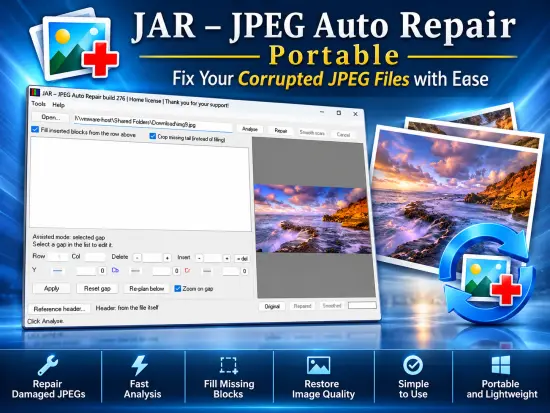
Digital photographs are among the most valuable files stored on computers, smartphones, cameras, and external storage devices. Unfortunately, even a photograph that appears to be safely stored can become damaged because of an interrupted transfer, an unreliable memory card, a failing USB drive, filesystem corruption, or an incomplete recovery operation. These problems can result in photographs that display incorrectly, contain gray sections, show displaced image bands, or refuse to open in conventional image viewers.
JAR provides a dedicated solution for these situations. Instead of functioning as a traditional photo editor, it concentrates on identifying damaged JPEG structures, locating problematic image data, correcting displaced image information, and restoring the visual continuity of affected photographs.
The application combines automatic analysis and repair with an assisted editing mode that allows users to correct difficult areas manually. Additional capabilities include header recovery using reference photographs, diagnostic tools, image smoothing, and support for extracting embedded JPEG images from RAW photographic files.
Designed for both occasional users and more experienced data recovery specialists, JAR offers a practical approach to JPEG restoration without requiring photographs to be uploaded to an external server. Its processing takes place locally on the Windows computer, making it suitable for sensitive personal photographs and professional recovery work.
What Is JAR – JPEG Auto Repair Portable?
JAR – JPEG Auto Repair Portable is a dedicated JPEG recovery and repair utility developed to address image corruption that ordinary photo viewers and editing applications cannot necessarily resolve.
The software is based on the way JPEG photographs store their image information. Rather than treating every damaged photograph as an ordinary image-editing problem, JAR examines the underlying image data and attempts to identify where corruption has interrupted the normal decoding process.
JPEG files organize compressed image information into small blocks that are decoded in sequence. When bytes are missing, incorrectly inserted, or damaged, the decoder can lose synchronization. As a result, information following the damaged section may be interpreted incorrectly, causing the rest of the photograph to appear shifted, discolored, or distorted.
JAR analyzes these problems and attempts to restore the correct arrangement of the image data. It identifies damaged locations, determines how the image information has become displaced, and applies corrections to bring the remaining photograph back into alignment.
The application is particularly useful for JPEG files that still contain substantial amounts of recoverable photographic information but display severe visual corruption.
Typical problems include photographs with gray or single-colored lower sections, horizontal bands shifted sideways, incorrect colors, missing image portions, and damaged pictures recovered from memory cards or storage devices.
The software offers both automatic and assisted repair methods, allowing users to begin with a straightforward recovery procedure and intervene manually when a particular photograph requires additional attention.
Understanding JPEG Corruption and Image Damage
JPEG is one of the most widely supported image formats because it provides efficient compression while maintaining acceptable visual quality for most photographic applications.
However, its internal organization also means that relatively small amounts of damaged data can affect much larger portions of the visible photograph.
JPEG images are constructed using blocks of image information known as Minimum Coded Units, or MCUs. These units are decoded sequentially, and the information required to interpret subsequent blocks can depend on previously decoded information.
When part of the compressed data disappears or becomes corrupted, the decoder may lose track of the correct boundaries between image units. It can then interpret subsequent information at the wrong position.
This explains why a photograph can display correctly in its upper section but suddenly become distorted below a particular point.
The damage may appear as:
- Large gray or single-colored image areas.
- Horizontal bands shifted to the left or right.
- Incorrect brightness or color reproduction.
- Sections containing unexpected image fragments.
- Missing photographic information.
- Incomplete photographs recovered from damaged storage.
- Corruption introduced by unreliable memory card readers.
- JPEG files with damaged or incomplete headers.
JAR is designed to recognize and address many of these situations by examining the underlying JPEG structure rather than simply applying conventional visual filters.
Automatic JPEG Analysis and Repair
One of the main advantages of JAR – JPEG Auto Repair Portable is its straightforward automatic repair workflow.
For many damaged photographs, users do not need to understand the technical details of JPEG compression or manually adjust individual image regions.
The standard procedure consists of three main operations: opening the photograph, analyzing its contents, and initiating repair.
After loading a damaged JPEG, the user selects Analyse. JAR examines the image data, identifies problematic locations, and determines how the affected portions can be corrected.
The software also performs preliminary cleanup of the file, removing data that does not belong to the JPEG image and identifying situations in which another file begins inside the damaged data.
Once analysis is complete, the user can proceed with Repair.
JAR attempts to correct the identified problems by restoring the correct arrangement of image blocks and adjusting the corresponding brightness and color information.
This automatic approach is particularly useful for photographs affected by missing or misplaced data, where the remaining image information is still available and can be reorganized.
The repaired photograph is saved as a separate file alongside the original, using the suffix _auto in its filename. The original photograph is never modified.
This non-destructive approach makes it possible to preserve the original damaged file while evaluating the recovered version independently.
Repairing Shifted Bands and Incorrect Image Colors
Shifted image bands are among the characteristic problems that JAR is designed to address.
When compressed JPEG data becomes corrupted, the image information following the damaged location may no longer be decoded at the correct horizontal position.
The result can be a photograph in which part of the scene appears displaced, stretched, or interrupted by horizontal bands.
Color errors can occur at the same time because JPEG decoding also relies on previously established brightness and color differences.
JAR attempts to identify the points where synchronization was lost and restore the correct alignment of the subsequent image information.
It also applies the necessary brightness and color corrections to improve the visual consistency of the photograph.
This is particularly valuable when a picture appears to have turned into a mixture of gray, pink, green, or otherwise incorrect colors after a specific point.
Instead of simply covering the visible distortion with an image filter, JAR works with the underlying compressed image information.
The result depends on the amount and condition of the surviving data, but the approach can recover photographs that remain substantially intact despite severe visual corruption.
Assisted Repair Mode for Difficult Photographs
Although automatic repair can handle many damaged JPEG files, some photographs contain problematic areas that require human judgment.
JAR includes an assisted mode that allows users to examine and correct individual damaged locations.
After analysis, the application presents a list of identified gaps. Each entry corresponds to a problematic location in the photograph and includes information such as its row and column position, the number of blocks to delete or insert, and brightness and color correction parameters.
Users can select a particular gap and examine it more closely.
The software provides controls for moving image information horizontally by inserting or deleting blocks. These operations make it possible to correct situations in which the image has shifted because information is missing or additional data has been inserted.
The adjustment controls also allow users to modify brightness and color values.
A zoomed view helps examine the affected region, while visual markers indicate the location of the selected problem.
Once the desired adjustments have been made, the user can select Apply to evaluate the result.
One important advantage of assisted mode is that users only need to correct the areas that automatic analysis could not resolve satisfactorily. The remaining repairs can be preserved.
This approach is particularly useful for photographs containing large areas of relatively uniform color, such as clear skies, white walls, or plain backgrounds, where automatic alignment can be more difficult.
Filling Missing Image Blocks
Some forms of JPEG corruption involve missing portions of image information rather than simply displaced data.
JAR includes an option to fill inserted blocks using information from the row above.
This operation provides a practical way to maintain the continuity of the photograph when certain image units cannot be recovered from the original file.
When information is missing, the software can use neighboring image content to fill the affected area instead of leaving it completely blank or gray.
This technique is particularly useful for relatively small damaged regions and photographs containing backgrounds with consistent colors or textures.
For example, a small missing section in a blue sky or a relatively uniform surface may be less noticeable when filled using information from an adjacent row.
It is important to understand that filling missing blocks does not recover the original photographic information. It provides an approximation using surviving image content.
Nevertheless, this approach can help produce a more complete and visually continuous photograph when the missing region is relatively limited.
Cropping Missing Image Tails
Not every damaged photograph should be repaired by filling missing information.
Sometimes a JPEG file is incomplete because the final portion of its image data was never successfully written or recovered.
In these situations, attempting to reconstruct the missing ending may not be the best solution.
JAR provides a dedicated Crop missing tail option, allowing the software to shorten the photograph instead of filling the incomplete area.
This is particularly useful when the missing data occurs near the bottom of the photograph and the remaining image is otherwise intact.
Cropping the incomplete ending can preserve the usable portion of the photograph without introducing an artificial reconstruction.
The option provides additional flexibility when deciding how to handle damaged JPEG files and can be especially valuable when preserving the available photographic content is more important than maintaining the original image dimensions.
Smooth Scars for Better Visual Results
Even when a photograph has been successfully repaired, some visual traces of the original damage may remain.
These imperfections are often referred to as scars. They can appear as thin lines, blurred strips, or small areas that do not perfectly match the surrounding image.
JAR includes a dedicated Smooth scars function to help improve the appearance of repaired photographs.
This additional processing can reduce visible irregularities around repaired areas and make the transitions between different image sections appear more natural.
The latest build also improves smoothing by handling damage extending two rows deep.
Smoothing is particularly useful when the main repair operation has restored the photograph but some localized imperfections remain visible.
However, it is important to distinguish between smoothing and recovering missing photographic information. Smoothing can improve visual continuity, but it cannot recreate details that are no longer present in the original file.
For photographs requiring extensive cosmetic correction, users can also employ a conventional image editor after completing the JPEG repair process.
Recovering Damaged JPEG Headers
JPEG headers contain information required to interpret the image correctly.
When header information is corrupted, a photograph may become difficult or impossible to open even if much of its actual image data remains intact.
JAR provides functionality for working with damaged headers and can use an intact photograph from the same camera as a reference.
This approach is particularly useful when multiple photographs were created by the same camera and share compatible structural information.
A reference photograph can provide the necessary information for interpreting the damaged image.
The reference does not necessarily need to have identical dimensions, although using a photograph from the same camera and compatible image settings can be beneficial.
This capability makes JAR especially relevant for photographers and technicians working with groups of damaged images recovered from the same memory card or storage device.
Instead of assuming that a photograph is completely lost because its header is damaged, users have another method of attempting to recover its contents.
Extracting Embedded JPEG Images from RAW Files
Modern digital cameras frequently store JPEG image data inside their RAW photographic files.
These embedded JPEG images can be valuable when the original RAW file is damaged or cannot be opened by conventional RAW processing software.
JAR provides functionality for extracting embedded JPEG photographs from RAW files.
This means users may be able to recover a usable JPEG image even when the original RAW file cannot be interpreted correctly by an ordinary image editor.
The application supports a wide range of RAW formats, including files produced by Canon, Nikon, Sony, Fujifilm, Olympus, Panasonic, Pentax, Leica, Sigma, and other camera manufacturers.
Examples include CR2, CR3, NEF, ARW, RAF, ORF, RW2, and DNG.
The extraction process focuses on recovering the largest embedded JPEG available in the RAW file.
JAR can also preserve or restore relevant EXIF information from the RAW file when the embedded JPEG does not contain all the necessary metadata.
This information can include the shooting date, camera model, exposure information, and image orientation.
Another useful aspect is that the extracted JPEG can be examined and repaired immediately if it also contains corruption.
Standard JAR supports working with individual RAW files, while JAR Pro extends this functionality to folder-based processing.
Advanced JPEG Diagnostics
In addition to automatic repair, JAR includes diagnostic tools that help users understand the internal condition of damaged image files.
These tools are particularly relevant for technicians and experienced users who need to investigate the origin and extent of JPEG corruption.
The diagnostic functionality includes a byte map, entropy graph, byte histogram, and JPEG structure examination.
The byte map provides a visual representation of the data contained in the file. It can help identify unusual sections, missing information, repeated patterns, and other characteristics associated with damaged storage or incomplete recovery.
The entropy graph provides additional information about the distribution and characteristics of the stored data.
The byte histogram offers another way to examine the contents of the file and recognize suspicious patterns.
Together, these diagnostic tools can help users determine whether a photograph contains recoverable image information or whether the underlying data is too severely damaged.
They can also provide clues about problems originating from storage devices, memory cards, or file-recovery operations.
JPEG Structure Examination
JAR includes a dedicated Structure tool that displays information about the internal organization of JPEG files.
This functionality is useful when a photograph contains structural problems that are not immediately obvious from its visual appearance.
The structure examination can identify the different JPEG sections, their positions, and their associated information.
Users can inspect details such as image dimensions, color sampling, JPEG tables, metadata, image data boundaries, and end markers.
The tool can also identify inconsistencies such as invalid section lengths, missing markers, data appearing before the JPEG start, or information remaining after the end of the image.
This makes it possible to investigate the file beyond its visible photographic content.
The structure information can also help technicians understand why a particular photograph cannot be opened or repaired successfully.
Recognizing Problems Caused by Storage Hardware
Not all image corruption originates inside the JPEG file itself.
A faulty card reader, USB adapter, cable, or storage device can introduce incorrect data when photographs are copied or recovered.
One example is a stuck bit, where a hardware problem causes certain bits to be read incorrectly.
JAR can recognize and report this type of condition rather than incorrectly treating it as ordinary image corruption.
This distinction is important because software repair alone cannot necessarily correct data that is being read incorrectly by defective hardware.
In such situations, users may need to copy or recover the photograph again using another card reader, adapter, or storage interface.
JAR can also identify files that contain no meaningful photographic information, such as files filled entirely with zeros or repeated bytes.
These diagnostics help users distinguish between repairable image damage and situations in which the underlying information is unavailable.
Handling Photos Recovered from Damaged Storage Devices
JAR is particularly relevant when working with photographs recovered from damaged memory cards, USB drives, and external hard disks.
Data recovery applications can sometimes retrieve JPEG files that are incomplete or contain incorrectly assembled data.
Although the recovered files may exist and have recognizable filenames, their image content may still be corrupted.
JAR is designed to address this additional stage of the recovery process.
It can examine photographs recovered through applications such as PhotoRec, Recuva, Disk Drill, and similar data recovery utilities.
The software attempts to identify foreign data mixed into photographs, missing image information, and damaged sections that cause the visible image to become distorted.
This makes it a useful companion to conventional file-recovery applications.
It is important to understand that file recovery and image repair are different processes. Recovering a JPEG file from a damaged storage device does not guarantee that its contents are intact.
JAR focuses on repairing the recovered photograph rather than locating deleted files on the storage device.
Recovering Photos with Embedded Previews
Some JPEG and RAW photographic files contain smaller preview images stored inside the original file.
These previews can sometimes remain available even when the main photograph cannot be repaired.
JAR includes an option to save an embedded preview as a last resort.
This functionality is particularly useful when the original image data is too damaged to produce a satisfactory full-size repair.
The embedded preview may still contain a recognizable representation of the photograph, allowing users to recover at least a smaller version of the original scene.
The application provides this functionality through its Tools menu.
It is important to note that an embedded preview is not necessarily equivalent to the original photograph. Its resolution and quality depend on what the camera stored inside the file.
Nevertheless, recovering a preview can be preferable to losing the visual content entirely.
Offline Operation and Privacy Protection
An important advantage of JAR – JPEG Auto Repair Portable is that it operates locally on the Windows computer.
Unlike online image repair services, the application does not require users to upload photographs to a remote server.
This is particularly valuable when working with private family pictures, confidential business photographs, customer images, or sensitive documentation.
All repair operations are performed locally, allowing users to maintain control over their image files.
The software can also work without an internet connection.
This offline functionality is useful for technicians who work in environments without reliable network access and for users who prefer to keep their photographs entirely within their own systems.
The application also avoids the upload restrictions and per-image processing arrangements commonly associated with online repair services.
JAR and JAR Pro: Understanding the Differences
JAR is available in different licensing editions designed for different types of users.
The standard edition is primarily intended for repairing individual photographs.
It provides automatic repair, assisted editing, diagnostic tools, header repair using reference photographs, and full-size image recovery with the appropriate license.
JAR Pro includes the same core repair technology but extends the workflow with additional features designed for professional environments.
One of its most important advantages is batch processing.
Instead of opening and repairing photographs individually, JAR Pro can process an entire folder containing damaged JPEG images.
Users can select an output folder, include subfolders, and configure the processing workflow.
The software can also copy undamaged photographs when required and resume an interrupted batch operation.
Another professional feature is the ability to save reports documenting the repair process.
These reports can include file hashes, removed data ranges, repair operations, and information about reconstructed image blocks.
This is particularly relevant for data recovery laboratories and technicians who need a documented and repeatable recovery process.
JAR Pro also extends RAW extraction and provides additional options for handling large collections of damaged photographs.
The core repair approach remains the same across the editions; the principal differences concern processing volume, professional workflow, and reporting capabilities.
Professional Forensic Reporting
Forensic mode is designed for situations in which transparency and documentation are important.
When enabled, JAR Pro can generate an HTML report for each repaired photograph.
The report documents the repair operations and provides information that can be used to examine and verify the resulting image.
It includes cryptographic hashes of the original and repaired files, information about the operations performed, and details of the data ranges removed during processing.
It can also provide a visual representation of the repaired photograph, highlighting image blocks that were filled because their original information was missing.
This functionality is useful for professional recovery services that need to document what was changed and explain the limitations of a repair.
The reports can be opened in a web browser and printed or converted to PDF.
Forensic mode also disables certain cosmetic adjustments so that the repair remains focused on the image information available in the original file.
User Interface and Ease of Use
JAR – JPEG Auto Repair Portable provides a functional desktop interface organized around the main repair workflow.
The application window includes file selection, analysis, repair, smoothing, image preview, and additional editing controls.
The main commands are easy to identify, allowing users to load a photograph and begin the analysis process without navigating through complicated menus.
The assisted editing area provides more advanced controls for selecting gaps, adjusting image positions, and modifying color and brightness parameters.
Separate preview controls make it possible to compare the original, repaired, and smoothed versions of a photograph.
Although the software includes technical functionality, its automatic repair workflow is relatively straightforward.
Users who simply want to repair a damaged photograph can begin with the basic Open, Analyse, and Repair sequence.
More experienced users can explore the assisted mode and diagnostic tools when a particular image requires additional investigation.
This combination makes JAR suitable for both occasional image recovery and more advanced troubleshooting.
Portable Workflow and Windows Compatibility
JAR – JPEG Auto Repair Portable offers a convenient desktop workflow without requiring a traditional installation procedure.
The application is distributed as a ZIP package that can be extracted into a suitable folder before launching the program.
This approach is useful for users who prefer maintaining a collection of specialized Windows utilities.
It also makes the application convenient for technicians who need access to image repair functionality across different compatible computers.
JAR is designed for Windows 10 and Windows 11.
Its local processing model means photographs can be examined and repaired without relying on an external image hosting service or permanent internet connection.
For the best results, users should preserve their original photographs and perform repair operations on working copies whenever possible.
This is particularly important when dealing with damaged storage devices or irreplaceable image collections.
Who Should Use JAR – JPEG Auto Repair Portable?
JAR can be useful for several different categories of users.
Photographers can use it when images transferred from cameras or memory cards contain damaged sections, incorrect colors, or shifted image information.
Computer technicians can use it to investigate photographs recovered from defective storage devices and assist customers who have lost access to important images.
Data recovery professionals can benefit from its diagnostic capabilities, assisted repair functionality, and professional batch-processing options available in JAR Pro.
Digital archivists may find it useful when examining older photographic collections containing damaged or incomplete JPEG files.
Everyday users can also benefit when family photographs, holiday pictures, and personal images become corrupted.
The application is particularly valuable when a photograph still contains recoverable image information but cannot be displayed correctly by conventional software.
Important Limitations of JPEG Repair
Although JAR offers several sophisticated recovery techniques, not every damaged JPEG photograph can be restored completely.
The most important limitation is the permanent loss of original image information.
When photographic data has been completely destroyed or overwritten, software cannot recreate the exact original details.
JAR can reorganize surviving image information, correct synchronization problems, and fill missing areas using nearby content, but these operations cannot guarantee an identical reconstruction of the original photograph.
Some repairs may also leave visible scars, particularly when large sections of image data are missing.
In such cases, additional manual editing may be necessary.
Furthermore, when corruption originates from faulty storage hardware, recovering the photograph again through a different reader or adapter may produce better results than attempting to repair the existing copy.
Understanding these limitations helps users approach image recovery realistically and choose the most appropriate repair method.
Final Verdict
JAR – JPEG Auto Repair Portable is a specialized and practical Windows utility for repairing corrupted JPEG photographs.
Its combination of automatic analysis, image reconstruction, assisted gap correction, header repair, smoothing, and diagnostic functionality makes it considerably more focused than an ordinary image viewer or photo editor.
The ability to work with photographs recovered from damaged storage devices is particularly valuable, as is the option to extract embedded JPEG previews from RAW files.
Its local offline operation also provides an important privacy advantage for users who do not want personal photographs uploaded to external services.
Standard JAR is suitable for individual image recovery, while JAR Pro provides additional capabilities for professional users who need batch processing and detailed forensic reporting.
The software cannot guarantee recovery of information that has been permanently lost, but it offers a structured approach to repairing many common forms of JPEG corruption.
For photographers, technicians, digital archivists, and anyone who regularly works with important digital photographs, JAR – JPEG Auto Repair Portable is a useful addition to a specialized image recovery toolkit.
Features at a Glance
- Automatic JPEG Repair: Analyze and repair damaged JPEG photographs with a straightforward workflow.
- Advanced Image Reconstruction: Restore the correct alignment of displaced image information.
- Shifted Band Correction: Address horizontal image displacement caused by corrupted data.
- Color Correction: Correct brightness and color inconsistencies in damaged image sections.
- Assisted Repair Mode: Manually adjust difficult repair locations.
- Gap Selection: Examine and modify individual damaged image areas.
- Missing Block Filling: Fill missing image information using content from the row above.
- Missing Tail Cropping: Crop incomplete image endings instead of filling them.
- Smooth Scars: Improve visible transitions around repaired areas.
- JPEG Header Repair: Use an intact photograph as a reference for damaged headers.
- RAW JPEG Extraction: Extract embedded JPEG photographs from supported RAW formats.
- EXIF Preservation: Retain relevant photographic metadata during RAW extraction.
- Embedded Preview Recovery: Save an available preview when the main photograph cannot be repaired.
- Byte Map Diagnostics: Examine the internal distribution of file data.
- Entropy Graph: Investigate data characteristics and possible corruption.
- Byte Histogram: Examine byte distribution within damaged files.
- JPEG Structure Analysis: Inspect image markers, metadata, tables, and structural problems.
- Hardware Error Detection: Identify and report certain storage-related reading problems.
- Original File Protection: Save repaired photographs separately without modifying the original.
- Offline Operation: Process photographs locally without uploading them to external servers.
- Batch Processing: Repair entire folders with JAR Pro.
- Professional Reporting: Generate detailed HTML repair reports with JAR Pro.
- Windows Compatibility: Designed for Windows 10 and Windows 11.
Changelog
JAR – JPEG Auto Repair Build 276
New Features and Improvements
- Faster Repair Processing: Significantly improved repair speed, particularly when processing heavily damaged photographs.
- Improved Stray Sector Handling: Better repairs when damaged sectors are located close together, preserving image information between affected areas and improving subsequent color correction.
- Multiple Copies of the Same Photograph: When a file contains multiple versions of the same photograph, JAR now uses the last and most complete copy.
- Automatic Detection of Subsequent Photographs: When another photograph follows a damaged image inside a file, JAR can stop at the correct boundary and save the subsequent photograph separately.
- Embedded Preview Recovery: Added the ability to save a camera-stored embedded preview when the main photograph cannot be repaired.
- Foreign Header Detection: Recognizes photographs hidden behind headers added by other repair applications and offers to open the original image data.
- Repeating Damage Detection: Identifies damage occurring at regular intervals and reports it in the batch log and Byte Map window.
- Stuck Bit Detection: Recognizes and reports certain hardware-related reading problems instead of incorrectly interpreting them as encryption.
- Empty File Detection: Identifies files containing only zeros or repeated bytes without meaningful photographic information.
- JPEG Structure Tool: Added detailed examination of JPEG markers, file structure, and detected structural problems.
- RAW Byte Map Support: Displays the actual RAW file data when an embedded JPEG is unavailable.
- Improved Smooth Scars: Enhanced smoothing functionality to handle damage extending two rows deep.
- Manual Update Checking: Added Help > Check for a newer version, allowing users to check for updates when desired without automatic online activity.
JAR Pro Improvements
- Advanced Batch Processing: Improved folder-based repair with flexible output folder selection.
- Subfolder Support: Include photographs stored in subdirectories during batch processing.
- Undamaged Photo Copying: Option to include undamaged photographs in the output.
- Interrupted Batch Recovery: Resume a batch operation from where it stopped.
- Separate Check Folder: Send repairs that may still contain banding to a dedicated folder for additional examination.
- Embedded Preview in Batch Processing: Save available embedded previews when photographs cannot be repaired.
- Forensic Mode: Generate detailed reports for individual repairs.
- Repair Verification: Include hashes, removed byte ranges, performed operations, and maps of reconstructed image areas.
- Human-Readable Reports: Provide a plain-language summary alongside technical repair information.
Bug Fixes
- Fixed an issue where certain photographs containing closely spaced stray sectors could produce worse repairs than earlier builds.
- Fixed an issue that could cause JAR to stop responding when opening certain heavily damaged files.
- Fixed an issue where opening a RAW file without an embedded JPEG could leave the previously displayed photograph visible.