Portable Movavi Video Editor 26.23.1 (x64) Multilingual

Movavi Video Editor Portable is one of the most versatile and user-friendly video editing software available in the market today. It is developed by the leading software development company Movavi, which specializes in various multimedia applications.
With Movavi Video Editor Portable, you can easily create high-quality videos, edit and polish them with a range of video editing tools, add various effects and filters, and export your project in multiple formats. Whether you’re a novice or a professional video editor, this software is perfect for everyone.
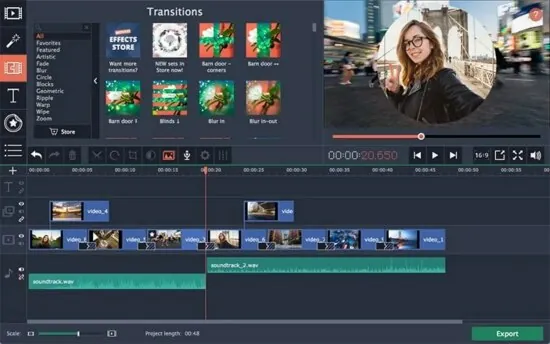
One of the best features of Movavi Video Editor Portable is its intuitive and easy-to-use interface. The tools and features are organized in a logical manner, so you can easily find what you’re looking for. The timeline editor is simple to navigate, and you can easily add and remove clips, apply transitions, and adjust the timeline to suit your needs. Also, you can choose from a variety of pre-made templates and themes to add some flare to your project.
Another great feature of Movavi Video Editor portable is its wide range of effects and filters. You can add various visual effects, including color correction, slow motion, reverse, and many more. There are also a variety of artistic filters available that allow you to add various creative effects to your clips. Additionally, the software comes with a vast built-in library of audio files, which can be used as background music or sound effects.
If you’re looking to add some text to your project, Movavi Video Editor has you covered. The software comes with a range of fonts and styles which can be used to create personalized titles and captions for your video. Also, with the help of keyframe animation, you can create motion effects to make your text more engaging.
Another great feature of Movavi Video Editor is its ability to stabilize shaky footage. This feature is particularly useful when recording footage using a handheld device or during fast-paced action shots. This tool ensures your videos remain stable and visually appealing, even when the raw footage is shaky.
The software can also be used to convert and optimize video files for different devices. Whether you want to upload your videos to social media platforms like YouTube and Facebook or watch your videos on your phone or tablet, Movavi Video Editor makes it easy to get the perfect video format for your needs.
Finally, one of the most significant benefits of using Movavi Video Editor is its excellent customer support. The company offers online tutorials, user guides, and a comprehensive knowledge base, which are all available on the website. Their customer support team is always available to assist you with any questions or issues you may encounter while using the software.
In conclusion, Movavi Video Editor Portable is a powerful and versatile video editing software that offers high-quality features suitable for creating stunning videos. Its intuitive interface, extensive selection of tools and features, and excellent customer support make it one of the most accessible and user-friendly video editing software available in the market. It is an excellent choice for both novice and professional video editors who want to produce high-quality video projects.
MOVAVI EFFECTS STORE
Buy stunning titles, transitions, and other extra content crafted by our professional designers. Take your videos to the next level!
Object Animation
Wondering how to make your videos more dynamic? Use keyframe animation to add seamless movement to overlay clips, titles, stickers, and callouts.
More Built-in Media
Need more videos, stickers, and audio clips for your project? Here’s what you get in the Video Editor Plus built-in collections: 16 new video clips, 86 themed stickers, and 22 new music tracks!
Automatic Video Creation
Want to make a movie from your recorded footage, but don’t want to spend time on video editing? Now you can just add your videos and photos to the smart Montage Wizard and it will produce a movie with the music of your choice in minutes.
Improved Timeline
We listened to your feedback, and now our Timeline is even more convenient.
Multitrack editing: add new tracks, change the order
Independent tracks: unlink overlay tracks and place clips anywhere you want on them
Enhanced design: the Timeline is now more compact and easier to navigate
Upload Multimedia Files
– Transfer recordings from photo or video camera to your computer
– Capture webcam footage, record your voice via microphone
– Upload video and audio files in any popular format: AVI, MOV, MP4, MP3, WMA, and many others
– Digitize VHS tapes, record video from TV tuners
– Add photos or any other graphic files
Cut Unnecessary Parts. Join Fragments
– Slice your video into as many segments as you want
– Rotate and crop videos, delete unwanted segments
– Join individual frames or video clips with over 20 stylish transitions
Improve Video Quality
– Adjust the sharpness of your video
– Improve brightness, contrast, and other color settings
– Stabilize any shaky sections
– Automatically improve video quality with Magic Enhance
– And much more!
Apply Titles
– Choose from more than 100 fonts
– Experiment with word art
– Set color, size, and other text parameters
– Create stylish text backgrounds
– Rotate captions in any direction
– Make text animations
– … and much more!
Add Music. Record Voiceover
– Upload background music and sound effects in MP3, WMA, or any other popular formats
– Capture sound from an MIDI-keyboard, electric piano, or other musical instruments connected to your computer
– Record voiceover using your microphone
Save Video in Convenient Format
– Save video clips in popular video and audio formats to play on your computer
– Use intelligent output presets for viewing on smart phones, tablets, and other mobile devices
– Prepare your videos for uploading to YouTube, Facebook, Vimeo, or any other website
The major release of Movavi Video Editor 2026 (Version 26) centers heavily on AI-driven automation, workflow speed, and enhanced creative effects.
Here is a breakdown of the key features, improvements, and optimizations introduced in the 2026 version.
Key AI & Smart Features
- AI Auto Subtitles & Translation: Automatically converts speech into text captions across multiple languages. It features over 30 pre-designed subtitle styles and introduces a one-click translation to English without needing external services.
- Caption Export (.SRT): You can now natively export your auto-generated subtitles as standalone SRT files. The software automatically titles the SRT file after your project name to save time.
- AI Silence Removal: Automatically detects and trims dead air/gaps from recordings.
- AI Auto Crop: Automatically reframes horizontal footage into vertical formats (like TikTok, Instagram Reels, or Shorts) by tracking the main speaker and keeping them centered.
- AI Motion Tracking: Allows you to effortlessly lock graphics, emojis, or text onto moving objects within your video frame.
Creative Tools & Editing Upgrades
- 40+ Adjustable Effects: Includes new realistic overlays like dust particles, light leaks, retro styles, and VHS. Every effect is fully customizable.
- 13 Overlay Blending Modes: You can now toggle through 13 different blending modes on overlay effects to seamlessly integrate animations, lighting, or textures with your background footage.
- Ultra-Fast Playback (Up to 100x): Video speed controls have been bumped up to 100x max speed for high-energy time-lapses. The timeline now displays magnetic dots to mark specific speed thresholds.
- Batch Effect Copying: A highly requested workflow fix—you can now copy and paste effect settings across multiple clips simultaneously.
- Hover Previews: You can now hover your cursor over the assets library (media, transitions, and effects) or along the timeline itself to quickly scrub and preview content before committing to a choice.
Performance & Workflow Optimizations
- Lighter Export Files: Files exported using the “Good” quality setting are now up to 67% smaller without losing clarity, saving hard drive space.
- New Project Format (
.mepj): Projects now load and save noticeably faster. Opening large files no longer causes the application to crash, and background autosaving has been fixed to prevent the interface from freezing. - Faster Startup: The program initializes up to 30% faster than previous builds.
- Timeline Behavior Adjustments: Track linking is now turned off by default (clips won’t automatically shift unless you toggle the “Link Track” button), and gaps between timeline clips are now enabled by default.
- Interface Cleanup: Higher contrast on buttons and sliders for better visibility, alongside optimized scaling for low-resolution monitors.