Portable Nevercenter Pixelmash 2027.0 (x64)
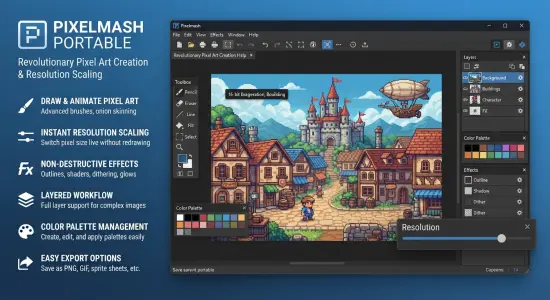
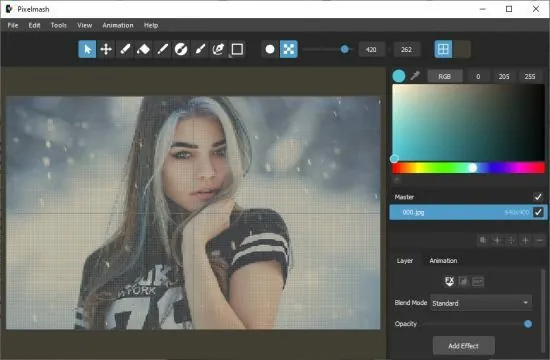
Nevercenter Pixelmash Portable is an innovative and powerful pixel art editor and animation tool that revolutionizes the creation of sprites, tilesets, and animated assets by blending traditional per-pixel painting with resolution-independent vector and high-resolution layers. Developed by Nevercenter—the creators of acclaimed 3D modeling software Silo—this next-generation application, now in version 2026.0 as of early 2026, empowers game developers, indie artists, hobbyists, and animators to produce professional-quality pixel graphics without the limitations of fixed canvas sizes.
By allowing users to import high-res images or SVG vectors that are non-destructively pixelated in real-time, apply dynamic layer effects like outlines, dithers, and gradients, and animate using keyframe tweening and rigging, Pixelmash streamlines workflows that traditionally require multiple apps. Available for Windows and macOS with Steam integration, it offers a full-featured toolset including onion skinning, advanced palettes, masked brushes, and export options for sprite sheets, GIFs, and game engine formats, making it ideal for retro-style games, pixel animations, or modern low-res aesthetics.
Pixelmash distinguishes itself through its hybrid layer system: mix low-res pixel-perfect layers for precise control with high-res or vector layers that automatically downsample to the project’s resolution (e.g., 128×128 canvas at 10x preview for 1280×1280 editing). This resolution independence means artists work comfortably at large scales—zooming infinitely without aliasing—while outputs remain crisp at native pixel sizes. The interface centers a multi-document timeline with tabbed canvases, layer stack, and property panels, supporting unlimited undo, reference layers for tracing, and tiled painting modes for seamless patterns.
Layer System and Non-Destructive Workflow
Pixelmash’s core innovation is its layered approach to pixel art, supporting three primary types:
-
Pixel Layers: Traditional 1-bit-per-pixel editing with pencil, bucket fill, line/marquee tools, and pixel-perfect snapping. Supports alpha channels for transparency and per-pixel selection.
-
High-Res Layers: Import raster images (PNG, JPEG, PSD layers) at any resolution; the app pixelates them live based on canvas scale, applying filters like nearest-neighbor or bilinear sampling.
-
Vector Layers: Full SVG import/edit with paths, shapes, gradients, and strokes, rendered pixel-perfect via auto-tracing or manual drawing. Editable at source resolution, pixelated on export.
Layers nest hierarchically with parenting for rigging—arm bones rotate forearm pixels—or group for effects stacking. Non-destructive pixelization means tweak vectors post-import without repixelating from scratch. Dynamic resolution sliders adjust preview scales (1x-20x), perfect for fine-tuning outlines on small sprites.
Reference layers overlay inspirations semi-transparent, toggleable for tracing. Masked brushes confine edits to selections, with soft/hard edges for feathering.
Animation and Keyframing Tools
Pixelmash elevates static sprites to animations via a timeline supporting dozens of frames at variable durations (1/60th second precision). Keyframe interpolation tween position, rotation, scale, opacity, and skew—transforming a static character into walking cycles with smooth easing (bounce, elastic, linear). Rigging parents layers (head to body, wheels to chassis), animating parents propagates to children realistically.
Onion skinning ghosts previous/next frames with opacity sliders and frame range controls, aiding fluid motion. Playback loops, scrubs at full speed, and exports as optimized GIFs, APNGs, sprite sheets (horizontal/vertical with JSON metadata), or video (ProRes, H.264). Frame-by-frame editing supports copy-paste between timelines, reverse playback, and speed ramping.
Layer Effects and Procedural Generation
Infinite layer effects stack non-destructively, previewed live:
-
Outline: Auto-contours with thickness, join styles (miter/round), and color fills (interior/full).
-
Dither: Bayer/error-diffusion patterns for gradients/shading, customizable matrices.
-
Gradient Map: Remaps pixels via lookup tables for cel-shading or retro palettes.
-
Repeat/Tile: Mirrors/flips for patterns, infinite scrolling.
-
Noise/Grain: Adds organic texture, animatable over time.
-
Color Key: Chroma-key transparency for sprites.
-
Smooth/Sharpen: Anti-aliasing control per-layer.
Effects presets (2026.0 addition) load/save stacks—e.g., “NES Glow Outline + Dither”—accelerating iteration. Procedural generators create plasma clouds, gradients, or Perlin noise as base layers.
Color Management and Palettes
Advanced palettes include indexed (1-256 colors), dynamic (expandable), and superpalettes with hue wheels, harmony rules (complementary, analogous), and import from PNG/GIMP/ACO files. Palette cycling snaps brushes to colors; tolerance sliders allow near-matches. Export palettes as ASE/PNG for Aseprite/Pyxeledit compatibility. Palette preview simulates dithering/quantization.
Brush and Painting Tools
Pencil tools offer size 1px to full-canvas, with pressure sensitivity (Wacom/ Surface), smoothing, and stabilizer lines. Fill tools flood with dither/contiguous modes; gradient fills radial/linear. Selection tools (lasso, magic wand, grow/shrink) support feathering and fill-from-history. Transform handles scale/rotate/skew with pixel-snapping and onion-skin guides.
Mirroring axes aid symmetry; tiled mode repeats canvases for backgrounds.
Import, Export, and Integration
Imports SVG (editable paths), PSD (layers preserved), PNG/GIF/APNG (animated frames). Exports PNG/PNG8 (indexed), sprite sheets (JSON for Unity/Godot), GIF (optimized loops), videos. Steam Workshop shares templates/assets; bundle with Silo/Milo/CameraBag unlocks 3D-to-pixel pipelines.
Performance and Platform Support
GPU-accelerated (Metal/OpenGL) for 4K canvases/60FPS previews, macOS 11+/Windows 10+ native. 64-bit, Retina/4K scaling.
Workflow Examples
Indie Devs: Rigged characters tweened to sprite sheets for Godot.
Animators: Vector landscapes dithered + animated wind effects.
Hobbyists: High-res photos pixelated retro-style for avatars.
Pixelmash redefines pixel art as hybrid, animatable craft—vectors + pixels + effects = limitless creativity. Its rigging, tweening, and presets make pro sprites accessible, fueling 2026’s retro revival.
Release Notes:
- Added new Effects Presets menu (in both the File menu and the Add Effect button menu in the right panel) to let you easily load pre-made layer FX, including the ability to add and edit your own
- Added New Window command (in the File menu) that lets you open multiple instances of Pixelmash to easily edit multiple documents at the same time
- Greatly improved Auto Palette layer effect (renamed from Auto Limit Colors) to easily convert photos and other art into pixel art, including ability to force palette colors and adjust smoothing amount
- Several speed improvements and bug fixes