

Portable Private Photo Move 1.1.0.6 (x64)
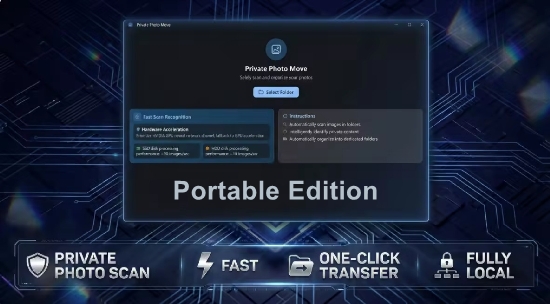
Private Photo Move Portable is a privacy-centric photo and media organization utility developed for Windows 10 and 11, engineered to automatically scan, categorize, and relocate personal photos, documents, videos, and files from cluttered directories into intelligently structured folders while ensuring zero data leakage through offline processing, no internet access, no account registration, and complete physical isolation from external servers.
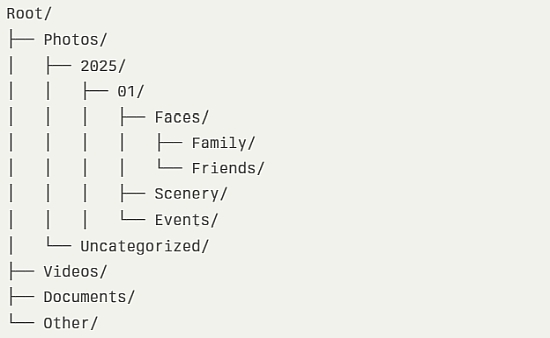
This lightweight Microsoft Store app addresses the chaos of scattered digital memories—photos dumped from phones, documents mixed in Downloads, screenshots littering Desktop—by employing smart AI-driven content recognition to classify items by faces, scenery, documents, objects, dates, and types, then moving or copying them to secure, named subfolders like “Photos/2025-01/Faces/Family,” “Documents/Scanned/Invoices,” or “Videos/Travel/Paris_2025” without ever uploading or scanning cloud services.
Ideal for photographers, families, professionals, and privacy-conscious users managing large libraries (10,000+ files), it combines one-click root directory selection with customizable rules, duplicate detection, metadata preservation, and batch previews, reclaiming gigabytes of space and restoring order in minutes while safeguarding sensitive personal content from breaches.
The app’s core philosophy—”privacy by design”—eliminates risks: local ML models (TensorFlow Lite) classify without phoning home, EXIF/metadata stays intact (strippable optionally), and encrypted temp storage prevents leaks. Minimalist interface: main window drop-zone prompts “Select Root Directory,” sidebar toggles categories (Photos, Videos, Docs, Other), preview pane thumbnails before/after, progress bar with stats (“Processed 5,237 files, 87% photos”).
Smart Content Recognition Engine
AI classification scans files non-destructively:
-
Faces: Detects/recognizes people (family modes: “Mom,” “Kids” trainable), groups into “People/Unknown/Face001.jpg.”
-
Scenery: Landscapes/skylines to “Photos/Landscapes/2025-01-Mountains.”
-
Documents: Scans/papers to “Docs/Scanned/Invoice_2025-01.”
-
Objects: Pets/cars/food tagged accordingly.
-
Date-Based: EXIF/CreatedDate sorts YYYY-MM-DD or custom (Year/Month/Day).
Tolerance sliders adjust sensitivity (e.g., 80% face confidence); manual overrides train models per user.
Folder Structure Generation
Auto-creates hierarchies:
Privacy and Security Safeguards
-
Offline AI: Local models—no cloud.
-
No Permissions: Reads only selected dirs.
-
Encryption: Temp files AES-256.
-
Audit Log: Tracks moves/deletes.
Duplicate detector hashes files (MD5), options: skip/rename/overwrite.
Batch Processing and Previews
Preview thumbnails before move (zoom/compare), dry-run simulates without changes. Pause/resume large jobs; multi-threaded (all cores).
Metadata preserves: EXIF, IPTC, GPS (scrub optional).
Customization and Rules
Profiles save setups (“PhoneDump,” “WorkDocs”). Rules: “If JPEG >5MP → Photos/HighRes,” regex names.
Exports CSV logs for audits.
Performance and Compatibility
Scans 10k files/min SSD; Windows 10/11 native. Free/basic, Pro unlocks unlimited/custom AI.
Private Photo Move Portable restores order privately—AI sorts, moves, secures. Chaos to clarity offline.