

Portable XMuli Quick Utilities Suite 4.0 (x64)
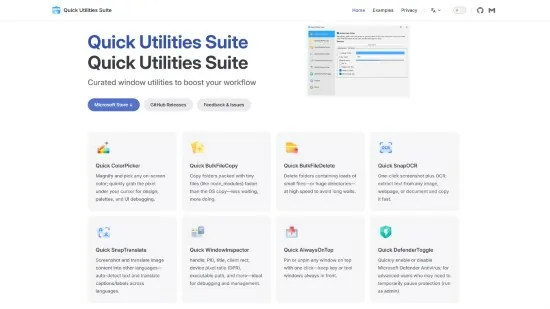
XMuli Quick Utilities Suite Portable is a lightweight collection of productivity boosters designed specifically for Windows power users, developers, designers, and office professionals who need instant access to essential tools without the bloat of full-featured applications. This curated bundle—version 4.0 as of late 2025—combines nine specialized utilities into a single, portable executable that launches a central hub with one-click access, enabling rapid file operations, screen captures, color picking, OCR text extraction, translations, bulk processing, and system tweaks.
Optimized for minimal resource usage (under 50MB RAM), it integrates seamlessly via system tray icon, global hotkeys, and Explorer context menus, transforming everyday workflows from tedious to turbocharged. Whether batch-copying thousands of files across drives, snapping OCR from any screen region, or instantly translating foreign text overlays, XMuli Quick Utilities Suite Portable eliminates app-switching friction, saving users hours daily while supporting high-DPI displays, dark mode, and multi-monitor setups for modern hybrid work environments.
Central Hub and Launch Interface
The suite opens to a sleek, resizable dashboard resembling a modern taskbar launcher, with nine large, icon-labeled tiles arranged in a 3×3 grid: Quick ColorPicker, Quick BulkFileCopy, Quick BulkFileDelete, Quick SnapOCR, Quick SnapTranslate, Quick Toolkit, Quick ScreenSnap, Quick PasswordGen, and Quick SysTuner. Each tile displays a live preview or status (e.g., last color picked, recent copy stats), with hover tooltips explaining usage. Customization options let users reorder tiles, hide unused ones, set default hotkeys (Win+1 through Win+9), or pin favorites to a collapsible sidebar.
Global activation via Win+Q summons a floating overlay anywhere on screen, searchable by keyword (“color” → ColorPicker). System tray integration adds right-click menus for quick launches, auto-start on login, and low-CPU monitoring for clipboard changes or folder watches. Portable mode runs from USB without installation, ideal for IT support or multi-machine users. Dark/light themes auto-match Windows settings, with accent color syncing for personalization.
Quick ColorPicker: Precision Sampling Tool
Quick ColorPicker stands out as a designer’s dream, capturing exact HEX, RGB, HSL, CMYK, or HSV values from anywhere on screen with a single screenshot-like activation (default Win+Shift+C). Crosshair cursor magnifies 10x for pixel-perfect selection, displaying real-time values, eyedropper history (up to 50 recent colors), and palette export options (ASE, PNG swatch sheets). Advanced modes include screen-wide averaging for gradients, harmonic color suggestions (complementary, analogous, triadic), and contrast ratio checks against WCAG standards for accessibility.
Integration shines: copy values to clipboard in multiple formats, save to JSON/CSS files, or inject directly into active apps like Photoshop, VS Code, or Figma via simulated keystrokes. Bulk mode processes image files, extracting dominant colors or palettes for mood boards. Magnifier grid overlays snap to palettes, while color wheel previews blends and tints. For web devs, it generates CSS variables, Tailwind classes, or SCSS mixins on-the-fly.
Quick BulkFileCopy and BulkFileDelete: High-Speed File Operations
File management gets supercharged with Quick BulkFileCopy and Quick BulkFileDelete, leveraging multi-threading for 10x faster transfers than Explorer. Copy selects files/folders via drag-drop or recursive scans (e.g., entire C:\Users*Documents), previewing destinations with smart conflict resolution: rename with counters (file(1).txt), overwrite oldest, or skip duplicates via hash checks. Progress wheels show speeds (MB/s), ETAs, and pause/resume, with bandwidth throttling to avoid network saturation.
Delete variant adds safety: dry-run previews totals, Recycle Bin routing with optional permanent shredding (1-35 Gutmann passes), and exclusion filters (system files, .git). Both support wildcards (.log, 2025), regex (^temp.$), date ranges (>30 days old), and size thresholds (>100MB). Queue chaining copies then deletes sources atomically, perfect for log rotations or project archiving. Verification hashes ensure integrity post-operation, logging to CSV for audits.
Quick SnapOCR: Instant Text Extraction
Quick SnapOCR revolutionizes screen reading with AI-powered optical character recognition on any captured region (Win+Shift+O). Bounding box selector grabs text from apps, PDFs, images, or videos—even handwriting or non-Latin scripts (50+ languages). Engine combines Tesseract with custom ML models for 98% accuracy on printed text, outputting editable plain text, RTF, or JSON with coordinates/fonts.
Post-extraction, one-click actions copy to clipboard, paste into active window, save as TXT/DOCX, or speak aloud via TTS. Table detection parses grids into CSV/Excel, preserving structure. Batch mode processes image folders, ideal for digitizing scanned docs. Error correction suggests fixes for low-confidence reads, with training mode for custom fonts/logos.
Quick SnapTranslate: Real-Time Language Bridge
Building on OCR, Quick SnapTranslate (Win+Shift+T) captures screen text and translates it instantly to 100+ languages using edge-deployed neural models (no cloud dependency). Detects source language auto, swapping UI languages on-the-fly. Output overlays bilingual text bubbles on original capture, exportable as annotated PNGs or subtitle SRT files.
Modes include word-for-word, full-paragraph fluency (GPT-like quality), or terminology glossaries for technical terms (load JSON dicts). Pronunciation audio plays hovered translations, with history search for repeated phrases. Integration pastes results into browsers/docs, or generates flashcards for language learning. Offline packs download for travel/privacy.
Quick Toolkit: Swiss Army Knife Essentials
Quick Toolkit bundles everyday utilities: QR/Barcode generator/scanner (from text/image), UUID v4/v5 generator, Base64/URL encoders, JSON/YAML formatters/validators, timestamp converters (Unix/Epoch to readable), hash calculators (MD5/SHA256), regex testers with visual match groups, and unit converters (bytes to GB, px to mm). Each sub-tool launches in a modal window with copy/share buttons, history, and favorites pinning.
PasswordGen creates secure strings (length 8-128, diceware passphrases, customizable charsets), strength meters, and bulk export. SysTuner offers toggles for Windows tweaks: dark mode force, animations off, power plans, clipboard history clear— all with previews and reboots optional.
Quick ScreenSnap: Advanced Capture Suite
Quick ScreenSnap (Win+Shift+S) captures full screens, windows, regions, or scrolling pages, with annotations (arrows, text, blur, highlights). Formats include PNG, JPG, GIF (animated regions), WebP. Delay timers, auto-save numbering, and clipboard sync streamline screenshots. Editor crops, resizes, adds watermarks/effects before save/share (email, Imgur upload). Scrolling mode grabs long web pages or docs beyond viewport.
Performance, Customization, and Extensibility
Multi-threaded across all cores, the suite idles at <10MB RAM, peaking under 200MB for batches. No telemetry/privacy invasion; all local. Settings JSON exports for backups/sharing. Hotkey conflicts auto-resolve. Plugins extend via Lua scripts (e.g., custom OCR languages).
Workflow Scenarios
Designers: ColorPicker + Translate for UI localization.
Devs: BulkCopy/Delete for builds, OCR for docs, Toolkit for debugging.
Office: SnapOCR/Translate for meetings, ScreenSnap for reports.
IT: PasswordGen, SysTuner for support.