Portable RipX DAW PRO 8.0.3 (x64)
RipX DAW PRO Portable is a revolutionary AI-powered digital audio workstation and audio manipulation suite that redefines music production, remixing, and sound design by breaking audio down to its fundamental musical elements—notes, chords, drums, vocals, and harmonics—for unprecedented granular control. Unlike traditional DAWs that rely on waveforms or stems, RipX DAW PRO Portable uses proprietary Rip format technology to visually separate and edit audio at the note level, enabling producers, remixers, composers, and audio engineers to isolate, repair, replace, or creatively manipulate individual sounds with surgical precision. This professional edition builds on the core DAW with advanced Audioshop tools, harmonic editing, noise reduction, and scripting, making it ideal for everything from stem separation in live performances to forensic audio cleanup in post-production, all within an intuitive, visual interface that democratizes complex tasks for beginners while empowering pros with pro-level depth.
Core Technology: Rip Format and AI Separation
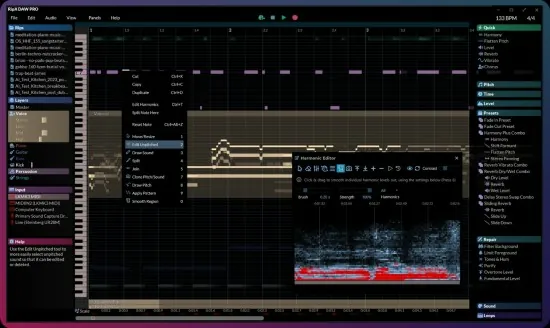
The foundation of RipX DAW PRO Portable is its patented Rip format, which transcribes audio into a layered, editable representation far beyond standard waveforms. Upon import—supporting MP3, WAV, FLAC, AIFF, and more—the AI engine performs 6+ stem separation, isolating vocals, drums, bass, other instruments, and even ambient noise into discrete tracks. This isn’t simple spectral gating; it’s intelligent polyphonic transcription that detects pitches, timings, velocities, and harmonics, rendering them as draggable notes on a piano-roll-like grid synced to the timeline.
Users see audio as colorful blobs representing notes: vocals in blue, drums in red, synths in green, with sizes indicating volume and positions reflecting pitch and time. AI enhancements like improved chord recognition and sibilance detection ensure clean splits, even on dense mixes or AI-generated music. The PRO version adds unpitched audio editing for breaths, knocks, or reverb tails, separating them from melodic content for targeted cleanup.
This visual paradigm shifts editing from guesswork to direct manipulation: select a note, drag to retime, pitch-shift without artifacts, or clone to harmonies. Tempo detection auto-matches imported loops, while scale fitting snaps elements to keys for instant harmony.
Note-Level Editing and Manipulation
RipX DAW PRO Portable’s editing canvas is a multi-layered timeline where each stem becomes a playground. Notes can be split, joined, resized for length/volume, or nudged with quantization grids. Polyphonic overdubs—multiple notes per time slice—are handled seamlessly, allowing guitar chords or piano runs to be deconstructed and rebuilt.
Instrument replacement swaps sounds effortlessly: drag a violin note onto a synth layer, and AI resynthesizes it with formant preservation. Harmonic editing dives deeper, adjusting overtones individually for timbre tweaks—boost a guitar’s bite by amplifying 3rd/5th harmonics or mellow vocals by damping highs. The Unpitched Audio Editor cleans noise floors, removing hums or crowd chatter without phasing artifacts.
Creative tools abound: randomize pitches for glitch effects, reverse sections mid-note, or apply vibrato/delay per element. MIDI export converts rips to SMF files with velocity/aftertouch, bridging to other DAWs.
Mixing, Effects, and Automation
The PRO mixer rivals industry standards with per-layer controls: EQ (parametric, graphic), compression, reverb, delay, chorus, distortion, and more. Live effects rack includes DeEsser, formant shifter, and harmony generator for thickening tracks. Automation lanes curve parameters over time—fade a vocal’s reverb during chorus or automate drum panning.
Master bus offers multiband dynamics, stereo imaging, and exciters, with real-time spectrum analysis. Groove templates quantize to humanized feels, while BPM adjustments stretch without pitch warble.
Unique effects like Reverse, Bitcrusher, and Ring Mod apply to selected notes only, enabling surgical sound design impossible elsewhere.
Recording and Live Integration
Built-in recording captures audio/MIDI/MPE with low latency, auto-grouping takes for comping. Visual pitch aids guide singers, while metronome syncs to project tempo. RipLink VST3/ARA2/AU/AudioSuite plugins embed RipX into hosts like Ableton, Logic, or Pro Tools, ripping clips in-place.
For live use, real-time stem separation previews mixes, isolating DJ drops or vocal fixes on-the-fly.
Audio Repair and Cleanup Tools
PRO-exclusive Audioshop suite excels at restoration: live noise reduction gates background hums/traffic, artifact limiters tame digital glitches, and tone reduction quiets feedback. Surgical harmonic fixes regenerate missing fundamentals, restoring muffled lows in old masters.
Clean Spectrum mode previews edits pre/post, with A/B comparisons. Declipper repairs peaked waveforms, while phase correction aligns multis.
Video and Post-Production Features
macOS-exclusive audio-to-video editing syncs rips to MP4/MOV timelines, ideal for sound design. Extract dialogue artifact-free from noisy footage, humanize robotic VO, or remix scores note-by-note.
Scripting and Customization
RipScript language builds custom tools: automate stem exports, batch pitch corrections, or create generative effects. Community scripts extend functionality, like auto-harmonizers or genre converters.
Workflow Efficiency and UI Design
The dark-themed interface centers a zoomable canvas with piano roll below, mixer right, browser left. Contextual panels expand for effects; one-click previews play selections. Unlimited undo/redo, session saving, and cloud backup ensure safety.
Performance scales: GPU acceleration rips 5-minute tracks in seconds on modern hardware. Cross-platform (Windows/macOS), with M1+ native support.
Export and Integration Options
Exports include stems (audio/MIDI), full mixes (WAV/FLAC/MP3), video rips, and Rip files for re-import. Batch processing handles albums; A/B rendering compares variants.
Seamless DAW round-tripping via RipLink preserves edits.
Use Cases Across Disciplines
Producers/Remixers: Stem packs into new beats; vocal tuning without Auto-Tune.
Composers: Note-by-note orchestration from loops.
Post Pros: Dialogue isolation, Foley layering.
Live Sound: Real-time fixes, multitrack rips.
Educators: Visual transcription for theory.
Hobbyists: Mashups from singles.
PRO vs DAW Edition
PRO adds Audioshop, harmonic editor, unpitched tools, advanced scripting—essential for pros needing cleanup/creativity.
Performance Specs
Windows 10+/macOS 11+, 8GB RAM min (16GB+ rec.), multi-core CPU/GPU.
Regular updates enhance AI, effects, formats.
RipX DAW PRO Portable shatters audio limits, turning any track into a playable instrument. Its note-level access, AI smarts, and repair power make it the ultimate creative forge for music’s future.