Portable X-NetStat Technician 6.0.0.40

X-NetStat Portable is a network monitoring and connection analysis tool designed for Windows users who want a clearer view of what their computer is doing on the network. It focuses on showing active connections, identifying the processes behind them, and presenting the details in a form that is much easier to understand than raw command-line output. For users who need to watch network activity in real time, investigate connections, or understand how applications communicate across the internet, the software offers a practical and detailed working environment.
The Portable version adds important flexibility. A portable network utility can be carried between machines, launched without a traditional installation process, and used whenever a system needs quick inspection. That makes X-NetStat Portable especially attractive for technicians, administrators, testers, and advanced users who work across multiple Windows computers and want a consistent diagnostic tool available in a self-contained format.
Core purpose
The main purpose of X-NetStat Portable is to show network connections clearly and in real time. Many users know that their computer is connected to the internet, but they do not always know which applications are creating those connections, where the traffic is going, or how long each connection has been open. The software is built to answer those questions with direct, organized information.
That purpose is important because network behavior can be difficult to interpret without the right tools. Background services, update checks, browser activity, remote sessions, and system processes may all generate traffic at the same time. X-NetStat Portable helps the user separate those details and see what is actually happening on the machine. That makes it useful both for troubleshooting and for everyday awareness.
Portable convenience
The portable format is a major advantage for a tool like this. Network analysis is often needed quickly and sometimes on machines where a full installation is inconvenient. With a portable version, the user can keep the utility on removable storage or within a maintenance toolkit and launch it as needed without a setup routine.
This is especially useful in support situations. If a technician is examining multiple computers, working on a client system, or reviewing a machine temporarily, a portable utility can save time and reduce friction. X-NetStat Portable gives the user a ready-to-use network view without requiring permanent changes to the host system.
Connection monitoring
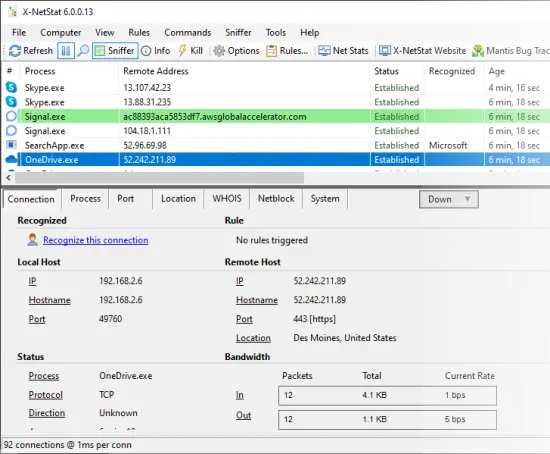
One of the software’s most useful functions is connection monitoring. The program displays active internet and network connections so the user can see which links are open at any given time. That is helpful when trying to understand what an application is doing behind the scenes or when investigating whether unexpected traffic is taking place.
Connection monitoring matters because network activity is often invisible in ordinary use. A program may appear idle while still maintaining a connection, checking for updates, syncing data, or communicating with a remote server. X-NetStat Portable gives users a visible record of those connections, turning hidden activity into something they can inspect directly.
Process association
Another key strength of X-NetStat Portable is that it shows the process responsible for a connection. That is a crucial detail because the same network port or address is not very useful by itself unless the user knows which application is involved. By linking connection data to the process behind it, the software makes network analysis much more understandable.
This process association is valuable in troubleshooting. If a user sees a surprising outbound connection, they can identify the application or service that created it. That can help distinguish normal behavior from something that deserves further attention. For administrators and power users, that clarity is one of the software’s biggest practical benefits.
Ports and addresses
X-NetStat Portable presents information about local and remote ports, local and remote addresses, and connection status. This gives the user a more complete picture of the communication path. Ports and addresses are essential pieces of network identity, and seeing them in one organized place helps users understand how the system is communicating.
This kind of detail is useful for both learning and investigation. A novice can start to understand how connections are formed, while an experienced user can use the information to diagnose a problem or monitor traffic patterns. The software’s strength lies in making these technical details visible without making them feel overwhelming.
Connection status and duration
Another practical part of the interface is the display of connection status and connection duration. Status tells the user whether a connection is active, waiting, established, or otherwise in a particular state. Duration shows how long the connection has existed, which can help identify persistent traffic or short-lived bursts of activity.
These details matter because network behavior is not static. Some connections are temporary and some remain open for extended periods. By showing both status and age, X-NetStat Portable helps the user tell the difference and make better judgments about what the system is doing. That is useful in debugging, performance analysis, and security awareness.
Bandwidth information
The software also displays information about bandwidth usage, which helps users understand the weight of each connection. Some traffic is minor and nearly invisible, while other traffic consumes noticeable resources or contributes to slower network performance. By showing bandwidth-related details, X-NetStat Portable helps users identify which connections are more demanding.
This is helpful when trying to understand performance issues. If a machine feels slow or network access seems congested, bandwidth information can reveal whether one process is using more resources than expected. That makes the tool useful not only as a monitor but also as a practical diagnostic aid.
Real-time visibility
Real-time visibility is one of the biggest advantages of using a network monitor. X-NetStat Portable is designed to show changes as they happen so users can watch connections appear, change state, and disappear. That live view is especially useful when trying to catch short-lived activity that might be missed in a slower or less responsive tool.
Real-time monitoring also helps with understanding cause and effect. If a user launches a program and sees a connection appear immediately, the relationship is easier to understand. This can be especially helpful when diagnosing startup behavior, update checks, or application communication patterns.
Diagnostic use
X-NetStat Portable is a strong diagnostic tool because it helps answer questions about network behavior that would otherwise be hard to observe. Is a process connecting to the internet? Is a service keeping a connection open too long? Is a machine communicating with a remote address unexpectedly? These are the kinds of questions the software is designed to help answer.
Diagnostics benefit from clarity, and that is exactly what this software tries to provide. Rather than relying on guesswork, users can inspect the active connection table and see what is really happening. That makes troubleshooting more direct and gives the user more confidence in their conclusions.
Security awareness
Although X-NetStat Portable is not limited to security use, it can certainly help with security awareness. Knowing which connections are active and which processes created them is useful when reviewing whether the system is behaving as expected. Unexpected network activity can stand out more clearly when the connection table is visible and organized.
This does not replace deeper security tools, but it provides an important layer of insight. Users can notice unfamiliar hosts, unusual ports, or processes that appear more active than expected. That makes the software useful for cautious monitoring and for keeping an eye on system behavior in a more informed way.
Learning tool value
X-NetStat Portable also has educational value. People who are learning about networking often need to see how addresses, ports, protocols, and processes connect in real use. A tool that shows live connections in a structured interface can make those concepts much easier to understand than abstract explanations alone.
Because the software displays technical details in a readable format, it can help users build a stronger mental model of how their computer communicates. That makes it useful not just for experts, but also for students, hobbyists, and curious users who want to learn more about network behavior in practical terms.
Useful lookup tools
Network analysis often benefits from related lookup functions. X-NetStat Portable is suited to that kind of workflow because users frequently want to know more about an address or host once they see it in the connection table. Additional lookup capability helps turn a raw connection into a more meaningful piece of information.
This is important because addresses and hosts by themselves are only part of the story. Knowing where a connection points, how it resolves, and what kind of service it may represent helps the user interpret the data. A monitoring tool becomes much more useful when it supports that kind of follow-up analysis.
Blocking and control
For some users, simply observing connections is not enough. They also want a way to react to what they see. X-NetStat Portable is the kind of tool that can support more active network control, helping users manage unwanted or suspicious connections in a more direct way. That makes it more than a passive monitor.
The ability to control or respond to network events is useful in maintenance and security contexts. If a connection is clearly not wanted, or if a user is experimenting with a system and wants to limit communication, the software can fit into a more intervention-focused workflow. This gives it broader practical value.
Interface clarity
A network monitor is only useful if the information is presented clearly. X-NetStat Portable is built around the idea that technical details should be visible and readable rather than buried in difficult output. That is part of what makes the software approachable to users who may not want to interpret low-level network data in text form.
Clarity is especially important when monitoring many connections at once. If rows of data are confusing, the tool quickly becomes frustrating. By organizing the information into understandable fields and allowing the user to inspect the active connections visually, the software becomes a more practical and less intimidating diagnostic environment.
Everyday and professional use
X-NetStat Portable fits both everyday and professional use. Everyday users may use it to see which applications are communicating online or to understand why the network seems busy. Professional users may use it for system checks, support tasks, policy review, or troubleshooting sessions where they need a clear picture of what a machine is doing.
This broad usefulness is one reason network monitors remain relevant. Network activity is present in nearly every modern workflow, and understanding it is useful in many settings. X-NetStat Portable provides a focused way to observe that activity without forcing the user into a more complicated or less convenient setup.
Why portability matters here
Portability matters especially in network work because diagnostic tasks are often mobile and situation-specific. A portable tool can be brought to the machine that needs inspection rather than requiring the machine to be prepared in advance. That makes the process faster and more flexible.
It also helps users maintain a reliable toolkit. If a technician or administrator has a standard portable environment, they can use the same familiar utility across different systems and retain the same workflow every time. That consistency is useful when time is limited and the diagnostic process needs to be efficient.
Overall character
X-NetStat Portable is best understood as a clear, practical, and technically useful network monitoring tool. It shows active internet and network connections, associates them with processes, and presents technical details in a way that helps users understand what their system is doing. The portable format makes it even more convenient because it can be used on different machines without a standard installation process.
The software’s overall character is centered on visibility and control. It gives users a better view of live network behavior and helps them make sense of processes, ports, addresses, and traffic patterns. That makes it useful for troubleshooting, awareness, teaching, and general system monitoring.
For anyone who wants a portable tool to inspect network connections and understand system communication more clearly, X-NetStat Portable offers a solid and practical solution. It turns complex network activity into something visible, organized, and far easier to work with.
Features
– Display all TCP Connections & UDP listens
– Connection Info: Addresses, Status, Ports, etc
– Process Info: Show program EXE behind connections
– Location Info: 1-Click Auto-WHOIS
– System Info: Uptime, MAC Address, Workgroup, etc
– Ability to Kill/Disconnect connections
– Nuke Connections (mass kill)
– DNS Cache for fast hostname resolution
– Log XNS activity to file / Log Manager
– Feature-Centric customizable toolbar
– ViewBar & System Tray Access
– Remote Access thru X-NetStat Web Server
– Comprehensive Port Information Database
– Get External IP address
– Show In/Out Traffic Rates / LED traffic lights
– 1-Click access to common DOS network commands
– Banish Hostname (prevent outgoing connections)
– Condition/Action Rules system
– Print / Save Connection Table
– Customize Columns & Toolbar buttons
– Customize Status Bar
– Customize External Programs
– Customize Font & Appearance
– Extensive set of configurable Options
– Lookup Tools (WHOIS, TraceRoute, etc)
– Net Stats (Interface, TCP, IP, ICMP, UDP)
– Check for Updates
– Assign addresses ”friendly” names
– Filter/Search Connections
– Bulk IP Import Tool (resolve IP lists)
– AutoRefresh & Pause buttons
New features
– Optimized for 64-bit Windows
– Optimized for multi-core processors
– Auto-ARIN lookup
– Auto-Ping lookup
– New Location lookup engine
– Integration w/ Emerging Threats IP blacklist for Threat detection
– Smart Update engine
– Support for NpCap packet sniffing
– Can now trigger a Rule by country
– Better firewall integration
– New NetStats module
– New Side-Panel
– Modern icons
– Event Log