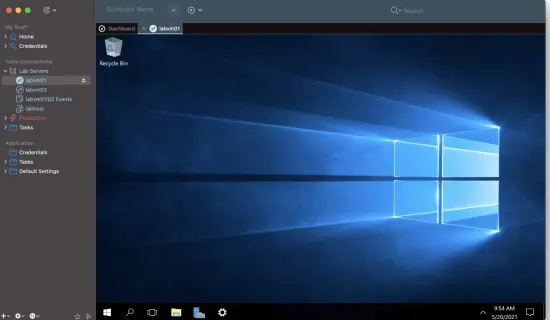
Portable Royal TS 7.4.50922 (x64) Multilingual

Royal TS Portable is a modern, cross‑platform remote management solution designed to centralize and streamline how IT professionals, system administrators, and developers access and organize a wide range of remote systems and services. Instead of juggling dozens of separate tools and scattered connection files, users can manage hundreds or even thousands of connections from a single, unified interface. The software is engineered to support multiple environments—on‑premises, cloud, hybrid, and even personal home labs—while keeping the experience intuitive enough for non‑expert users yet powerful enough for enterprise‑class operations.
What Royal TS Portable is
Royal TS Portable is a connection and session management platform that lets you store, organize, and launch remote connections to servers, workstations, and online services through dozens of protocols and technologies. It is built from the ground up to support multi‑user teams as well as solo administrators, offering both local configuration and centralized, server‑based document storage. The product family is available for Windows, macOS, iOS, and Android, which means you can maintain the same document structure and access the same resources whether you are on a desktop, laptop, tablet, or phone.
From a workflow standpoint, Royal TS Portable replaces the need to remember individual IP addresses, hostnames, ports, and connection settings. Instead, you define each resource once—such as a Windows server, a Linux VM, a web‑based admin console, or a cloud‑hosted database interface—and then reopen it with a single click or a quick keyboard shortcut. Because the tool is cross‑platform, documents created on one operating system can be opened and edited on another, preserving your layout, icons, tags, and organization. This makes it easy to move between your workstation, laptop, and mobile device without losing context or re‑entering credentials.
At its core, Royal TS Portable is a “document‑oriented” manager. Everything you work with—connections, credentials, folders, layouts, and extensions—is stored inside a Royal TS Portable document, which behaves like a portable configuration file. You can back up, share, or synchronize these documents across multiple machines or even via cloud storage, depending on your security and compliance requirements. For teams, the software can also connect to a dedicated server‑side component that allows centralized management of documents, access control, and connection policies, so that multiple technicians can collaborate on the same infrastructure without duplicating or conflicting configuration work.
Key features and capabilities
Royal TS Portable is packed with features that make it suitable for both small‑scale home‑lab use and large‑scale enterprise environments. Below are some of its main capabilities, described in a way that fits smoothly into a WordPress‑style article.
Centralized connection management
Royal TS Portable lets you collect all your remote systems in one place, regardless of where they are physically located or how you connect to them. This includes:
- Windows servers accessed via Remote Desktop (RDP).
- Linux and Unix machines reached through SSH sessions.
- Virtual desktops and terminal servers used by remote workers.
- Web‑based administration portals for routers, firewalls, NAS devices, and cloud consoles.
- Tunneling and gateway‑based connections that route traffic through secure intermediaries.
Each connection is stored as a discrete object inside your Royal TS Portable document, typically placed inside a folder or group that reflects your logical structure: per department, per data‑center, per project, or per environment (development, staging, production). You can also create nested folder hierarchies, which makes it easy to mirror your internal IT taxonomy without having to invent new tools or scripts.
Support for multiple protocols and connection types
The software is designed to support a wide spectrum of protocols and connection methods, so you are not limited to any single technology. Common scenario‑based capabilities include:
- Remote Desktop (RDP) for Windows servers and virtual machines, including support for multi‑monitor setups, display scaling, and advanced authentication options.
- SSH and terminal‑based connections for Linux, macOS, and network appliances, often with configurable shells, environment variables, and key‑based authentication.
- VNC‑based remote desktops for legacy or cross‑platform systems that do not use RDP.
- HTTP and HTTPS connections to internal dashboards, monitoring tools, and web‑based admin panels.
- Custom plugin or script‑based connection types that can embed other tools inside Royal TS Portable windows or tabs.
These connection types are not just “one‑off” entries; they can inherit settings from parent folders, so you can define default timeouts, credential templates, certificate settings, or layout preferences at the folder level and then let individual connections pick them up automatically. This reduces configuration drift and ensures a consistent experience across many similar hosts.
Visual organization and navigation
Royal TS Portable emphasizes visual organization, making it easy to scan large numbers of connections and locate the right one quickly. The interface is built around:
- Tree‑style folders and categories that you can collapse and expand.
- Custom icons and color labels for different servers, services, or environments.
- Tagging and metadata fields that help you filter or search by any attribute (e.g., location, role, owner, or SLA tier).
- Tabs and panes that let you keep multiple sessions open side‑by‑side within the same application window.
You can also define custom layouts and perspectives—sets of filters, column views, or dashboard‑style arrangements that show only the systems you care about at a given moment. For example, a “Nightly Backup” view might display only the servers scheduled for backup tonight, while a “Production Outage” view might highlight only the heaviest nodes in your most critical cluster.
Credential and authentication handling
Access to remote systems always hinges on secure, reliable credentials, and Royal TS Portable offers several mechanisms to help you manage them without exposing plain‑text passwords or private keys. Key aspects include:
- Built‑in credential storage that can keep usernames, passwords, SSH keys, and other secrets in an encrypted form inside the Royal TS Portable document.
- Support for external credential providers and vault‑style backends, allowing integration with centralized secrets management solutions.
- Credential inheritance and templates, so you can define a default set of credentials at the folder level and then override only specific fields on individual connections.
- Password‑prompting behavior that can be tuned per connection, per folder, or globally, enabling you to enforce re‑authentication or “just‑in‑time” logins when needed.
This approach helps reduce the temptation to hard‑code credentials into scripts or configuration files stored outside Royal TS Portable, while still giving you the flexibility to use different authentication methods depending on the target system’s requirements.
Cross‑platform and mobile access
One of Royal TS Portable’s standout traits is its coverage across desktop and mobile platforms. Cloud‑centric workflows and remote‑first teams can benefit from:
- Full‑featured Windows and macOS desktop versions that support advanced layout options, multi‑monitor arrangements, and scripting.
- Mobile apps for iOS and Android that render the same document structure and allow you to open the same connections from a tablet or phone.
- Consistent document format so that a document created on a Windows machine can be opened and edited on macOS or a mobile device without losing features or metadata.
The mobile experience is tailored to smaller screens, with touch‑optimized navigation, simplified views, and context‑sensitive menus that make it easier to perform quick checks or emergency access without a full‑size workstation. Connection properties and authentication data synchronize with the document itself, so you do not need to reconfigure your environment every time you switch devices.
Document‑level configuration and sharing
Royal TS Portable treats each configuration as a document, much like a project file in other desktop applications. This design has several practical implications:
- You can create multiple documents for different scopes (e.g., “Production,” “Staging,” “Home Lab,” “Client A”).
- Documents can be version‑controlled, backed up, or shared across a team by copying files or using collaboration storage.
- Each document can define its own set of default settings, plugins, and user preferences, so environments stay isolated and avoid accidental cross‑configuration.
For teams that need tighter governance, the software can integrate with a server‑side component that stores documents centrally, manages access control lists, and enforces policies such as read‑only permissions for junior staff or audit‑only access for security reviewers. This allows larger organizations to maintain a single “source of truth” for connection definitions instead of relying on personal, ad‑hoc files scattered across different workstations.
Use cases and typical workflows
Royal TS Portable is particularly valuable in environments where IT staff must manage many different systems, often with overlapping responsibilities. Typical use‑case patterns include:
Server and infrastructure administration
System administrators can use Royal TS Portable to:
- Maintain a complete inventory of all servers, physical and virtual, grouped by function (web, database, monitoring, etc.).
- Quickly jump between backend components when troubleshooting a complex application stack.
- Apply consistent connection settings, such as display resolution, keyboard shortcuts, or tunneling rules, across large groups of servers.
For example, a sysadmin might create a folder for “Web Tier,” another for “Database Tier,” and a third for “Monitoring and Logging,” each with its own icon set, default credentials, and connection templates. When an alert fires at 3 a.m., the admin can open the document, navigate to the relevant folder, and connect to the affected machine in seconds, without first searching through spreadsheets or text files.
Development and DevOps teams
Developers and DevOps engineers often work across multiple environments (development, staging, production) and need to keep track of ephemeral test instances:
- Connect to cloud‑based VMs, containers, and CI/CD runners without manually remembering hostnames or IP addresses.
- Group connections by environment and tag them with metadata such as “ephemeral,” “owned‑by‑team‑x,” or “scheduled‑for‑teardown.”
- Use shared documents to ensure that all team members use the same access methods and credentials, reducing drift and configuration errors.
During a deployment or incident, a developer might open a pre‑defined “Production Triage” view that shows only the live nodes relevant to the current service, allowing rapid inspection and interactive debugging without risking mis‑connection to non‑production systems.
Managed service providers and IT support teams
Managed service providers (MSPs) and helpdesks can leverage Royal TS Portable to:
- Maintain separate documents or sections for each client, each with its own access rules and credential sets.
- Quickly onboard new technicians by granting them access to a shared document instead of forcing them to re‑create each connection from scratch.
- Enforce standardized security practices, such as using tunneling or gateway connections instead of direct Internet‑exposed RDP.
In a support scenario, a technician might receive an incident ticket and then simply open the “Client X – Production” document, filter connections by the affected service name, and begin working from there. This reduces the time spent looking up connection details and lowers the risk of connecting to the wrong host or environment.
Home lab and personal experimentation
Outside of enterprise IT, Royal TS Portable is also popular among enthusiasts and hobbyists who run personal labs with multiple servers, virtual machines, and network devices:
- Organize Raspberry Pis, homelab servers, and smart‑home controllers into a single, visually clear structure.
- Keep experimental VMs and temporary test machines in a “Sandbox” folder that can be easily archived or deleted without affecting production‑related entries.
- Use tags and notes to document each host’s purpose, installed software, and current state.
For example, a home‑lab user might create a document titled “My Homelab” containing folders such as “Core Networking,” “Media Server,” “Game Servers,” and “Test Environments,” each with custom icons and color labels. This makes it easy to navigate the lab from a desktop or a mobile device, and to quickly remember which machine performs which role.
Extensibility and plugin ecosystem
Royal TS Portable is designed to be extensible, which means you are not limited to the built‑in connection types. Through plugins and add‑ons, you can:
- Extend Royal TS Portable to support new protocols or proprietary tools that are not covered by the core product.
- Embed custom scripts or utilities inside the Royal TS Portable window, reusing the same interface while adding domain‑specific functionality.
- Integrate with external management or monitoring platforms, feeding information into Royal TS Portable or using Royal TS Portable as a launch hub for other tools.
Plug‑in behavior can be configured at the document level, so different environments can use different extensions without affecting one another. For example, a production‑focused document might include stricter security plugins and logging hooks, while a development‑oriented document might use more experimental or debug‑oriented extensions. This flexibility allows Royal TS Portable to adapt to specialized workflows in industries such as finance, healthcare, or industrial automation, where security and compliance requirements vary widely.
Security, access control, and compliance
Because Royal TS Portable holds access information to critical systems, its security model is an important consideration:
-
Credentials and other sensitive data can be encrypted within the document, with options to control how and where decryption keys are stored (e.g., on‑device only).
-
Documents can be configured with password‑protected access, so only authorized users can open or modify them.
-
When integrated with server‑based components, access can be governed by role‑based or attribute‑based rules, allowing administrators to grant read‑only, read‑write, or no access to specific users or groups.
In regulated environments, organizations can also combine Royal TS Portable with broader compliance tools such as endpoint encryption, logging servers, and audit workflows. For example, connection startup events, user identities, and connection durations can be logged externally, while Royal TS Portable itself focuses on the practical work of organizing and launching sessions. This separation of concerns helps satisfy both operational efficiency and regulatory requirements.
Collaboration, versioning, and team use
Royal TS Portable is not just a solo tool; it supports collaborative workflows in several ways:
- Shared documents that multiple team members can access, with configurable permissions for who can edit, delete, or only view connection entries.
- Folder‑level comments, notes, or metadata fields that can document ownership, change windows, or emergency procedures.
- Check‑in / check‑out style workflows when documents are stored on a shared server or version‑controlled repository, helping to avoid conflicting edits.
In a team environment, one person might act as the “document owner,” responsible for maintaining the master structure, while others contribute updates or additions under review. This mirrors the way code repositories are managed: changes are proposed, inspected, and then merged into the main document, ensuring consistency and reducing the risk of accidental misconfiguration.
Practical benefits for IT professionals
Across all these scenarios, Royal TS Portable delivers several concrete benefits that accumulate over time:
- Reduced cognitive load: Instead of remembering tens or hundreds of hostnames, ports, and credentials, you bookmark them once and rely on visual navigation.
- Faster incident response: During outages or security events, the ability to open a predefined set of relevant systems in seconds can save critical minutes.
- Improved consistency: Default templates, inherited credentials, and shared documents help ensure that all team members connect to systems the same way, using the same security settings.
- Easier onboarding: New team members can be brought up to speed quickly by giving them access to an existing Royal TS Portable document structure instead of asking them to recreate everything from scratch.
- Better mobility: With support for desktop and mobile platforms, you can handle routine checks or urgent connections from almost any device, without losing your organizational structure.
When combined with disciplined documentation practices—such as adding notes, tags, and metadata to each connection—Royal TS Portable becomes not just a connection launcher but also a living inventory of your infrastructure, annotated with operational context that would otherwise live only in individual memory or scattered wikis.
Interface and user experience
Royal TS Portable places a strong emphasis on usability, even when dealing with very large sets of connections:
- Clean, tabbed interface that keeps multiple sessions open without cluttering the workspace.
- Customizable layouts and perspectives that let you build different “views” for different tasks.
- Keyboard shortcuts, drag‑and‑drop operations, and quick‑search tools that speed up navigation and reduce manual pointing.
- Context‑sensitive menus and right‑click actions that surface the most relevant options for each connection type.
The UX is designed to stay out of the way during routine work but to provide powerful tools when you need them. For example, you might use a simple tree view to launch a daily check, while switching to a more detailed grid or dashboard view during a troubleshooting session. This adaptability makes Royal TS Portable suitable for both casual users who need occasional access and power users who spend most of their day managing remote systems.
Getting started with Royal TS Portable
For someone new to Royal TS Portable, the typical onboarding flow looks roughly like this:
- Install the version appropriate for your operating system (Windows, macOS, iOS, or Android).
- Create a new document or open an existing one if you have one shared with your team.
- Begin by adding a few test connections, such as a home server or a cloud VM, experimenting with different protocols (RDP, SSH, HTTP, etc.).
- Organize those connections into folders that reflect your mental model of the environment.
- Configure default credentials, icons, and metadata so that the list is easy to scan and understand.
- Gradually expand the document to cover more of your infrastructure, always using folders and tags to keep things organized.
Over time, you can refine your structure based on how you actually use the connections, adjusting folders, views, and plugins to match your evolving workload. The result is a personalized, highly efficient hub for managing remote systems that stays useful whether you are working alone or as part of a larger organization.
Summary of why Royal TS Portable stands out
Royal TS Portable stands out as a connection and session management platform that combines deep feature support with a flexible, document‑oriented design. It is not merely a remote desktop client or a terminal launcher; it is a full‑fledged environment for organizing, securing, and accessing a wide range of systems and services. Its cross‑platform nature, support for multiple protocols, and extensibility make it suitable for many different roles—from solo home‑lab enthusiasts to enterprise IT departments and managed service providers.
By centralizing connection definitions, standardizing authentication practices, and enabling team‑based collaboration, Royal TS Portable helps reduce configuration drift, improve incident response times, and make infrastructure management more intuitive and scalable. Whether you are managing a handful of servers or a globally distributed cloud estate, Royal TS Portable can serve as a single, consistent entry point to your remote environment, turning fragmented, ad‑hoc connections into a structured, navigable, and secure resource.