

Portable Zortam Mp3 Media Studio Pro 33.55 Multilingual
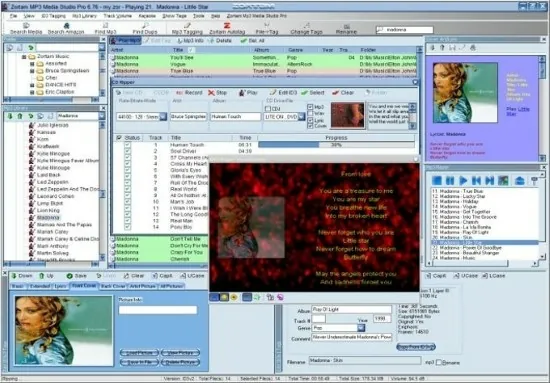
Zortam Mp3 Media Studio Portable is a comprehensive all-in-one multimedia management suite tailored for Windows users who maintain large music collections, offering powerful tools for organizing, tagging, playing, converting, and enhancing MP3 and other audio files.
This professional-grade software combines an intuitive interface with advanced automation features, enabling effortless batch processing of thousands of tracks, automatic retrieval of metadata like album art and lyrics, and precise audio normalization for consistent playback quality.
Designed for audiophiles, DJs, music enthusiasts, and professionals handling extensive libraries, Zortam Mp3 Media Studio Portable transforms disorganized file collections into polished, searchable, and visually appealing music databases, complete with integrated playback, ripping, burning, and conversion capabilities.
Zortam Mp3 Media Studio gives you
Auto tag your Mp3 music collection using the Zortam Music Internet Database (ZMLIMD)
Mp3 Tagger and MP3 Manager
Zortam Mp3 Player with cover arts and lyrics support
Organize Mp3 music and edit tags in your audio library with a powerful interface
ID3 Tag Editor (Mp3 Tagger) with separate views for ID3v1 and ID3v2.4 Tags
Download song lyric and download cover arts (Album covers) from the Zortam Music Interent Database using batch processing – iPod and iTunes ready
Normalize your Mp3’s with Volume Normalizer and set custom volume in dB
Rip your CD with CD Ripper and tag your songs in one single step with cover arts(artworks) and lyrics
Batch Wav to Mp3 converter and vice versa
Burn Audio or Mp3 CD
Print HTML Lyrics book width cover arts
Powerful drag & drop playlist manager
Write ID3 Tags from filename
Delete ID3 Tags, delete cover arts, delete lyrics (ID3 Tag Remover)
Search for duplicate Mp3’s
Batch file rename using information from ID3 tags(Mp3 Renamer)
Write ID3 tags using information from filename
Add karaoke and midi files directly to ID3 tags
All options are supporting batch processing
Use mp3 tag lookup using Zortam Music Internet Database for auto tagging
Plus much more …
Core Modules and Workflow Integration
Zortam Mp3 Media Studio Portable operates as a unified platform with interconnected modules that streamline music management workflows. The central hub is the MP3 Organizer, which scans directories and automatically populates a database with audio files, displaying them in a customizable grid or list view enriched with album artwork, track details, and playback controls. Users can drag and drop files or folders directly into the interface, triggering instant analysis and tagging suggestions.
The Auto Tagger module leverages Zortam’s proprietary Music Internet Database (ZMLIMD) to fetch accurate ID3v1 and ID3v2.4 tags, including artist names, album titles, track numbers, genres, years, and composer information. This process runs in batch mode, processing up to 50,000 files rapidly, with options to verify matches manually or accept bulk updates. For unmatched tracks, the software cross-references fingerprints against online sources, minimizing errors and ensuring high accuracy even for obscure releases.
Complementing tagging is the Lyrics Finder, which downloads and embeds synchronized lyrics into files, supporting formats like LRC for karaoke-style display during playback. Similarly, the Cover Art Downloader retrieves high-resolution album images, embedding them directly into ID3 tags for portable device compatibility.
ID3 Tag Editor and Batch Processing Power
The Universal Tag Editor stands out as one of the most robust components, offering granular control over metadata fields. Users can edit tags for single files or apply changes across entire albums or libraries via batch operations. Features include automatic tag generation from filenames (e.g., converting “Artist – Song.mp3” to proper fields), tag copying between files, and advanced renaming rules based on tags, dates, or custom patterns.
Batch processing extends to volume normalization, where the software analyzes peak levels and applies ReplayGain or custom normalization to ensure uniform loudness across tracks, eliminating the need for constant volume adjustments during playback. BPM (Beats Per Minute) analysis provides tempo detection for DJs, facilitating seamless mixing and playlist curation.
The editor supports multiple tag views side-by-side, allowing comparison and synchronization between ID3v1, ID3v2.3, and ID3v2.4 standards, crucial for compatibility with diverse players and devices.
Integrated Audio Player and Visualization
Zortam includes a full-featured MP3 player with spectrum analyzer, 10-band equalizer, and visualizers that display waveforms, spectrograms, and album art in real-time. The player supports gapless playback, crossfade transitions, and playlist management with drag-and-drop reordering. Karaoke mode highlights lyrics in sync with music, ideal for practice or performance.
Playlists can be saved as M3U or PLS files, with smart playlist generation based on criteria like genre, rating, play count, or recently added tracks. The player integrates with Windows Media Library, enabling seamless control via hotkeys or system tray icon.
CD Ripper, Converter, and Burning Tools
For physical media enthusiasts, the CD Ripper converts audio CDs to MP3, FLAC, WAV, WMA, or AAC using high-quality encoders like LAME for MP3. Freedb/CDDB integration automatically retrieves track information during ripping, with secure mode for error-free extraction. Users can select ripping speeds, quality presets (up to 320kbps), and output folders structured by artist/album.
The Audio Converter handles format transcoding between MP3, WAV, FLAC, OGG, and more, preserving quality through bit-perfect conversions. Batch mode processes entire folders, with options for joint stereo, variable bitrate (VBR), or constant bitrate (CBR).
Burning capabilities extend to creating MP3 or audio CDs/DVDs, with buffer underrun protection for reliable burns. Users can compile custom compilations with track gaps, disc-at-once mode for perfect copies, and verification post-burn.
File Organization and Library Management
Zortam’s strength lies in its file organizer, which renames files and folders based on tags (e.g., “Artist/Album/Track – Title.mp3”) and moves them to structured hierarchies. This prevents duplicates, enforces consistency, and simplifies navigation. The duplicate finder scans by hash, size, or tags, allowing bulk deletion or merging.
Search functionality spans titles, artists, lyrics, or tags, with filters for quick library navigation. Ratings, play counts, and last played dates enable personalized recommendations and usage analytics.
Integration with iPod/iPhone/iPad allows bidirectional transfer: rip to library, sync to device, or extract from iPod back to PC. Android support via MTP ensures broad device compatibility.
Advanced Features for Professionals
Pro users benefit from YouTube to MP3 conversion (for legal content), screen-based auto-tagging via waveform analysis, and HTML lyrics book printing with embedded covers. The BPM analyzer suits DJs, while the normalizer ensures broadcast-ready volume levels.
Customization includes skins, toolbar layouts, and hotkey assignments. Export options cover playlists, tag reports, and database backups to XML or CSV.
Performance and Compatibility
Optimized for Windows 7 through 11 (32/64-bit), Zortam loads libraries of 50,000+ files swiftly using efficient indexing. Multi-threading accelerates batch tasks without system lag. Minimal resource footprint suits older hardware.
Use Cases Across User Groups
-
Music Collectors: Auto-organize ripped CDs or downloaded albums.
-
DJs/Producers: BPM tagging, normalization, playlist building.
-
Casual Listeners: Simple tagging, playback, device syncing.
-
Karaoke Enthusiasts: Lyrics embedding, synced display.
Conclusion
Zortam Mp3 Media Studio Portable excels as a feature-packed music manager, automating tedious tasks while offering pro-level control. From tagging vast libraries to ripping CDs and syncing devices, it delivers efficiency, quality, and enjoyment for any music workflow. Its evolution keeps pace with digital audio needs, making it a timeless tool for music lovers.
Note: If it reverts to trial…delete the data folder and add it to firewall.