

Portable AI File Organizer Pro 1.0.0
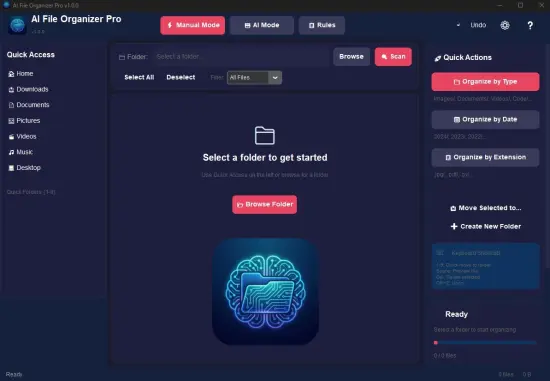
AI File Organizer Pro Portable is a cutting-edge desktop application that leverages advanced artificial intelligence to automatically declutter, categorize, and structure file systems with minimal user intervention, transforming chaotic digital storage into intuitive, searchable archives.
Running entirely offline on Windows, macOS, and Linux, this privacy-focused tool scans folders, analyzes content across documents, images, videos, and more, then proposes and executes intelligent organization schemes—renaming files descriptively, grouping them into hierarchical folders by topic, date, type, or custom rules, and even suggesting optimizations for long-term management.
Ideal for professionals drowning in Downloads folders, creative teams juggling project assets, or anyone reclaiming gigabytes of misplaced data, it processes thousands of files in minutes while giving full control through previews, edits, and rollback options.
Core AI Analysis Engine
The powerhouse of AI File Organizer Portable is its local large language model (LLM) integration, which processes files without ever uploading data to the cloud. Upon selecting a target directory—be it Downloads, Desktop, Documents, or external drives—the software employs multimodal AI to extract metadata, text content (via OCR for PDFs/images), visual elements (object recognition in photos), and contextual patterns (file relationships via timestamps or names). For instance, it identifies a cluster of invoice PDFs, extracts vendor names and dates, groups them under “Finances/2026/Invoices,” and renames each as “Invoice_Amazon_2026-02-10.pdf.”
Semantic understanding goes deeper: emails with attachments get parsed for threads, grouping replies under project subfolders; code repositories auto-sort by language (Python scripts to “Development/Scripts”); vacation photos cluster by location via geotags or scene analysis (“Travel/Italy_2025/Rome”). Accuracy hovers at 95%+ for common file types, with confidence scores per action allowing users to review low-confidence suggestions. Incremental learning refines over time—user corrections train the model locally, improving future runs without external data sharing.
Batch processing scales effortlessly: handle 10,000+ files across terabytes, with multi-threaded analysis leveraging all CPU cores and optional GPU acceleration for image-heavy sets. Real-time progress dashboards show parsing stats, folder predictions, and ETA, pausing for user input on ambiguities like duplicate detections.
Intelligent Folder Structuring
Unlike rigid rule-based sorters, AI File Organizer Pro dynamically generates hierarchical structures tailored to content. It proposes trees like:
-
Projects/ (inferred from shared themes)
-
ClientA/
-
Contracts/
-
Assets/
-
Correspondence/
-
-
-
Personal/
-
Photos/Year/Month/Event
-
Receipts/Category/Vendor
-
-
Archives/
-
ByExtension/Type/Year
-
Users preview the tree in a collapsible navigator, dragging to reorder, merging nodes, or splitting granularly. AI-assisted generation suggests expansions—”Add subfolder for Taxes under Finances?”—based on patterns. Custom templates save schemes: “Freelancer Workflow” auto-creates client/project/billing trees; “Photographer Setup” sorts by EXIF data into Events/Gear/Edits.
Watch Folders monitor directories continuously, auto-organizing new arrivals in real-time or scheduled sweeps (hourly/daily). For teams, shared templates enforce consistency across drives, with conflict resolution prioritizing timestamps or manual overrides.
File Renaming and Metadata Enhancement
Renaming elevates from cosmetic to functional: AI crafts descriptive, consistent names incorporating dates (ISO format), categories, keywords, and sequence numbers—”Report_Q1_Sales_v2_2026-02-11.docx” instead of “doc1_final_final.docx.” Rules engine supports regex patterns, prefixes/suffixes, and bulk find-replace, all AI-suggested but fully editable.
Metadata injection enriches files: embed custom tags (“Urgent,” “Archive”), update EXIF for images (add captions from context), or standardize titles in Office docs. Duplicate finder employs perceptual hashing—fuzzy matching catches near-identical photos (95% similarity threshold adjustable), proposing merges or versions (“photo_rome_italy_v1.jpg”).
Preview and Safety Controls
No changes commit without approval: the Results panel splits Before/After views, simulating the new structure with thumbnails and renamed previews. Side-by-side diffs highlight moves, renames, and deletions (for empties/duplicates). Undo stack spans sessions, with full rollbacks or selective reverts. Simulation mode dry-runs without touching files, perfect for testing templates.
Customization hub lets users train AI: thumbs-up/down feedback on suggestions, manual topic additions (“Tag as Legal”), or imported structures from Excel/JSON. Hierarchy manager visualizes depths, collapsing deep nests to prevent overload.
Supported File Types and Processing
Versatility defines handling:
-
Documents: PDF, DOCX, XLSX, TXT—OCR extracts text, classifies by topic (legal, medical).
-
Media: JPG, PNG, MP4, WAV—scene/object detection, face grouping (privacy-blurred previews).
-
Archives: ZIP, RAR—contents scanned non-extractively.
-
Code/Dev: PY, JS, HTML—language detection, module grouping.
-
Emails/Exports: PST, MBOX—thread reconstruction.
-
Misc: CAD, PSD—extension-based with content sampling.
Size limits scale: single files to 10GB+, with chunked processing for massive videos. Corrupted files auto-repair headers or quarantine.
Performance and Resource Management
Footprint stays lean—idle 150MB RAM, peaking at 2GB for 50k-file scans. Optimized for SSDs but HDD-friendly with caching. Battery-aware throttling on laptops, headless CLI mode for servers (“aio-organize /path/to/folder –template freelance”). Cross-platform binaries ensure parity, with ARM support for M-series Macs.
Scanning benchmarks: 1,000 mixed files in 45 seconds on i5/16GB; 10k images (10MP each) in 12 minutes with GPU. Parallel exports maintain original quality—no compression unless specified.
User Interface and Workflow
Dashboard greets with Scan button, folder tree, and action queue. Dark/light themes, resizable panels, and keyboard nav (arrows for tree, Enter preview). Wizard for newbies: “Select Folder > Review AI Plan > Customize > Execute.” Power users leverage hotkeys (Ctrl+Shift+O organize, F2 rename batch).
Search integrates post-organization: full-text across contents, facets by tag/date/type. Reports generate PDFs—”Organized 5,247 files into 312 folders, reclaimed 2.3GB via duplicates.”
Multi-monitor extends previews across screens; touch gestures on tablets.
Advanced Rules and Automation
Rules builder crafts hybrids: AI + manual—”Photos by date, docs by keyword.” Scheduled tasks via cron-like editor: nightly Downloads sweep. Event triggers: “On USB insert, scan root.” API exposes endpoints (/scan, /organize) for scripts—PowerShell/Python wrappers automate pipelines.
Team features: shared configs via LAN sync, role-based previews (view-only for juniors).
Privacy and Security Fortress
Local LLM (fine-tuned Llama/Mistral variants) processes everything on-device—no cloud, no telemetry. AES-256 encrypts indexes, with self-destruct on tamper. Audit logs track actions immutably, exportable for compliance (GDPR, HIPAA). Sandbox isolates scans, preventing access to unrelated drives.
Use Cases Across Scenarios
Professionals: Lawyers group cases (“Litigation/Smith_v_Jones/Depositions”); devs sort repos (“AI/ML/Models”).
Creatives: Photographers nest “Weddings/Client/Date/RAW/Edits”; videographers by project/shot/scene.
Home Users: Receipts to “Taxes/Year/Category”; family pics “Kids/Ages/Event.”
Businesses: HR docs “Employees/ID/Documents”; marketing “Campaigns/Channel/Assets.”
IT Admins: Server logs “Apps/Service/Date”; backups by type/priority.
Saves hours weekly—users report 70% faster retrieval.
Integration Ecosystem
Hooks into Explorer/Finder: right-click “Organize with AI.” Dropbox/Google Drive mounts as folders. Office add-ins suggest organization on save. CLI pipes outputs to Git for versioned structures.
Analytics and Insights
Post-run dashboards chart clutter stats: files/folder ratios, largest categories, growth trends. Predictive alerts: “Downloads bloating—organize now?” Duplicate savings pie, tag clouds visualize themes.
Export insights CSV: “Invoices: 1,247 files, avg size 2MB.”
Customization Depth
Themes skin UI (minimalist, vibrant); layouts dock panels. Preset library: “Academic Papers,” “E-commerce Orders.” Macro recorder captures workflows—”Scan > Preview > Rename DatePrefix > Execute.”
Accessibility: high-contrast, screen reader labels, scalable fonts.
Extensibility and Updates
Plugin system adds analyzers (custom ML models). Auto-updates patch silently, changelog previews betas like video transcription.
Future Horizons
Roadmap eyes real-time desktop monitoring, collaborative team org, AR previews of structures.
PERFECT FOR
1. Organizing Downloads: Turn your chaotic downloads folder into a neat library.
2. Photo Management: Sort thousands of photos by date, event, or subject.
3. Document Archiving: Automatically file invoices, receipts, and contracts by year or client.
4. Project Management: Detects coding projects (Python, Node.js, Unity) and keeps their folder structures intact.