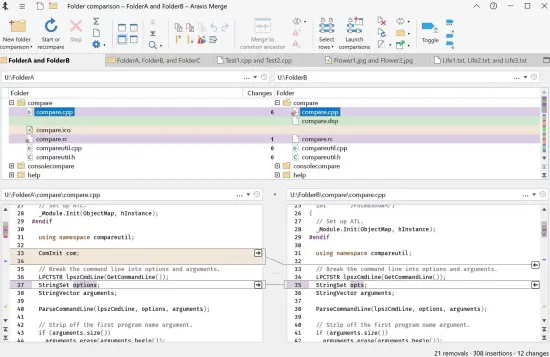
Portable Araxis Merge Professional Edition 2026.0 (x64)

Core Architecture and Technical Foundation
Araxis Merge Portable operates on a sophisticated multi-platform architectural foundation that delivers consistent performance and feature parity across both Windows and operating systems while maintaining native application speed that leverages the full capabilities of each platform’s underlying system APIs and rendering engines. The software employs advanced diff computation algorithms optimized specifically for human-readable content rather than raw binary data, utilizing variants of the longest common subsequence algorithm enhanced with heuristics that identify meaningful structural changes at the line, block, and paragraph levels rather than overwhelming users with character-level minutiae that obscure the actual transformations between versions. This algorithmic sophistication means that when comparing two versions of a source code file or document, Araxis Merge Portable identifies the actual logical changes—moved functions, reorganized sections, renamed variables, transformed paragraphs—rather than presenting a sea of character differences that would require manual interpretation to understand what actually changed.
The encoding support architecture within Araxis Merge Portable is exceptionally comprehensive, handling ANSI, UTF-8, UTF-16, UTF-32, and numerous legacy character sets including various Asian double-byte character sets, ensuring that files created in different geographical regions, with different applications, or using different encoding standards can be compared accurately without encoding-related corruption, misinterpretation, or data loss. This encoding flexibility is critical in today’s globalized development environment where source code, documentation, configuration files, and data exports frequently contain characters from multiple languages and must be processed reliably regardless of their original creation context or the encoding used by the originating application. The software includes automatic encoding detection that attempts to identify the correct character set when opening files, while also providing manual override options when automatic detection produces ambiguous results or fails entirely, ensuring that users always have control over how files are interpreted regardless of encoding complexity.
From a performance perspective, Araxis Merge Portable implements intelligent streaming and buffering strategies that load file content in manageable chunks rather than requiring entire files to be resident in memory simultaneously, enabling the software to compare files measured in hundreds of megabytes or even gigabytes without substantial memory consumption, performance degradation, or system instability. This streaming architecture is particularly valuable when working with large log files, extensive database export files, comprehensive test output, or massive documentation sets where traditional comparison tools might struggle with memory constraints, become unresponsive during processing, or fail entirely when encountering files that exceed available RAM. The portable version maintains this performance optimization while adding the benefit of running without installation, demonstrating that the portable implementation does not sacrifice any technical capability, performance characteristics, or feature availability compared to the traditionally installed version of the software.
The multi-platform nature of Araxis Merge Portable requires careful attention to platform-specific optimizations that ensure the software performs elegantly on both Windows and while maintaining identical functionality and user experience across platforms. On Windows, the software leverages native Win32 and WinRT APIs for file system access, rendering, and user interface components, while on it utilizes Cocoa frameworks, Core Text for text rendering, and native file system APIs, ensuring that the application feels like a first-class native application on each platform rather than a cross-platform port that might exhibit platform-agnostic behavior or inconsistent performance. This native implementation approach results in superior responsiveness, better integration with platform-specific features such as Gatekeeper security or Windows Defender, and more efficient resource utilization that takes advantage of platform-specific optimizations in the underlying operating system.
File Comparison Capabilities and Advanced Features
The file comparison functionality in Araxis Merge Portable extends far beyond simple text matching or character-level diffing, offering a rich and comprehensive set of features designed to handle the diverse and evolving requirements of modern software development, documentation management, content translation workflows, quality assurance testing, and forensic document analysis. When comparing two text files, the software presents differences in a synchronized side-by-side format with automatic scroll linking that keeps corresponding lines aligned in both views, allowing users to see both versions simultaneously while maintaining visual correspondence between related content. Each difference is highlighted with sophisticated color coding that distinguishes between additions, deletions, modifications, moves, and formatting changes, with the ability to customize these colors extensively through the comprehensive options dialog to match personal preferences, organizational standards, or accessibility requirements for users with visual impairments.
Araxis Merge Portable includes exceptionally sophisticated whitespace handling options that allow users to control precisely how spaces, tabs, line endings, and other whitespace characters are treated during comparison operations. Users can choose to ignore all whitespace differences completely, ignore only trailing whitespace at line ends, ignore changes in the number of spaces between words, treat tab characters as equivalent to spaces, or treat all whitespace as significant and meaningful, providing granular control over comparison sensitivity that can be tuned to the specific requirements of each use case. This flexibility is essential when working with files edited by different applications with different default formatting settings, when comparing code where whitespace changes are intentionally irrelevant to functional content, or when analyzing documents where whitespace variations indicate meaningful structural changes that should not be overlooked.
The software supports both case-sensitive and case-insensitive comparison modes with on-demand toggling that enables users to determine whether capitalization differences should be treated as meaningful changes requiring attention or as stylistic variations that can be ignored. This capability is particularly important when working with programming languages where case sensitivity fundamentally affects semantics and behavior, such as C++, Java, Python, JavaScript, or C#, versus languages, contexts, or file types where case differences are purely cosmetic or stylistic and do not impact functionality. The ability to toggle case sensitivity instantly without reconfiguring the entire comparison means that Araxis Merge Portable can adapt seamlessly to the conventions of different projects, file types, or organizational standards without requiring separate configuration profiles, complex setup procedures, or multiple application instances.
Line folding and code collapsing functionality in Araxis Merge Portable allows users to selectively hide sections of code, text, or structured content that are not currently relevant to their comparison task, dramatically reducing visual clutter and enabling focused attention on specific areas where differences exist or where detailed review is required. This folding can be based on syntax structure for numerous programming languages including C++, Java, Python, JavaScript, C#, Visual Basic, PHP, Ruby, and many others, on indentation levels for structured text formats, on user-defined marker comments or special syntax, or on automatic detection of logical code blocks such as functions, methods, classes, or conditional branches. When working with extensive source code files containing thousands of lines, multiple classes, or complex nested structures, line folding becomes an essential navigation and productivity tool that prevents the comparison view from becoming overwhelming, maintains cognitive focus on relevant content, and preserves productivity during detailed review sessions that might otherwise require scrolling through hundreds of lines of unchanged code.
Araxis Merge Portable includes built-in support for integration with popular version control systems, allowing users to compare files against their versions in repository systems without leaving the application and enabling direct workflow integration that eliminates the need for manual file extraction, external comparison tools, or disjointed processes that break developer productivity. This integration supports distributed version control systems such as Git, Mercurial, and Subversion (SVN) as well as centralized systems including Perforce, IBM ClearCase, and Microsoft Team Foundation Version Control, making the software valuable for teams using diverse infrastructure configurations, enterprises with legacy version control investments, and developers working across multiple projects with different repository systems. The version control integration enables comparison with baseline versions from specific commits or tags, identification of uncommitted local changes, viewing of pending changes before commit, and in many configurations the ability to commit merged results directly back to the repository without manual file copying or external tool invocation.
The software provides comprehensive support for comparing and merging binary files, including executable files, library archives, database files, and other non-text content where traditional text-based diffing would be meaningless or produce unusable results. Binary comparison in Araxis Merge Portable operates at the byte level, identifying exact byte positions where differences occur and presenting these differences in a hex viewer format that allows users to see the actual binary content with highlighted differences marked clearly for identification. This capability is essential for software developers working with compiled executables, reverse engineers analyzing binary file formats, quality assurance specialists verifying binary file integrity, or anyone who needs to identify precise byte-level changes in non-text files where textual representation is unavailable or meaningless.
Image File Comparison and Visual Diffing
Araxis Merge Portable includes specialized functionality for comparing image files with pixel-level difference detection that identifies exactly which pixels have changed between images, making it an invaluable tool for graphic designers, UI developers, quality assurance specialists testing visual rendering, and anyone who needs to verify that image files are identical or understand precisely what visual changes occurred between versions. The image comparison engine analyzes image files pixel by pixel, comparing color values at each coordinate and identifying differences in RGB or RGBA channels with precision that reveals even subtle changes that might be invisible during casual visual inspection but could indicate rendering bugs, unintended modifications, or compression artifacts that affect image quality.
The image diff visualization in Araxis Merge Portable presents differences through multiple viewing modes that can be selected based on user preference and the specific requirements of the comparison task. Users can view images side-by-side with difference highlighting overlaid, see a merged view where differences are marked with distinct colors, examine a difference-only image that shows only the pixels that changed with all matching pixels rendered transparent or black, or utilize a swipe comparison mode that allows interactive splitting of the view between the two images with a draggable divider that makes it easy to compare specific regions in detail. This flexibility ensures that image comparison can be adapted to different use cases, from quick visual verification that two images are identical to detailed forensic analysis of precise pixel-level differences in complex graphics.
Image comparison in Araxis Merge Portable supports numerous common image file formats including PNG, JPEG, GIF, BMP, TIFF, PSD, and many others, with automatic format detection that handles files regardless of their extension or actual encoding. The software preserves image metadata during comparison operations, allowing users to see not just pixel differences but also variations in file metadata such as creation timestamps, author information, copyright notices, or embedded keywords that might indicate different sources or handling of the compared images. This metadata visibility is particularly valuable when verifying image authenticity, tracking image provenance, or identifying whether two apparently identical images actually originated from the same source or underwent different processing.
For UI developers and application testers, Araxis Merge Portable’s image comparison capabilities enable verification that user interface rendering remains consistent across different platforms, browser versions, display resolutions, or theme configurations. By comparing screenshot images of UI elements captured under different conditions, developers can identify visual rendering bugs, CSS incompatibilities, layout breaks, or typography differences that might affect user experience and require correction. The pixel-level precision of the image diff ensures that even subtle rendering variations—such as a one-pixel offset in element positioning, a slight color shift in rendered text, or minor anti-aliasing differences—are detected and made visible for correction, preventing visual bugs from reaching production environments where they could impact user satisfaction or brand perception.
Folder Comparison and Directory Synchronization
Beyond individual file comparison, Araxis Merge Portable offers comprehensive and sophisticated folder comparison capabilities that enable users to analyze entire directory structures with hierarchical depth, identify differences between complete project versions, backup sets, deployment packages, or synchronized copies, and perform intelligent synchronization operations that bring folder contents into alignment based on configurable rules and user-defined preferences. When comparing folders, the software recursively examines all subdirectories to arbitrary depth, matching files by name with optional content-based verification, and presents a hierarchical tree view of differences that clearly shows which files exist in one location but not the other, which files have been modified with changes to content or attributes, which files remain identical across both locations, and what the overall structural differences are between the directory trees being compared.
The folder comparison engine in Araxis Merge Portable provides multiple sophisticated matching strategies that can be configured and combined based on specific requirements, project characteristics, or organizational policies. Users can choose to match files strictly by filename alone, by content hash regardless of filename (using MD5, SHA-1, or SHA-256 checksums), by a combination of both approaches with configurable prioritization that first matches by name and then verifies by content, or by custom rules that incorporate file attributes such as size, timestamp, or modification date into the matching algorithm. Content-based matching is particularly powerful and essential when files have been renamed during migration, reorganization, or version updates, as it allows the software to identify that two files with different names are actually identical in content, preventing false positives in difference reporting and ensuring that the comparison reflects actual content differences rather than superficial naming variations.
Synchronization preview and simulation functionality in Araxis Merge Portable allows users to see exactly what operations would be performed if they chose to synchronize two folders, showing with complete transparency which files would be copied from source to target, which files would be deleted from either location, which files would be updated with newer content replacing older content, and what the final state of both folders would be after synchronization completes. This comprehensive preview capability prevents accidental data loss, enables validation that synchronization will produce the intended results, and provides confidence before executing operations that could be irreversible if performed incorrectly. The preview includes detailed information about file sizes in bytes and human-readable formats, modification dates with timezone information, transfer directions indicating source and target for each operation, and estimated total transfer time based on file sizes and typical transfer speeds, enabling users to make informed decisions about whether to proceed with synchronization based on the complete picture of what will change and the resources required.
Araxis Merge Portable includes highly flexible filtering options for folder comparisons that allow users to exclude specific file types, directory names, filename patterns, or content characteristics from the analysis, providing precise control over which files are included in the comparison and which are ignored as irrelevant noise. Filtering is configurable through regular expression patterns that support complex matching logic, simple wildcard specifications using asterisks and question marks, predefined file type groups for common categories such as temporary files, build output, version control metadata, or log files, and custom rules that can incorporate multiple conditions with AND, OR, and NOT logic. Users can exclude temporary files created by applications, build output directories containing compiled binaries, version control metadata folders such as .git or .svn, backup files with specific naming patterns, log files that are regenerated continuously, or any other content that should not be considered when evaluating differences between directory structures for purposes such as version comparison, backup verification, or deployment validation.
The folder synchronization functionality in Araxis Merge Portable supports multiple synchronization modes that can be selected based on the specific goal of the synchronization operation, the relationship between source and target folders, and the desired outcome for folder contents. One-way synchronization copies files from a source folder to a target folder with the target becoming a mirror of the source, suitable for backup creation, deployment package generation, or distributing files to multiple locations. Two-way synchronization merges contents from both folders into both locations, copying new files from either side to the other and updating modified files with the newer version, ideal for maintaining synchronized working copies across multiple machines or collaborative environments where files are modified in different locations. Mirror synchronization makes the target folder an exact copy of the source by copying new and modified files while deleting files from the target that do not exist in the source, appropriate for creating clean deployment environments or ensuring test environments match production exactly.
Three-Way Merging and Advanced Change Integration
The merging capabilities of Araxis Merge Portable represent one of its most powerful and distinguishing features, enabling users to not only identify differences between files but also to actively integrate changes from multiple source versions into a single target through an interactive, controlled, and highly sophisticated three-way merge process that provides far more capability and flexibility than simple two-way copy operations. Three-way merging is the industry standard for professional change integration in software development, enabling users to merge changes from two different branches or versions into a common base while resolving conflicts where both sources modified the same content in incompatible ways. Araxis Merge Portable implements three-way merging with exceptional sophistication, presenting both source versions alongside the target output file in a comprehensive three-panel view that allows users to selectively copy changes from either source into the target while maintaining complete control over which modifications are accepted, rejected, or manually edited.
Interactive merging in Araxis Merge Portable allows users to review each difference block individually and make contextual, informed decisions about whether to accept the change from source A, accept the change from source B, create a manually edited combined result, or reject the change entirely and preserve the base version content. The interface provides clear visual indicators for the current state of each difference block, showing which source version contributed the content, whether the block has been resolved or remains pending, what type of change is involved (addition, deletion, modification, or move), and whether the block represents a conflict that requires manual resolution. Users can navigate through differences sequentially using keyboard shortcuts for rapid navigation, mouse clicks for point-and-click selection, or menu commands for batch operations, making the merge process efficient and productive even for files with hundreds or thousands of change points that would be overwhelming to review manually without assistance.
Araxis Merge Portable supports automatic merging for differences that are non-conflicting, meaning changes that appear in different parts of the file and do not overlap or interact in ways that would create inconsistencies. The software intelligently identifies these non-conflicting regions through sophisticated analysis of change locations, content boundaries, and semantic relationships, and integrates them automatically without user intervention while marking conflicting regions for manual review and resolution. This automation significantly accelerates the merge process for files where changes are well-separated across different functions, sections, or logical blocks, allowing users to focus their attention and cognitive effort on the truly conflicting differences that require human judgment, contextual understanding, and manual resolution. The automatic merge engine includes safeguards that prevent incorrect automatic integration when changes might interact in subtle ways that are not immediately obvious through location analysis alone, ensuring that automation accelerates merge operations without introducing errors.
Conflict resolution in Araxis Merge Portable is facilitated through an intuitively designed interface that clearly presents the conflicting content from both source versions side by side with the base version content also visible for reference, providing complete context for understanding what each source changed and why the changes conflict. The conflict viewer offers multiple resolution options including selecting content entirely from source A, selecting content entirely from source B, manually editing a combined result that incorporates elements from both sources, using advanced conflict resolution strategies such as keeping the longer version, keeping the newer version, or applying custom rules for specific conflict patterns. The conflict viewer includes comprehensive line numbering for precise location reference, color coding that distinguishes content from different sources, indentation preservation that maintains the structural formatting of the original code or text, and syntax highlighting for programming languages that makes it easier to understand the semantic context of the conflict and resolve it appropriately without introducing syntax errors or logical bugs.
The merge result in Araxis Merge Portable can be saved directly to a new file with a user-specified name and location, overwriting an existing file with confirmation and backup options, or exporting in various formats including the native merged file format, Unix diff format for use with external tools, HTML format for sharing with colleagues who do not have the software, HTML slideshow format for presentation purposes, or XML format for integration with automated processing pipelines. Save operations include comprehensive validation that checks for syntax integrity in supported programming languages, ensuring that the merged output maintains structural correctness, will compile successfully, and will function properly in its intended execution environment without introducing errors that could cause compilation failures, runtime exceptions, or unpredictable behavior. This validation step is particularly critical when merging source code files where even minor syntax errors could prevent entire projects from building, cause deployment failures, or introduce bugs that impact end users and require costly remediation after release.
Reporting, Audit Trails, and Documentation
Araxis Merge Portable includes comprehensive reporting functionality that enables users to generate detailed comparison reports documenting all differences identified between files or folders, suitable for auditing purposes, quality assurance documentation, change review meetings, compliance requirements, or archival records that provide permanent documentation of what changed between versions. Reports can be generated in multiple formats including HTML for easy sharing and viewing in web browsers, HTML slideshow format for presentation to stakeholders who need to understand changes without technical comparison tools, XML format for integration with automated processing systems or archival in structured databases, and plain text format for simple documentation or inclusion in email messages. Each report format includes comprehensive details about differences identified, files compared, timestamps, user information, and metadata that provides complete context for understanding the comparison results.
The reporting system in Araxis Merge Portable supports customizable report templates that allow organizations to standardize report formatting according to corporate policies, include required headers and footers with company branding, add specific sections for compliance documentation, or incorporate custom fields for tracking information such as ticket numbers, change request IDs, or approval codes. Template customization ensures that reports generated by different team members maintain consistent formatting and include all required information for organizational processes, audit requirements, or compliance frameworks that mandate specific documentation elements. Users can create multiple templates for different purposes such as internal team reviews, external client deliveries, compliance audits, or archival records, selecting the appropriate template based on the specific audience and purpose of each report.
Audit trail functionality in Araxis Merge Portable maintains detailed logs of all comparison and merge operations performed, recording timestamp information, files involved, user identification, operations executed, changes made, and results achieved. This audit trail capability is essential for organizations subject to compliance frameworks such as SOX, HIPAA, FDA regulations, or industry standards that require documented evidence of change management processes, quality assurance activities, or system modification controls. The audit trail can be exported to external files for archival, integrated with external logging systems, or queried for specific operations to provide evidence of compliance with organizational policies or regulatory requirements. Audit logs include tamper protection that prevents unauthorized modification, ensuring that the recorded history remains accurate and trustworthy as a record of actual operations performed.
Comparison summary reports in Araxis Merge Portable provide high-level overview information that summarizes the scope and nature of differences without requiring readers to examine every individual change, making these summaries valuable for executive reviews, stakeholder briefings, or quick assessments of change magnitude. Summaries include statistics such as total number of files compared, number of files with differences, percentage of content changed, breakdown of change types (additions, deletions, modifications), and overall assessment of change severity or impact. These summaries enable decision-makers to understand the scope of changes without technical detail, assess whether changes are within acceptable parameters, and make informed decisions about whether to proceed with deployment, request additional review, or reject changes that exceed acceptable thresholds.
Command-Line Interface and Automation Support
Araxis Merge Portable includes a comprehensive command-line interface that enables integration with automated build systems, continuous integration pipelines, scripted workflows, and batch processing operations where graphical interface interaction is impractical or impossible. The command-line interface supports all major comparison and merging operations including file comparison, folder comparison, three-way merge, two-way merge, synchronization, and report generation, with configurable parameters that control comparison sensitivity, output formatting, error handling, and integration behavior. This automation capability enables organizations to incorporate Araxis Merge Portable into automated quality assurance processes where comparison operations are performed automatically as part of build pipelines, continuous integration testing, or deployment validation without requiring manual intervention.
The command-line interface in Araxis Merge Portable supports scripting integration through standard shell scripting languages including batch files on Windows, bash scripts on and Linux, and PowerShell for advanced automation scenarios. Scripts can invoke comparison operations, evaluate results through exit codes that indicate success or failure, process output files generated by the comparison, and chain multiple operations together to create complex automated workflows that perform multi-step validation or processing. Exit code semantics provide clear indication of comparison results, with distinct codes for successful comparison with no differences, successful comparison with differences found, failed comparison due to errors, and other conditions that enable scripts to handle different outcomes appropriately through conditional logic.
Automation support in Araxis Merge Portable includes integration capabilities with popular continuous integration and continuous deployment platforms such as Jenkins, GitLab CI, GitHub Actions, Azure DevOps, and CircleCI, enabling the software to be incorporated into automated build and testing pipelines that are standard in modern software development organizations. Integration plugins or configuration templates are available for these platforms, reducing the effort required to incorporate Araxis Merge Portable into existing CI/CD infrastructure and ensuring that comparison operations execute correctly within the constraints and conventions of each platform. This integration enables automated change detection in build pipelines, automated quality gates that prevent deployment when unacceptable differences are found, and automated documentation of changes for compliance or audit purposes.
Portable Implementation Benefits and Professional Advantages
The portable nature of Araxis Merge Portable provides numerous practical benefits that extend well beyond simple convenience, offering professional users a level of flexibility, control, and deployment options that installed applications cannot provide and that are particularly valuable in enterprise environments, consulting scenarios, and restricted computing contexts. Since the portable version runs without installation, it does not modify system registries, create file associations, write configuration data to system directories, register COM components, or create start menu entries, meaning that removing the software is accomplished simply by deleting the folder containing the executable and all associated files without requiring uninstallation procedures, registry cleanup, or system restoration. This clean removal characteristic is particularly valuable in corporate environments where software must be deployed temporarily for specific projects, evaluated before purchase decisions, or used on systems where permanent installation is not permitted due to security policies or administrative constraints.
Araxis Merge Portable can be executed from any location on a computer including USB drives, network shares, cloud storage folders synchronized to local disk, temporary directories, or read-only media, providing exceptional flexibility to use the professional tool on any machine without requiring administrative privileges for installation, without modifying system configuration, and without creating permanent changes that must be managed or removed later. This capability is essential for software consultants who deploy to multiple client environments for project work, IT professionals performing system audits or forensic analysis across multiple machines, developers working in corporate environments where installation privileges are restricted, students using lab computers or shared facilities, and remote workers who use various machines depending on location, project requirements, or client meetings. The portable version maintains full professional functionality regardless of execution location, with no degradation in performance, feature availability, comparison accuracy, or merging capability compared to the traditionally installed version.
Configuration data for Araxis Merge Portable is stored within the portable folder itself rather than in user profile directories, application data folders, registry locations, or other system-managed locations, meaning that all settings, preferences, customizations, workspace configurations, and user-defined options are carried with the executable wherever it is taken and remain consistent across all machines where the portable version is used. This self-contained configuration approach ensures that users maintain the same working environment, interface customization, comparison preferences, and workflow settings across all computers they use, eliminating the need to reconfigure the software on each new system, manually transfer settings between machines, or maintain separate configuration files for different environments. For professional users who maintain multiple portable instances for different clients, projects, or work contexts, each instance can have completely independent configurations without any risk of cross-contamination between settings, ensuring that client-specific customizations or project-specific preferences remain isolated and do not interfere with other work.
The portable implementation of Araxis Merge Portable also provides enhanced security characteristics since the software does not have the ability to modify system files, registry entries, or protected system directories, reducing the potential impact of any security vulnerabilities that might exist in the application and limiting the attack surface available to potential exploits. Running from a portable location means that the software operates with the same permissions as the user account executing it, without any elevated privileges that might be granted to installed applications through registration as a system service, installation of kernel drivers, or registration for privileged operations, providing a more restricted and secure execution environment that aligns with security best practices for minimizing privilege escalation risks. This security model is particularly important in sensitive computing environments such as government facilities, financial institutions, healthcare organizations, or research laboratories where minimizing the potential impact of software vulnerabilities is a priority and where security policies may restrict installation of software that modifies system configuration.
Araxis Merge Portable supports multiple simultaneous instances running concurrently, allowing professional users to work on multiple comparison tasks, merge operations, or folder synchronization projects at the same time without interference between sessions, context switching overhead, or the need to close one operation before starting another. Each instance maintains its own complete set of open files, comparison state, merge progress, configuration settings, and workspace information, enabling parallel workflows where different projects are being reviewed, merged, or analyzed concurrently with full independence between sessions. This multi-instancecapability is particularly valuable for professional users managing complex projects with multiple file pairs requiring attention, consultants working on multiple client projects simultaneously, quality assurance teams reviewing multiple test artifacts, or developers integrating changes from multiple branches, as it eliminates the productivity loss associated with closing and reopening files, preserves mental context by maintaining all work in visible windows, and maximizes throughput through concurrent task handling rather than sequential processing.
Performance Characteristics and Enterprise Scalability
Araxis Merge Portable is engineered with performance optimization as a fundamental design consideration, delivering exceptionally fast comparison speeds even for very large files and complex folder hierarchies while maintaining reasonable memory consumption that does not overwhelm system resources, degrade overall system performance, or cause instability through resource exhaustion. The software employs intelligent multi-threaded processing that distributes comparison computation across multiple CPU cores when available, utilizing parallel processing to minimize completion time for large comparisons and ensuring that the software scales effectively with increasing hardware capabilities rather than being limited to single-core performance that becomes increasingly inadequate as CPU core counts increase. This parallel processing architecture means that comparison operations on modern multi-core systems complete significantly faster than would be possible with single-threaded implementations, improving productivity for users who perform frequent comparisons and reducing the time required for automated operations in build pipelines where comparison speed affects overall build duration.
Memory usage in Araxis Merge Portable is carefully managed through sophisticated allocation strategies that prevent excessive consumption, automatically release memory from files that have been closed, clean up comparison results from completed operations, and reclaim resources from workspaces that are no longer active. This comprehensive memory management ensures that prolonged use of the software over extended work sessions does not lead to gradual memory accumulation, memory bloat, or resource exhaustion that could impact system performance, cause application instability, or require manual intervention to recover resources. Users working with many files sequentially through a long work session will not experience memory degradation from previous comparisons, as the software maintains a clean memory state between distinct comparison tasks and ensures that each new comparison starts with available resources rather than accumulated overhead from previous operations.
Disk I/O operations in Araxis Merge Portable are optimized to minimize unnecessary read and write operations that would slow comparison performance, wear storage devices, or consume bandwidth on network-mounted storage. The software employs intelligent caching strategies that avoid re-reading file content that has already been loaded and cached in memory, cache file metadata to avoid repeated queries for size and timestamp information, and prefetch content that will be needed soon based on analysis of comparison algorithms and access patterns. This caching strategy reduces the total number of disk accesses required for comparison operations, improving performance on systems with slower storage devices such as traditional hard disk drives, reducing latency on network-mounted storage where each I/O operation incurs network transmission time, and reducing wear on solid-state drives through reduced write operations that contribute to SSD wear over time. The caching is also intelligent about cache validity, ensuring that files modified externally since being cached are detected through timestamp verification or content hashing and re-read to maintain accuracy in comparison results, preventing stale cache data from producing incorrect comparison results.
For enterprise deployments involving large-scale comparison operations such as analyzing entire codebase repositories, comparing production and backup database exports, or validating deployment packages containing thousands of files, Araxis Merge Portable scales effectively to handle these demanding workloads without performance degradation, timeouts, or failures that might occur with less sophisticated tools. The software handles large folder hierarchies with deep nesting and thousands of files, processes multi-gigabyte files without memory exhaustion, and maintains responsive performance even when comparison operations involve substantial computational work. This scalability ensures that Araxis Merge Portable remains practical and productive for enterprise use cases where comparison scope and file sizes exceed the capabilities of consumer-grade or less sophisticated comparison tools, making it suitable for professional environments where large-scale comparison operations are routine rather than exceptional.
Professional Use Cases and Industry Applications
Software development teams and engineering organizations find Araxis Merge Portable invaluable for reviewing code changes between revisions, analyzing pull requests and merge requests, identifying what modifications were made in feature branches, merging contributions from multiple developers into cohesive codebases, and enforcing code quality standards through systematic comparison-based review processes. The ability to compare source code files with comprehensive syntax highlighting for numerous programming languages makes the review process significantly more efficient, as developers can quickly understand the context and semantic meaning of changes rather than examining raw text differences without structural or linguistic context. The three-way merge functionality is particularly essential for integrating feature branches into main development branches, releasing versions from release branches, or merging hotfix branches back into development, allowing developers to selectively incorporate changes while resolving conflicts that arise from parallel modifications to the same code sections by different developers working independently.
Translation teams and localization organizations use Araxis Merge Portable extensively for comparing translated documents across different language versions, ensuring translation consistency is maintained across languages, verifying that all versions contain equivalent content despite linguistic differences, managing translation workflows where source documents are updated and translations must be synchronized, and identifying translation gaps where source content lacks corresponding translation. The software’s exceptional ability to handle multiple encodings and character sets including Asian double-byte character sets, Arabic and Hebrew right-to-left scripts, and complex Unicode combining characters is essential for working with translations that include non-Latin characters from diverse languages, and the side-by-side comparison view with visual linking enables translators to verify that meaning is preserved across languages even when sentence structure, grammar, or word order differs significantly between languages. Folder comparison capabilities help translation managers and project coordinators verify that all source files have corresponding translated versions in each target language, that no files were missed during the translation process, and that translation deliverables are complete before client delivery.
Document editors, technical writers, authors, and content management professionals use Araxis Merge Portable to track changes between draft versions of manuscripts, articles, reports, documentation, policies, or procedures, identifying exactly what content was added, removed, modified, moved, or reorganized during the revision process through successive drafts. This capability is essential for maintaining comprehensive version history in long documents where multiple revisions occur over extended development periods, for understanding the evolution of content and reasoning through successive drafts, for identifying which reviewer comments were incorporated into changes, and for providing authors and editors with clear visibility into what changed between versions. The merge functionality allows editors to combine contributions from multiple authors, co-writers, or review contributors into a single cohesive document while resolving conflicts where different contributors made incompatible changes to the same sections, paragraphs, or sentences, ensuring that all valuable contributions are incorporated while maintaining document consistency and coherence.
Quality assurance teams, testing organizations, and validation professionals use Araxis Merge Portable for comparing test output files, verifying that software builds produce expected results, identifying differences between test runs that indicate behavioral changes, validating that configuration changes produce intended effects, and documenting test results through comparison-based evidence. The software’s ability to compare log files, test result files, data exports, and configuration files with precise difference detection enables QA teams to identify bugs, performance issues, configuration errors, or unexpected behavior by comparing current test results against baseline results from previous versions or expected results from requirements. The folder comparison functionality helps QA teams verify that test environments contain all required files, that deployment packages match intended contents, and that environment configurations are consistent across test, staging, and production environments to ensure test validity and result reproducibility.
System administrators, IT professionals, and infrastructure engineers use Araxis Merge Portable for comparing configuration files between different server environments, identifying discrepancies that could cause inconsistent behavior, performance variations, security vulnerabilities, or operational issues across environments. The software helps ensure configuration consistency across development, testing, staging, and production environments, validates that deployment packages contain all required configuration files with correct content, identifies unauthorized configuration modifications that might indicate security issues or operational problems, and documents configuration changes for audit and compliance purposes. The portable nature of the software allows administrators to run it on any server without installation, facilitating quick comparison tasks during troubleshooting sessions, incident response, or emergency maintenance without requiring administrative privileges, installation time, or permanent system changes that might conflict with security policies or change management requirements.
Forensic analysts, security professionals, and compliance auditors use Araxis Merge Portable for comparing file systems to identify unauthorized modifications, detecting malware through file content comparison against trusted baselines, verifying integrity of critical system files, identifying data breaches through unusual file changes, and documenting forensic evidence through detailed comparison reports that provide audit trail documentation. The binary file comparison capability enables analysis of executable files, library binaries, and other non-text content to identify tampering, injection of malicious code, or modification of legitimate files that might indicate security compromises. The comprehensive reporting and audit trail functionality provides the documentation required for compliance audits, legal proceedings, incident reports, or regulatory investigations where detailed evidence of file changes must be documented and preserved.
Conclusion and Professional Value Assessment
Araxis Merge Portable stands as an exceptionally powerful and professionally refined tool for anyone who regularly works with multiple versions of files across text, binary, image, or folder categories, offering enterprise-grade differencing and merging capabilities with the sophistication, reliability, and performance that professional workflows demand while providing the deployment flexibility and convenience of portable implementation. The combination of advanced technical features including three-way merging, image diffing, binary comparison, comprehensive folder synchronization, and version control integration; intuitive yet powerful user interface with visual linking, syntax highlighting, and customizable color schemes; extensive file format and encoding support; comprehensive reporting and audit trail capabilities; and portable deployment flexibility makes it suitable for the most demanding professional use cases spanning software development, translation and localization, document editing, quality assurance, system administration, forensic analysis, and compliance auditing. The commercial foundation with Standard and Professional editions ensures professional support, regular updates, and continuous improvement while the portable implementation adds significant practical value for users who require flexibility in deployment and execution environments.
The portable implementation of Araxis Merge Portable provides exceptional value for professional users by enabling deployment on any compatible Windows system without installation, maintaining complete configuration portability across different machines and environments, providing clean removal that leaves no system residue, operating without administrative privileges, supporting multiple concurrent instances for parallel workflows, and delivering full professional functionality without any degradation compared to the installed version. This flexibility is particularly valuable in modern professional computing environments where users frequently work across multiple machines for client work, consulting projects, remote work, or collaborative environments; require software that can be deployed temporarily without permanent system changes for evaluation, troubleshooting, or project-specific work; operate in restricted environments where installation privileges are not available due to security policies, administrative constraints, or organizational standards; or need to maintain consistent working environments across diverse machines without repetitive configuration effort. The portable version maintains complete professional capability ensuring that users receive full value regardless of deployment method or execution environment.
For organizations, professionals, and individuals seeking a robust, reliable, sophisticated, and professionally supported solution for comprehensive file and folder comparison, merging, and synchronization needs, Araxis Merge Portable represents an outstanding investment that delivers enterprise-grade capabilities with professional support, regular updates, and continuous feature enhancement. The software’s maturity with years of development and refinement, active professional development team, comprehensive documentation and training resources, extensive feature set covering diverse use cases, proven reliability in enterprise environments, and scalability to handle large-scale professional workloads ensure that it can address even the most demanding comparison and merging requirements while remaining accessible through intuitive interfaces and comprehensive support resources. Whether used occasionally for simple file comparisons in ad hoc review scenarios, regularly for routine development workflow integration, or continuously as a central tool in professional quality assurance, translation, or document management processes, Araxis Merge Portable provides the professional tools, technical sophistication, and performance necessary to work efficiently, accurately, and productively with files across versions in professional contexts where quality, reliability, and completeness are essential.
The enduring professional value of Araxis Merge Portable is demonstrated by its continued active development, widespread adoption across diverse professional industries and organizations, positive reputation within the software development community, and sustained relevance as a professional tool for over two decades of continuous improvement. This sustained professional relevance reflects the software’s ability to address fundamental needs that remain constant despite technological evolution—the need to understand what changed between file versions, to merge changes from multiple sources into cohesive results, to synchronize folder contents across locations, and to document changes for audit and compliance purposes—while continuously incorporating new capabilities such as modern encoding support, version control integration, image comparison, and automation features that address evolving professional workflows and technologies. For professional users seeking a comparison, merging, and synchronization tool that will remain reliable, supported, sophisticated, and useful for years to come while addressing both current requirements and evolving future needs, Araxis Merge Portable offers the comprehensive combination of technical excellence, practical flexibility, professional support, and continuous development necessary for long-term viability as an essential professional tool.
Based on the context from our previous discussions about WinMerge Portable and Araxis Merge Portable, here is a detailed “Features at a Glance” list that covers the core capabilities of professional file comparison and merging software:
Features at a Glance
File Comparison
-
Two-way and Three-way File Comparison – Compare two or three versions of files simultaneously with synchronized scrolling
-
Side-by-Side Visual Display – View compared files in parallel panels with color-coded difference highlighting
-
Smart Difference Detection – Identifies additions, deletions, modifications, and moved content with precision
-
Line-Level and Character-Level Diffing – Navigate differences at multiple granularity levels
-
Syntax Highlighting – Supports numerous programming languages (C++, Java, Python, JavaScript, C#, PHP, Ruby, XML, HTML, and more)
-
Automatic Encoding Detection – Handles ANSI, UTF-8, UTF-16, UTF-32, and legacy character sets including Asian double-byte sets
-
Manual Encoding Override – User-selectable encoding when automatic detection fails
-
Case Sensitivity Toggle – Switch between case-sensitive and case-insensitive comparison modes
-
Whitespace Control – Configure treatment of spaces, tabs, and line endings (ignore all, ignore trailing, treat as significant)
-
Line Folding/Code Collapsing – Hide uninteresting sections based on syntax, indentation, or user-defined markers
-
Move Detection – Identifies relocated content rather than marking as deleted/recreated
-
Search and Replace – Find and replace text patterns across both files with regular expression support
-
Line Ending Normalization – Convert between Windows (CRLF), Unix (LF), and old Mac (CR) formats
-
Tab Width Configuration – Customize tab display and conversion to spaces
Folder Comparison & Synchronization
-
Recursive Directory Comparison – Analyze entire folder hierarchies with arbitrary depth
-
Multiple Matching Strategies – Match by filename, content hash (MD5/SHA-1/SHA-256), or combined approaches
-
Hierarchical Difference Tree View – Visual representation of folder structure differences
-
File Status Indicators – Clear markers for new, modified, deleted, and identical files
-
Synchronization Preview – See exact operations before executing (copy, delete, update)
-
Multiple Sync Modes – One-way mirror, two-way merge, or backup synchronization
-
Flexible Filtering – Exclude files by regex patterns, wildcards, file types, or custom rules
-
Attribute Preservation – Maintain file timestamps, sizes, and security permissions during sync
-
Batch Operations – Process multiple folder pairs in sequence
Three-Way Merging
-
Interactive Three-Panel Merge View – Source A, Source B, and Target output simultaneously visible
-
Selective Change Integration – Copy changes from either source to target with manual control
-
Non-Conflicting Auto-Merge – Automatically integrate non-overlapping changes
-
Conflict Resolution Tools – Choose from Source A, Source B, manually edit combined result, or keep base version
-
Conflict Visual Indicators – Clear marking of unresolved conflicts with navigation support
-
Merge State Tracking – Monitor resolved vs. pending conflicts
-
Undo Individual Decisions – Revert specific merge actions without affecting entire result
-
Syntax Validation – Check merged output for code syntax integrity
-
Backup Creation – Automatic backup before overwriting existing files
Binary & Image File Support
-
Binary File Comparison – Byte-level diff for executables, libraries, databases, and non-text files
-
Hex Viewer with Difference Highlighting – Visual byte-level comparison with color-coded changes
-
Image File Diffing – Pixel-level difference detection for PNG, JPEG, GIF, BMP, TIFF, PSD formats
-
Multiple Image View Modes – Side-by-side, merged overlay, difference-only, and swipe comparison
-
Metadata Preservation – Retain image metadata (timestamps, author, copyright) during comparison
-
UI Rendering Verification – Compare screenshots to detect visual bugs, CSS issues, layout breaks
Version Control Integration
-
Distributed VCS Support – Git, Mercurial, Subversion (SVN) integration
-
Centralized VCS Support – Perforce, IBM ClearCase, Microsoft TFS/VCS
-
Baseline Comparison – Compare against specific commits, tags, or repository versions
-
Uncommitted Changes Detection – Identify local modifications before commit
-
Direct Repository Commit – Merge results committed back to repository without external tools
-
Branch Comparison – Analyze differences between development branches
-
Pull Request/Merge Request Review – Facilitate code review workflows
Customization & User Interface
-
Fully Customizable Color Schemes – Separate controls for additions, deletions, modifications, moves
-
High-Contrast Accessibility Options – Support for users with visual impairments
-
Layout Presets – Save and restore panel configurations for different workflows
-
Toolbar Customization – Show/hide specific functions based on preferences
-
Keyboard Shortcut Configuration – Define custom key bindings with conflict detection
-
Multi-Monitor Support – Optimized for dual/triple display setups
-
High-DPI Display Scaling – Proper rendering on modern laptops and tablets
-
Multi-Instance Support – Run multiple comparison sessions concurrently
Reporting & Documentation
-
Multiple Report Formats – HTML, HTML Slideshow, XML, plain text export
-
Customizable Report Templates – Corporate branding, required sections, compliance fields
-
Detailed Difference Documentation – Line numbers, change types, content samples
-
Comparison Summary Statistics – Total files, difference counts, change percentages
-
Audit Trail Logging – Timestamped operation records with user identification
-
Tamper-Protected Logs – Prevent unauthorized modification of audit records
-
Export Options – XLS/CSV for alert searches, integrated logging systems
Command-Line & Automation
-
Full Command-Line Interface – Scriptable file/folder comparison, merging, synchronization
-
Exit Code Semantics – Distinct codes for success, differences found, errors
-
Shell Script Integration – Batch files (Windows), bash scripts (/Linux), PowerShell
-
CI/CD Platform Integration – Jenkins, GitLab CI, GitHub Actions, Azure DevOps, CircleCI
-
Automated Quality Gates – Prevent deployment when unacceptable differences detected
-
Batch Processing – Chain multiple operations in automated workflows
Performance & Scalability
-
Multi-Threaded Processing – Parallel computation across CPU cores
-
Streaming Architecture – Handle gigabyte-sized files without memory exhaustion
-
Intelligent Caching – Avoid redundant disk reads, prefetch anticipated content
-
Memory Management – Automatic cleanup of closed files and completed operations
-
Large Folder Hierarchy Support – Deep nesting with thousands of files
-
Responsive Performance – Maintains UI responsiveness during large comparisons
Portable Implementation Benefits
-
No Installation Required – Execute from USB drives, network shares, cloud storage
-
No System Registry Modification – Clean removal by deleting folder
-
Self-Contained Configuration – All settings stored within portable folder
-
No Administrative Privileges Needed – Run on restricted systems
-
Multiple Concurrent Instances – Independent configurations per instance
-
Cross-Platform Portability – Works on any compatible Windows or system
-
Enhanced Security Profile – Limited permission scope, no system file modification
-
Consistent Environment – Same settings across all machines without reconfiguration
Platform Support
-
Windows Compatibility – Windows 7, 8, 10, 11, Server editions (32-bit and 64-bit)
-
Dual-Architecture Support – Automatic 32-bit/64-bit binary selection
-
Native Platform APIs – Win32/WinRT on Windows, Cocoa/Core Text on
-
Cross-Platform Feature Parity – Identical functionality on Windows and
Support & Ecosystem
-
Comprehensive Documentation – User guides, tutorials, API documentation, FAQs
-
Multi-Language Support – Documentation and interface in multiple languages
-
Plugin Architecture – Extendable through third-party modules
-
Active Development Community – Continuous improvements, bug fixes, feature additions
-
Professional Support Options – Technical assistance for enterprise deployments
-
Regular Release Cycles – Scheduled updates with detailed changelogs