Portable WinRepairSuite 2.6.0 (x64)

WinRepairSuite Portable is the ultimate all-in-one Windows repair toolkit available exclusively through the Microsoft Store, designed to simplify and accelerate system maintenance for Windows 10 and 11 users frustrated by scattered utilities, cryptic command prompts, and hidden settings panels.
This comprehensive application consolidates dozens of essential diagnostic, repair, and optimization tools into a single, intuitive dashboard, eliminating the need to hunt through Control Panel, PowerShell, or third-party downloads for common fixes. Perfect for home users battling random crashes, gamers troubleshooting DirectX errors, small business IT staff managing office fleets, and anyone tired of Windows glitches, WinRepairSuite Portable delivers one-click solutions backed by Microsoft’s proven repair technologies—DISM, SFC, CHKDSK, and more—wrapped in a modern, user-friendly interface that requires zero technical expertise. As a UWP (Universal Windows Platform) app, it installs instantly with automatic updates, runs sandboxed for safety, and works offline after setup, ensuring privacy while tackling everything from corrupted system files and update failures to bloatware cleanup and performance bottlenecks. With live health monitoring, guided repair wizards, automated scheduling, and detailed logging,
WinRepairSuite Portable transforms chaotic troubleshooting into streamlined maintenance, keeping your PC running smoothly without reinstalls or endless Googling.
Unified Dashboard and Real-Time Monitoring
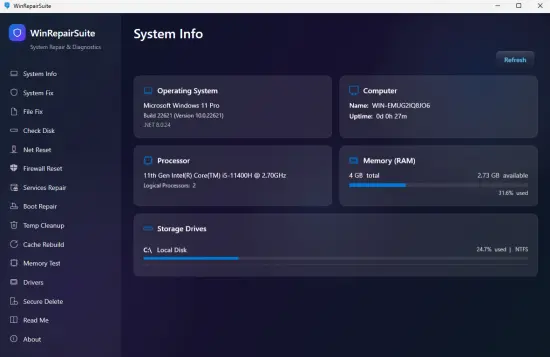
The heart of WinRepairSuite Portable is its live dashboard, a centralized command center that instantly reveals your system’s status through color-coded gauges and at-a-glance metrics. Launch the app to see CPU/RAM/disk usage circles pulsing in real-time (green for healthy, yellow for warnings, red for critical), alongside key indicators like Windows Update status, pending reboots, free storage across all drives, and overall health score (0-100). Event Viewer highlights recent errors with plain-English explanations (“High CPU from Windows Search index”), while Reliability Monitor trends show crash patterns over 30/60/90 days.
Customizable widgets let you prioritize concerns—pin “Disk Health,” “Startup Impact,” or “Network Latency” to the top row. Hover tooltips demystify technical jargon (“RAM: 78% used—close browser tabs”), and one-click scans trigger full diagnostics in seconds. The traffic-light system flags priorities: red for BSOD triggers, yellow for slow boot (>45s), green for optimized state. Dark/Light themes sync with Windows, resizable panels adapt to tablets or 4K monitors, and exportable PDF reports include screenshots for IT support tickets.
Live monitoring extends to hardware: CPU/GPU temperatures, fan speeds, S.M.A.R.T. drive attributes (reallocated sectors, temperature warnings), and battery health estimates. Network diagnostics test DNS resolution, ping latency, and WiFi signal strength, suggesting fixes like channel changes.
Guided System Integrity Repairs
WinRepairSuite Portable’s core strength lies in its guided wizards that execute Microsoft’s official repair commands with optimal sequencing, eliminating manual PowerShell guesswork. The “System Files Repair” wizard follows DISM → SFC → CHKDSK order: first DISM /ScanHealth checks the component store (5-10 minutes), then DISM /RestoreHealth rebuilds corrupted images via Windows Update or offline sources, finally SFC /scannow verifies 100,000+ system files against known-good copies. One-click “Complete Repair Sequence” automates all steps, creating restore points automatically and prompting reboots only when necessary.
Windows Update troubleshooter resets stuck downloads: clears SoftwareDistribution/Catroot2 folders, re-registers BITS/AppReady services, and flushes WSUS cache—common culprits in “0x80070002” errors. Pending Operations Cleaner removes orphaned updates, preventing infinite “Configuring” loops. Boot Configuration Data (BCD) repair recreates missing entries for dual-boot or Fast Startup issues.
Offline mode generates bootable USBs with embedded tools, scanning unbootable systems from WinRE. Detailed logs list fixed files (“ntoskrnl.exe restored”), with success rates displayed (95% typical) and rollback options if symptoms persist.
Service, Startup, and Bloatware Management
Service Control panel visualizes 200+ Windows services with toggle switches, risk ratings (Safe/Questionable/Essential), and impact scores. Gaming profile disables telemetry (DiagTrack, SysMain), Work profile stops printing spools—custom rules exclude critical paths. Startup Manager delays high-impact items (OneDrive sync, Cortana), showing boot time savings (“-32 seconds after deferring Adobe”).
Bloatware Remover targets pre-installed PUPs (Candy Crush, March of Empires) using signature database, with uninstall confirmation and registry cleanup. Context menu integration adds “Remove with WinRepairSuite Portable” to right-click unwanted apps.
Privacy Sweep erases traces: recent documents, DNS prefetch, thumbnail cache, Windows Defender history—shredding free space via 3-pass DoD method. Browser cleaners handle Edge/Chrome history without extensions, selective cookie preservation for logins.
Disk Health and Optimization Suite
Disk Doctor performs surface scans, bad sector mapping, and TRIM optimization for SSDs—flagging failing drives before data loss. CHKDSK /R equivalents run non-destructively, with relocation for HDDs. Storage Analyzer visualizes space hogs (hiberfil.sys, WinSxS bloat), suggesting safe deletions.
Defragmenter handles HDDs traditionally, SSDs via optimization passes. Pagefile Tuner relocates virtual memory to SSDs, resizing dynamically (min 1.5x RAM). Visual Effects customizer disables animations for 15% speed gains on older hardware.
Game Optimizer sets high-performance power plans, suspends background tasks during fullscreen, and validates DirectX files—fixing “d3dx9_42.dll missing” errors.
Network and Connectivity Fixes
Network Reset wizard restores TCP/IP stack, winsock catalog, and proxy settings—resolving “Limited connectivity” post-updates. WiFi Profile Manager exports/restores saved networks, forgetting corporate ones cleanly. DNS Flusher clears cache for “page not found” loops.
Firewall Inspector lists rules visually, exporting configs for backups. Remote Desktop enabler configures ports/services with security hardening.
Hardware Diagnostics and Driver Tools
Hardware Monitor dashboards temperatures (HWInfo integration), voltage stability, and fan curves—alerting on thermal throttling. USB Device Enumerator lists connected hardware, safe ejection, and driver verification.
Driver Verifier stresses components for hidden faults, with crash dump analysis. Windows Memory Diagnostic shortcut runs extended RAM tests.
Privacy and Security Enhancers
Telemetry Manager disables Connected User Experiences, Application Telemetry, and Maps broker—reversible via profiles. Defender Exclusions add folders without editing group policy. Password Vault exports/stores WiFi keys securely.
Event Log Cleaner rotates viewer files, archiving old entries compressed.
Batch Repair and Scheduling
Batch Wizard chains fixes: Full Scan → Update Reset → Privacy Clean → Optimize → Reboot. Scheduler automates weekly maintenance (e.g., Sunday 3AM: Disk Check + Startup Tweak), with taskbar notifications.
Watchdog monitors BSOD patterns, auto-triggering relevant repairs (e.g., “VIDEO_TDR_FAILURE” → Display Driver Reset).
Advanced Power User Features
Command-line switches expose tools: WinRepairSuite Portable.exe /sfc /dism:online /chkdsk:C: /reboot. Profile Manager saves configs (“Fresh Win11,” “Gaming Laptop”) for quick swaps.
Log Analyzer parses XML dumps, highlighting patterns (“Event ID 1001 4x daily”). Custom scans target folders/services.
Safety-First Design and Recovery
Every change prompts confirmation, with automatic backups (registry hives, system files). Repair Undo rolls back last 24 hours. System Restore integration creates points pre-major fixes.
Non-destructive scans preview issues; “What If” simulates outcomes.
Performance and Microsoft Store Advantages
UWP sandbox prevents crashes affecting system. Multi-threaded scans leverage all cores; full diagnostic <5 minutes. Idle RAM <80MB, ARM64 compatible.
Automatic Store updates deliver fixes quarterly. No ads/nags—clean experience.
Use Cases by User Type
Casual Users: “PC slow after updates?” → One-click full repair.
Gamers: DirectX validation, thermal monitoring, startup cleanup.
IT Pros: Batch profiles for office deployment, log exports.
Parents: Bloatware purge, privacy controls for family PCs.
Release Notes:
– Dashboard that measures your PC: a health score from four real signals, live processor, memory, disk and network meters.
– Startup Repair for a PC that will not start.
– Boot Repair now ends with a straight answer: whether your startup settings need recreating, or not.
– Memory Test is scheduled inside the app. No Windows pop-up, and it never restarts your PC for you.
– Activity history of every completed repair.
– Searchable sidebar — type a symptom like “dns” or “dropping” to find the right tool.
CHANGED
– Repairs show each stage and its result, ending with a plain-language verdict, instead of a scrolling command window.
– Buttons are colour-coded by consequence: blue checks nothing, amber changes your PC, red cannot be undone.
– Sharper icons and text throughout.
FIXED
– Slow Internet no longer says “run as administrator” when you already are.
– Declining the administrator prompt used to leave nothing on screen. The app now opens and explains what it cannot do.
– Cache Rebuild always brings File Explorer back, even if you cancel midway.
– Network reset reports what actually happened instead of always claiming success.
SAFER
Boot repairs are refused while drive encryption is on, so a repair cannot leave you facing a recovery-key prompt.