

Portable Batch Image Converter 2.2.1 (x64)
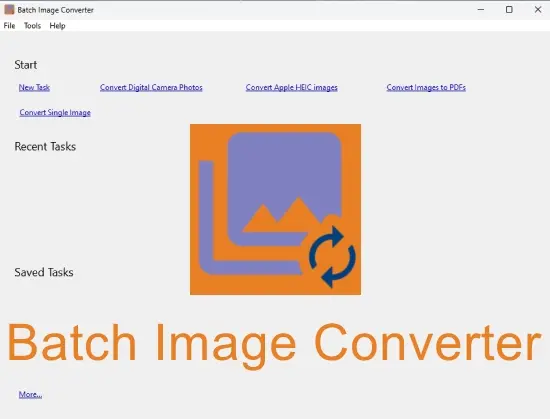
Batch Image Converter Portable is a streamlined, cross-platform batch image processing utility engineered for professionals, photographers, web developers, designers, and everyday users who need to convert, resize, compress, and optimize hundreds or thousands of image files simultaneously across diverse formats, all through an intuitive graphical interface complemented by robust command-line capabilities for automation and scripting.
This efficient software—available for Windows, Linux, and macOS, with a compact 10MB footprint—supports an extensive array of input formats including BMP, GIF, JPG/JPEG, PNG, TIFF/TIF, WebP, PSD, RAW camera files (ARW, CR2, NEF, ORF, DNG, HEIC), and many more, converting them to popular outputs like JPEG for web compression, PNG for transparency, TIFF for print quality, or WebP/AVIF for modern efficiency, while preserving metadata, applying lossless optimizations, and handling high-resolution images up to 32K pixels without quality degradation.
It excels in visually configured workflows where users simply drag-and-drop folders, tweak settings via sliders/previews, save sessions for repetition, and execute either interactively or scheduled, making it indispensable for preparing photo libraries for websites, e-commerce catalogs, social media campaigns, archival backups, or print production where manual editing proves prohibitively time-consuming.
The application’s philosophy emphasizes simplicity meeting power: no bloated menus or unnecessary features, just core conversion prowess with visual feedback—live thumbnails showing before/after sizes/quality, progress bars tracking multi-GB batches, and one-click presets like “Web JPEG 85%” or “Print TIFF 300DPI”—ensuring even novices achieve pro results while experts script complex pipelines via CLI parameters for serverless deployments or CI/CD integration.
Visual Configuration and User Interface
Batch Image Converter Portable launches to a clean, single-window interface divided into intuitive sections:
-
File List: Drag-drop folders/files populates a sortable table with thumbnails, source format/size/date, previewing conversions. Multi-select, remove duplicates, filter extensions.
-
Conversion Settings: Central panel sliders/configure:
-
Output Format: Dropdown 20+ options (JPEG quality 1-100, PNG compression 0-9 lossless, WebP lossy/lossless).
-
Resize: Width/height/% scale, fit/crop modes, maintain aspect.
-
Compression: JPEG chroma subsampling (4:4:4/4:2:0), PNG optimizer (pngquant).
-
Metadata: Copy EXIF/IPTC/XMP, strip for privacy.
-
Rename: Patterns (#name#, #date#, #counter#, #ext#).
-
-
Preview Pane: Dual thumbs compare original vs. converted (size savings highlighted).
-
Output Options: Folder (same/source-adjacent/custom), overwrite/prefix/suffix.
“Save Session” stores configs for reloads; presets button one-click “Web Optimize.”
Extensive Format Support
Input breadth covers:
-
Raster: BMP, GIF (animated), JPG/JPEG (progressive/baseline), PNG (interlaced), TIFF (multi-page/LZW), WebP, ICO, TGA.
-
RAW: ARW (Sony), CR2/CR3 (Canon), NEF (Nikon), ORF (Olympus), DNG, HEIC/HEIF.
-
Special: PSD (flattened), PCX, CUR.
Outputs prioritize versatility: JPEG (optimized MozJPEG), PNG (deflated), TIFF (LZW/JPEG-compressed), WebP (VP8/VP8X), BMP, GIF.
Batch mixes: RAW→JPEG, PNG→WebP, TIFF→PNG.
Resize and Compression Intelligence
Resize modes:
-
Absolute: Fixed WxH pixels.
-
Percentage: Scale 50% uniformly.
-
Fit: Max long edge (1920px web).
-
Crop: Center/square/aspect.
Compression perceptual:
-
JPEG: Quality slider correlates PSNR/SSIM.
-
PNG: Lossless crunch + optional pngquant (256 colors).
-
WebP: Lossy (VP8) 25-40% smaller JPEGs.
Preview metrics: original 5MB → 450KB (91% savings).
Metadata and Rename Automation
EXIF copy preserves camera data/GPS (strip location optional). Rename templates:
IMG_{date:yyyyMMdd}_{counter:0001}.{ext}

DSC_001.jpg → IMG_20260115_0001.jpgCommand-Line Power
CLI unlocks scripting:
batchimageconverter.exe -i input/ -o output/ -jpeg85 -resize 1920 -rename "{name}_{counter}"Performance and Workflow Efficiency
Multi-threaded (cores utilized), 1000 images/min SSD→SSD. Session reloads resume interrupted jobs.
Windows/Linux/macOS native binaries.
Use Cases
Web Devs: 10k product photos PNG→WebP, <100KB each.
Photographers: RAW→JPEG web proofs.
Marketers: Social batches resized/compressed.
Archivists: TIFF→PNG lossless migration.
Batch Image Converter Portable visualizes batch power—drag, tweak, convert. Formats, resize, CLI versatility optimize workflows effortlessly.