
Portable ECOMTECH BOOT Fixer v1.3.3
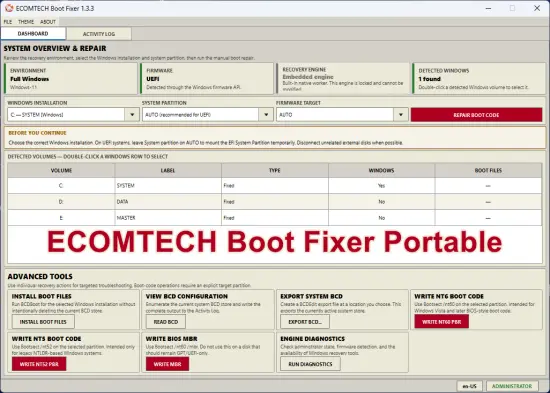
ECOMTECH Boot Fixer Portable is a graphical Windows boot-recovery and BCD maintenance utility built with PyQt5. It helps technicians and advanced users diagnose boot problems, restore Windows boot files, rebuild damaged Boot Configuration Data stores, and repair legacy BIOS boot code from either a normal Windows environment or Windows PE.
The application uses native Windows recovery utilities directly through an embedded background engine. PowerShell is not required. It automatically scans available volumes, detects Windows installations and existing boot files, identifies the current firmware mode, and provides both a recommended automatic repair workflow and individual advanced recovery operations.
Main Features
Automatic Windows Detection
- Scans accessible fixed and removable volumes.
- Detects valid Windows installations.
- Identifies existing EFI and BIOS boot files.
- Displays volume letters, labels, drive types, Windows status, and boot-file status.
- Allows a detected Windows installation to be selected by double-clicking its volume.
- Preserves the selected repair target when the system scan is refreshed.
System and Recovery Dashboard
The dashboard provides an overview of:
- Current operating environment: full Windows or Windows PE.
- Detected firmware type: UEFI, BIOS, or unknown.
- Administrator privilege status.
- Availability of the embedded recovery engine.
- Number of detected Windows installations.
- Selected Windows installation, system partition, and firmware target.
Recommended Automatic Boot Repair
The recommended repair process:
- Validates the selected Windows installation.
- Detects or uses the selected UEFI/BIOS firmware target.
- Temporarily mounts the EFI System Partition when required.
- Creates a timestamped backup of the existing BCD store when one is available.
- Installs fresh Windows boot files using BCDBoot.
- Writes NT6 partition boot code for applicable BIOS targets.
- Automatically releases temporary EFI mounts after the operation.
BCD Store Rebuild
- Backs up the existing BCD store.
- Removes hidden, system, and read-only attributes when necessary.
- Moves the previous BCD store aside using a timestamped filename.
- Creates fresh Windows boot configuration data.
- Uses BCDBoot’s clean-store option when no explicit BCD store can be resolved.
Advanced Recovery Tools
The Advanced Tools page includes:
- Install Boot Files — installs Windows boot files without intentionally deleting the existing BCD store.
- View BCD Configuration — enumerates the complete active BCD configuration using BCDEdit.
- Export System BCD — saves the active system BCD store to a user-selected backup file.
- Write NT60 Boot Code — writes Windows Vista or later BIOS-style partition boot code.
- Write NT52 Boot Code — writes legacy NTLDR-compatible partition boot code.
- Write BIOS MBR — writes Windows-compatible BIOS master boot record code.
- Engine Diagnostics — checks the environment, privileges, firmware detection, selected targets, and required recovery utilities.
UEFI and BIOS Support
- Automatic firmware detection through the Windows firmware API.
- Manual target selection for UEFI, BIOS, or ALL.
- Automatic EFI System Partition mounting for UEFI repairs.
- Intelligent BIOS system-partition selection.
- Explicit partition selection required before performing destructive boot-code operations.
Native Windows Recovery Engine
ECOMTECH Boot Fixer runs native Windows recovery commands directly and searches standard Windows, WinPE, installation-media, and application directories for:
bcdboot.exebcdedit.exebootsect.exemountvol.exeattrib.exe
The engine captures command output in real time and does not require PowerShell.
Activity Logging
- Captures executed commands and their output.
- Adds timestamps to recovery sessions.
- Reports informational, warning, success, cancellation, and error messages.
- Automatically opens the Activity Log while an operation is running.
- Supports clearing the displayed log.
- Saves logs as
.logor.txtfiles. - Refreshes the system scan after completed recovery operations.
Background Processing and Cancellation
- Recovery commands run in a dedicated worker thread.
- The graphical interface remains responsive while commands are running.
- Other tabs and conflicting controls are temporarily disabled.
- Active native processes can be terminated when cancellation is requested.
- The application prevents accidental closing while a recovery operation is still active.
Safety Protections
- Requires administrator privileges for system-modifying operations.
- Offers automatic restart with elevated privileges.
- Validates the selected Windows installation before repair.
- Requires an explicit target partition for NT60, NT52, and MBR operations.
- Displays confirmation dialogs before modifying boot data.
- Requires a safety acknowledgment before automatic repair or BCD rebuilding.
- Prevents multiple recovery operations from running simultaneously.
- Creates BCD backups before recommended repair and rebuild operations.
Customizable Interface
Includes seven selectable interface themes:
- Light
- Dark
- Blue
- Purple
- Red
- Orange
- Classic
The selected theme is saved in setting.ini and restored when the application is started again. The interface also supports high-DPI scaling, adaptive button sizing, status indicators, and an optional application icon loaded from icon.ico.
Interface Sections
- Dashboard — system information, firmware detection, drive scanning, and target selection.
- Automatic Repair — recommended repair and complete BCD rebuild.
- Advanced Tools — targeted BCDBoot, BCDEdit, Bootsect, MBR, and diagnostic operations.
- Activity Log — live recovery output, diagnostics, clearing, and log export.
Requirements
- Microsoft Windows or Windows PE.
- Python with PyQt5 when running from source, or a packaged executable build.
- Administrator privileges for boot-file, BCD export, boot-code, and MBR operations.
- Native Windows recovery tools must be available.
bootsect.exemay need to be obtained from Windows installation or recovery media for Bootsect-based operations.
Important Warning
This application modifies Windows boot files, BCD data, partition boot records, and potentially BIOS master boot record code. Selecting the wrong Windows installation, system partition, firmware mode, or disk may make an operating system unbootable. Verify all selected targets, disconnect unrelated external disks when possible, and maintain a complete backup before performing recovery operations.
Release Notes:
UI & Layout
- Redesigned the interface to be significantly more compact.
- Reduced status-card height and spacing for a denser dashboard.
- Reduced action-card height and internal spacing.
- Reduced control heights and padding throughout the interface.
- Reduced table row and header padding for better information density.
- Added a maximum application window size of 1600 × 1000.
- Adjusted the default window size to 1024 × 700, with a smaller minimum size of 920 × 620.
- Added automatic screen-aware startup sizing and centering.
- Improved button text fitting across DPI settings and themes.
- Reduced Activity Log font size to improve visibility of more output.
Dashboard Improvements
- Merged Advanced Tools directly into the Dashboard instead of keeping it as a separate tab.
- Dashboard now contains:
- System/environment status
- Firmware status
- Recovery-engine status
- Detected Windows installation
- Windows installation selector
- System partition selector
- Firmware target selector
- Boot repair action
- Detected volumes table
- Advanced recovery tools
- Changed the main tab structure from Dashboard / Advanced Tools / Activity Log to Dashboard / Activity Log.
Advanced Recovery Tools
The advanced recovery functions remain available, but are now presented directly inside the Dashboard:
- Install Windows boot files
- View BCD configuration
- Export system BCD
- Write NT60 boot code
- Write NT52 boot code
- Write BIOS MBR
- Run engine diagnostics
Display & Usability
- Added minimum table height and expanding table behavior so detected-volume information uses available dashboard space efficiently.
- Standardized the Dashboard selector controls to a 24-pixel row height in 1.3.3.
- Improved compact spacing around warnings, panels, tables, and headings.
- Added additional startup text-fitting after the main window is displayed.
Theme & Visual Refinements
- Preserved the existing seven theme choices:
Light, Dark, Blue, Purple, Red, Orange, Classic. - Tightened typography, padding, control dimensions, and tooltip spacing to better support smaller windows.
- Reduced action-title sizing and table padding for a more compact presentation.
Boot Engine
- Core boot-repair functionality remains based on the native Windows recovery tools and does not require PowerShell.
- Existing support for BCDBoot, BCDEdit, Bootsect, Mountvol, and Attrib is retained. – Existing UEFI EFI-partition mounting and cleanup behavior is retained.
