Portable Cavalry Professional 2.7.2 (x64)

Cavalry Portable is a high‑end, node‑based 2D animation and motion‑design application built for designers and motion artists who need scalable, modular workflows without relying on traditional keyframe‑heavy paradigms. Developed by Scene Group, it sits between a vector‑drawing tool and a procedural animation environment, blending the immediacy of a 2D design app with the power of parametric, non‑destructive systems. Cavalry Portable is marketed as a “procedural revolution” in motion graphics, emphasizing automation, templating, and real‑time manipulation of complex 2D compositions, making it particularly attractive to broadcast designers, branding teams, explainer‑video studios, and UI/UX motion designers who regularly produce multiple variants of the same visual system.
Core concept and design philosophy
At its heart, Cavalry Portable is built around the idea that motion design should be as much about systems and behaviors as it is about individual keyframes. Instead of encouraging users to manually animate every property on every layer, the software pushes a more abstract, procedural model where:
-
Shapes, text, and effects are treated as living objects driven by expressions, modifiers, and data sources.
-
Changes propagate automatically through a network of dependencies, so editing one parameter can update entire families of elements.
-
Templates become reusable “machines” that can generate dozens of variations from the same core design, while keeping the identity and style coherent.
This philosophy is especially useful in environments where:
-
Designers need to produce multiple versions of the same asset (for example, sports graphics for different teams, language‑localized UI animations, or data‑driven infographics).
-
Teams want to hand off complex, parameterized compositions to junior artists or editors who should not need intimate knowledge of every tiny detail of the animation.
-
Creatives want to experiment with different timing, values, and layouts rapidly, without fear of breaking the entire composition.
Cavalry Portable is designed to feel at home for both illustrators who think in shapes and vectors and for motion designers who think in timelines and effects, trying to bridge the gap between design and animation in a single, integrated environment.
Interface, workspace, and workflow
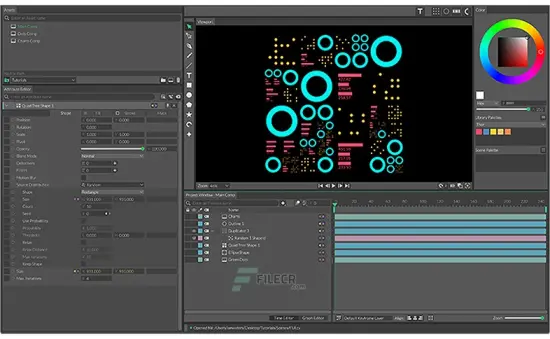
The interface of Cavalry Portable is centered around a node‑oriented, non‑linear workspace where compositions are structured as networks of objects, modifiers, and directors rather than a flat stack of layers. The typical layout includes:
-
A viewport where the visual composition is rendered in real time, usually with a generous canvas area and zoom/pan controls.
-
A scene‑tree or layer list that shows the hierarchy of objects, groups, and compositions.
-
A node graph or expression panel where the procedural logic of the animation lives: this is where you wire up behaviors, create expressions, and connect modifiers to shapes and text.
-
A timeline or “event‑sheet” area that lets you sequence different scenes, trigger states, or data‑driven changes over time.
Unlike more traditional motion‑graphics tools that rely heavily on layer‑stack timelines and keyframe editors, Cavalry Portable encourages you to think in relationships and signals: how one shape responds to another, how text changes with numeric input, or how an entire grid of elements rearranges based on data.
Workflows often look like this:
-
You create vector shapes, text, or import SVG/illustrations directly into the scene.
-
You attach behaviors and modifiers (clone, noise, falloff, equations, generators) to those objects, defining how they move, deform, and respond.
-
You wire these systems together in the node graph, so that a single numeric value or a data source can drive many visual elements at once.
-
You refine the timing and variation either through procedural tools or by sequencing different states on the timeline.
-
You export the final animation as video, a sequence, or a lightweight vector‑based format suitable for interactive use.
This node‑first approach is closer to modern compositing or 3D tools than to classic 2D motion suites, but it is tailored for flat, 2D graphics rather than 3D scenes.
Vector drawing and shape tools
Cavalry Portable includes robust, integrated vector tools so you are not forced to export shapes from a separate illustration app. The software is designed to let you:
-
Draw and edit vector paths and shapes directly in the viewport with intelligent pen and pencil tools that automatically smooth control points and create clean, editable curves.
-
Use primitives such as rectangles, ellipses, paths, and polygons as building blocks for complex compositions.
-
Connect shapes so that the output of one shape can influence the stroke, fill, or deformation of another, enabling things like “stroking” along a generated path or using one shape as a clipping mask on a group.
-
Work with SVG layers, importing existing vector artwork and treating each path or group as a manipulable object within the procedural system.
These vector features integrate tightly with the animation engine, so any shape you create can immediately begin participating in motion behaviors, duplications, or data‑driven transformations.
Procedural animation and behaviors
One of the most distinctive aspects of Cavalry Portable is its procedural animation system, which minimizes the need for manual keyframing by letting you define how objects should move and change based on rules, math, and data.
Key procedural concepts
-
Modifiers and behaviors: Instead of setting keyframes frame by frame, you attach “behaviors” to properties such as position, scale, rotation, or opacity. These behaviors can be driven by time, noise, expressions, or external data.
-
Duplicator and quad‑tree tools: A powerful Duplicator lets you create grids, arrays, and radial layouts from a single shape, then apply per‑item offsets, scaling, or animation without duplicating work. Quad‑tree tools support mathematically structured distributions, often used for generative grids or tiling patterns.
-
Noise and falloff modifiers: Noise behaviors introduce randomness or organic jitter to motion, while falloffs let you control how an effect diminishes over distance, radius, or time, creating more natural and complex looks.
-
Magic easing and interpolation tools: Rather than relying on generic easing presets, Cavalry offers smart interpolation tools that let you shape the motion curve procedurally, often via simple numeric parameters or visual curve editors.
In practice, this means you can:
-
Create a grid of 100 floating squares with a single shape and a few nodes, then animate them collectively with noise, delays, and falloffs instead of keyframing each one.
-
Set up complex UI‑style animations (such as expanding menus or cascading particle‑like elements) by driving all offsets from a single master parameter.
This procedural approach is where Cavalry Portable truly differentiates itself from timeline‑first tools: instead of manually choreographing each element, you build a small system that choreographs the group automatically.
Data‑driven and dynamic design
Cavalry Portable is built for environments where design and motion must respond to changing information, not just to static scripts. The data‑driven workflow is a major pillar of the Professional tier:
-
CSV, JSON, and text‑based data import: You can feed external data files (for example, CSV or JSON) into the software and drive animation, text, or layout parameters from those values.
-
Google Sheets integration (Professional only): The paid version can connect to live Google Sheets, turning the spreadsheet into a real‑time control panel for your motion design. Editing a cell in the sheet can instantly update the corresponding animation, making it perfect for sports graphics, live data visualizations, or multi‑language workflows.
-
Smart folders for assets: Image Smart Folder and Audio Smart Folder let you reference assets by name, so that the system can automatically swap in the correct logo, image, or sound based on data or script execution, without manual relinking.
These features make it possible to:
-
Generate squads, scores, or tournament brackets from live data feeds, updating both text and layout automatically.
-
Build modular branding systems where changing a single data parameter updates colors, logos, and layouts across an entire library of animations.
-
Create templated explainer or promotional videos that can be customized for different clients or markets from a single source file.
For studios that produce hundreds of similar assets, this data‑driven paradigm drastically reduces repetitive manual work and the risk of human error.
Rigging, text, and layout tools
Cavalry Portable includes a suite of tools that cater specifically to the kinds of UI, broadcast, and motion‑graphics work that designers produce every day.
Rig Control and rubber‑hose style
-
Rig Control lets you build simple rigs for characters or icons: you can create hierarchical relationships between shapes, bones, or hotspots and then drive motion through expressions or interactive controls rather than dense keyframe sets.
-
Rubber‑hose style tools are useful for 2D character animation or stylized mascots, where limbs and body parts bend and stretch in a controlled, non‑linear way with minimal manual intervention.
Text animation and components
-
Text animation tools are deeply integrated: you can animate individual letters, words, or lines procedurally, using the same duplicator and noise systems that apply to shapes.
-
Components and pre‑comp overrides allow you to create reusable containers that encapsulate complex behaviors and expose only a small set of parameters to the end user. This is ideal for design systems where you want others to tweak colors, timing, or layout without touching the underlying logic.
-
Smart layouts and layout groups let you stack and arrange shapes in grids, rows, or columns, automatically updating positions when elements are added, removed, or resized, which is crucial for dynamic UI layouts and responsive motion.
Cameras and 2.5D space
While Cavalry is fundamentally a 2D environment, the Professional version supports cameras and 2.5D transforms:
-
You can add a camera to a composition to create pseudo‑depth by moving the viewpoint through a flat scene, giving the illusion of 3D without the complexity of true 3D modeling.
-
Z‑style extrusions and depth effects can be applied to shapes, letting you create subtle 3D‑like edges or shadows while still working in a vector‑centric workflow.
These features make it easier to produce broadcast‑style motion graphics, lower‑thirds, and UI mockups that feel spatially rich without leaving the 2D domain.
Effects, filters, and visual polish
To give compositions a finished, broadcast‑ready look, Cavalry Portable includes a range of effects and filters that can be applied procedurally through the node system:
-
Blurs, chromatic aberration, pixelation, halftone, and stylized distortions help create visual hierarchy, mood, or stylistic looks (for example, retro, glitch, or comic‑book effects).
-
Blend modes, color management, and falloffs let you blend multiple layers, adjust color consistently across devices, and create gradients that follow paths or shapes.
-
Trail and motion‑stretch tools can generate motion trails or smear‑style effects that enhance the sense of speed and direction in fast‑moving compositions.
These tools are designed to be non‑destructive: you can toggle them on and off, tweak parameters, or swap effects without baking them into rasterized layers, which keeps the workflow flexible and editable.
Export, rendering, and sharing
Cavalry Portable is built for real‑world production pipelines, so it exposes a wide range of output options:
-
Video export to formats such as MP4, WebM, and ProRes, suitable for delivery to clients, broadcasters, or social platforms.
-
Image and sequence exports including PNG, JPG, WebP, GIF, APNG, sprite sheets, and SVG sequences, useful for UI work, web animations, or game assets.
-
Lottie export (Professional only): you can generate Lottie‑compatible JSON definitions that describe your animation, which can then be used directly in web and mobile apps for lightweight, resolution‑independent motion.
-
Dynamic rendering: the Professional tier supports dynamic rendering, where different values or states can be automatically generated at render time, enabling automated pipelines that render dozens or even hundreds of variants from the same scene.
Additional features include:
-
Batch rendering: sequence multiple render configurations (different aspect ratios, overlays, or data states) and execute them in a single operation.
-
Background rendering: hand off the render process so you can continue working in the editor without the interface freezing.
-
Render‑time uploads: automatically upload rendered assets to cloud destinations or CDNs, integrating with modern delivery workflows.
This export ecosystem is tailored for teams that need to support not only single‑video outputs but also libraries of assets, variants, and interactive motion elements.
Audio integration and time‑based control
Cavalry Portable also includes audio tools that let you sync motion to sound:
-
Audio import for common formats such as WAV, MP3, and AAC, allowing you to bring music, voice‑overs, or sound effects into the project.
-
Sound‑driven behaviors: you can use audio waveforms or amplitude data to drive deformation, opacity, color, or other properties, creating audio‑reactive motion graphics similar to what you might see in music‑video or live‑visuals setups.
-
Audio playback and mixing: multiple audio tracks can be played back in sync with the timeline, and you can mix levels and set in/out points as needed.
This combination makes it possible to create tightly synced promos, music‑video style infographics, or UI‑style animations that feel organically linked to the soundtrack.
Scripting and advanced automation
Beyond the built‑in expression system, Cavalry Portable supports scripting and automation for highly technical workflows:
-
You can write scripts that generate or manipulate entire scenes, create or modify modifiers, and automate complex tasks that would be tedious to perform by hand.
-
Scripting can be used to build custom tools and generators that integrate into the node graph, letting studios encode their own house‑style behaviors or production‑pipeline utilities.
This capability is especially valuable for:
-
Large studios that want to enforce style guidelines programmatically.
-
Technical directors who need to automate the creation of complex motion‑graphics templates.
-
Developers who want to integrate Cavalry into broader pipelines involving data, code, and cloud infrastructure.
Overall user experience and strengths
Cavalry Portable is designed for motion designers who want to move beyond the limitations of classic keyframe‑centric tools and into a world where design systems, automation, and data control the animation. It is not a toy or a lightweight utility; it is a deep, expressive, and ambitious environment that rewards users who are comfortable thinking in networks, parameters, and behaviors.
Strengths include:
-
A procedural, non‑destructive workflow that lets you iterate quickly and safely.
-
Built‑in vector tools, rigging, text animation, and layout features that reduce the need for external plugins or round‑tripping between apps.
-
Data‑driven and automation‑oriented design, especially via Google Sheets, CSV, and dynamic rendering, which is ideal for large‑scale or template‑based projects.
-
Lottie and web‑friendly export, making it a strong choice for designers who work across motion graphics, UI, and interactive experiences.
For studios and individuals who produce high‑volume, consistent, or data‑driven 2D motion, Cavalry Portable offers a powerful, cohesive environment that can replace or complement traditional tools while pushing the envelope of how motion graphics are created and deployed.
Release Notes:
Enhancements
- Deleting Layers in the Scene Tree is now ~10x faster.
Notable Bug Fixes
- When deleting keyframes from animation curves in the Graph Editor, the animation curve is no longer deselected.
- When moving the Centre of a Spherise Filter, the resulting lighting is no longer inverted.
- The ‘Frame tools’ have been restored to the Cel Animation Shape’s UI.
- An over-optimisation meaning updates to a Shape with a connected Resample Path were not instant has been resolved.
- An issue meaning a Shape with a Mirror Filter could become clipped when zooming the Viewport has been resolved.