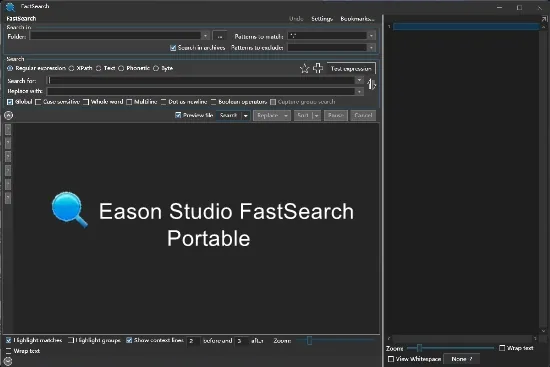
Portable Eason Studio FastSearch 4.6.0.0 (x64)
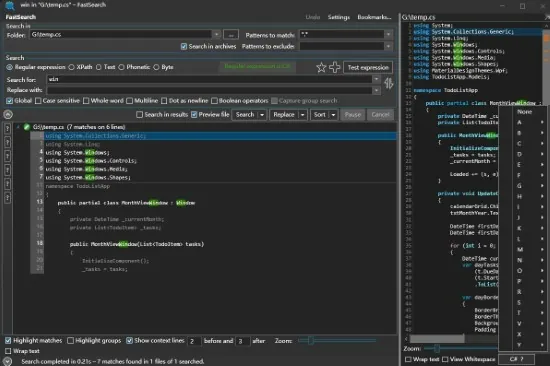
Eason FastSearch Portable is a high-performance desktop search utility engineered for Windows users who need to locate specific content buried deep within files, folders, and archives without the limitations of traditional filename-based searches. This powerful tool scans the actual contents of documents, spreadsheets, PDFs, compressed archives, and even binary files, delivering lightning-fast results across thousands of files in seconds.
Designed for professionals such as developers, researchers, legal analysts, writers, and power users managing large document repositories, FastSearch combines advanced query languages like regex and XPath with intuitive filtering, safe editing capabilities, and seamless Windows integration to transform chaotic file systems into efficiently searchable knowledge bases.
Core Search Engine and Multi-Format Support
FastSearch’s engine excels at deep content indexing and real-time scanning, supporting an extensive array of file types without requiring preprocessing or extraction. Text-based documents like PDF, Word (.doc/.docx), Excel (.xls/.xlsx), PowerPoint (.ppt/.pptx), and plain text files are parsed for readable content, including embedded tables, footnotes, and metadata. Office formats undergo intelligent structure recognition, extracting cell values from spreadsheets or slide notes from presentations.
Compressed archives represent a standout capability: ZIP, 7Z, RAR, JAR, and similar containers are searched directly—no unpacking needed. The tool traverses nested archives recursively, surfacing matches from files buried multiple levels deep, such as a keyword in a .txt inside a .zip within another .zip. This proves invaluable for software developers scanning JARs for code snippets or analysts reviewing zipped reports.
Binary and specialized formats extend versatility: source code (C++, Java, Python, HTML/CSS/JS), logs, databases (SQLite excerpts), and even image metadata (EXIF in JPEGs). The engine handles encodings like UTF-8, ANSI, and Unicode seamlessly, with automatic detection to prevent garbled results.
Search speed scales impressively: on modern SSDs, it indexes gigabytes in under a minute, with live queries returning hits instantly as typing progresses. Multi-threading leverages all CPU cores, while RAM-efficient processing suits machines with 4GB+ memory.
Advanced Query Languages and Precision Matching
FastSearch transcends basic keyword hunts with sophisticated query syntax tailored for power users:
-
Plain text and phrases: Exact matches with quotes (“project deadline”), wildcards (budget2025*), or Boolean operators (budget AND deadline NOT draft).
-
Regular expressions (regex): Full PCRE support for pattern matching, like \d{3}-\d{2}-\d{4} for SSNs or ^import.*from for Python imports. Visual regex tester validates patterns pre-search.
-
XPath for structured data: Query XML/Office internals, e.g., //w:t[contains(text(),’confidential’)] for Word docs or spreadsheets://ss:cell[@r=’A1′ and @t=’s’]/ss:v for cell values.
-
Byte strings: Hex searches for binaries, like FF D8 FF for JPEG headers.
-
Proximity and fuzzy: NEAR/5 finds terms within 5 words; soundex/levenshtein tolerates typos.
Filters refine results dynamically: file type (docx|pdf), size (>1MB), modified date (last 30 days), path patterns (C:\Projects*), or custom attributes. Results sort by relevance, hit count, path, or recency, with highlighting of matches in context snippets.
Result Presentation and Instant Preview
Search outcomes display in a customizable grid or list view, each row showing filename, path, hit count, snippet with bolded matches, and thumbnail previews for images/docs. Click expands to a full-file viewer pane, rendering Office/PDF content natively with zoom, page navigation, and syntax highlighting for code.
Dual-pane layout splits search results left, preview right; resizable columns pin essentials like path/size. Context menu actions include “Copy path,” “Open containing folder,” or “Quick edit matched line.”
Saved searches as profiles enable one-click reuse—e.g., “PII Scan” for regexes flagging personal data across drives.
Safe Find-and-Replace Editing
A killer feature for remediation: safe text replacement across files without corrupting binaries. Select results, choose replace, preview diffs, and apply with undo stack. Text-only mode protects Word/PDF structures; binary-safe skips non-text. Batch operations handle thousands of files, logging changes to CSV.
Line-level editing opens matches in external editors (VS Code, Notepad++) or internal viewer. Rename/move/copy/delete act on selections, with dry-run previews.
Windows Explorer and Workflow Integration
Deep OS hooks streamline usage:
-
Right-click folder/drive in Explorer → “Search with FastSearch” launches indexed scan.
-
Shell extensions add “Find in Files” to context menus.
-
Global hotkey (Win+F) summons floating search bar over any folder.
-
Drag-drop folders into app for instant queries.
Custom layouts save workspaces: developer view with code filters, legal with date/PII focus.
Indexing for Ultra-Fast Repeated Searches
Optional background indexing builds catalogs of drives/folders, supporting incremental updates. Indexes store content hashes, not full text, for privacy. Query indexes at 100x live-scan speed; hybrid mode falls back for unindexed areas.
Pro features: encrypted indexes, scheduled re-indexes, exclusion rules (node_modules, temp files).
Themes, Performance, and Accessibility
Light/dark themes adapt to Windows mode; high-DPI scaling ensures crisp 4K renders. Minimal footprint (50MB RAM idle) runs alongside IDEs/browsers. Accessibility: keyboard nav, screen reader labels, high-contrast mode.
Version 4.6+ adds neural search (semantic similarity), live USB scanning, and cloud sync for profiles.
Use Cases by Profession
Developers: Grep codebases for functions/classes; refactor strings across projects.
Researchers/Writers: Locate quotes/references in paper stacks; cross-doc analysis.
Legal/Compliance: PII hunts, contract clause audits.
Admins: Log mining for errors; duplicate content detection.
Creatives: Asset libraries for phrases/styles.
FastSearch obliterates search friction, turning file hordes into instant-access intel. Its depth, speed, and safety make it indispensable for knowledge workers wielding documents as daily swords.