

Portable Easy File Organizer 3.4.8
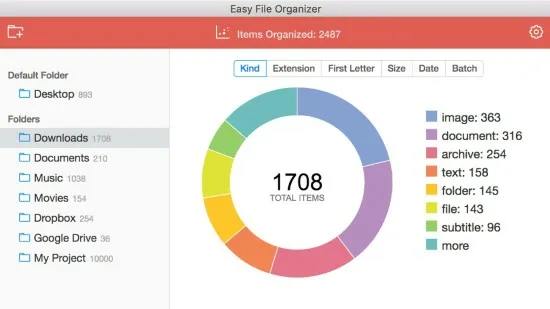
Easy File Organizer Portable is a lightweight yet highly efficient file management utility designed to automatically sort, categorize, and declutter folders on Windows, macOS, and Linux systems with minimal user intervention. This intuitive software tackles the common chaos of scattered downloads, desktops cluttered with miscellaneous files, and disorganized project directories by employing smart rules, filters, and one-click organization features that transform messy storage into structured, accessible hierarchies. Targeted at both casual users overwhelmed by digital accumulation and professionals handling large volumes of documents, images, videos, and archives, Easy File Organizer Portable combines blazing-fast performance—organizing thousands of files in seconds—with flexible customization, making it an essential tool for maintaining productivity in personal, work, or creative workflows.
Core Organization Engine and Speed
At its heart, Easy File Organizer Portable leverages a multi-threaded engine optimized for rapid scanning and relocation, capable of processing over 1,000 files in under half a second on standard hardware. Users select a target folder—commonly Downloads, Desktop, or any custom directory—and the app instantly analyzes contents by type, extension, size, modification date, or name patterns. Built-in smart filters pre-categorize files into intuitive subfolders like Documents, Images, Videos, Audio, Archives, Applications, and Others, preventing overlap through intelligent conflict resolution.
The recursive organizing mode dives into subfolders at any depth, ensuring comprehensive cleanup without manual navigation. For instance, a cluttered Downloads folder with nested ZIPs containing PDFs gets fully unpacked in structure, with contents redistributed appropriately. Auto-organizing monitors watched folders in real-time, applying rules to new arrivals instantly—ideal for download-heavy workflows where invoices, photos, or scripts pile up unchecked.
Drag-and-Drop Simplicity and User Interface
The interface prioritizes accessibility with a clean, modern design featuring a prominent “Organize Now” button, drag-and-drop zones for folders/files, and a live preview pane showing before/after structures. A central dashboard displays recent operations, folder stats (file count, size savings), and quick-access presets like “Downloads Cleanup” or “Desktop Tidy.” Sidebar panels house filters and rules, collapsible for full-screen previews.
Novices appreciate one-click modes: select “By Kind” for extension-based sorting (.docx → Documents, .jpg → Images), “By Date” for chronological archiving, or “By Size” to isolate large media. Power users expand into custom views, toggling dark/light themes, high-DPI scaling, and keyboard shortcuts for rapid iteration.
Advanced Filtering and Sorting Options
Filtering forms the software’s intelligence core, offering layered criteria for precise control:
-
By Extension/Type: Comprehensive presets cover 50+ common formats—Office docs, Adobe files, media codecs, code extensions (py, js, cpp), compressing archives (zip, rar, 7z).
-
By Size: Thresholds bucket tiny (<1MB), medium (1-50MB), large (>50MB) files, flagging space hogs.
-
By Date: Modified/created/access dates sort into Today, This Week, This Month, Older, with age-based archiving.
-
By Name/ABC: Alphabetical grouping or regex patterns (e.g., invoice2025* → Invoices).
-
Smart Filters: AI-like heuristics detect “likely documents” by content sampling, grouping ambiguous files.
Combined filters create power combos: “Images larger than 5MB modified last month” → High-Res Photos subfolder. Results preview in a tree view, with color-coded icons and duplicate warnings.
Custom Rules and Automation
The rule builder elevates Easy File Organizer Portable to automation powerhouse. Drag conditions (if extension=pdf AND size<2MB AND name contains “report”) to actions (move to /Reports/, rename “YYYY-MM-DD_Report.ext”). Boolean logic (AND/OR/NOT), wildcards, and variables (e.g., extract date from filename) enable sophisticated setups:
-
Downloads rule: MP3s → Music/Artist/, invoices → Bills/YYYY/.
-
Project rule: *.psd → Photoshop/YYYY-MM/, logs → Archives/Logs/.
-
Cleanup rule: Delete temp files older than 30 days (with confirmation).
Rules apply globally or per-folder, with priority ordering and conflict arbitration (e.g., merge duplicates). Scheduled tasks run hourly/daily, integrating with Windows Task Scheduler or macOS LaunchAgents for hands-off maintenance.
Batch operations extend to copy/move/delete/rename across selections, with dry-run simulations and undo stacks preserving originals via backup copies.
Undo, History, and Safety Features
Safety anchors every action: full undo/redo reverses entire sessions, restoring exact original states. History log tracks operations with timestamps, before/after paths, and filter details—searchable and exportable to CSV for audits. “What If” mode simulates without moving files, perfect for testing rules on live data.
Duplicate finder scans by hash/content, offering merge/rename/ignore options. Empty folder cleanup prunes ghosts post-organization, reclaiming space.
Subfolder and Nested Structure Management
Multi-level subfolders generate dynamic hierarchies: Images/2025/12/Portraits/, Videos/ProjectX/Exports/. Users define depth limits or auto-nest by metadata (EXIF dates for photos, ID3 tags for MP3s). Flatten/expand toggles views, while structure templates save custom trees (e.g., Creative: Sketches/Photos/Videos/Renders).
Cross-volume support organizes to external drives/USB/cloud sync (OneDrive, Dropbox), with path mapping for portability.
Search and Quick Access Integration
Post-organization, integrated search indexes organized structures for instant retrieval by name/content/tag. Global hotkeys summon the app over Explorer/Finder, with pinned favorites for frequent folders. Shell extensions add “Organize with Easy File” to right-click menus.
Performance, Compatibility, and Platforms
Ultra-light (under 50MB RAM idle), it scales to millions of files on HDDs/SSDs. Cross-platform builds ensure consistency: Windows (7+), macOS (10.15+), Linux (AppImage/Flatpak). No internet required post-install; portable modes run from USB.
Premium unlocks unlimited rules/batches, advanced regex, cloud backups—free tier suffices for basics.
Practical Workflows and Use Cases
Home User: Tame Downloads/Desktop weekly; auto-sort photos by date/device.
Developer: Group builds/logs/tests; archive by commit date.
Creative: Sketches/RAWs/Exports by project/client.
Office: Invoices/Reports/Contracts by year/vendor.
Archivist: Media by decade/genre; dedupe collections.
Easy File Organizer Portable liberates users from manual drudgery, enforcing order through speed, smarts, and safeguards. Its blend of simplicity and depth makes digital housekeeping effortless, reclaiming hours weekly while scaling to enterprise needs—proving that true productivity stems from invisible organization.