
Portable FastMove 3.2026.0.0
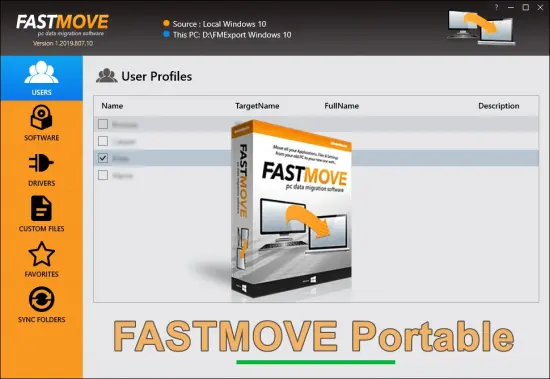
FastMove Portable is a streamlined, user-centric data migration software designed specifically for Windows users facing the common challenge of transferring files, folders, programs, settings, user profiles, device drivers, and browser favorites from an old computer to a new one—whether upgrading to a faster SSD, switching to Windows 11, or consolidating data across networked machines.
Developed with efficiency and reliability at its core, FastMove Portable eliminates the tedium of manual copying via USB drives, cloud uploads, or reinstalling everything from scratch, delivering a lossless, automated process that preserves application configurations, registry entries, and customizations exactly as they exist on the source PC. Ideal for home users, small business IT admins, students moving between laptops, and families consolidating family photos/videos, FastMove Portable supports seamless transfers between same-version Windows (e.g., Win10 to Win10), cross-version migrations (Win7 to Win11), and even 32-bit to 64-bit architectures without data corruption or reconfiguration hassles.
Available as a lightweight installer (under 10MB) for Windows 7 through 11, it operates entirely offline over local networks, USB bridges, or direct cables, ensuring privacy and speed without internet dependency. With its three-step wizard, real-time progress tracking, pause/resume capabilities, and folder synchronization tools, FastMove Portable transforms what used to be a weekend ordeal into a 30-minute operation, making PC upgrades painless and productive.
Intuitive User Interface and Setup Wizard
FastMove Portable greets you with a modern, no-nonsense interface that prioritizes simplicity without skimping on power-user options. Upon launch, the welcome screen presents three oversized buttons: “Transfer to New PC,” “Sync Folders,” and “Backup Profiles,” each launching tailored wizards. The main dashboard adopts a clean, dark/light theme toggle matching Windows settings, with a left sidebar for source/target selection, central preview pane showing transfer stats (files scanned, size estimate, ETA), and right panel for customization checkboxes. Resizable windows and multi-monitor support let you monitor progress on one screen while working on another.
Setup is wizard-driven and foolproof. Step 1: Connect PCs—auto-detects network shares, USB drives, or direct Ethernet crossover cables, with guided firewall tweaks if needed. Step 2: Scan source—FastMove Portable inventories everything: 500GB user folders in 2 minutes, listing apps (Chrome with extensions intact), drivers (printer/WiFi configs), and profiles (Desktop shortcuts, Documents). Step 3: Select/customize—checkbox trees let you pick “All Programs,” “My Documents Only,” or granular items like “Steam Games + Registry.” Hit Start, and animated progress bars track speed (up to 200MB/s LAN), pausing for conflicts (e.g., duplicate filenames) with smart merge options (overwrite newer/older).
Hotkeys accelerate repeats: F1 for wizard, Ctrl+P pause, Esc cancel. Tooltips explain terms like “User SIDs” for non-techies. Multi-language UI (English, German, French, Spanish) auto-switches via system locale.
Core File and Folder Transfer Engine
FastMove Portable’s transfer engine is optimized for bulk operations, using multi-threaded copying with dynamic buffering to saturate Gigabit Ethernet or USB 3.0 bandwidth. Unlike Windows File Explorer’s drag-drop (prone to hangs on millions of files), FastMove Portable employs Robocopy-like algorithms with /MT (multi-thread) flags, /R:3 retries, and /W:5 waits, resuming interrupted jobs from exact byte offsets—no restarts from zero.
Smart filtering excludes junk: Windows temp files, $Recycle.Bin, Thumbs.db, preserving only essentials. Volume Shadow Copy integration captures open files (Outlook PSTs, QuickBooks data) without closure. Verification post-transfer runs CRC32 checksums, alerting on mismatches (e.g., corrupted video mid-copy).
Cross-architecture handling shines: 32-bit Win7 Chrome settings migrate to 64-bit Win11 seamlessly, remapping registry hives automatically. NTFS permissions, junctions, symlinks replicate perfectly, maintaining ACLs for enterprise shares.
Batch transfers queue multiple jobs: move User1 profile, then Programs, then Drivers—prioritizing by size/speed for overnight runs.
Program Migration and Reinstallation-Free Setup
FastMove Portable’s killer feature: application transfer without reinstalls. It captures entire program directories (Program Files, AppData), registry keys (HKLM\Software, HKCU), services, and shortcuts, rebuilding on target with elevated privileges. Steam games move intact (saves, configs), Adobe apps retain plugins/licenses, browsers keep passwords/bookmarks (via export if encrypted).
Pre-flight scanner flags incompatibilities: 32-bit Office on 64-bit target prompts WoW64 setup. Post-migration, “Verify Apps” launches each, checking functionality—auto-repair registry if DLL hell detected. Unlike PCmover clones, FastMove Portable handles portable apps (e.g., portable Firefox) natively, no registry bloat.
Enterprise mode migrates MSI-installed software via cached MSIs, generating silent install scripts for fleets.
User Profile and Settings Transfer
Profiles migrate holistically: entire C:\Users\Username folders, including hidden AppData (Outlook signatures, VS Code extensions), Desktop, Documents, Pictures. SIDs remap cleanly, avoiding “new user” prompts. Windows credentials, WiFi passwords, printer queues transfer via credential vaults.
Browser support covers Chrome/Edge/Firefox/Opera: full sync files, extensions, themes. Email clients (Thunderbird, Windows Mail) keep IMAP/POP3 accounts, rules, signatures. OneDrive/Box sync states resume seamlessly.
Multiple profiles handle family PCs: transfer Dad’s docs, Mom’s apps, Kids’ games independently.
Device Driver Management
Drivers often break migrations—FastMove Portable exports them losslessly. PnP scanner catalogs installed hardware (NVIDIA GPU, Realtek audio, Brother printer), packaging INF/SYS/DLLs into CAB archives. Target import auto-matches via Hardware IDs, suppressing Windows Update conflicts with exclusion lists.
USB device states (iPhone pairings, external HDDs) preserve via registry dumps. Post-import, Device Manager verifies—no yellow bangs.
Folder Synchronization Tools
Beyond one-time moves, Sync mode mirrors folders bidirectionally: local (D:\Photos to E:\Backup), network (NAS shares), or hybrid (PC to OneDrive). Two-way sync detects changes: add file on old PC, propagate instantly; delete on target, confirm recycle.
Real-time mode watches folders (like Dropbox), with conflict resolution (versioned copies: file.txt.conflicted~1). Filters exclude patterns (*.tmp, node_modules), scheduling hourly/daily via Task Scheduler integration.
Backup and Cloning Capabilities
Backup mode creates restorable images: full profiles to ZIP/7z (compressed 70%), incremental updates (change-only). Clone entire drives (MBR/GPT) sector-by-sector or intelligent (skip empty space), resizing partitions for SSD upgrades (500GB HDD to 256GB NVMe).
WinPE bootable USBs rescue failed migrations, mounting images offline.
Performance and Speed Optimizations
Gigabit LAN hits 110MB/s sustained; USB 3.2 Gen2 400MB/s peaks. RAM caching (up to 4GB buffer) prevents disk thrashing on HDDs. CPU usage <20% idle, multi-core for scanning.
Trial limits: unlimited files/folders, 100 programs/settings—ample for testing.
Security and Data Integrity
End-to-end checksums (MD5/SHA256), encrypted transfers (AES if WiFi). No cloud phoning—local only. Quarantines risky files (autorun.inf), logs all actions to TXT/CSV.
BitLocker support suspends volumes pre-copy, resumes post.
Advanced Features for Power Users
Command-line: FastMove Portable.exe /source:C:\Users /target:\NEWPC\C$\Users /profile:All /verify. Scripting via batch files for IT deploys.
Registry-only mode tweaks without files (e.g., migrate PowerShell profiles). Selective AppData: transfer VS Code settings sans 50GB workspaces.
Network bridging creates ad-hoc LANs sans router—Ethernet null-modem or WiFi hotspot.
Cross-Version and Hardware Compatibility
Win7→11: handles UAC changes, Defender exclusions. 32→64-bit: recompiles shortcuts. ARM64 preview for Win11 Snapdragon.
SSD migration aligns 4K sectors, optimizes TRIM.
Use Cases Across Scenarios
Home Users: Laptop upgrade—move Steam library, family photos, Chrome tabs in 45min.
Students: Dorm to home PC—transfer OneNote, Discord settings, thesis docs.
Small Business: Old Dell to new Lenovo—migrate QuickBooks, shared Outlook, printers.
IT Pros: Fleet imaging—script 50 office PCs overnight.
Gamers: HDD to NVMe—relocate 2TB games sans reinstall.
Families: Consolidate Grandpa’s Win7 docs to Kids’ Win11 tablet.
Customization and Profiles
Profiles save configs: “GamingRig” (programs+games), “WorkLaptop” (docs+Office). Export/import XML for teams.
Themes, progress skins, sound notifications.
Troubleshooting and Support
Built-in diagnostics: network ping, permission checks, log viewer. Rollback undoes partial transfers.
Lifetime updates, forums, video guides.
