

Portable Inflazor Focustra 1.0.0 (x64)
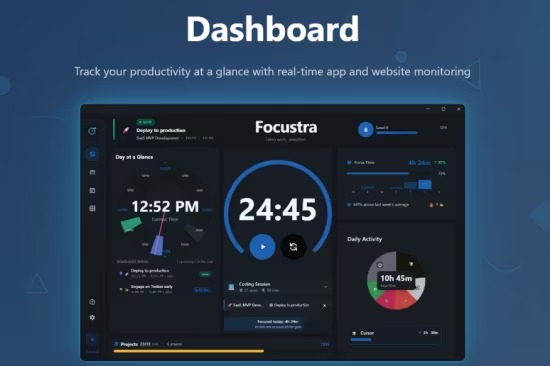
Focustra Portable is a cutting-edge productivity and time management application exclusively designed for Windows 10 and 11, serving as an all-in-one solution for automatic app and website usage tracking, Pomodoro technique implementation, task and project organization, and insightful analytics visualization, all while maintaining complete local data privacy without cloud syncing or external servers.
Launched in early 2026 via the Microsoft Store, this lightweight app (under 50MB install) empowers remote workers, students, freelancers, developers, and knowledge professionals to reclaim focus in distraction-filled digital environments by passively monitoring screen time across applications and browsers, categorizing activities intelligently, enforcing deep work sessions with customizable timers, and generating motivational charts that reveal productivity patterns, bottlenecks, and achievements over days, weeks, or months.
With features like automatic tagging of productive/distracting sites (YouTube, Slack vs. VS Code, Google Docs), goal setting with streaks/badges, distraction blockers, and exportable reports for performance reviews, Focustra transforms chaotic workflows into data-driven mastery, all processed offline on-device for ironclad privacy.
The app’s minimalist, modern interface—dark/light themes, resizable panels, and gesture support—prioritizes glanceable insights: a dashboard shows today’s focus score (percentage productive time), active Pomodoro timer with break reminders, top apps/sites pie charts, and streak counters (“7 days 4h+ deep work”). One-click start tracking requires no setup—grant accessibility permissions, and it runs silently in the system tray, logging without interrupting.
Automatic Time Tracking Engine
Focustra’s core innovation is seamless, passive monitoring leveraging Windows APIs (UI Automation, accessibility hooks) to capture foreground window titles, executable paths, and URLs (via browser extensions for Chrome/Edge/Firefox). Unlike manual timers, it distinguishes:
-
Apps: VSCode.exe (productive coding), Discord.exe (social distraction), Excel.exe (work).
-
Websites: github.com (dev), reddit.com (distraction), docs.google.com (productive).
-
Idle/Away: Screensaver, lock screen, minimized states.
AI classification (local ML models) tags activities: “Development” for IDEs/editors, “Communication” for email/Slack/Teams, “Research” for Wikipedia/Google, “Entertainment” for streaming/YouTube. Users refine tags via right-click menus or bulk edits.
Background logging stores SQLite database (encrypted, local-only), pruning old data (30/90/365 days configurable).
Pomodoro and Deep Work Sessions
Integrated Pomodoro timer customizes: classic 25min work/5min break, or 50/10, 90/20 for flow states. Visual/audio cues (chimes, full-screen blockers) enforce focus; session history logs distractions attempted (e.g., “Alt-Tab to Twitter blocked”).
Deep Work mode silences notifications, grays distracting apps, and tracks immersion time. Goals set daily/weekly targets (4h coding, <30min social), gamified with streaks, levels, badges (“Marathoner: 10x 2h sessions”).
Task and Project Management
Kanban-style boards organize tasks/projects: drag cards across To Do/In Progress/Done, subtasks/checklists, due dates/priorities (Eisenhower matrix colors). Time estimates vs. actuals track accuracy, improving planning.
Projects group related tasks (e.g., “Q1 Report”), assigning tags/categories for filtering. Calendar integration views timelines, overdue alerts.
Analytics and Visualization Dashboards
Insightful charts motivate:
-
Daily/Weekly Pie: Productive vs. Distraction (80/20 Pareto visualized).
-
Timeline Heatmap: Peak focus hours (e.g., 9-11AM).
-
App/Site Rankings: Bar graphs top consumers (Chrome 40%, VSCode 25%).
-
Trend Lines: Focus score over months, regressions predicting weekly highs.
-
Distraction Radar: Circular plots social/email vs. work.
Exports CSV/PDF/JSON for Excel/Tableau, anonymized sharing.
Privacy and Security Focus
“Local-only” mantra: no telemetry, no accounts, SQLite encrypted (AES-256). Permissions minimal (screen reading for tracking, notifications). Open-source components audited.
Distraction blocker whitelists productive apps/sites, grays/closes others during sessions.
Customization and Extensibility
Themes/fonts, timer sounds, tag rules (regex “netflix.*” → Entertainment). Rules engine automates (“After 2h VSCode, 10min break”). Browser extensions log tabs accurately.
Multi-monitor support tracks across screens; work profiles separate personal/professional.
Performance and Compatibility
Near-zero overhead (<1% CPU idle), real-time without lag. Windows 10/11 native, ARM64 preview.
Use Cases
Developers: Track coding vs. StackOverflow rabbit holes, Pomodoro sprints.
Students: Study sessions, essay timelines, distraction-free exams.
Freelancers: Billable hours, client project boards.
Executives: Meeting vs. deep work balance, weekly reports.