Portable Mass Image Compressor 4.2.1
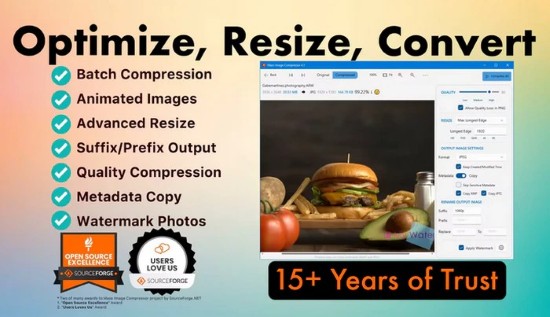
Mass Image Compressor Portable is a powerful batch image optimization utility designed for Windows, macOS, and available through Microsoft Store distributions, enabling photographers, web developers, graphic designers, content creators, and casual users to drastically reduce file sizes of entire folders of images and videos without compromising visual quality.
This lightweight application specializes in compressing, resizing, converting, and watermarking thousands of files in minutes via an intuitive drag-and-drop interface, supporting modern formats like JPEG, PNG, WebP, AVIF, HEIC, GIF (including animated), TIFF, BMP, and RAW camera files from Canon, Nikon, Sony, Fujifilm, and more.
With advanced metadata preservation (EXIF, IPTC, XMP), regex filename filtering, pixel-perfect previews, and flexible output options (replace originals, dedicated folders, suffixed copies), it streamlines workflows for web uploads, client deliveries, social media sharing, e-commerce product images, and archival storage, often achieving 90%+ size reductions while maintaining print-ready sharpness.
The software’s core strength lies in its balance of simplicity and professional controls: novices drag a folder and click “Compress,” while experts fine-tune quality sliders (1-100%), dimension constraints (percentage, long edge, fixed width/height, responsive sets like 1x/2x/3x), and format conversions (JPEG→WebP for 30-50% better compression). Multi-threaded processing leverages all CPU cores for blazing speeds—handling 1000+ images in under a minute on modern hardware—and Explorer integration via “Send To” menus embeds it directly into daily routines.
User Interface and Drag-and-Drop Workflow
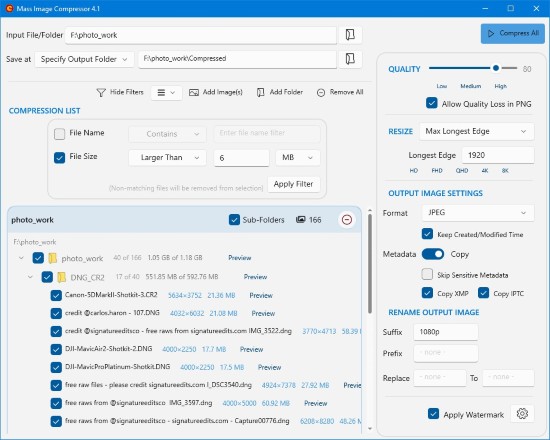
Mass Image Compressor Portable launches to a clean, dark-themed window dominated by a central drop zone labeled “Drag images or folders here,” flanked by sidebar panels for input lists, settings, and live previews. Dropping files/folders auto-populates a queue with thumbnails, file sizes, formats, and dimensions, color-coded by type (photos green, RAW orange, videos blue). Checkbox selection allows deselection, with regex filters excluding patterns like “*.tmp” or files >50MB.
The Settings panel divides logically:
-
Compression: Quality slider, lossless PNG optimization (pngquant/OxiPNG), JPEG subsampling (4:4:4/4:2:2/4:2:0).
-
Resize: Percentage (10-500%), long edge (e.g., 1920px max), frame sets (print 300DPI, web 72DPI), aspect ratio lock.
-
Convert: Output formats (WebP/AVIF for modern browsers, JPEG fallback), animated GIF/WebP preservation.
-
Metadata: Copy EXIF/IPTC/XMP selectively (strip GPS, camera serials for privacy), embed software tags.
-
Watermark: Text (font/size/color/opacity/position), image logos (PNG/SVG scaled), tiled/repeated.
-
Output: Replace originals (with backup prompt), subfolder “Compressed,” source-adjacent with prefix/suffix (e.g., “_opt”), custom path.
Preview mode (Ctrl+T) splits screens for before/after pixel comparison, zooming to verify details like edges, gradients, and noise. Progress bars track total/remaining files, average reduction (e.g., “92% smaller”), and ETA, pausing/resuming for interruptions.
Supported Formats and Processing Power
Input versatility covers:
-
Raster: JPEG/JPG, PNG (static/animated), WebP (static/animated), AVIF, HEIC/HEIF, TIFF (multi-page), BMP, ICO.
-
RAW: CR2/CR3/CRW (Canon), NEF (Nikon), ARW (Sony), RAF (Fujifilm), ORF (Olympus), DNG (Adobe), RW2 (Panasonic), and 20+ others, converted to JPEG/PNG/WebP.
-
Videos: Basic thumbnail extraction/compression for MP4/MKV (Pro previews).
Output prioritizes web efficiency: WebP/AVIF (superior to JPEG at same quality), optimized JPEG (progressive, chroma optimization), lossless PNG, animated formats intact. Batch conversion swaps HEIC→JPEG for iPhone exports or PNG→WebP for sites.
Lossy compression employs perceptual algorithms (MozJPEG for JPEG, libvips for WebP), balancing artifacts via quality metrics (SSIM/PSNR previews). Lossless modes crunch PNG/GIF redundancies without pixel changes.
RAW handling decodes Bayer patterns, applies default color profiles (Adobe/sRGB), and exports optimized JPEGs, preserving lens corrections where metadata allows.
Advanced Features for Professionals
Photographers appreciate client-proofing: bulk resize to 2048px long edge (Instagram max), embed watermarks (“©2026 YourName.com”), strip location data. EXIF copying retains aperture/shutter/ISO for portfolios, while serial stripping anonymizes gear.
Web devs generate responsive sets: input 4000px photo → outputs 1x (1920px), 2x (3840px), 3x (5760px) in WebP, named “hero_1x.webp.” Regex renames “DSC_####.jpg” to “product-####_opt.webp.”
Regex filters: “^backup.*” skips, “>10MB” excludes large files. Suffix/prefix automation: “IMG_001.jpg” → “IMG_001_webp.webp.”
Animated support processes GIF/WebP loops frame-by-frame, optimizing delays/palettes without frame drops.
Multi-folder mode recurses subdirectories (toggle on/off), preserving folder trees in outputs.
Output and Integration Options
Flexible destinations prevent overwrites:
-
Replace: Backs up originals to ZIP, swaps with optimized.
-
Subfolder: “Compressed/” mirrors structure.
-
Adjacent: “IMG_001.jpg” → “IMG_001_opt.jpg.”
-
Custom: Fixed path, overwritable.
Windows Explorer “Send To” adds right-click “Compress with MIC.” CLI mode (v4.1+) scripts: mic.exe input/ -q85 -web -out output/.
Performance and Resource Efficiency
Multi-core scaling processes 10x faster than Photoshop Actions; GPU acceleration (v4.2) offloads WebP/AVIF encodes. Idle RAM <100MB, peaks at 2GB for 10k images. Portable ZIP runs USB/offline.
Cross-platform: Windows 7-11 (Store/MSIX), macOS (App Store), Linux via Flatpak previews.
Use Cases and Scenarios
Photographers: Client galleries—500 wedding shots from 50MB→5MB each, watermarked, ZIP-ready.
Web Designers: Hero/product images optimized for Core Web Vitals (LCP<2.5s), AVIF fallbacks.
Social Media: Instagram/TikTok batches resized/compressed, metadata-clean.
E-commerce: 10k thumbnails converted PNG→WebP, 80% bandwidth savings.
Archivists: Legacy TIFF/JPEG folders to efficient storage, RAW previews.
Developers: Asset pipelines for Unity/Unreal, responsive sprite sheets.
Marketers: Email newsletters—images <100KB, no quality loss.
Customization and Extensibility
Themes (dark/light/high-contrast), hotkeys (Ctrl+P preview), presets save profiles (“WebP85,” “Print300”). Logs detail reductions/metadata changes, exportable CSV.
Updates (v4.2 2026): AVIF animations, HEIC input, batch rotate/crop.
Mass Image Compressor Portable democratizes pro optimization—drag, tweak, export. Its speed, formats, previews empower bulk workflows, slashing storage/bandwidth while preserving artistry. Free/open-source, it rivals paid suites, fueling efficient visual content in 2026’s media-saturated world.