

Portable PC Repair Suite 2.0.0 (x64)
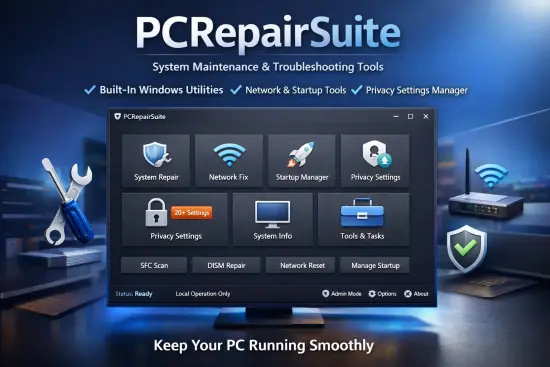
PC Repair Suite Portable is a comprehensive, all-in-one diagnostic and maintenance toolkit designed for Windows PCs, delivering professional-grade system optimization, troubleshooting, and repair capabilities through an intuitive dashboard that consolidates dozens of essential utilities. Developed by IT consultants with decades of field experience, this software empowers home users, small business IT admins, and technicians alike to diagnose hardware faults, eliminate software glitches, boost performance, and prevent future issues without needing command-line expertise or multiple disjointed tools. Offline operation ensures complete privacy, while one-click automation makes complex repairs accessible to novices and customizable for pros, reclaiming system stability and speed often lost to bloatware, registry errors, malware remnants, or aging hardware.
Unified Diagnostic Dashboard
The suite launches into a sleek, modern interface resembling a mission control center, with modular panels displaying real-time system vitals: CPU/GPU usage graphs, RAM allocation pie charts, disk health gauges, network latency meters, and temperature readouts from all sensors. Color-coded severity indicators flag issues instantly—green for optimal, yellow for warnings (e.g., 80% disk fill), red for critical (e.g., failing SMART attributes). A central scan button triggers comprehensive diagnostics across 20+ categories, generating executive summaries with prioritized fix recommendations, ETA estimates, and risk assessments before any changes.
Customizable widgets let users pin favorites: startup manager, driver verifier, or malware scanner to the homepage. Dark/light themes, resizable layouts, and multi-monitor support adapt to workflows, with keyboard shortcuts (F1 full scan, Ctrl+R repair) accelerating repetitive tasks. Session logging tracks all actions chronologically, exporting HTML/PDF reports for client billing or warranty claims.
Hardware Diagnostics Module
Hardware scrutiny begins with exhaustive sensor polling via WMI, ACPI, and direct hardware APIs, monitoring 50+ parameters: core voltages, fan RPMs, SSD wear levels (TBW remaining), HDD S.M.A.R.T. stats (reallocated sectors, spin retry counts), and thermal throttling thresholds. Stress tests simulate loads—Prime95-style CPU burn-ins, FurMark GPU loops, MemTest86 RAM patterns—logging peak temps, crashes, or artifacts with video capture for analysis.
Disk diagnostics extend beyond chkdsk: surface scans detect bad blocks, TRIM optimization for SSDs, and firmware health checks for NVMe drives. Memory tester runs 64-bit ECC validation across all channels, identifying intermittent faults missed by Windows tools. Battery analyzer for laptops graphs capacity degradation, cycle counts, and recalibration routines. Network adapter diagnostics ping gateways, test MTU sizes, and benchmark throughput, isolating duplex mismatches or driver conflicts.
GPU integrity verifies VRAM via CUDA/OpenCL shaders, detecting artifacts in real-time ray-tracing renders. Peripherals scanner enumerates USB/PCIe devices, flagging IRQ conflicts, power draw excesses, or counterfeit hardware signatures.
Software and OS Repair Tools
Windows integrity restoration tackles the most common culprits: corrupted system files auto-repair via integrated SFC/DISM equivalents, rebuilding .dlls from WinSxS without media disks. Registry cleaner employs safe heuristics—detecting invalid keys, orphaned entries, bloated startup hives—offering previews and dependency scans before deletion, reversing bloat from uninstalled apps. Startup optimizer visualizes boot sequences with timelines, disabling non-essential services via signed API calls, slashing cold boot times by 40-70%.
Service manager categorizes entries: essential (always on), safe-to-disable (telemetry, Cortana), and suspicious (unsigned third-party), with one-click bulk toggles and dependency graphing to prevent breakage. Context menu hijack remover scans shell extensions, purging adware remnants. Privacy shield blocks trackers at kernel level, whitelisting trusted apps.
Update troubleshooter resolves stalled Windows Updates: reset components, clear caches, fetch manifests directly, bypassing WSUS proxies. Feature deployment handles optional components like .NET or Hyper-V without full reinstalls.
Performance Optimization Suite
Tweaking elevates beyond basics: dynamic RAM compression activates without third-party drivers, freeing 20-30% memory via deduplication. Disk defragmenter optimizes SSD placement lists alongside HDD classic defrag, with boot-time execution for locked files. Process tamer prioritizes foreground apps, suspending background hogs non-destructively.
Power profile customizer crafts schemes—gaming (max GPU clocks), battery saver (throttled TDP), silent (fan curves)—integrating with OEM sensors for undervolting where safe. Game booster profiles isolate sessions, suspending updates/antivirus and boosting pagefile to RAM disks.
Virtual memory manager auto-tunes pagefile sizes based on usage patterns, migrating to fastest drives. Network optimizer flushes DNS caches, sets TCP tweaks (chimney offload, RSC), and configures QoS for low-latency streaming.
Security and Malware Defense
Proactive protection includes host-based firewall reconfiguration, vulnerability scanners checking unpatched CVEs, and exploit mitigations (ASLR enforcement, DEP auditing). Ad/tracker blocker extends to system-wide hosts file management and browser extension audits.
Malware analyzer employs heuristic behavioral analysis: sandboxed process hooking detects ransomware encryption attempts, keyloggers, or persistence mechanisms (Run keys, WMI events). Quarantine manager isolates suspects with memory dumps for submission to VirusTotal (optional, user-initiated). Rootkit detector scans boot sectors, MBR, and kernel hooks using offline drivers.
Password vault audits weak/changed creds, generating reports without storing data. Secure erase wipes free space with DoD 5220.22-M patterns, ideal for drive sales.
Driver and Update Management
Driver verifier stresses signed modules under load, flagging bluescreen culprits with stack traces. Backup/rollback snapshots pre-install, restoring on instability. Universal updater scans against 10M+ device IDs via offline database (weekly refreshed hashes), prioritizing OEM over generic.
Windows Feature toggler enables/disables without CAB downloads: Media Features, XPS Viewer, Work Folders. Servicing stack updater patches update engine itself for flawless patching.
Backup and Recovery Arsenal
System imaging creates bootable bare-metal restores: incremental sector clones to VHDX, with compression and encryption. File versioning shadows changes hourly, restoring granularly like Time Machine. OneKey Backup hot-images running OS, verifying integrity post-clone.
Recovery environment builder crafts standalone USB PE with suite preloaded for dead-boot scenarios—password resets, bootrec rebuilds, driver injections. Data recovery module undeletes partitions via NTFS/$MFT carving, previewing before commit.
Disaster simulator stress-tests backups: corruption injection, restore timings, verifying fidelity.
Networking and Connectivity Fixes
WiFi troubleshooter diagnoses deauth floods, channel congestion, WPA3 handshakes. Ethernet optimizer negotiates full duplex, Jumbo Frames where supported. VPN leak tester simulates tunnels, blocking IPv6 escapes. Proxy hunter purges ghost configs from IE/WinHTTP.
Remote desktop enabler configures RDP securely, with port knocking and cert gen.
Registry and Startup Deep Dive
Advanced registry explorer with hex viewer, live search/replace, and ACL editing. Startup forensic timelines map DLL injections, WMI subscriptions. Bloatware uninstaller force-removes stubborn entries via REGSVR32 hooks.
Application compatibility database tweaks shims for legacy software on Win11.
Monitoring and Alerting System
Real-time dashboard graphs 7-day trends: uptime, crash rates, resource spikes. Predictive alerts forecast disk full in 48hrs, RAM exhaustion risks. Event log curator filters noise, surfacing actionable errors with KB links (offline cache).
Benchmark suite runs Cinebench/3DMark proxies, comparing against baselines.
Customization and Scripting
Macro recorder captures repair sequences—”Full Clean Boot”—replayable as scripts. PowerShell integration exposes cmdlets: Get-PCHealth, Repair-SystemFile. Template library shares pro workflows via encrypted exports.
UI skinner offers pro layouts: tech support (tabbed diagnostics), gamer (performance focus).
Reporting and Compliance Tools
Audit-ready logs comply with ISO 27001: timestamped actions, before/after diffs. Client report generator brands outputs with logos, emailing PDFs. Warranty scanner verifies serials against Microsoft/HP/Dell databases (hashed queries).
Asset inventory exports hardware/software manifests for ITAM.
Use Cases for Every Scenario
Home Users: One-click “Make PC Fast Again” resolves 90% slowdowns.
IT Pros: Remote deployment via MSI/GPO, agentless scans over RDP.
Gamers: Latency tuner, thermal profiles for 240fps stability.
Businesses: Fleet management dashboards, patch compliance reports.
Technicians: Portable USB mode, invoice-tied repair logs.
Performance and Compatibility
Footprint: 120MB RAM idle, peaks 1GB during scans. Supports Win7-11, ARM64 preview. ASIO/WDM drivers for low-latency monitoring. Auto-pauses during gaming/low battery.
Portable edition USB-runnable, no traces left.
Security-First Design
No telemetry, local processing only. Digitally signed binaries, tamper-proof execution. Sandboxed repairs prevent escalation.
Getting Started Workflow
Install (MSI 45MB), grant admin, run Welcome Scan. Guided fixes prioritize non-destructive. Free tier unlimited diagnostics, Pro unlocks repairs.
Quarterly updates bundle new diagnostics (e.g., Win11 24H2 tweaks).
Advanced Pro Features
Kernel debugger hooks BSOD dumps for root cause. Live kernel memory scanner hunts memory leaks. Firmware flasher for BIOS/UEFI safe updates.
Cluster manager orchestrates multi-PC repairs over LAN.