Portable PDF Annotator 10.0.0.1004 (x64) Multilingual
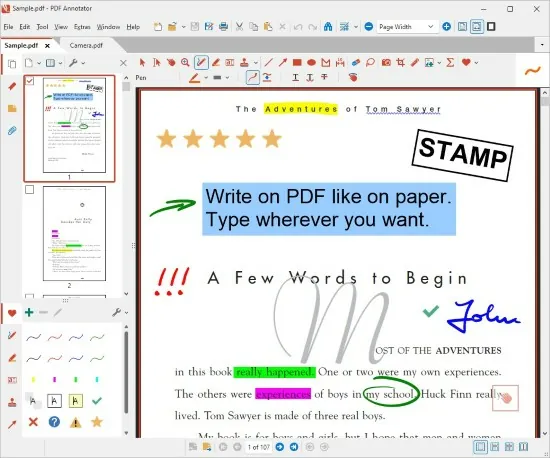
PDF Annotator Portable is a comprehensive and highly versatile software application designed for marking up, annotating, editing, and managing PDF documents with precision and ease. It empowers users to interact directly with PDF files by adding notes, highlights, drawings, images, and signatures without the need to print or convert files back into other formats, revolutionizing the way individuals and organizations collaborate, review, and present documents digitally.
Built with robust annotation tools, a user-friendly interface, and support for pen-enabled devices, PDF Annotator Portable has become a preferred solution for professionals, educators, students, and businesses seeking to streamline document workflows and enhance communication.
Annotation Manager in the Sidebar
• Get a quick overview of all annotations in a document.
• Navigate to any annotations quickly.
• Perform operations on any selection of annotations.
Filter Annotations
• Only display a filtered subset of your annotations in the new Annotations sidebar.
• Filter by type, color, or page number.
Print Annotations Overviews
• Print a detailed list with small previews of every single annotation in a document.
• Print an overview only outlining the pages containing annotations.
Core Features and Functionality
Annotation and Markup Capabilities
At its most fundamental level, PDF Annotator Portable enables users to write, draw, highlight, and insert comments directly onto any PDF document. Annotations can take the form of freehand pen drawings, shapes such as circles and rectangles, arrows, text highlights, strikeouts, underlines, and sticky notes placed intuitively throughout the content. The software provides a rich set of annotation pens and brushes, with customizable widths, colors, and opacities to suit different needs and preferences.
Users can annotate using a mouse, stylus, or digital pen, benefiting from advanced pressure sensitivity and high-resolution rendering that closely mimics the natural feel of handwriting or sketching. The software’s sophisticated “Auto-Smooth” feature intelligently straightens lines and perfects geometric shapes, enhancing the neatness and professional appearance of annotations.
Text and Typing Tools
PDF Annotator Portable goes beyond freehand markup by allowing users to add typed comments, text boxes, or callouts. Font styles, sizes, colors, and alignments can be adjusted to emphasize information clearly. This is crucial when precise, easily readable notes or instructions must be added to PDF reports, contracts, or forms.
The software supports multi-line text boxes, allowing the creation of extensive comments or explanations within the document. Text selections can be underlined, highlighted, or struck through to draw attention to or indicate edits in existing PDF text.
Handwritten Notes and Signatures
PDF Annotator Portable’s deep integration with pen input devices makes it ideal for tablets and touchscreen laptops, enabling natural writing and signing experiences. Electronic signatures can be drawn, inserted as images, or digitally certified, facilitating document approval workflows without the need to print, scan, or fax.
Beyond signatures, users can write annotations directly on forms, contracts, or academic papers as they would with traditional ink, yet retaining the full flexibility and non-destructive benefits of a digital file.
Page Management and Editing
The software provides extensive options for managing PDF pages within documents. Users can insert blank pages to add annotations or illustrations, delete or reorder existing pages, and even merge multiple PDFs into a single file seamlessly. This level of control supports the organization of complex documents, preparation of presentations, and compilation of multi-source materials.
Cropping tools allow removing unwanted margins or whitespace, providing cleaner document layouts and optimizing space for annotations.
Document Viewing and Navigation
PDF Annotator Portable is equipped with features facilitating smooth navigation and viewing of documents. Its tabbed interface supports multiple open documents simultaneously, allowing users to switch effortlessly between tasks without losing context.
Bookmarks can be created and managed to mark important sections or pages for easy retrieval. The software’s search capabilities enable rapid location of text strings within documents, accelerating review and editing processes.
A unique Presentation Mode transforms PDF Annotator Portable into an interactive digital whiteboard allowing real-time annotation during meetings or lectures. This feature is optimized for touch and pen input, making it valuable for educators and presenters.
Annotation Management and Export
Annotations are saved directly into the PDF file in standard formats, ensuring compatibility with most PDF readers and enabling recipients without PDF Annotator Portable to view the markup. Users can opt to “melt” annotations, making them permanent and non-editable to preserve the document state for legal or archival purposes.
Annotations can be grouped, locked to prevent accidental modifications, or selectively hidden to tailor document views during review.
The software supports exporting annotation summaries or detailed annotation reports to facilitate collaboration and documentation tracking.
Integration and Compatibility
PDF Annotator Portable supports creation of PDFs from virtually any application via its print-to-PDF functionality, enabling seamless workflows across word processors, spreadsheets, web browsers, and email clients.
It supports standard PDF formats including PDF/A for archiving and PDF/X for printing, ensuring output consistency for professional and legal needs.
Attachments, embedded media, and PDF portfolios are fully supported, allowing users to work with complex documents containing diverse content types.
Advanced Tools and Features
-
Snapshot Tool: Users can capture any screen portion of a PDF page and save it as an image or reusable stamp to enhance recurring annotations.
-
Stamps and Signatures Library: Predefined and customizable stamps such as “Approved,” “Draft,” or “Confidential” streamline document review and approval workflows.
-
Undo/Redo Stack: Comprehensive undo and redo options allow users to experiment with annotations without the fear of making irreversible changes.
-
Multi-Layered Annotation Support: Multiple annotation layers support organizing ideas or collaborative markup, with the ability to toggle visibility or lock layers.
-
Security Integration: Supports encryption and digital signatures to protect document integrity and authenticity during sharing.
Use Cases and User Profiles
PDF Annotator Portable’s broad feature set caters to various professional and personal use cases:
-
Education: Teachers and students annotate lecture notes, highlight study materials, and electronically submit corrected assignments, supporting digital learning environments.
-
Legal and Business: Lawyers use the tool to review contracts with markup, add signatures, and prepare legal documents with precise annotations.
-
Creative and Design: Artists and designers mark up portfolios, provide presentation feedback, and create digital mockups directly on PDFs.
-
Corporate Collaboration: Teams collaborate effectively by reviewing reports, proposals, and strategic documents with clear comments and shared annotations.
-
Personal Productivity: Users add notes to ebooks, manuals, recipes, or scanned documents to personalize content for better usability.
Performance, System Compatibility, and Support
PDF Annotator Portable is optimized for Windows platforms, compatible with Windows 7 through Windows 11, and runs efficiently on both desktops and tablets, maximizing touch and pen hardware features.
The software boasts a responsive and lightweight design, ensuring stable performance even with large or complex PDF files. Frequent updates improve usability, security, and compatibility with evolving PDF standards and operating system changes.
Customer support includes comprehensive online help, tutorials, user forums, and responsive technical assistance to guide users through features and troubleshooting.
Summary
In conclusion, PDF Annotator Portable is a feature-rich, user-friendly, and highly customizable PDF editing and annotation tool that transforms how users interact with PDF documents. It offers a full spectrum of markup options, seamless integration with common applications, and specialized functions tailored for pen-enabled devices. Whether for academic, professional, or personal use, it enhances workflows by allowing users to add, edit, organize, and share annotations effortlessly while maintaining compatibility with standard PDF formats.
Its unique presentation mode, advanced annotation management, and security features empower users to create dynamic, interactive documents, making PDF Annotator Portable an indispensable tool in contemporary document handling and communication. From handwriting notes on digital textbooks to securely signing legal contracts, PDF Annotator Portable provides a versatile and elegant solution that meets the demands of modern document-centric work environments.